
1. Introduction
This manual provides detailed instructions for the safe and effective use of your Walimex Pro Stager 400 HSS Studio Flash Set Double. This powerful studio flash system is designed for professional photographers requiring high-speed synchronization (HSS) and precise flash control. Please read this manual thoroughly before operating the equipment and retain it for future reference.
2. Safety Instructions
WARNING: Failure to follow these safety instructions may result in electric shock, fire, or serious injury.
- Do not operate the flash unit in wet or damp conditions.
- Ensure the power supply voltage matches the unit's requirements.
- Always disconnect the power cable before cleaning or performing maintenance.
- Do not attempt to disassemble or repair the unit yourself. Refer all servicing to qualified personnel.
- Keep the flash unit away from flammable materials.
- Avoid direct eye exposure to the flash light, as it can cause temporary vision impairment.
- Ensure proper ventilation around the unit during operation to prevent overheating.
- Use only Walimex Pro approved accessories and replacement parts.
3. Package Contents
Verify that all items listed below are present in your package. If any items are missing or damaged, contact your retailer.
- 2x Walimex Pro Stager 400 HSS Studio Flash Units
- 2x Lamp Tripods (260 cm)
- 2x Softboxes (60x90 cm)
- 2x Softbox Adapters
- 1x Wireless Trigger
- 2x Standard Reflectors (included with flash units)
- 2x Power Cables (4m)
- 2x Sync Cables (4m)
- 2x Flash Tubes (pre-installed)
- 2x Protective Caps
- 1x Photo and Studio Bag XXL

Figure 3.1: Overview of the Walimex Pro Stager 400 HSS Studio Flash Set Double, showing two flash units mounted on light stands with softboxes attached.

Figure 3.2: Detailed view of the Walimex Pro Stager 400 HSS Studio Flash unit, highlighting the main components and controls.
4. Product Overview
The Walimex Pro Stager 400 HSS is a robust studio flash designed for professional use. It features a 400 Ws flash output, adjustable from 1/1 to 1/128, and an integrated 2.4 GHz receiver for wireless control.
4.1 Key Features
- Flash Output: 400 Ws, continuously adjustable from 1/1 to 1/128.
- High Speed Sync (HSS): Supports shutter speeds up to 1/8000s.
- Wireless Control: Integrated 2.4 GHz receiver with 16 channels and 5 groups.
- Modeling Light: Modern 25W LED adjustment light.
- Mount: Bowens/Walimex Pro bayonet connection for various light shapers.
- Recycle Time: Short recycle time, under 0.3 seconds.
4.2 Components and Controls

Figure 4.1: Front view of the Walimex Pro Stager 400 HSS flash unit with a standard reflector attached. This view shows the flash tube and the LED modeling light.

Figure 4.2: Rear view of the Walimex Pro Stager 400 HSS flash unit, displaying the control panel, power input, sync port, and fan vents. The user-friendly control panel allows for easy adjustment of settings.
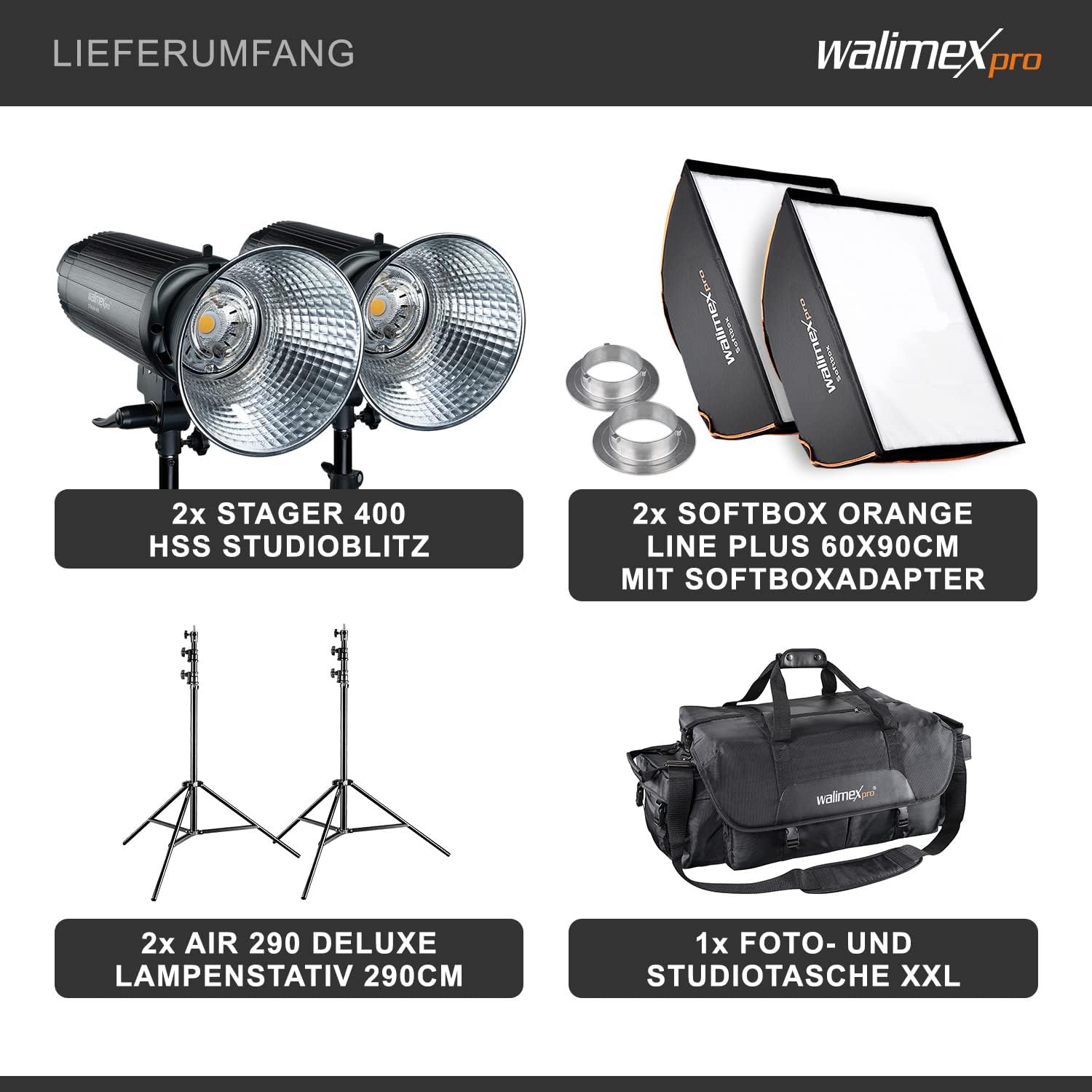
Figure 4.3: Close-up of the flash tube and the 25W LED modeling light, which provides consistent illumination for previewing lighting effects.
5. Setup
5.1 Assembling the Light Stand
- Extend the legs of the lamp tripod to form a stable base.
- Adjust the height of the stand to the desired level and secure it with the locking knobs.
5.2 Mounting the Flash Unit
- Remove the protective cap from the flash unit.
- Attach the flash unit to the top stud of the light stand and tighten the mounting screw securely.
5.3 Attaching the Softbox
- Assemble the softbox according to its specific instructions, inserting the rods into the speed ring.
- Attach the softbox adapter to the flash unit's Bowens/Walimex Pro bayonet mount by aligning the pins and twisting until it locks into place.
- Secure the softbox to the adapter.
- Install the inner and outer diffusers as desired.
5.4 Power Connection
- Connect the power cable to the flash unit's power input.
- Plug the other end of the power cable into a suitable power outlet.
6. Operating Instructions
6.1 Powering On and Basic Operation
- Turn on the flash unit using the power switch located on the rear panel.
- The display will illuminate, showing current settings.
- Adjust the flash output using the control dial. The output can be set from 1/1 (full power) to 1/128.
- Press the "TEST" button to fire a test flash.
6.2 Modeling Light
The 25W LED modeling light assists in previewing lighting effects. Use the dedicated button on the control panel to turn the modeling light on or off.
6.3 High Speed Sync (HSS) Mode
HSS mode allows the flash to synchronize with camera shutter speeds up to 1/8000s, enabling wider apertures in bright conditions or freezing fast motion.
- Ensure your camera and wireless trigger support HSS.
- Activate HSS mode on your wireless trigger and/or camera settings. The flash unit will automatically detect and operate in HSS mode when triggered by an HSS-compatible transmitter.

Figure 6.1: Side view of the flash unit, illustrating its compact design and mounting bracket.
6.4 Wireless Control (2.4 GHz)
The integrated 2.4 GHz receiver allows for wireless control of the flash unit using the included wireless trigger.
- Set the channel and group on the flash unit to match your wireless trigger. Refer to the trigger's manual for specific instructions.
- The flash unit supports 16 channels and 5 groups for flexible studio setups.
7. Maintenance
7.1 Cleaning
- Always disconnect the power before cleaning.
- Use a soft, dry cloth to wipe the exterior of the flash unit.
- For stubborn dirt, a slightly damp cloth with mild detergent can be used, followed by a dry cloth.
- Do not use abrasive cleaners, solvents, or strong chemicals.
- Keep the flash tube and modeling light free from dust and fingerprints for optimal performance.
7.2 Storage
- Store the flash unit in a cool, dry place, away from direct sunlight and excessive humidity.
- Use the provided protective cap for the flash tube during storage and transport.
- When transporting, use the included XXL photo and studio bag to protect all components.
8. Troubleshooting
If you encounter issues with your Walimex Pro Stager 400 HSS, refer to the following common problems and solutions.
| Problem | Possible Cause | Solution |
|---|---|---|
| Flash not firing |
|
|
| Modeling light not working |
|
|
| Overheating warning |
|
|
9. Specifications
| Feature | Detail |
|---|---|
| Model Number | 23358 |
| Flash Output | 400 Ws |
| Output Adjustment | 1/1 to 1/128 (stepless) |
| High Speed Sync (HSS) | Up to 1/8000s |
| Wireless Receiver | Integrated 2.4 GHz (16 channels, 5 groups) |
| Modeling Light | 25W LED |
| Recycle Time | < 0.3 seconds |
| Bayonet Mount | Bowens/Walimex Pro |
| Product Dimensions (Flash Unit) | Approx. 35 cm (Length) x 13 cm (Width) x 13 cm (Height) |
| Weight (Flash Unit) | Approx. 2.8 kg |
| Manufacturer | Walser GmbH |
10. Warranty and Support
For warranty information and technical support, please refer to the documentation provided with your purchase or visit the official Walimex Pro website. Keep your proof of purchase for warranty claims.
Manufacturer: Walser GmbH