
1. Introduction
The FrSky Archer Plus SR8 Receiver is an advanced gyro-stabilized receiver designed for remote control applications, offering enhanced performance and new features. This manual provides essential information for the proper setup, operation, and maintenance of your Archer Plus SR8 receiver.
Key features include:
- Enhanced Anti-RF-Interference capability for solid RF performance.
- Smart-matched ACCESS & ACCST D16 modes for flexible compatibility.
- Basic Black-Box function for preserving flight data.
- Built-in 3-axis gyroscope and 3-axis accelerometer sensor.
- Multiple flight modes (Auto-level, Stabilization, Knife-Edge) and configuration tools (ETHOS, LUA scripts).
- SBUS Out port (16CH / 24CH mode) and SBUS In port (Signal Redundancy).
- Full control range with telemetry (S.Port or FBUS).
- Over-The-Air (OTA) Firmware updates.
- External battery/device voltage detection via AIN2.
2. Product Overview

Figure 2.1: Top view of the FrSky Archer Plus SR8 Receiver, showing the main body with antenna connections and port labels.

Figure 2.2: Angled view of the FrSky Archer Plus SR8 Receiver, highlighting the compact design and antenna routing.

Figure 2.3: Side view of the FrSky Archer Plus SR8 Receiver, showing the various channel and SBUS ports.
3. Setup
3.1 Binding Process
The Archer Plus SR8 receiver supports both ACCESS and ACCST D16 modes. The RF protocol is automatically smart-matched during the binding process with your FrSky 2.4GHz compatible transmitter. Refer to your transmitter's manual for specific binding instructions.
3.2 Antenna Placement
The receiver features dual detachable antennas. For optimal signal reception and range, ensure the antennas are positioned at a 90-degree angle to each other and away from conductive materials or large metal objects in your model. Avoid bending the antenna tips sharply.
3.3 Wiring and Connections
Connect your servos to the appropriate PWM channels (CH1-CH8). The receiver also includes:
- SBUS Out Port: Supports 16CH / 24CH mode for connecting to flight controllers or other SBUS compatible devices.
- SBUS In Port: Allows for signal redundancy when connected to another FrSky receiver equipped with an SBUS Out port.
- FBUS Protocol: Enables seamless pairing with multiple telemetry devices such as XACT servos and ADV Sensors, simplifying your build setup.
- AIN2 Port: For external battery/device voltage detection (0-35V, Battery Voltage Divider Ratio: 1:10).
Ensure all connections are secure before operation.
3.4 Configuration
The Archer Plus SR8 can be configured using various tools, including FrSky's ETHOS operating system or LUA scripts. These tools allow for setting up multiple flight modes (Auto-level, Stabilization, Knife-Edge) and fine-tuning the built-in 3-axis gyroscope and 3-axis accelerometer sensor. Consult the FrSky website or your transmitter's documentation for detailed configuration guides.
4. Operating Instructions
4.1 Flight Modes
The integrated gyro and accelerometer allow for various flight stabilization modes. These modes can be activated and configured via your transmitter, providing enhanced control and stability for your model. Common modes include:
- Auto-level: Automatically levels the aircraft.
- Stabilization: Provides general stabilization against external disturbances.
- Knife-Edge: Assists in maintaining a knife-edge flight attitude.
4.2 Black-Box Function
The receiver includes a basic Black-Box function that preserves essential flight data, such as power and signal-related information. This data can be useful for diagnostics and performance analysis. Refer to FrSky's software tools for accessing and interpreting Black-Box data.
4.3 Over-The-Air (OTA) Firmware Updates
The Archer Plus SR8 supports Over-The-Air (OTA) firmware updates, allowing you to update the receiver's firmware wirelessly via your compatible FrSky transmitter. This ensures your receiver always has the latest features and bug fixes. Follow the instructions provided by FrSky for performing OTA updates.
5. Maintenance
To ensure the longevity and reliable performance of your FrSky Archer Plus SR8 Receiver, follow these maintenance guidelines:
- Keep Clean: Regularly inspect the receiver for dust, dirt, or debris. Use a soft, dry brush or compressed air to gently clean the casing and ports. Avoid using liquid cleaners.
- Environmental Protection: Protect the receiver from moisture, extreme temperatures, and direct sunlight. If operating in humid environments, consider conformal coating for added protection.
- Connection Integrity: Periodically check all wiring connections for looseness or damage. Ensure servo leads and antenna connections are secure.
- Firmware Updates: Keep the receiver's firmware updated to the latest version using the OTA update feature. Firmware updates often include performance improvements and bug fixes.
- Antenna Inspection: Inspect the antennas for any nicks, cuts, or kinks. Damaged antennas can significantly reduce range and signal quality. Replace if necessary.
6. Troubleshooting
If you encounter issues with your Archer Plus SR8 Receiver, consider the following troubleshooting steps:
6.1 Receiver Not Binding
- Ensure your transmitter is in the correct mode (ACCESS or ACCST D16) and that its firmware is up to date.
- Verify the binding procedure is followed precisely as per your transmitter's manual.
- Check for any RF interference in the immediate environment.
- Confirm the receiver is receiving adequate power.
6.2 Servos Not Responding
- After successful binding, ensure the receiver is powered on and the LED indicates a solid connection.
- Check all servo connections to the receiver's PWM ports.
- Verify that the correct channel assignments are set in your transmitter.
- If using the SBUS Out port, ensure your flight controller or device is correctly configured to receive SBUS signals.
- For gyro calibration issues (as reported by some users with older transmitters like X9D+), ensure your transmitter and receiver firmware are compatible and updated. Consult FrSky's support resources for specific compatibility notes.
6.3 Reduced Range or Signal Loss
- Inspect antenna placement and ensure they are not obstructed or damaged.
- Verify that the antennas are positioned at a 90-degree angle to each other.
- Check for potential sources of RF interference in your model (e.g., ESCs, motors, carbon fiber structures).
- Ensure the receiver is not experiencing voltage drops.
For persistent issues, refer to the official FrSky support resources or contact their customer service.
7. Specifications
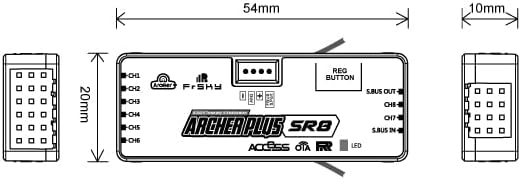
Figure 7.1: Dimensional drawing of the FrSky Archer Plus SR8 Receiver, showing key measurements.
| Feature | Detail |
|---|---|
| Model | Archer Plus SR8 |
| Dimensions | Approx. 54mm x 20mm x 10mm (2.13 x 0.79 x 0.39 inches) |
| Weight | Approx. 0.317 ounces (9 grams) |
| Number of Channels | 8 High-precision PWM & 16 SBUS channels (16CH Mode) / 8 High-precision PWM & 24 SBUS channels (24CH Mode) |
| Operating Voltage Range | 3.5V - 10V |
| Operating Current | <65mA@5V |
| Operating Range | >2km (Full range) |
| Voltage Measurement Range (AIN2) | 0-35V (Battery Voltage Divider Ratio: 1:10) |
| Antenna Connector | IPEX4 |
| Compatibility | FrSky 2.4GHz ACCESS / ACCST D16 capable transmitters |
| Sensors | Built-in 3-axis gyroscope and 3-axis accelerometer |
8. Warranty Information
FrSky products typically come with a limited warranty. For detailed warranty terms, conditions, and duration, please refer to the official FrSky website or contact the authorized dealer from whom you purchased the product. Keep your proof of purchase for warranty claims.
9. Support
For technical support, firmware downloads, and additional resources, please visit the official FrSky website. You can also reach out to the seller, FrSky Hobby, for product-specific inquiries.
FrSky Official Website: www.frsky-rc.com
Seller: FrSky Hobby