
Fydeamer MYH04001WB
Fydeamer Easel TV Stand User Manual
Model: MYH04001WB | Brand: Fydeamer
Introduction
Thank you for choosing the Fydeamer Easel TV Stand. This modern and artistic floor stand is designed to securely hold LED, LCD, and OLED screens ranging from 55 to 86 inches. Its height-adjustable feature and stable 4-leg studio design make it a versatile addition to any bedroom or living room. This manual provides essential information for safe installation, operation, and maintenance of your TV stand.
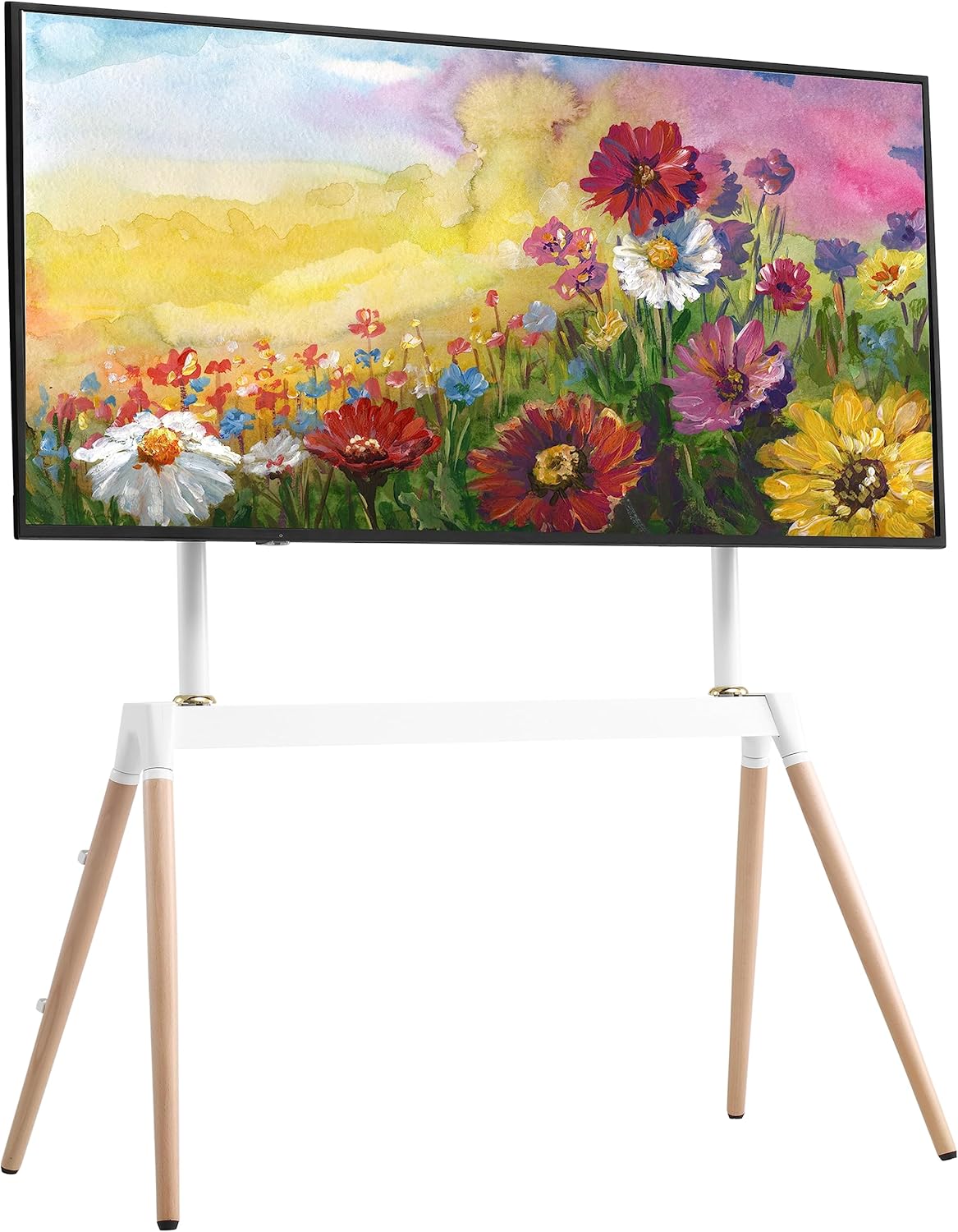
Figure 1: Fydeamer Easel TV Stand with a mounted television.
Safety Information
Please read all instructions carefully before assembly and use. Keep this manual for future reference.
- Do not exceed the maximum weight capacity of 88 lbs (40 kg).
- Ensure the TV stand is assembled on a flat, stable surface.
- Always use the provided hardware. Do not substitute parts.
- Two people are recommended for assembly and TV mounting to prevent injury or damage.
- Keep children and pets away during assembly.
- Regularly check all screws and connections to ensure they remain tight and secure.
- Do not hang or climb on the TV stand.
- Ensure proper ventilation around the TV to prevent overheating.
Package Contents
Verify that all components are present and undamaged before beginning assembly. If any parts are missing or damaged, please contact customer support.
| Part | Description | Quantity |
|---|---|---|
| Main Frame Components | Vertical posts, horizontal support bar, TV mounting brackets | 1 set |
| Wooden Legs | Four solid wood legs with non-slip feet | 4 |
| Hardware Kit | Screws, washers, nuts, Allen wrench, cable clips | 1 set |
| Instruction Manual | Detailed assembly guide | 1 |
Product Features
- TV Compatibility: Suitable for most LED LCD OLED screens from 55 inches to 86 inches. Supports VESA patterns from 100x100 mm to 600x400 mm.
- Variable Height: Adjustable mounting arms allow for flexible height positioning to suit various viewing preferences.
- Heavy Duty Support: Utilizes a clever laid-back design with 4 legs for central weight distribution, providing maximum support up to 88 lbs (40 kg) without needing wall anchoring.
- Modern Art Design: Constructed from high-quality carbon steel and solid wood, balancing a sophisticated minimal look with exceptional strength.
- Cable Management: Includes practical cable clips with strain relief to neatly route all cables along the back of the stand's legs, ensuring a tidy setup.
- Easy Assembly: All required tools and clear instructions are included for straightforward setup by one person.

Figure 2: Fydeamer's 4-leg design offers greater stability and compatibility with larger screens (55-86 inches) compared to typical 3-leg stands.

Figure 3: Key design elements: adjustable shelf, integrated wire management, and non-slip feet for stability.
Setup and Assembly
Follow these steps carefully for proper assembly. It is recommended to have a second person assist with mounting the TV.
- Unpack and Identify Parts: Lay out all components on a soft, clean surface to prevent scratches. Refer to the "Package Contents" section to ensure all parts are present.
- Assemble the Base: Attach the four wooden legs to the main horizontal support bar using the provided screws and Allen wrench. Ensure they are securely fastened.
- Attach Vertical Posts: Connect the two vertical posts to the horizontal support bar. Make sure the holes align for the TV mounting brackets.
- Install TV Mounting Brackets: Secure the TV mounting brackets to the vertical posts. These brackets will attach to the back of your television. Adjust their height as desired before mounting the TV.
- Prepare Your TV: Carefully place your TV face down on a soft, clean surface. Attach the remaining TV mounting brackets to the VESA holes on the back of your TV using the appropriate screws and spacers from the hardware kit. Ensure the brackets are level and securely tightened.
- Mount the TV: With the help of a second person, carefully lift the TV and hook the brackets on the TV onto the corresponding brackets on the stand. Secure the TV to the stand using the locking mechanisms or screws as indicated in the detailed assembly instructions provided in the box.
- Cable Management: Use the included cable clips to route and organize all TV and device cables along the back of the stand's legs. This helps maintain a clean appearance and prevents tripping hazards.
Operating Instructions
Height Adjustment
The Fydeamer Easel TV Stand allows for flexible height adjustment of your television. To adjust the height:
- Ensure the TV is securely mounted to the brackets.
- Loosen the height adjustment screws on the vertical posts (refer to your assembly diagram for exact locations).
- Carefully slide the TV and its attached brackets up or down to the desired viewing height. It is recommended to have assistance when adjusting the height of larger TVs.
- Once the desired height is achieved, securely tighten all height adjustment screws to lock the TV in place.
Cable Management
Utilize the integrated cable clips to keep your setup neat and organized. Route power cords, HDMI cables, and other wires along the back of the stand's legs and secure them with the clips. This prevents tangles and improves safety.

Figure 4: The stand's design allows for comfortable viewing in various home settings.

Figure 5: The versatile design is suitable for both home and professional environments.
Maintenance
Proper maintenance will ensure the longevity and appearance of your Fydeamer Easel TV Stand.
- Cleaning: Wipe the stand with a soft, dry cloth. For stubborn marks, a slightly damp cloth can be used, followed by immediate drying. Avoid harsh chemicals or abrasive cleaners.
- Hardware Check: Periodically check all screws and connections to ensure they are tight. Loose connections can compromise stability.
- Environmental Conditions: Avoid placing the stand in direct sunlight or near heat sources, which can affect the wood and finish.
Troubleshooting
| Problem | Possible Cause | Solution |
|---|---|---|
| Stand is wobbly/unstable. | Loose screws; uneven floor. | Check and tighten all assembly screws. Ensure the stand is on a flat, level surface. |
| TV does not fit the stand. | Incorrect TV size or VESA pattern. | Verify your TV's size (55-86 inches) and VESA pattern (100x100 to 600x400 mm) against the specifications. |
| Difficulty adjusting TV height. | Adjustment screws are too tight; TV is too heavy for one person. | Loosen adjustment screws sufficiently. Seek assistance from another person for heavy TVs. |
| Missing parts. | Packaging error. | Contact Fydeamer customer support with your purchase details. |
Specifications

Figure 6: Detailed dimensions and compatibility specifications.
| Attribute | Detail |
|---|---|
| Brand | Fydeamer |
| Model | MYH04001WB |
| Compatible TV Sizes | 55 - 86 inches |
| VESA Compatibility | 100x100, 200x100, 200x200, 200x300, 200x400, 300x300, 300x400, 400x400, 600x400 mm |
| Maximum Weight Capacity | 88 lbs (40 kg) |
| Material | Carbon Steel and Wood |
| Color | White |
| Product Dimensions (L x W x H) | 88.65 x 50.04 x 138.43 cm (approx. 34.9 x 19.7 x 54.5 inches) |
| Item Weight | 5.44 kg (approx. 12 lbs) |
| Mounting Type | Floor Mount |
Warranty and Support
Fydeamer provides a limited warranty for this product. Please refer to the warranty card included in your package for specific terms and conditions. For any questions, missing parts, or assistance with assembly and operation, please contact Fydeamer customer support. We aim to respond to inquiries within 24 hours.
Contact Information: Please refer to the contact details provided on the Fydeamer official website or the warranty card.
Ask a question about this manual
Ask about setup, troubleshooting, compatibility, parts, safety, or missing instructions. Manuals+ will review the question and use this page’s manual context to help answer it.