
1. Introduction
This manual provides detailed instructions for the assembly, operation, and maintenance of your YMYNY 3-Tier Printer Stand. Designed for versatility and organization, this mobile cart features three sturdy tiers, an adjustable shelf, and smooth-rolling wheels, making it an ideal solution for office, home, or kitchen use. Please read all instructions carefully before proceeding with assembly or use to ensure safe and proper functionality.

Image 1.1: The YMYNY 3-Tier Printer Stand, showcasing its design and potential uses with a printer, shredder, and hanging accessories.
2. Safety Instructions
- Read and understand all instructions before assembly and use.
- Keep all small parts and packaging materials away from children and pets to prevent choking hazards.
- Do not exceed the maximum weight capacity of 27 kg (approximately 59.5 lbs) per shelf. Overloading can cause instability and damage.
- Ensure all screws and fasteners are securely tightened before using the stand. Periodically check and re-tighten as needed.
- Assemble the stand on a soft, clean surface to prevent scratching the components.
- Use the stand on a flat, stable, and level surface to prevent tipping.
- When moving the stand, ensure the wheels are unlocked. Lock the wheels when the stand is in its desired position to prevent accidental movement.
- Avoid exposing the stand to excessive moisture, direct sunlight, or extreme temperature changes, which can damage the wood material.
3. Package Contents
Before beginning assembly, please verify that all components listed below are present and undamaged. If any parts are missing or damaged, please contact customer service.
| No. | Part Name | Quantity |
|---|---|---|
| A | Wooden Shelves | 3 |
| B | Metal Frame Components | Various |
| C | Lockable Wheels | 4 |
| D | Adjustable Feet | 4 |
| E | S-Hooks | 4 |
| F | Assembly Hardware (Screws, Allen Key) | 1 Set |
| G | Instruction Manual | 1 |
4. Setup and Assembly
Follow these steps to assemble your YMYNY 3-Tier Printer Stand. Assembly is straightforward and requires minimal tools.
- Unpack and Identify Parts: Carefully remove all components from the packaging. Lay them out on a clean, soft surface to prevent scratches. Refer to the 'Package Contents' section to ensure all parts are present.
- Assemble the Metal Frame: Connect the vertical metal frame components using the provided screws and Allen key. Ensure the pre-drilled holes for the adjustable shelf are facing inwards.
- Install Wooden Shelves: Insert the bottom and top wooden shelves into their designated slots in the metal frame and secure them with screws.
- Adjustable Middle Shelf Installation: The middle shelf can be adjusted to three different heights. Align the middle wooden shelf with your desired height setting on the metal frame and secure it with screws.
- Attach Wheels or Adjustable Feet: Decide whether you want to use the mobile wheels or the stationary adjustable feet. Screw the chosen components into the bottom of the metal frame. If using wheels, ensure the two lockable wheels are positioned at the front for easy access.
- Attach S-Hooks: Hang the provided S-hooks onto the side bar of the metal frame. These are useful for hanging headphones, cables, or other accessories.
- Final Tightening: Once all components are in place, carefully go over all screws and tighten them firmly to ensure the stand is stable and secure.
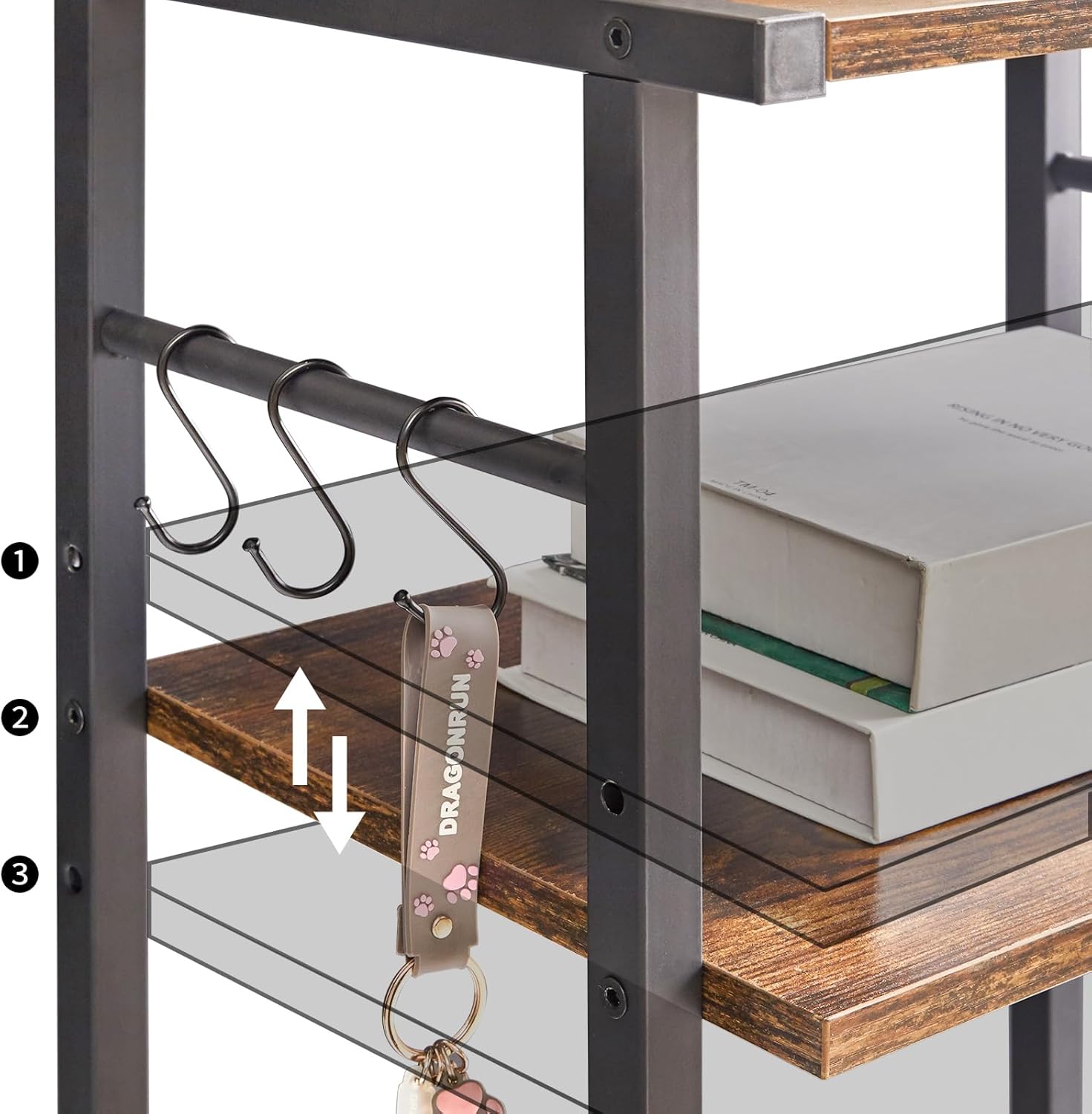
Image 4.1: Detail showing the adjustable height settings for the middle shelf and the S-hooks.

Image 4.2: Detail of the 360-degree rotating and lockable wheel for easy mobility and stability.
5. Operating Instructions
Your YMYNY 3-Tier Printer Stand is designed for versatile use. Here's how to maximize its functionality:
- Adjusting Shelf Height: The middle wooden shelf can be repositioned to one of three available heights to accommodate different sized items, such as printers, shredders, or storage bins. To adjust, remove the screws securing the shelf, reposition it to the desired height, and re-secure the screws.
- Mobility and Stability: The stand is equipped with four smooth-rolling wheels, two of which are lockable. To move the stand, unlock the wheels by flipping the lever on the lockable wheels. To secure the stand in place, flip the lever back to the locked position. Alternatively, you can use the included adjustable feet for a stationary setup.
- Storage Capacity: Each tier of the stand is designed to hold up to 27 kg (59.5 lbs), providing ample storage for printers, paper, office supplies, books, or decorative items.
- Accessory Hooks: Utilize the S-hooks on the side bar to hang headphones, keys, small bags, or other frequently used items for easy access and organization.

Image 5.1: The printer stand integrated into an office workspace, demonstrating its practical use for a printer, books, and hanging headphones.

Image 5.2: The versatile stand repurposed as a mobile bar cart, showcasing its adaptability for various home environments.
6. Maintenance
Proper care will extend the life and appearance of your YMYNY Printer Stand:
- Cleaning: Wipe the wooden and metal surfaces with a soft, damp cloth. Avoid using abrasive cleaners, harsh chemicals, or excessive water, as these can damage the finish.
- Screw Tightness: Periodically check all screws and fasteners to ensure they remain tight. Re-tighten if necessary to maintain stability.
- Protection: Protect the wooden surfaces from scratches by avoiding direct contact with sharp or rough objects. Use coasters or mats under items that might leave marks or moisture.
- Environmental Conditions: Keep the stand in a dry environment and avoid prolonged exposure to direct sunlight or extreme temperatures, which can cause warping or fading of the wood.
7. Troubleshooting
If you encounter any issues with your YMYNY 3-Tier Printer Stand, refer to the following common problems and solutions:
- Stand is Unstable/Wobbly:
- Ensure all assembly screws are fully tightened.
- Verify that the stand is placed on a flat and level surface. If using adjustable feet, adjust them to compensate for uneven floors.
- Check that the metal frame components are correctly aligned and not bent.
- Wheels Not Rolling Smoothly:
- Check if the wheel locks are engaged. Disengage them to allow free movement.
- Inspect the wheels for any debris (hair, dust, etc.) that might be obstructing their movement. Clean as necessary.
- Ensure the wheels are securely screwed into the frame.
- Difficulty Assembling:
- Re-read the assembly instructions carefully, paying close attention to diagrams.
- Ensure you are using the correct screws and parts for each step.
- Do not overtighten screws until all components are loosely assembled, then tighten them fully at the end.
8. Specifications
| Feature | Detail |
|---|---|
| Brand | YMYNY |
| Model | 999HPT002H (printer stand) |
| Product Dimensions | 44 x 30 x 82 cm (17.32 x 11.81 x 32.28 inches) |
| Item Weight | 6.2 Kilograms (13.67 lbs) |
| Material | Wood |
| Compatible Peripherals | Printer |
| Additional Features | 3 adjustable tiers, Mobile (on wheels) or Stationary (on feet) |
| Number of Items | 1 |
| Installation Type | Tabletop / Floor Standing |
| First Available Date | May 24, 2023 |

Image 8.1: Dimensional diagram of the YMYNY 3-Tier Printer Stand.
9. Warranty and Support
YMYNY is committed to customer satisfaction and provides professional customer service. While specific warranty details are not provided in this manual, for any inquiries, support, or assistance with your YMYNY 3-Tier Printer Stand, please contact the seller directly through their Amazon seller page or refer to any contact information provided with your purchase. Please have your model number (HPT002H) and purchase details ready when contacting support.