
Introduction
This manual provides comprehensive instructions for the iBUYPOWER Y40WI7N46T01 Gaming PC. It covers essential information regarding setup, operation, maintenance, and troubleshooting to ensure optimal performance and longevity of your system. Please read this manual thoroughly before using your new gaming PC.
Package Contents
Verify that all items listed below are included in your package:
- iBUYPOWER Y40WI7N46T01 Gaming PC System
- Gaming Mouse
- Gaming Keyboard
- Power Cord
Note: A monitor is not included and must be purchased separately.
Setup Guide
1. Unboxing and Placement
Carefully remove the PC from its packaging. Place the PC on a stable, flat surface with adequate ventilation. Ensure there is enough space around the case for proper airflow.

Figure 1: Front view of the iBUYPOWER Y40WI7N46T01 Gaming PC, showcasing its transparent side panel and internal RGB lighting.
2. Connecting Peripherals
Connect your monitor, keyboard, and mouse to the appropriate ports on the rear and front of the PC. The PC includes a gaming keyboard and mouse.
- Monitor: Connect your monitor using an HDMI cable to the graphics card port.
- Keyboard & Mouse: Connect the included gaming keyboard and mouse to any available USB ports.
- Network: For wired internet, connect an Ethernet cable to the RJ-45 port. For wireless, the PC is equipped with 802.11AC Wi-Fi.
- Power: Connect the power cord to the PC's power supply unit and then to a wall outlet.
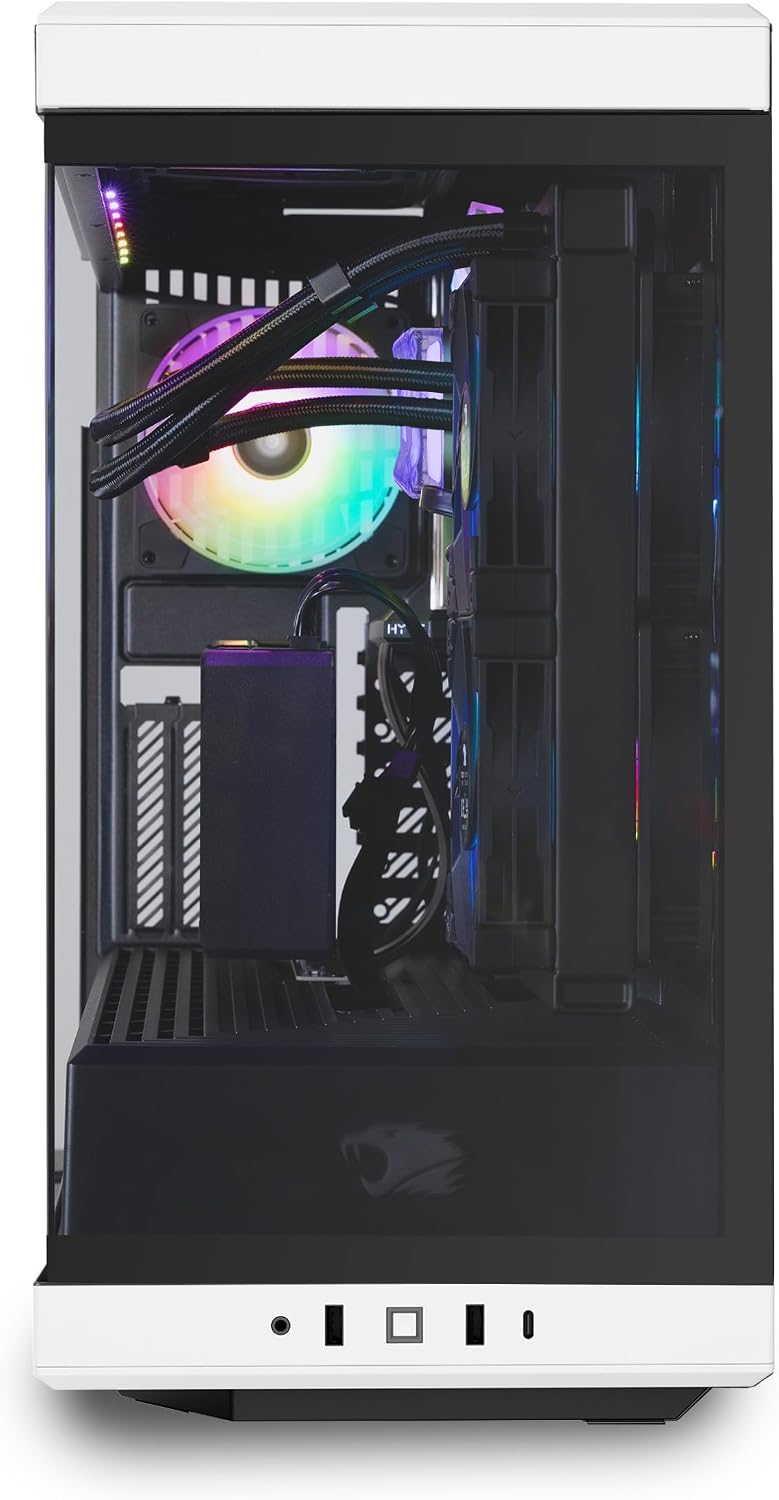
Figure 2: Rear view of the PC, highlighting the connectivity options including USB, Ethernet, and HDMI ports.

Figure 3: Front I/O ports for convenient access to USB and audio connections.

Figure 4: The included iBUYPOWER KM7 RGB Gaming Keyboard and Mouse.
3. Initial Boot-up and Operating System Setup
Press the power button located on the front of the PC. The system will boot into Windows 11 Home. Follow the on-screen instructions to complete the initial setup, including language, region, network connection, and user account creation.

Figure 5: A complete PC setup with the iBUYPOWER Y40WI7N46T01, monitor, keyboard, and mouse.
Operation
General Usage
Your iBUYPOWER Y40WI7N46T01 is pre-installed with Windows 11 Home, providing a user-friendly interface for all your computing needs. The powerful Intel Core i7 13700KF processor and NVIDIA GeForce RTX 4060 Ti 8GB graphics card are designed for demanding applications, including gaming, content creation, and multitasking.
RGB Lighting Customization
The PC features a 16-color RGB lighting case and RGB components. Lighting effects can typically be controlled via pre-installed software or motherboard utilities. Refer to the specific component manufacturer's documentation for detailed instructions on customizing RGB lighting.
Video 1: An overview of the iBUYPOWER HYTE Y40 Gaming Desktop PC, showcasing its design and customizable RGB lighting.
Connectivity
The system offers robust connectivity options:
- USB Ports: 6 x USB 3.1 ports for high-speed peripheral connections.
- Network: 1x RJ-45 Network Ethernet 10/100/1000 for stable wired internet. Integrated 802.11AC Wi-Fi for wireless connectivity.
- Audio: On-board audio for headphones, speakers, and microphones.
- Video Output: HDMI for display connection.
Maintenance
Cleaning
Regular cleaning helps maintain optimal performance and extends the lifespan of your PC.
- Exterior: Use a soft, damp cloth to wipe down the exterior surfaces. Avoid abrasive cleaners.
- Dust Filters: The case features patterned airflow panels. Regularly clean any accessible dust filters to prevent dust buildup, which can impede airflow and cooling.
- Internal Components: For internal cleaning, it is recommended to use compressed air to remove dust from fans, heatsinks, and other components. Ensure the PC is powered off and unplugged before opening the case.

Figure 6: Patterned airflow panels on the PC case, designed for efficient cooling.
Software Updates
Keep your operating system, drivers, and applications updated to ensure security, stability, and performance. Windows Update will handle OS updates, and graphics card drivers can be updated via NVIDIA's official website.
Troubleshooting
This section addresses common issues you might encounter.
- No Display: Ensure your monitor is correctly connected to the graphics card (not the motherboard's integrated graphics ports) and powered on. Check all cable connections.
- PC Not Powering On: Verify the power cord is securely connected to both the PC and the wall outlet. Check the power switch on the power supply unit (PSU) at the back of the PC.
- System Freezes/Crashes: Ensure all drivers are up to date. Monitor system temperatures using software utilities. Excessive heat can cause instability.
- Slow Performance: Check for background applications consuming resources. Ensure sufficient free space on the 2TB NVMe SSD. Run a malware scan.
- RGB Lights Not Working: Check software controls for RGB lighting. Ensure all internal RGB cables are properly connected.
If issues persist, refer to the iBUYPOWER support website or contact technical support.
Specifications
| Component | Specification |
|---|---|
| Brand | iBUYPOWER |
| Model Name | Y40WI7N46T01 |
| Operating System | Windows 11 Home |
| CPU Model | Intel Core i7-13700KF (16 Cores, 3.4 GHz) |
| Graphics Coprocessor | NVIDIA GeForce RTX 4060 Ti 8GB GDDR6 |
| RAM Memory | 32GB DDR5 5200 MHz (16x2) |
| Memory Storage Capacity | 2TB NVMe SSD |
| Cooling Method | Water Cooling (240mm liquid cooling system) |
| Connectivity | 6 x USB 3.1, 1x RJ-45 Ethernet, 802.11AC Wi-Fi, HDMI |
| Additional Features | Tempered Glass RGB Gaming Case, 16 Color RGB Lighting, Vertical GPU Riser, No Bloatware |
| Item Dimensions | 17.28 x 9.4 x 18.58 inches |
| Item Weight | 35 Pounds |

Figure 7: Side view of the PC, revealing the internal components including the GPU, CPU cooler, and RGB fans.

Figure 8: Detail of the vertical GPU riser, providing secure mounting and enhanced aesthetics for the graphics card.

Figure 9: The included PCIe 4.0 Riser Cable, designed for vertical GPU mounting.
Warranty and Support
Your iBUYPOWER Y40WI7N46T01 Gaming PC comes with a 1 Year Parts & Labor Warranty. Additionally, iBUYPOWER provides Free Lifetime US Tech Support for your convenience. For technical assistance or warranty claims, please visit the official iBUYPOWER support website or contact their customer service.


