
AZBME RC-709M
AZBME RC-709M Replacement Remote Control User Manual
Model: RC-709M
1. Introduction
This manual provides essential information for the use and care of your AZBME RC-709M Replacement Remote Control. Designed as a direct replacement for various Onkyo AV receivers, this remote offers seamless operation without the need for complex programming.
2. Setup
2.1 Battery Installation
The RC-709M remote control requires two (2) AAA batteries (not included).
- Locate the battery compartment on the back of the remote control.
- Press down on the tab and slide the battery cover off.
- Insert two AAA batteries, ensuring the positive (+) and negative (-) terminals align correctly with the markings inside the compartment.
- Slide the battery cover back into place until it clicks securely.
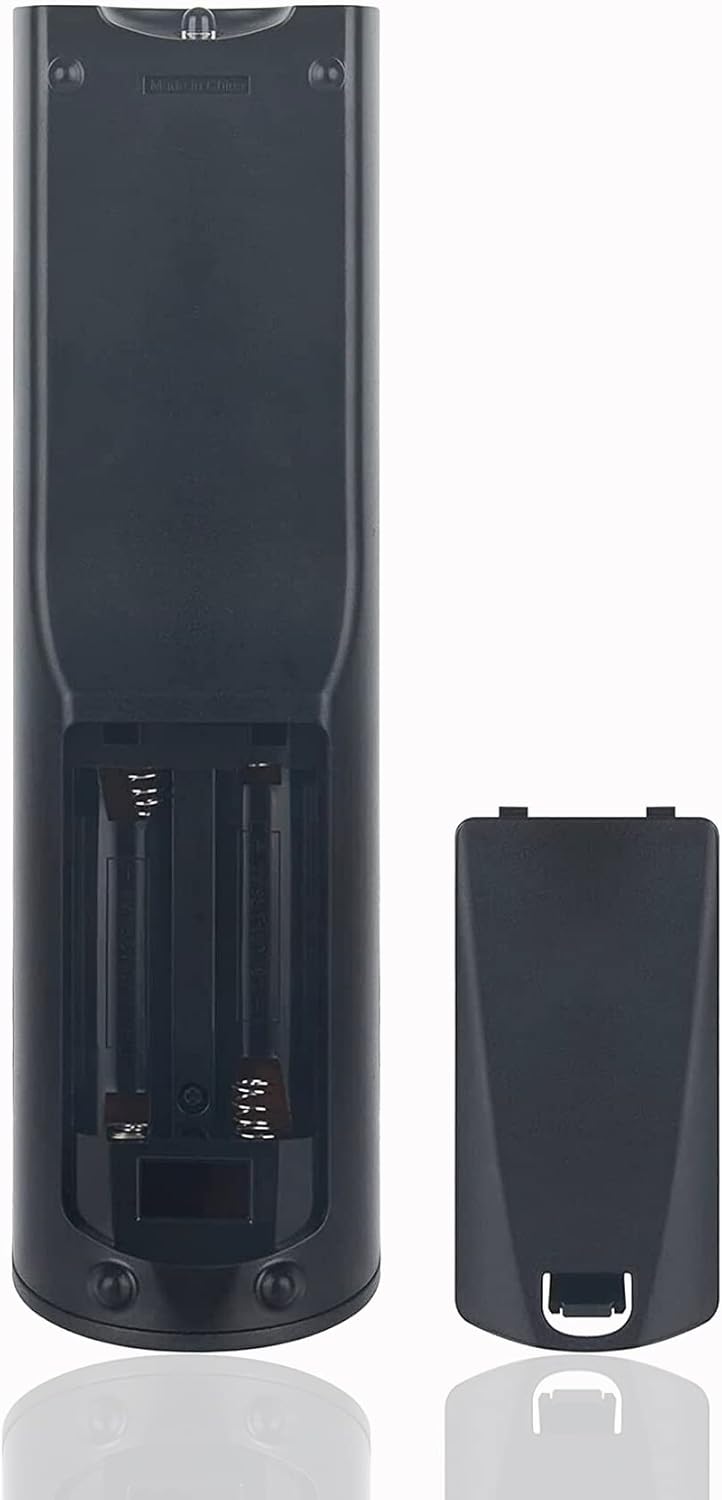
Figure 2.1: Battery compartment of the RC-709M remote control. Insert two AAA batteries as shown.
3. Operating Instructions
3.1 Basic Functions
The RC-709M remote control is designed to function immediately with compatible Onkyo receivers without any setup or programming.
- Power On/Off: Press the 'ON/STANDBY' button to power the receiver on or off.
- Volume Control: Use the 'VOL +' and 'VOL -' buttons to adjust the audio volume.
- Input Selection: Use the 'REMOTE MODE/INPUT SELECTOR' buttons (e.g., DVD, CBL/SAT, CD, MULTICH, AUX, TAPE, TUNER, DOCK, TV, RECEIVER) to switch between different audio/video inputs.
- Muting: Press the 'MUTING' button to temporarily silence the audio.
- Navigation: Use the directional arrow buttons and 'ENTER' button for menu navigation and selection.
- Playback Controls: Use the play, pause, stop, fast forward, and rewind buttons for media playback.

Figure 3.1: Overview of the RC-709M remote control buttons.
3.2 Compatible Models
This remote control is compatible with a wide range of Onkyo receiver models, including but not limited to:
- TX-SR606
- TX-SR607
- TX-SR608
- RC-880M
- TS-XR606
- SR507
- TX-NR626
- TX-NR636
- RC-866M
- RC-764M
- RC-710M
- RC-879M
- RC-737M
- TX-NR525
- TX-NR535
- HT-R391

Figure 3.2: The RC-709M functions as a direct replacement for various Onkyo AV receivers.
3.3 Signal and Range
The RC-709M utilizes infrared (IR) technology for control. Ensure a clear line of sight between the remote control and your Onkyo receiver for optimal performance. The remote is designed for long-distance precise control, effective up to 10 meters (33 feet).

Figure 3.3: The remote offers strong signal and key sensitivity for direct use.

Figure 3.4: The remote provides long-distance precise control via infrared technology.
4. Maintenance
To ensure the longevity and proper functioning of your remote control:
- Cleaning: Wipe the remote control with a soft, dry cloth. Do not use liquid cleaners or abrasive materials.
- Storage: Store the remote in a cool, dry place away from direct sunlight and extreme temperatures.
- Battery Replacement: Replace batteries promptly when the remote's performance degrades. Remove batteries if the remote will not be used for an extended period to prevent leakage.
5. Troubleshooting
If you experience issues with your RC-709M remote control, refer to the following table for common problems and solutions:
| Problem | Possible Cause | Solution |
|---|---|---|
| Remote not responding | Dead or low batteries | Replace batteries with new AAA batteries, ensuring correct polarity. |
| Remote works intermittently | Obstruction between remote and receiver | Ensure a clear line of sight. Remove any objects blocking the IR signal. |
| Remote range is reduced | Weak batteries or interference | Replace batteries. Ensure no strong light sources (e.g., direct sunlight, fluorescent lights) are interfering with the IR signal. |
| Certain buttons do not work | Remote is not compatible with specific receiver function | Verify your Onkyo receiver model is listed as compatible. Some advanced functions may not be supported if your original remote had unique features. |
| Remote is physically damaged | Impact or liquid exposure | If the remote has been dropped or exposed to liquids, internal components may be damaged. Replacement may be necessary. |
6. Specifications
Detailed specifications for the AZBME RC-709M Replacement Remote Control:
| Feature | Detail |
|---|---|
| Model Number | RC-709M |
| Brand | AZBME |
| Color | Black |
| Material | Plastic (ABS) |
| Function | Infrared Control |
| Item Weight | 3.52 ounces |
| Package Dimensions | 9.8 x 4.53 x 1.54 inches |
| Max Number of Supported Devices | 1 |
| Compatible Devices | Onkyo AV Receivers (specific models listed above) |
| Country of Origin | China |
| Date First Available | April 9, 2023 |

Figure 6.1: Key product specifications.
7. Warranty and Support
This product is a high-quality replacement remote control. For any queries or assistance, please contact the seller, AZBME, through the platform where you purchased the product. They are committed to helping you with any issues you may encounter.
Ask a question about this manual
Ask about setup, troubleshooting, compatibility, parts, safety, or missing instructions. Manuals+ will review the question and use this page’s manual context to help answer it.