Introduction
Thank you for choosing the Bgift DC810 10.1-Inch Digital Calendar Alarm Clock. This manual provides detailed instructions for setting up, operating, and maintaining your new clock. Please read this manual thoroughly before use to ensure proper function and longevity of the device.
Package Contents
- Bgift DC810 10.1-Inch Digital Calendar Alarm Clock
- Remote Control
- A/C Power Adapter
- User Manual (this document)
Product Overview
The Bgift DC810 features a large 10.1-inch display, designed for clear visibility of time, date, and day of the week. It includes multiple alarm settings and reminder functions to assist with daily schedules.

Figure 1: Front view of the Bgift DC810 Digital Calendar Alarm Clock and its remote control. The clock displays the day of the week, time, month, day, and year in large, clear white text on a black background.
Rear Panel and Connections
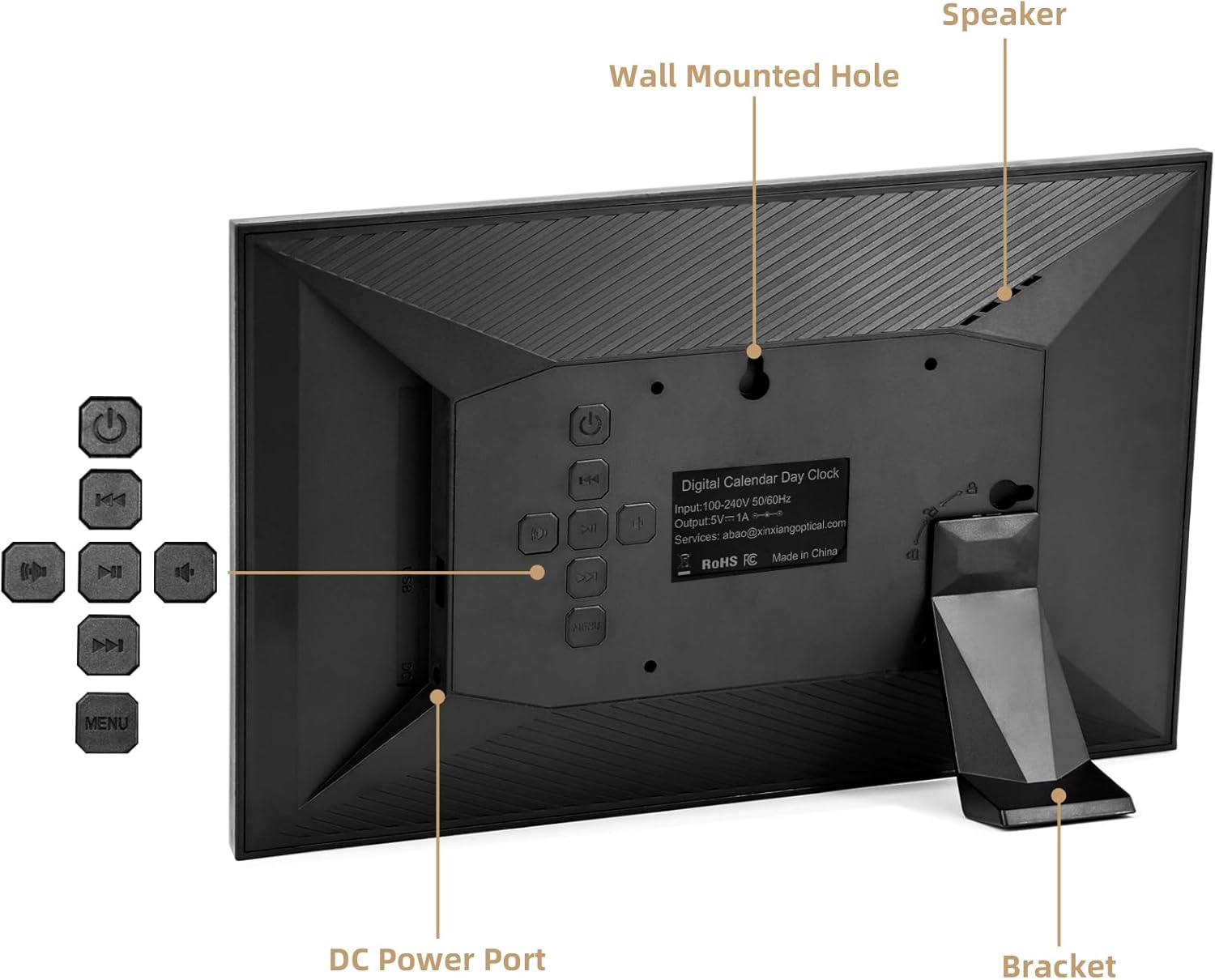
Figure 2: Rear view of the clock, highlighting the DC Power Port, Wall Mounted Hole, Speaker, and control buttons on the side.
- Display Screen: 10.1-inch high-resolution display for clear visibility.
- DC Power Port: Connects to the A/C power adapter.
- Wall Mounted Hole: Allows for wall mounting.
- Speaker: For alarm and reminder audio.
- Control Buttons: Located on the side/rear for manual adjustments (also controllable via remote).
- Bracket: Integrated stand for tabletop placement.
Setup
- Unpack: Carefully remove all components from the packaging.
- Power Connection: Connect the A/C power adapter to the DC Power Port on the back of the clock. Plug the adapter into a standard electrical outlet. The clock will power on automatically.
- Placement:
- Tabletop: Use the integrated bracket to stand the clock on a flat surface.
- Wall Mount: Utilize the wall-mounted hole on the back to hang the clock securely on a wall.
- Initial Settings: Upon first power-on, you may need to set the time, date, and other preferences. Use the remote control or the side buttons to navigate the menu.

Figure 3: The clock's settings menu, showing options for Set Time, Set Date, Time Mode, Date Mode, Language, and Color Mode. Below, an example of a medicine reminder is displayed.
Operating Instructions
Setting Time and Date
Use the remote control to access the settings menu. Navigate to "Set Time" and "Set Date" to adjust these parameters.

Figure 4: The clock's display showing its dimensions (10.4in W x 6.58in H, 10.1in diagonal) and a selection of 18 supported languages, including English, French, Italian, German, and Spanish.
Time and Date Modes
- Time Mode: Choose between 12-hour (with AM/PM) or 24-hour format.
- Date Mode: Select your preferred date display format (e.g., Month-Day-Year).
Language Settings
The clock supports multiple languages. Navigate to the "Language" option in the settings menu to select your desired language.
Alarm and Reminder Functions
The clock allows for setting up to 12 alarms and 20 reminder scenarios. These can be customized for various daily activities.
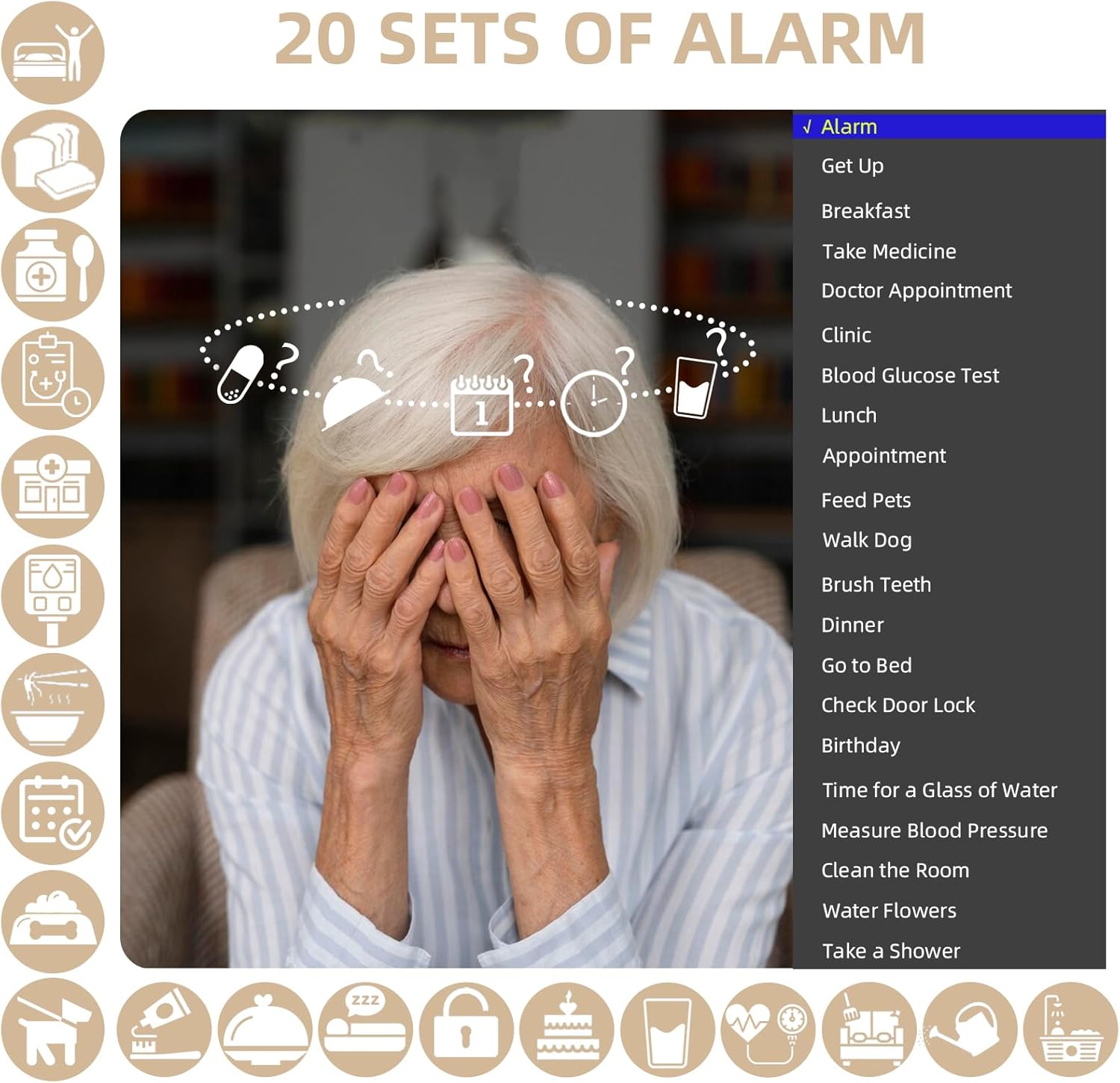
Figure 5: The clock screen showing a list of 20 pre-set reminder options, including "Get Up", "Breakfast", "Take Medicine", "Doctor Appointment", "Lunch", and "Dinner".
To set an alarm or reminder:
- Access the "Alarm Status" or "Reminder" menu via the remote control.
- Select an alarm slot and set the desired time.
- Choose a reminder scenario from the available options or customize one.
- Confirm your settings.
When an alarm sounds, press any button on the clock or remote to stop it.
Auto Dimming Option
The clock features an automatic dimming function to adjust brightness based on the time of day.
- Automatic Mode: The display automatically dims at 8:00 PM and brightens at 7:00 AM. (Day brightness: 50cd/m², Night brightness: 10cd/m²)
- Low Mode: Similar to Automatic, but with a lower night brightness. (Day brightness: 50cd/m², Night brightness: 5cd/m²)
- Off Mode: Brightness remains constant at 50cd/m² throughout the day and night.
You can also customize the time the screen goes out. The alarm clock will function normally even when the screen is off.

Figure 6: The clock display showing the difference between day (automatically brightens at 7 AM) and night (automatically darkens at 8 PM) brightness levels.
Navigate to "Color Mode" or "Display Mode" in the settings to cycle through the available options.
Multiple Display Modes
The clock offers various display styles, including different calendar layouts and font color switching.

Figure 7: Six examples of display modes, including analog clock face, full calendar view with colored headers, and various font color combinations for the digital display.
Navigate to "Color Mode" or "Display Mode" in the settings to cycle through the available options.
Maintenance
- Cleaning: Use a soft, dry cloth to clean the display and exterior of the clock. Do not use abrasive cleaners or solvents.
- Power: The clock requires an A/C adapter to operate and does not run on batteries. Ensure a stable power supply.
- Power Outage: In case of a power outage, the clock is designed to reset to the correct time and date automatically once power is restored.
Troubleshooting
| Problem | Possible Solution |
|---|---|
| Clock does not power on. |
|
| Display is too dim or too bright. |
|
| Alarms are not sounding. |
|
| Incorrect time or date displayed. |
|
Specifications
- Model Number: DC810
- Display Type: Digital
- Screen Size: 10.1 inches
- Product Dimensions: 10.4"W x 6.4"H
- Power Source: Corded Electric (A/C Adapter included)
- Material: Plastic
- Mounting Type: Wall Mount & Tabletop
- Item Weight: 6.4 ounces
- Special Features: Alarm, Auto Dimmable, Calendar Display, Large Display, Multilingual (18 languages)
- Number of Alarms: 12
- Number of Reminders: 20
Warranty Information
The Bgift DC810 Digital Calendar Alarm Clock comes with a 1-year warranty from the date of purchase. This warranty covers manufacturing defects under normal use. Please retain your proof of purchase for warranty claims.
Customer Support
For any questions, technical assistance, or warranty claims, please contact Bgift customer service.
- Email: abao@gimvangsoptical.com
- Online: Visit the official Bgift store on Amazon for more information and support resources.
We also provide 180 days of friendly worry-free customer service.