
Introduction
This manual provides essential information for the safe and effective use of your Skullcandy Terrain XL Wireless Bluetooth Speaker. This portable speaker is designed for adventure, featuring IPX7 waterproofing, an 18-hour battery life, and True Wireless Stereo capabilities.
What's in the Box
- SKDY Terrain™ XL Wireless Speaker
- 1 x 3FT C-to-A Charging Cable
- 1 x Wrist Strap
- 1 x User Manual

Image: The Skullcandy Terrain XL speaker, showcasing its grey body and blue accents.
Key Features
- IPX7 Waterproof: Submersible in water up to 1 meter for 30 minutes, making it ideal for outdoor and wet environments.
- Powerful Bass Punch: Dual custom passive radiators deliver enhanced bass performance.
- Portable & Durable: Equipped with a nylon wrist wrap for easy transport and a waterproof woven fabric mesh for durability.
- Long Battery Life: Up to 18 hours of continuous playtime on a single charge.
- Multi-Link Technology: Connects with up to 99 other Skullcandy speakers for expanded audio coverage.
- Bluetooth v5.3: Ensures stable and efficient wireless connectivity.
- USB-C Charging Port: Modern and convenient charging interface.

Image: An infographic showing the key features of the Terrain XL: 18 hours of battery, IPX7 submersible waterproof rating, and Multi-Link capability to pair up to 99 speakers.

Image: Multiple Skullcandy Terrain XL speakers partially submerged in water, illustrating their IPX7 waterproof design.
Setup
Initial Charge
Before first use, fully charge your Skullcandy Terrain XL speaker.
- Connect the provided 3 ft C-to-A charging cable to the USB-C port on the speaker.
- Connect the other end of the cable to a compatible USB power adapter (not included).
- The LED indicators on the speaker will show charging status. A full charge takes approximately 18 hours.

Image: A detailed view of the speaker's control buttons and the USB-C charging port, with LED indicators visible.
Bluetooth Pairing
- Power on the speaker by pressing and holding the power button until you hear an audible cue.
- The speaker will automatically enter Bluetooth pairing mode, indicated by a flashing LED.
- On your device (smartphone, tablet, etc.), enable Bluetooth and search for "Skullcandy Terrain XL" in the list of available devices.
- Select "Skullcandy Terrain XL" to connect. Once connected, you will hear a confirmation tone.
Operating Instructions
Basic Controls
| Function | Action |
|---|---|
| Power On/Off | Press and hold Power button |
| Play/Pause | Press Play/Pause button |
| Volume Up | Press '+' button |
| Volume Down | Press '-' button |
| Next Track | Press and hold '+' button |
| Previous Track | Press and hold '-' button |
| Answer/End Call | Press Play/Pause button |
| Reject Call | Press and hold Play/Pause button |
Multi-Link Pairing
The Skullcandy Terrain XL features Multi-Link technology, allowing you to connect up to 99 Skullcandy speakers for a larger sound experience.
- Ensure all speakers you wish to link are powered on and not currently connected to any Bluetooth device.
- On the primary speaker (the one connected to your device), press the Multi-Link button (often indicated by a chain link icon).
- On the secondary speakers, press their Multi-Link button. They will automatically search for and connect to the primary speaker.
- Once connected, audio will play simultaneously through all linked speakers.

Image: An illustration showing three Skullcandy Terrain XL speakers wirelessly linked together, emphasizing the Multi-Link capability.

Image: A visual representation of different Skullcandy Terrain speaker models (Mini, standard, and XL) connected via Multi-Link, showcasing scalability.
Maintenance
Cleaning
To clean your speaker, use a soft, damp cloth. Do not use harsh chemicals or abrasive cleaners. Ensure the charging port cover is securely closed before cleaning or exposing to water.
Storage
Store the speaker in a cool, dry place away from direct sunlight and extreme temperatures. If storing for an extended period, charge the battery periodically to maintain its lifespan.
Troubleshooting
| Problem | Possible Solution |
|---|---|
| Speaker does not power on. | Ensure the battery is charged. Connect to a power source using the USB-C cable. |
| Cannot pair via Bluetooth. | Make sure the speaker is in pairing mode (flashing LED). Turn off and on your device's Bluetooth. Ensure no other devices are connected to the speaker. |
| No sound. | Check volume levels on both the speaker and your connected device. Ensure the speaker is properly paired. |
| Multi-Link not working. | Ensure all speakers are Skullcandy Multi-Link compatible. Make sure secondary speakers are not already paired to another device. Follow Multi-Link pairing steps carefully. |
| Short battery life. | Ensure the speaker is fully charged before use. Battery life can vary with volume levels and usage. |
Specifications
- Model Name: Skullcandy Terrain XL
- Model Number: 2SKSK1848O0L2
- Dimensions: 3.5"D x 3.5"W x 7.5"H
- Weight: 2.07 pounds
- Water Resistance: IPX7 (Waterproof)
- Battery Life: Up to 18 Hours
- Wireless Technology: Bluetooth v5.3
- Connectivity: Bluetooth, USB, Wireless
- Speaker Output Power: 3 Watts
- Frequency Response: 30 Hz
- Woofer Diameter: 48 Millimeters
- Control Method: Touch
- Power Source: Battery Powered (1 Lithium Ion battery included)
- Manufacturer: Lifeworks Technology Group, LLC.
- Country of Origin: China
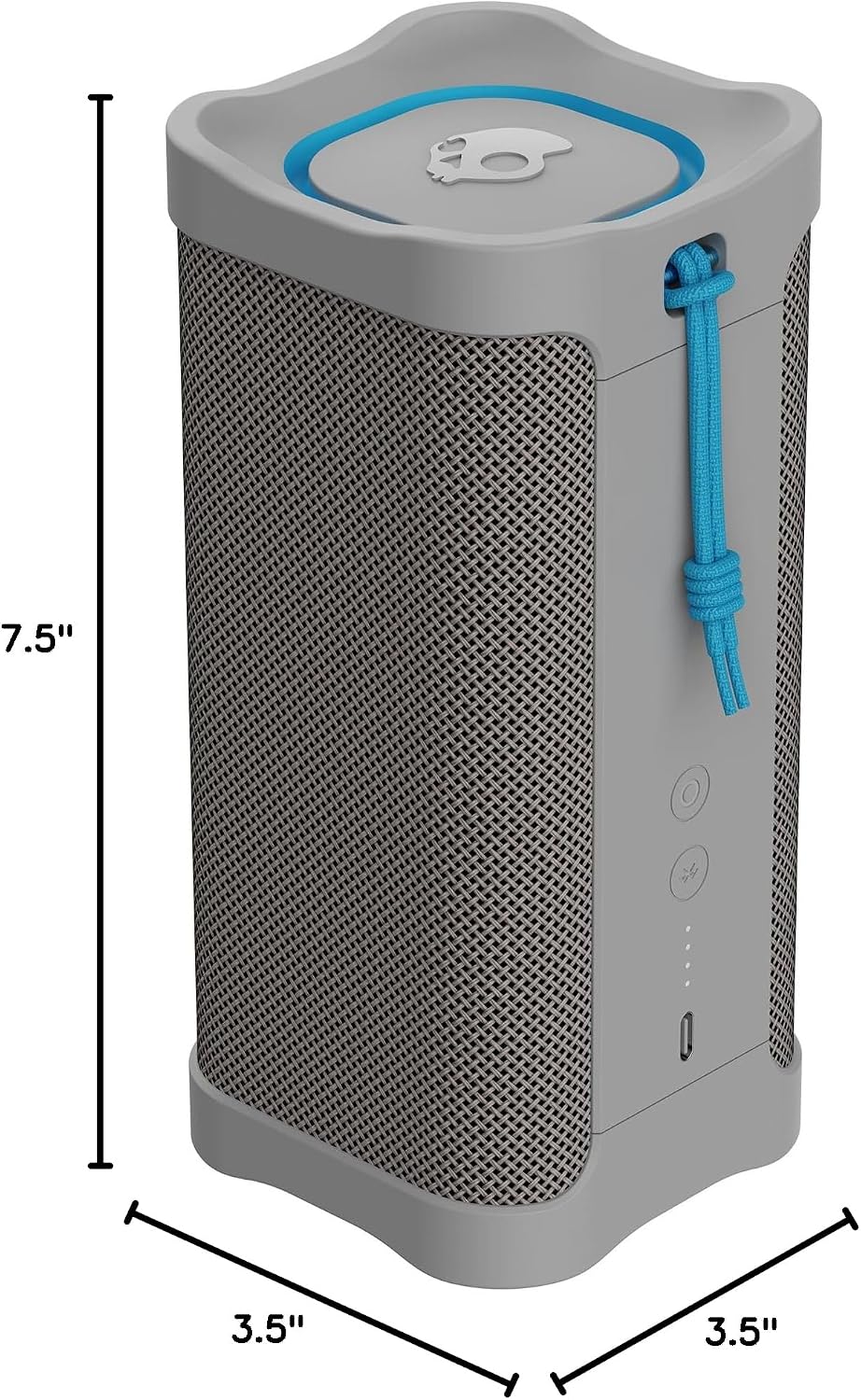
Image: A diagram illustrating the physical dimensions of the Skullcandy Terrain XL speaker.
Warranty and Support
For warranty information and customer support, please refer to the official Skullcandy website or contact their customer service directly. Keep your proof of purchase for warranty claims.
Online Support: Visit Skullcandy Support


