
1. Introduction
This manual provides essential information for the safe and effective use of your Smart Med Alert Cellular Medical Alert Necklace. Please read it thoroughly before operating the device.
Key Features:
- 24/7 Monitored Emergency Response: Immediate connection to trained operators via an SOS button.
- Built-in Cellular Connectivity: Operates independently with nationwide AT&T 4G LTE coverage.
- Location Tracking: Utilizes GPS, AGPS, Wi-Fi, LBS, and Geo-Fence technology for precise location sharing.
- Fall Detection: Automatically detects falls and sends alerts, with customizable sensitivity.
- Water-Resistant Design: IP67 rated, suitable for wear during showers and baths.
- Long Battery Life: 3-6 days on a single charge.
- Personalized Emergency Contacts: Add up to 5 contacts for notification.

Figure 1: Smart Med Alert Cellular Medical Alert Necklace. This image displays the front of the black medical alert pendant with a digital display showing time and date, an SOS button, and a voice key button.
2. Setup and Activation
2.1. What's in the Box?
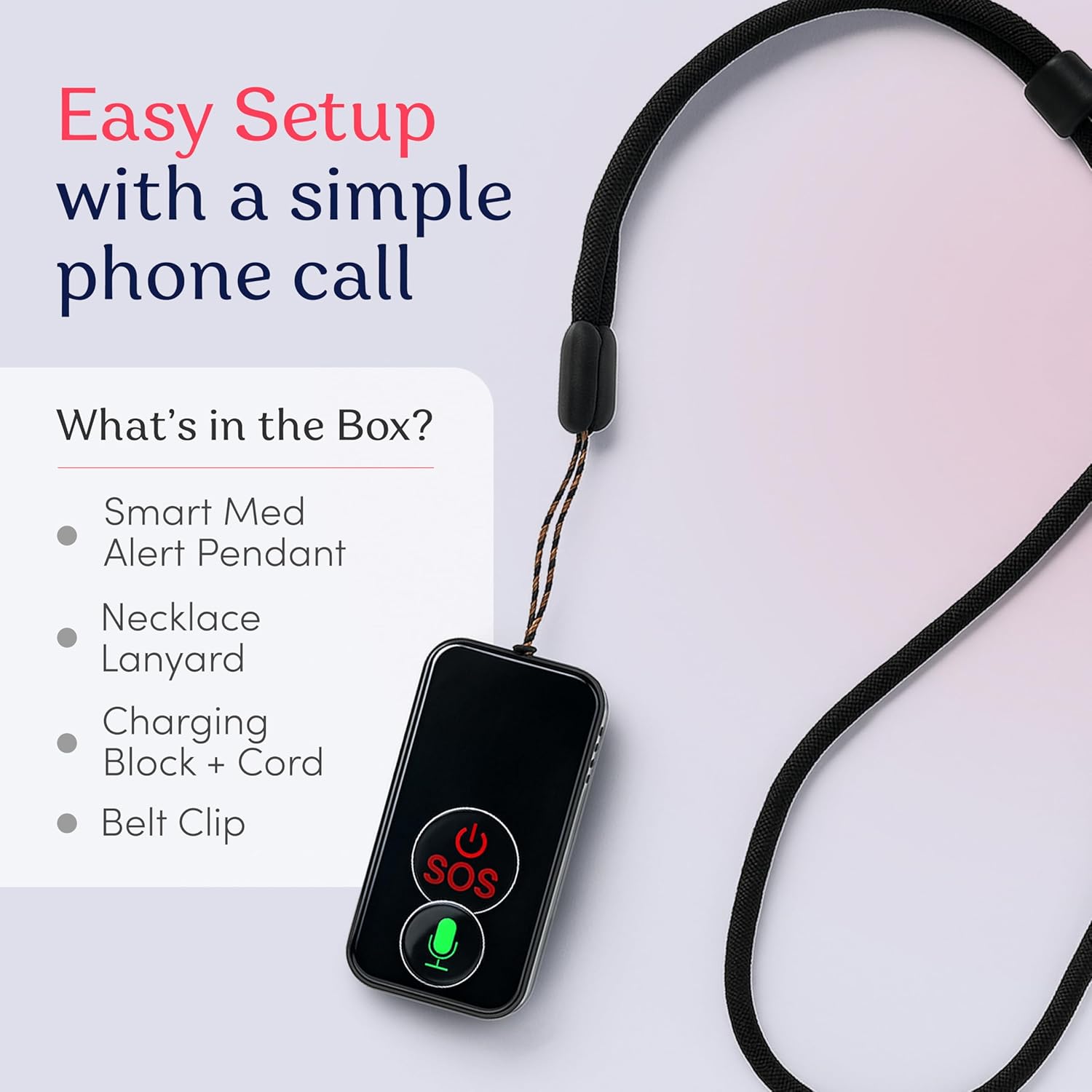
Figure 2: Contents of the Smart Med Alert package. The image shows the Smart Med Alert pendant, necklace lanyard, charging block + cord, and a belt clip.
- Smart Med Alert Pendant
- Necklace Lanyard
- Charging Block + Cord
- Belt Clip
2.2. Initial Charging
Before first use, fully charge your device. Connect the charging cord to the charging block and plug it into a standard wall outlet. Place the pendant into the charging cradle, ensuring the charging points align. A full charge typically takes 3-4 hours and provides 3-6 days of battery life.

Figure 3: Detailed diagram showing the charging points on the back of the device and how to connect the magnetic charger.
2.3. Activation Process
To activate emergency monitoring, a subscription is required. Contact Smart Med Alert customer service to set up your device and activate the monitoring service for a monthly fee. This step is crucial for the device's emergency response features to function.
Video 1: "Medical Alert Device Whats In The Box" - This video provides a visual guide to the contents of the medical alert device package and initial setup steps.
3. Operating Your Device
3.1. Power On/Off
- Power On: Press and hold the power button for more than 5 seconds to turn on the device.
- Power Off: Press the reset button on the side of the device to turn off the device.
3.2. Emergency SOS Button
In case of an emergency, press and hold the SOS button on the device for 3 seconds. This will trigger an emergency call and connect you to a trained operator. The operator will assess the situation and dispatch appropriate help.
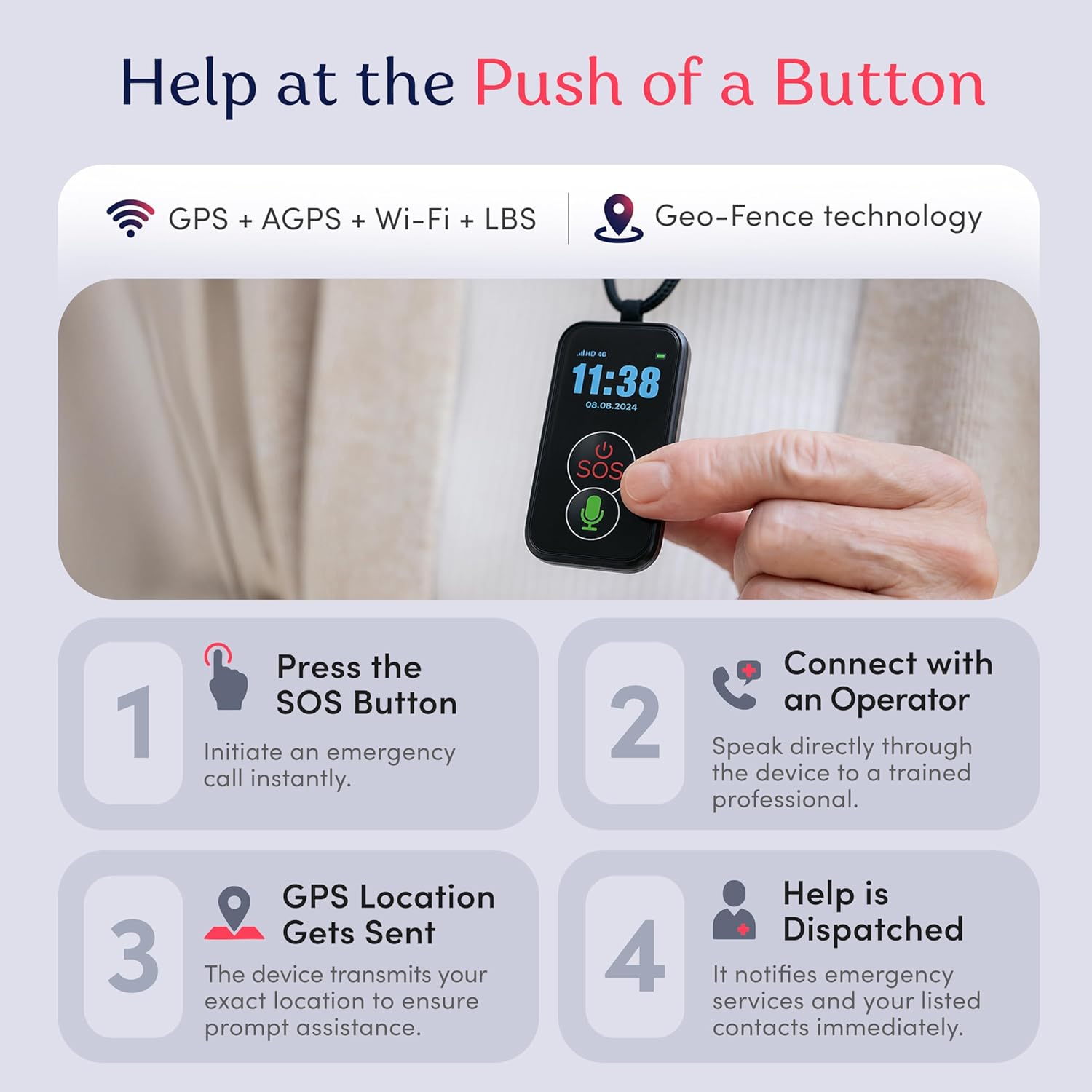
Figure 4: Visual steps on how the device works: 1. Press SOS Button, 2. Connect with an Operator, 3. GPS Location Gets Sent, 4. Help is Dispatched.
3.3. Two-Way Communication
The device features a built-in speaker and microphone, allowing for real-time, two-way communication with emergency operators. Spanish-speaking operators are available upon request.
3.4. Fall Detection
The medical alert necklace is equipped with fall detection technology that automatically senses falls and sends alerts, even if the wearer is unable to press the button. Fall sensitivity can be customized by contacting customer support.

Figure 5: An elderly woman using a cane on stairs, illustrating the built-in fall detection feature of the device.
3.5. GPS Tracking
The device provides accurate location tracking using GPS, AGPS, Wi-Fi, LBS, and Geo-Fence technology. This ensures that responders and caregivers can quickly locate the wearer in an emergency.
3.6. Voice Key
Press the voice key button twice, and the device will audibly announce the current time.
Video 2: "Smart Med Alert Necklace" - A short preview video showcasing the Smart Med Alert necklace in use. Note: This is a 7-second preview video.
4. Care and Maintenance
4.1. Water Resistance
The device is IP67-rated water-resistant, meaning it can withstand splashes, rain, and can be worn in the shower or bath. However, it should not be submerged in water for extended periods.

Figure 6: Image highlighting the water-resistant design of the Smart Med Alert necklace, showing it being splashed with water.
4.2. Battery Life and Charging
The device offers a battery life of 3-6 days on a single charge. To maintain optimal performance, charge the device regularly, ideally overnight. The charging process is simple: place the pendant in its magnetic charging cradle.
4.3. Cleaning Instructions
To clean your device, gently wipe it with a soft, damp cloth. Do not use harsh chemicals or abrasive cleaners, as these may damage the device.
5. Troubleshooting
Common Issues and Solutions:
- Device Not Activating: Ensure your subscription is active and the device has been properly set up with customer service. Contact support if issues persist.
- Accidental Alerts: If the fall detection is too sensitive or the SOS button is pressed accidentally, contact customer support to adjust settings or for guidance on cancellation procedures.
- Short Battery Life: Ensure the device is fully charged using the provided charging cradle. Avoid extreme temperatures, which can affect battery performance.
- No Signal/Location Issues: Ensure the device is used in an area with AT&T 4G LTE coverage. If issues persist, contact customer support.
6. Product Specifications
| Feature | Detail |
|---|---|
| Product Dimensions | 2 x 1.68 x 0.62 inches |
| Item Weight | 6.4 ounces |
| Model Number | SMA-Wafer-4G |
| Manufacturer | Smart Med Alert |
| Connectivity Technology | Cellular (AT&T 4G LTE) |
| GPS | Built-in GPS, AGPS, Wi-Fi, LBS, Geo-Fence |
| Water Resistance | IP67 Rated |
| Battery Life | 3-6 days per charge |
| Display Type | Digital (3 Inches) |
| Special Feature | Heart Rate Monitor |
7. Warranty and Support
7.1. Manufacturer Information
The Smart Med Alert Cellular Medical Alert Necklace is manufactured by Smart Med Alert.
7.2. Customer Support
For technical assistance, activation support, or any inquiries regarding your device, please contact Smart Med Alert customer service. Our team is available 24/7 to provide help.
Visit the Smart Med Alert Store for more information.
7.3. Protection Plans
Extended protection plans are available for purchase to cover your device beyond the standard warranty. Options include:
- 2-Year Protection Plan
- 3-Year Protection Plan
- Complete Protect: Covers eligible past and future purchases (monthly billing)
For details on coverage and pricing, please refer to the product listing or contact your provider.