
Introduction
This manual provides comprehensive instructions for using the Awesome Pattern Studio Turtles Collection CS1740-2 Counted Cross Stitch Pattern. This product includes four distinct printed patterns designed for cross-stitching. Please note that this package contains only the printed patterns; fabric, threads, needles, and hoops are not included and must be acquired separately.
The patterns are suitable for various skill levels and are intended to guide you through the creation of a beautiful cross-stitch design featuring turtles.
Product Overview
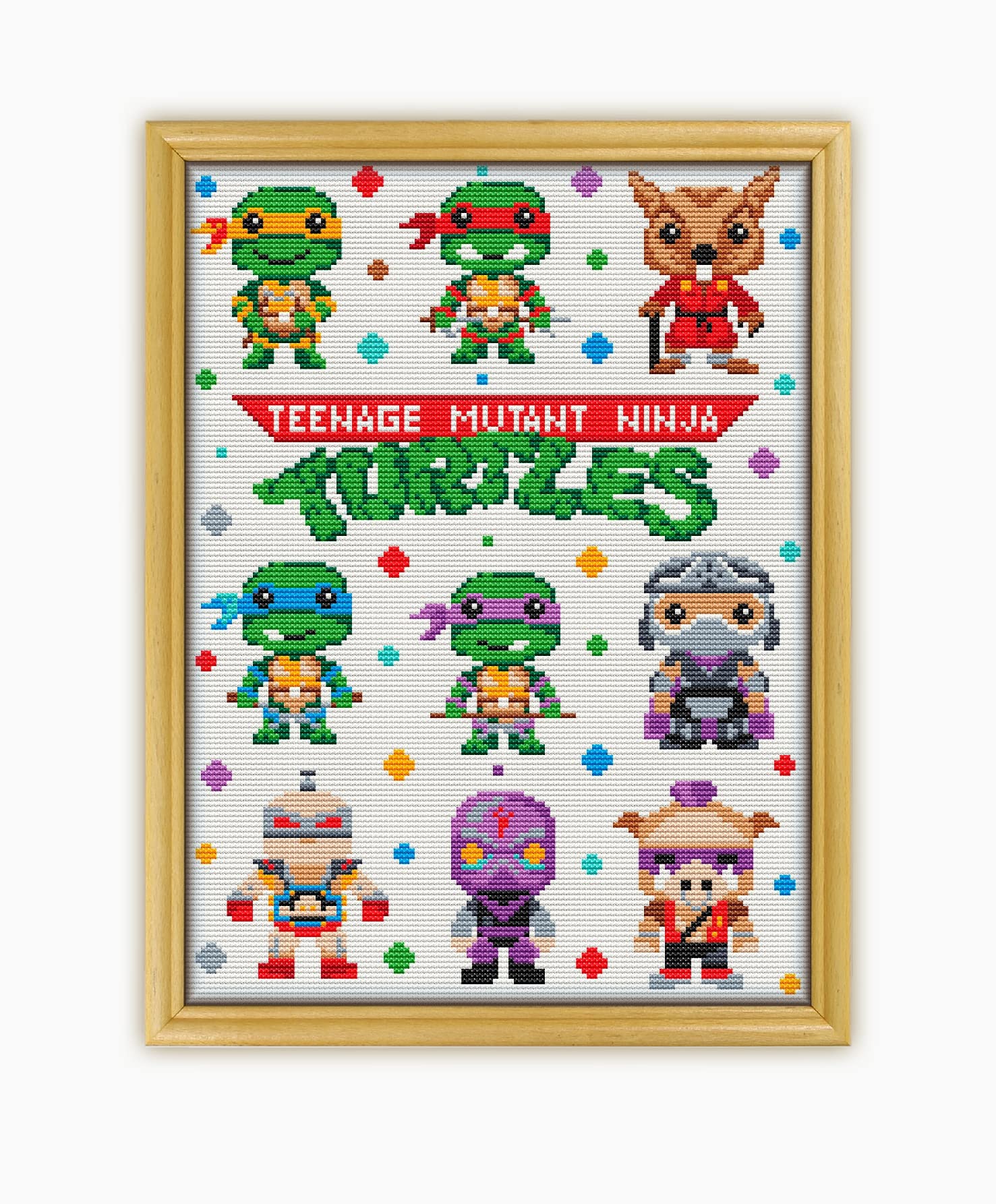
Figure 1: Overview of the Turtles Collection CS1740-2 Counted Cross Stitch Pattern package. This image displays the primary pattern design and the various printed pattern sheets included.
The Turtles Collection CS1740-2 includes four types of printed patterns on A3 format paper to assist in your cross-stitching project:
- Black and White Symbols: A pattern chart using black and white symbols for stitch identification.
- Color Symbols: A pattern chart using colored symbols for stitch identification.
- Color Blocks: A pattern chart displaying solid color blocks for each stitch.
- Color Blocks and Symbols: A combined pattern chart featuring both color blocks and symbols.
These variations allow you to choose the most comfortable and effective method for following the design.
Setup
Before beginning your cross-stitch project, ensure you have all necessary materials. This pattern set does not include the following items, which are essential for completing the project:
- Fabric: AIDA fabric, typically 16 count, is recommended.
- Threads (Floss): Embroidery floss in the specified colors (17 colors for this design). A color chart is provided within the pattern sheets to match symbols to thread colors.
- Needles: Cross-stitch needles appropriate for your chosen fabric count.
- Hoop or Frame: To keep your fabric taut while stitching.
- Scissors: Small, sharp scissors for cutting floss.
Refer to the color chart provided with your pattern to select the correct thread colors. Organize your threads for easy access during stitching.
Operating (Using the Patterns)
Follow these steps to effectively use your cross-stitch patterns:
- Choose Your Pattern Type: Select one of the four provided pattern types (Black and White Symbols, Color Symbols, Color Blocks, or Color Blocks and Symbols) based on your preference.

Figure 2: Example of different pattern types. This image illustrates the variations in how the design is presented across the different pattern sheets.
- Understand the Symbols: Each pattern type uses symbols to represent specific thread colors. A legend or color chart is included with the patterns to match each symbol to its corresponding DMC or equivalent thread number and color.

Figure 3: Detailed view of a pattern sheet, highlighting the color chart and symbol legend. This chart is crucial for selecting the correct thread colors for each symbol.
- Center Your Fabric: Find the center of your fabric and the center of your pattern. Begin stitching from the center outwards to ensure the design is properly positioned.
- Follow the Grid: The patterns are gridded to correspond with the weave of your AIDA fabric. Each square on the pattern represents one cross-stitch on your fabric.
- Stitch Carefully: Use the chosen pattern to guide your stitches. Pay attention to the symbols and colors to accurately reproduce the design.

Figure 4: Multiple pattern sheets laid out, demonstrating the grid and symbol details. This visual aid helps in understanding how to follow the pattern accurately.
Maintenance
To ensure the longevity and readability of your cross-stitch patterns, follow these maintenance guidelines:
- Storage: Store patterns flat in a dry, cool place away from direct sunlight to prevent fading and creasing.
- Protection: Consider placing patterns in clear plastic sleeves or folders to protect them from spills, dust, and tears.
- Handling: Handle patterns with clean, dry hands to avoid transferring oils or dirt onto the paper.
Troubleshooting
Here are some common issues and their solutions when working with cross-stitch patterns:
- Difficulty Reading Symbols: If symbols are hard to distinguish, try using a magnifying glass or switching to a different pattern type (e.g., Color Blocks) if available. Ensure adequate lighting.
- Incorrect Thread Color: Double-check your thread against the color chart and legend. Sometimes similar-looking symbols or colors can be confused.
- Design Not Centered: Always start stitching from the center of your fabric and pattern. If you've already started and it's off-center, you may need to carefully unpick stitches and re-center.
- Pattern Damage: If a pattern sheet becomes damaged or unreadable, contact Awesome Pattern Studio support for potential replacement options.
Specifications
| Product Model | CS1740-2 |
| Brand | Awesome Pattern Studio |
| Design Name | Turtles Collection |
| Pattern Type | Counted Cross Stitch Pattern (Printed) |
| Included Items | 4 Color Printed Patterns (Black & White Symbols, Color Symbols, Color Blocks, Color Blocks & Symbols) |
| Recommended AIDA Count | 16 count |
| Finished Design Size (16 count AIDA) | 7.5 x 10.13 inches (19.05 x 25.72 cm) |
| Stitch Count | 162 x 120 stitches |
| Number of Colors | 17 |
| Paper Format | A3 |
| Product Dimensions | 9.06 x 6.42 x 0.08 inches |
| Item Weight | 5.3 ounces |
Warranty Information
No specific warranty information is provided for this pattern product. For any concerns regarding the quality or completeness of the patterns, please refer to the support section.
Support
For further assistance, questions, or to explore other products from Awesome Pattern Studio, please visit their official store:
Visit Awesome Pattern Studio Store
You can also refer to the product listing on Amazon for additional details and contact options.