
1. Introduction
This manual provides essential information for the safe and effective installation, operation, and maintenance of your MOLLOM HT-3 3-Way MCB Distribution Protection Box. Please read these instructions carefully before use and retain them for future reference. This product is designed to house Miniature Circuit Breakers (MCBs) and provide protection for electrical distribution in various environments.
2. Safety Information
WARNING: Electrical work should only be performed by qualified personnel. Failure to follow these safety instructions can result in electric shock, fire, or serious injury.
- Always disconnect power at the main supply before installing, servicing, or performing any work on the distribution box or connected circuits.
- Ensure all wiring complies with local and national electrical codes and regulations.
- Do not open the enclosure or attempt repairs if the product is damaged. Contact qualified service personnel.
- Verify the IP65 rating is maintained after installation by ensuring all cable glands and the cover are properly sealed.
- Do not exceed the maximum current or voltage ratings of the installed MCBs or the enclosure.
3. Package Contents
Verify that all items are present in the package:
- 1 x MOLLOM HT-3 3-Way MCB Distribution Protection Box
- 4 x Expansion Screws for mounting
- 2 x Waterproof Cable Glands
4. Specifications
| Model | HT-3 |
| Brand | Mollom |
| Dimensions (L x W x H) | 80 x 95 x 160 mm (3.1 x 3.7 x 6.3 inches) |
| Material | PC+ABS Alloy |
| IP Rating | IP65 (Dust-tight and protected against water jets) |
| Impact Resistance | IK08 |
| Number of Modules | 3-Way |
| Weight | 266 Grams |

Figure 1: Product Dimensions
5. Setup and Installation
Before beginning installation, ensure the main power supply is OFF.
- Mounting the Enclosure:
- Select a suitable mounting location, ensuring it is flat and stable.
- Use the provided expansion screws to securely fasten the distribution box to the wall. Mark the drilling points using the box as a template.

Figure 2: Internal Mounting Points
- Cable Entry:
- Carefully punch out the desired cable entry points on the enclosure.
- Install the provided waterproof cable glands into the entry points. Ensure a tight seal to maintain the IP65 rating.

Figure 3: Cable Entry Points
- MCB and Wiring Installation:
- Open the transparent cover of the distribution box.
- Install your 3-way Miniature Circuit Breakers (MCBs) onto the integrated DIN rail.
- Route the electrical cables through the cable glands and connect them to the MCBs according to your electrical diagram. Ensure all connections are secure and properly insulated.
- The enclosure includes a latex sealing ring. Ensure this ring is correctly seated to maintain waterproof integrity when closing the cover.

Figure 4: Interior with DIN Rail
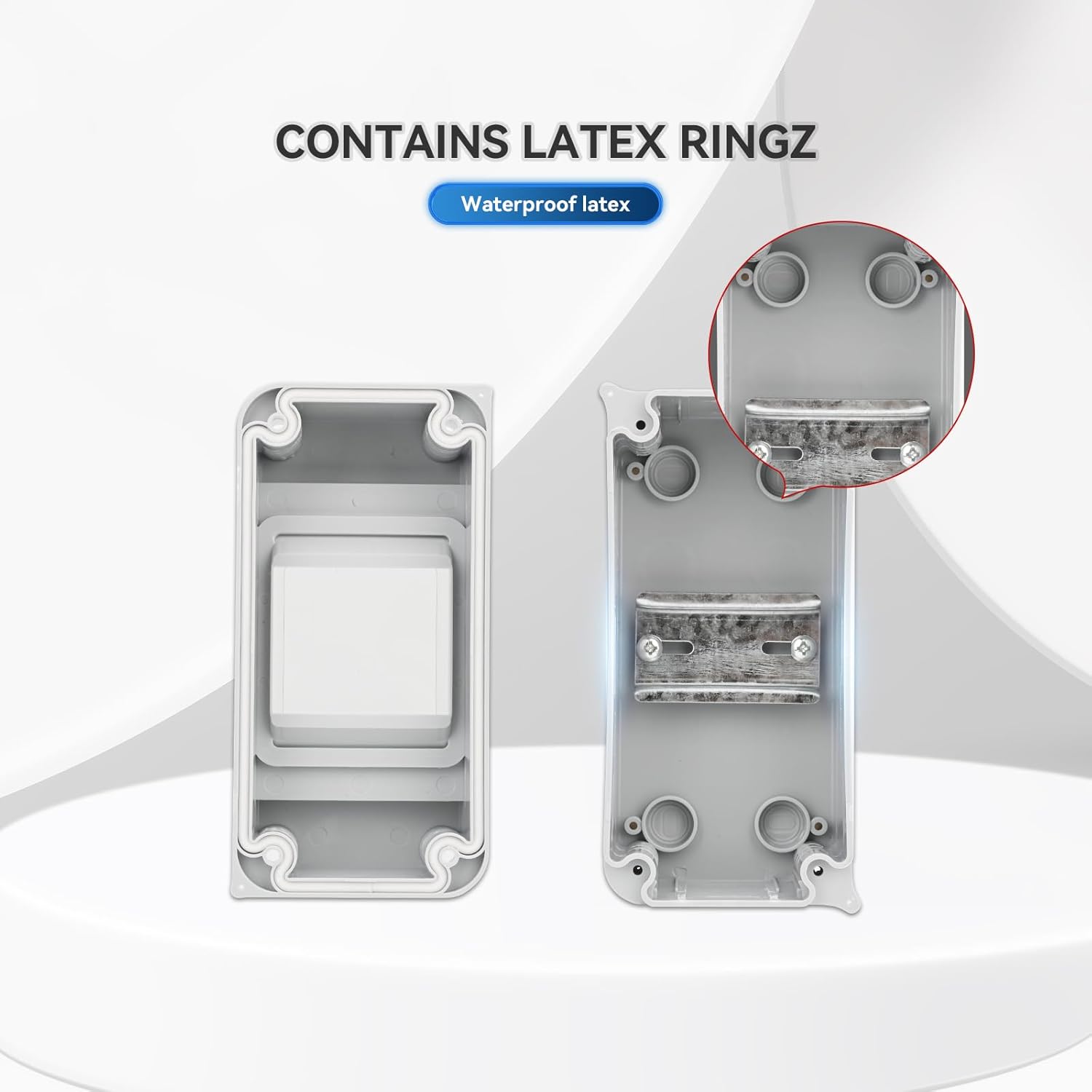
Figure 5: Latex Sealing Ring
- Final Steps:
- Once all wiring is complete and checked, close the transparent cover and ensure it latches securely.
- Restore power to the main supply.
6. Operating Instructions
The MOLLOM HT-3 distribution box is a passive enclosure designed to protect your MCBs. Operation primarily involves managing the MCBs installed within it.
- Accessing MCBs: To access the MCBs, unlatch and open the transparent front cover.
- MCB Operation: Operate the MCBs (ON/OFF) as per their individual instructions. The transparent cover allows visual inspection of MCB status without opening the box.
- Environmental Protection: The IP65 rating ensures protection against dust and water, making it suitable for outdoor and harsh indoor environments. The robust PC+ABS material provides IK08 impact resistance and protection against sun exposure.

Figure 6: IP65 Waterproof Protection

Figure 7: Dust and Sun Protection
7. Maintenance
Regular maintenance ensures the longevity and continued protection offered by your MOLLOM distribution box.
- Cleaning: Clean the exterior of the box periodically with a soft, damp cloth. Do not use abrasive cleaners or solvents. Ensure the transparent cover remains clear for visibility.
- Seal Inspection: Annually inspect the latex sealing ring and cable glands for any signs of wear, cracking, or damage. Replace if necessary to maintain the IP65 rating.
- Connection Check: Periodically, with power disconnected, open the box and check all electrical connections for tightness. Loose connections can cause overheating and fire hazards.
- Physical Damage: Inspect the enclosure for any physical damage, cracks, or deformation. If significant damage is found, the enclosure's protective capabilities may be compromised, and it should be replaced.
8. Troubleshooting
This section addresses common issues you might encounter.
| Problem | Possible Cause | Solution |
|---|---|---|
| Water or dust inside the enclosure | Improperly sealed cover or cable glands; damaged sealing ring. | Ensure cover is latched correctly. Tighten cable glands. Inspect and replace the sealing ring if damaged. |
| MCBs not functioning correctly | Faulty MCB; incorrect wiring; overload. | Check MCB for damage. Verify wiring connections. Ensure the circuit load does not exceed MCB rating. Consult an electrician. |
| Enclosure appears loose on wall | Mounting screws are loose or improperly installed. | Tighten mounting screws. If necessary, remount the box using appropriate anchors for the wall material. |
9. Warranty and Support
MOLLOM products are designed for performance and durability. While specific warranty details are not provided in this manual, please refer to your purchase documentation or the retailer for warranty information.
For technical support or inquiries, please contact your point of purchase or visit the official Mollom website for contact information. Always provide your product model (HT-3) and purchase details when seeking support.