
1. Introduction
The XYGStudy CM4-NVME-NAS-BOX is a multi-functional mini-computer designed to integrate with the Raspberry Pi Compute Module 4 (CM4), which is not included. This compact device serves as a network-attached storage (NAS) solution, offering robust network capabilities and versatile expansion options. It is an all-in-one solution primarily intended for home and small office environments, providing a straightforward approach to network storage without requiring extensive networking or storage system expertise.
The system features dual M.2 M KEY slots for NVME Solid State Drives, dual Gigabit Ethernet ports, and 4G network support, all housed within a durable metal case. It also includes multiple connectivity options such as HDMI 4K outputs, USB 3.2 ports, and a 3.5mm audio jack, making it a comprehensive platform for various applications.

Figure 1.1: The XYGStudy CM4-NVME-NAS-BOX mini-computer, showcasing its compact design and metal casing.
2. Package Contents
Please verify that all items listed below are included in your package. If any components are missing or damaged, please contact customer support.
- CM4-NVME-NAS-BASE x1
- Metal case (top and bottom) x1
- Momentary push button switch ~12mm (with LED and four pre-wired cables) x1
- 30×40mm Silicone thermal tape x1
- 15×15mm Silicone thermal tape (2PCS) x1
- 7×7mm Silicone thermal tape (2PCS) x1
- Antenna connector rubber plug (2PCS) x1
- Screws pack x1

Figure 2.1: Exploded view of the CM4-NVME-NAS-BOX components, illustrating the various parts included in the package.
3. Features
The CM4-NVME-NAS-BOX offers a comprehensive set of features for a versatile mini-computer experience:
- Integrated Design: All-in-one mini-computer solution, primarily designed for home and small office use.
- Storage Expansion: Onboard 2× M.2 M KEY slots for installing NVME Solid State Drives (supports 2230, 2242, 2260, 2280 sizes).
- Network Connectivity: Dual Gigabit Ethernet ports (Original Network port ETH0, and PCIE extended Network port ETH1) and onboard MINI PCIE connector for 4G module installation (USB protocol, not PCIE protocol).
- Video Output: 2× HDMI 4K output interfaces, supporting 4K@30fps.
- USB Ports: Onboard USB 3.2 Gen1 (5Gbps) ports.
- Audio: 3.5mm earphone/mic jack.
- Real-time Clock (RTC): Includes a real-time clock with battery socket for accurate timekeeping.
- Camera Interface: MIPI CSI-2 camera port × 2, 15pin 1.0mm FPC connector.
- TF Card Slot: Supports TF card for Compute Module 4 Lite (without eMMC) variants.
- Power Input: Type-C (5V 4A).
- VESA Mounting: Supports 100×100mm and 75×75mm standard VESA holes for flexible mounting options.
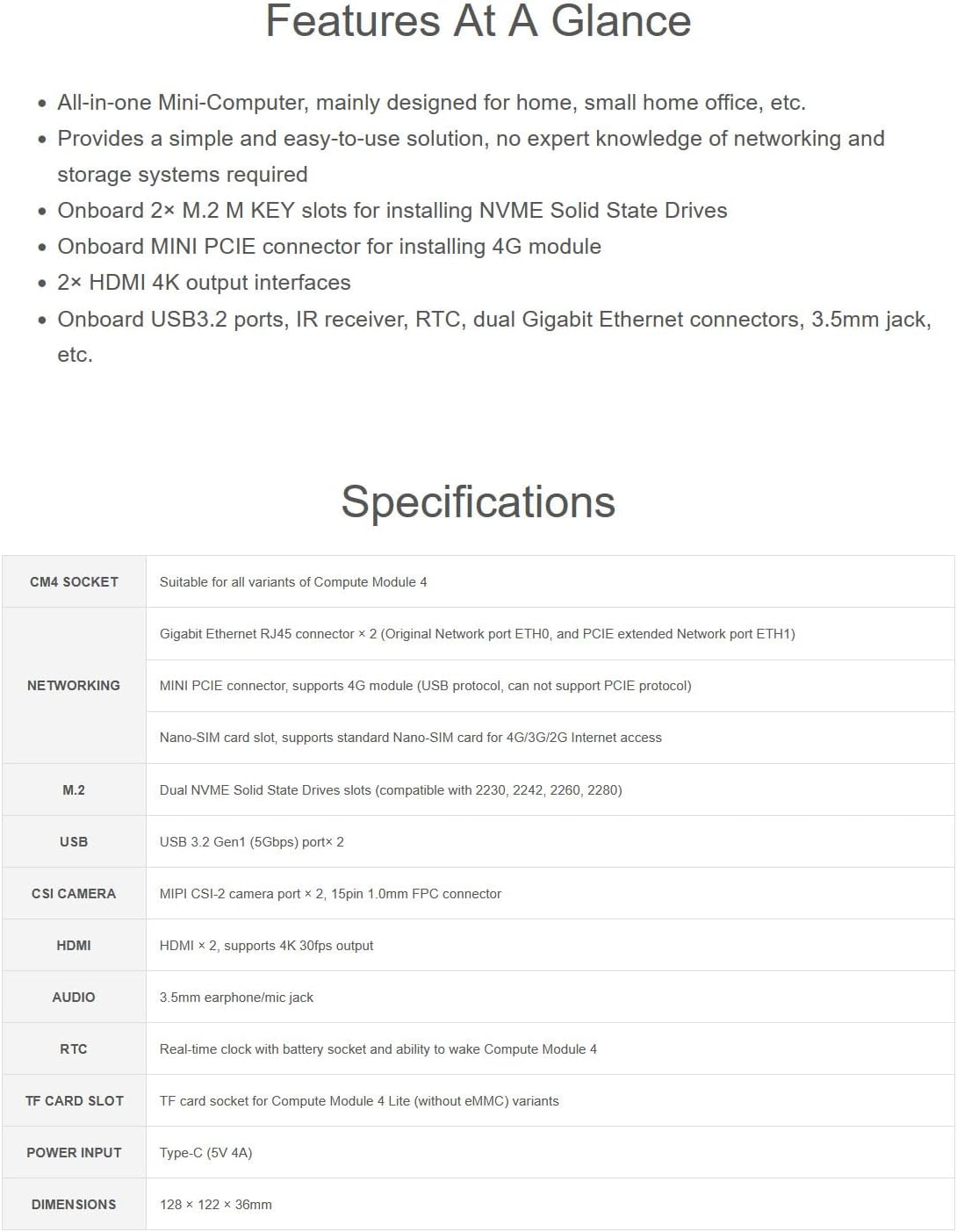
Figure 3.1: Key features of the CM4-NVME-NAS-BOX, highlighting its capabilities.

Figure 3.2: Detailed diagram illustrating the various onboard interfaces and connectors.
4. Specifications
Detailed technical specifications for the CM4-NVME-NAS-BOX:
| Category | Specification |
|---|---|
| CM4 Socket | Suitable for all variants of Compute Module 4 |
| Networking | Gigabit Ethernet RJ45 connector × 2 (Original Network port ETH0, and PCIE extended Network port ETH1) MINI PCIE connector, supports 4G module (USB protocol, can not support PCIE protocol) Nano-SIM card slot, supports standard Nano-SIM card for 4G/3G/2G Internet access |
| M.2 | Dual NVME Solid State Drives slots (compatible with 2230, 2242, 2260, 2280) |
| USB | USB 3.2 Gen1 (5Gbps) port × 2 |
| CSI Camera | MIPI CSI-2 camera port × 2, 15pin 1.0mm FPC connector |
| HDMI | HDMI × 2, supports 4K 30fps output |
| Audio | 3.5mm earphone/mic jack |
| RTC | Real-time clock with battery socket and ability to wake Compute Module 4 |
| TF Card Slot | TF card socket for Compute Module 4 Lite (without eMMC) variants |
| Power Input | Type-C (5V 4A) |
| Dimensions (L×W×H) | 128 × 122 × 36 mm (5.04 x 4.80 x 1.42 inches) |
| Material | Metal |
| Color | Black |
5. Setup and Installation
This section outlines the general steps for assembling and setting up your CM4-NVME-NAS-BOX. Please note that the Raspberry Pi Compute Module 4 (CM4) is NOT included and must be acquired separately.
5.1 Component Assembly
- Carefully unpack all components listed in the Package Contents section.
- Install the Raspberry Pi Compute Module 4 onto the CM4 socket on the CM4-NVME-NAS-BASE board. Ensure proper alignment and secure connection.
- If using NVME SSDs, insert them into the M.2 M KEY slots.
- Apply the provided silicone thermal tapes to the appropriate components for heat dissipation as indicated in the installation diagram.
- Mount the cooling fan (if included or purchased separately) to the designated area on the metal case.
- Assemble the metal top and bottom cases around the CM4-NVME-NAS-BASE board, ensuring all cut-outs align with the ports and connectors.
- Install the momentary push button switch and connect its pre-wired cables to the corresponding pins on the board.
- Secure the assembly with the provided screws.
- Attach antenna connectors if a 4G module is installed.
Figure 5.1: Exploded view showing the assembly process and component placement. The CM4 is not included.
5.2 Initial Connection
- Connect a compatible 5V 4A Type-C power adapter to the device's power input port.
- Connect an Ethernet cable to one of the Gigabit Ethernet ports for network access.
- If using a display, connect an HDMI cable from one of the HDMI output ports to your monitor.
- Connect any desired USB peripherals (e.g., keyboard, mouse) to the USB 3.2 ports.
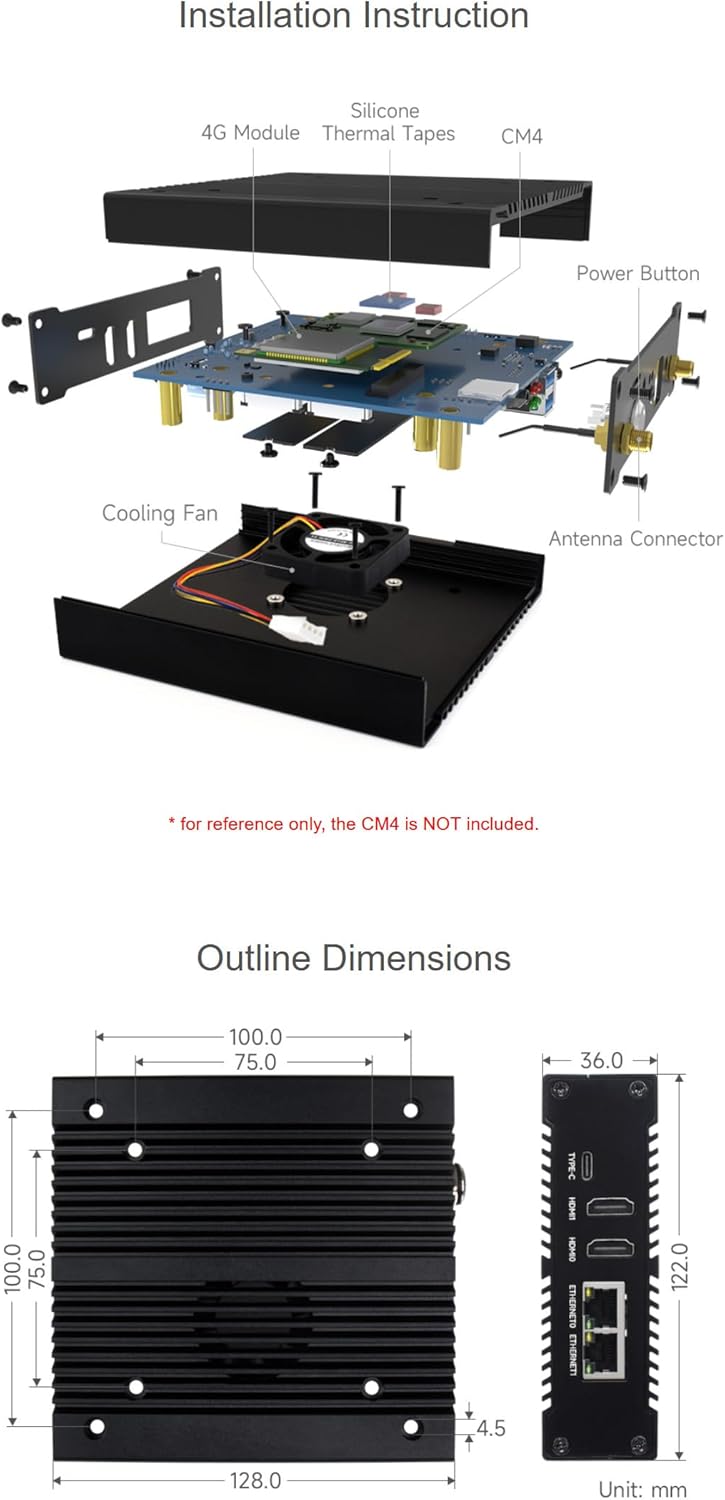
Figure 5.2: External views of the device, showing precise cut-outs and clear labels for all ports and connectors.
6. Operating Instructions
Once assembled and connected, the CM4-NVME-NAS-BOX functions as a versatile mini-computer and network storage device, depending on the operating system and software installed on your Raspberry Pi Compute Module 4.
6.1 Powering On/Off
- To power on, ensure the power adapter is connected and press the momentary push button switch.
- To power off, it is recommended to shut down the operating system gracefully before disconnecting power. A short press of the power button may initiate a graceful shutdown, while a long press typically forces a power off. Refer to your CM4's operating system documentation for specific power management settings.
6.2 Network Storage (NAS) Functionality
With appropriate software (e.g., OpenMediaVault, TrueNAS SCALE) installed on your CM4, the dual NVME SSD slots allow for robust network storage solutions. You can configure shared folders, user access, and various network protocols (SMB/CIFS, NFS, FTP) to create a centralized storage system accessible over your local network or via 4G connectivity.
6.3 4G Network Connectivity
If a 4G module is installed in the MINI PCIE slot and a Nano-SIM card is inserted, the device can establish a cellular data connection. This enables remote access to your NAS or other internet-dependent applications, even without a wired Ethernet connection. Configuration will depend on the specific 4G module and the CM4's operating system.
6.4 Display and Peripheral Use
Connect up to two 4K displays via the HDMI ports for a multi-monitor setup. The USB 3.2 ports support various peripherals, including keyboards, mice, external storage, and other USB devices, expanding the functionality of your mini-computer.
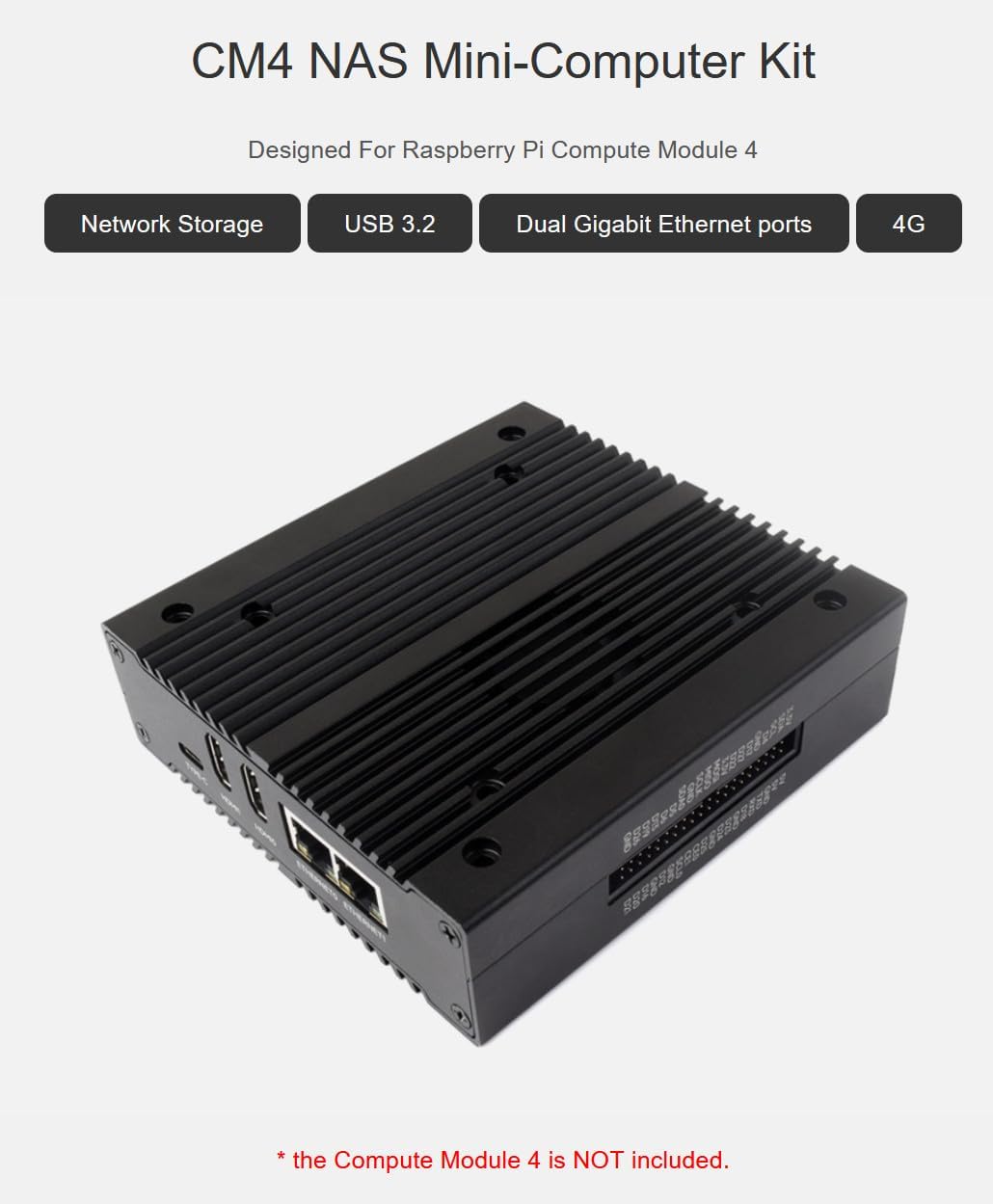
Figure 6.1: The CM4 NAS Mini-Computer Kit, highlighting its core functionalities like network storage, USB 3.2, dual Gigabit Ethernet, and 4G support.
7. Maintenance
Proper maintenance ensures the longevity and optimal performance of your CM4-NVME-NAS-BOX.
- Cleaning: Regularly clean the exterior of the device with a soft, dry cloth. Avoid using liquid cleaners or abrasive materials. Ensure ventilation openings are free from dust and debris.
- Ventilation: Ensure the device is placed in a well-ventilated area to prevent overheating. Do not block the ventilation holes.
- Firmware/Software Updates: Keep the operating system and any installed software on your Raspberry Pi Compute Module 4 updated to the latest versions to ensure security and performance.
- Thermal Management: Periodically check that the cooling fan (if installed) is functioning correctly and that thermal tapes are properly seated.
8. Troubleshooting
If you encounter issues with your CM4-NVME-NAS-BOX, try the following troubleshooting steps:
- No Power:
- Ensure the Type-C power adapter is securely connected to both the device and a working power outlet.
- Verify that the power adapter meets the 5V 4A specification.
- Check the power button connection to the board.
- No Display Output:
- Confirm that the HDMI cable is securely connected to both the device and the monitor.
- Ensure the monitor is powered on and set to the correct input source.
- Verify that the Raspberry Pi Compute Module 4 is properly seated and functioning.
- Network Connectivity Issues:
- Check Ethernet cable connections to both the device and your router/switch.
- Verify network settings within the CM4's operating system.
- For 4G issues, ensure the 4G module is correctly installed, the Nano-SIM card is active, and APN settings are configured.
- SSD Not Detected:
- Ensure NVME SSDs are correctly inserted into the M.2 M KEY slots.
- Verify that the SSDs are compatible with the M.2 M KEY interface.
- Check the CM4's operating system for disk management and driver status.
For more complex issues or if troubleshooting steps do not resolve the problem, please refer to the Raspberry Pi Compute Module 4 documentation or contact XYGStudy customer support.
9. Warranty and Support
For specific warranty information regarding your XYGStudy CM4-NVME-NAS-BOX, please refer to the purchase documentation or contact your retailer. XYGStudy provides support for its products to ensure customer satisfaction.
If you require further assistance, have questions, or need additional resources (such as detailed schematics or software guides), please contact XYGStudy directly via Amazon message. They will provide necessary attachments and support.
For technical support related to the Raspberry Pi Compute Module 4 itself, please refer to the official Raspberry Pi documentation and community forums.