1. Introduction
This user manual provides comprehensive instructions for the safe and efficient use of your Generic Oma 5330CA Professional Treadmill. Please read this manual thoroughly before assembly or operation to ensure proper usage and to prevent injury or damage to the equipment. Keep this manual for future reference.
2. Important Safety Information
Before using the treadmill, please observe the following safety precautions:
- Consult a physician before starting any exercise program.
- Place the treadmill on a flat, stable surface with adequate clearance around it.
- Keep children and pets away from the treadmill during operation.
- Wear appropriate athletic footwear and clothing.
- Do not operate the treadmill if it is damaged or malfunctioning.
- Always use the safety key during operation.
- Maximum user weight: 140 kg.
3. Assembly Instructions
The Generic Oma 5330CA treadmill requires some assembly. Follow these general steps. Refer to the separate assembly guide for detailed diagrams and hardware lists.
- Unpack all components and verify against the parts list.
- Attach the uprights to the base frame.
- Secure the console mast to the uprights.
- Connect the console wiring.
- Attach the handlebars and console unit.
- Ensure all bolts are tightened securely before use.
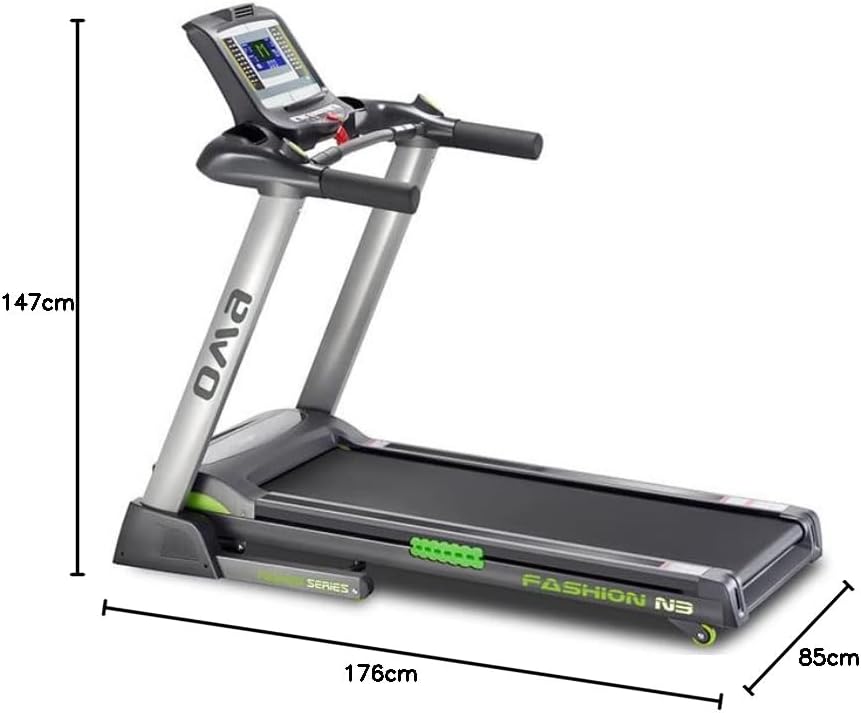
Image: The Oma 5330CA treadmill with its overall dimensions (176cm length, 85cm width, 147cm height). This image illustrates the fully assembled unit.
4. Operating Instructions
4.1 Console Overview
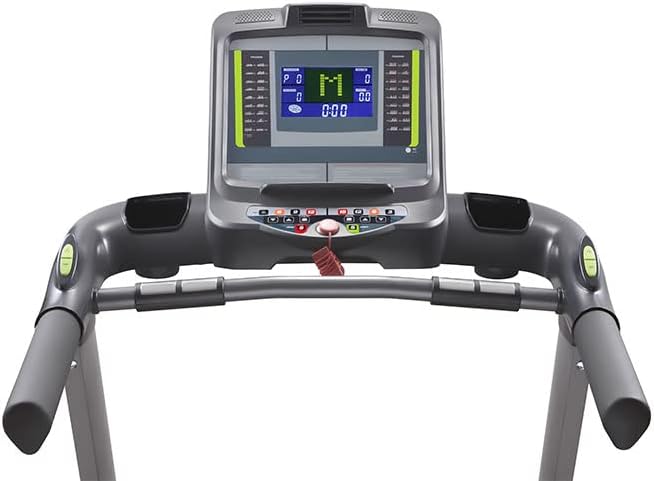
Image: Front view of the Oma 5330CA treadmill console and handlebars. The console features a central display and various control buttons.
The treadmill features a 7-inch LCD display and intuitive controls. The display shows Speed, Time, Distance, and Calories Burned. Heart rate sensors are integrated into the handlebars.

Image: Close-up of the Oma 5330CA treadmill's 7-inch LCD display, showing program selection (P0, M), speed, and time.
4.2 Starting a Workout
- Plug the treadmill into a grounded electrical outlet.
- Attach the safety key to your clothing and insert it into the console.
- Step onto the side rails of the treadmill.
- Press the START button. The belt will begin to move at a low speed.
- Adjust speed using the SPEED +/- buttons or quick-select buttons on the handlebars.
- Adjust incline using the INCLINE +/- buttons or quick-select buttons on the handlebars.

Image: Close-up of the Oma 5330CA treadmill handlebars, showing integrated speed and incline controls, as well as pulse sensors.
4.3 Using Programs
The treadmill includes 36 pre-set training programs and 3 user-defined programs. To select a program:
- From the main screen, press the PROGRAM button to cycle through available programs (P1-P36).
- Press START to begin the selected program.
- The program will automatically adjust speed and incline according to its profile.
4.4 Body Fat Measurement
The treadmill features a body fat measurement system. To use this function, follow the instructions displayed on the console, typically involving holding the pulse sensors for a short period.
4.5 Folding and Storage
The Generic Oma 5330CA treadmill is foldable for convenient storage.
- Ensure the treadmill is turned off and unplugged.
- Carefully lift the running deck until it locks into the upright position.
- To unfold, gently push the release mechanism and lower the deck slowly to the floor.

Image: Rear view of the Oma 5330CA treadmill in its folded position, demonstrating its space-saving design for storage.
5. Maintenance
Regular maintenance ensures the longevity and optimal performance of your treadmill.
- Cleaning: Wipe down the treadmill after each use with a damp cloth. Avoid abrasive cleaners.
- Belt Lubrication: Lubricate the running belt every 3-6 months or after 100-150 hours of use, using silicone lubricant specifically designed for treadmills. Refer to the separate lubrication guide for detailed instructions.
- Belt Tension and Alignment: Periodically check the running belt for proper tension and alignment. Adjust as needed using the rear roller bolts.
- Motor Cover: Periodically remove the motor cover and vacuum any dust or debris. Ensure the treadmill is unplugged before doing so.
6. Troubleshooting
This section addresses common issues you might encounter with your treadmill.
| Problem | Possible Cause | Solution |
|---|---|---|
| Treadmill does not start. | Power cord unplugged, safety key not inserted, circuit breaker tripped. | Check power connection, insert safety key fully, reset circuit breaker. |
| Running belt slips or hesitates. | Belt too loose, belt needs lubrication. | Adjust belt tension, lubricate the running belt. |
| Unusual noise during operation. | Loose parts, motor issues, belt friction. | Check for loose bolts, lubricate belt, contact customer support if noise persists. |
| Inaccurate heart rate reading. | Hands not properly placed on sensors, dry hands. | Ensure firm contact with sensors, moisten hands slightly if dry. |
7. Product Specifications
| Feature | Detail |
|---|---|
| Model Number | 5330CA |
| Brand | Generic |
| Motor Horsepower | 3.0 HP (DC Motor) |
| Maximum Speed | 18 km/h |
| Incline Range | 0-15% (Adjustable) |
| Running Area | 50 x 140 cm |
| Maximum User Weight | 140 kg |
| Display Type | 7-inch LCD |
| Display Readings | Speed, Time, Distance, Calories Burned |
| Programs | 36 Pre-set, 3 User-defined |
| Special Features | Foldable design, Heart Rate Sensors, Body Fat Measurement, Shock Absorbers |
| Frame Material | Alloy Steel |
| Product Dimensions (L x W x H) | 176 x 85 x 147 cm |
| Color | Grey |
| Power Source | Plug-in Electric |
8. Warranty and Support
For warranty information and customer support, please refer to the warranty card included with your product or contact the retailer where you purchased the treadmill. Keep your proof of purchase for any warranty claims.