
Introduction
Thank you for purchasing the ROGALALY RC Tank Set. This manual provides essential information for the safe operation, setup, and maintenance of your 1/24 scale remote control battle tanks. Please read these instructions thoroughly before use to ensure optimal performance and longevity of your product.

Image: The ROGALALY RC Tank Set, featuring two tanks and their remote controls, demonstrating the spray and firing effects.
Package Contents
Verify that all items listed below are included in your package:
- 2 x RC Tanks (Model 788-3)
- 2 x Remote Controls
- 2 x 3.7V 500mAh Lithium Polymer Batteries
- 2 x USB Charging Cables
- 2 x Tank Commander Figures
- 2 x Water Bottles for Spray Function
- 1 x Screwdriver
- 1 x Instruction Manual (this document)

Image: All components included in the ROGALALY RC Tank Set package.
Setup Guide
1. Battery Installation
- Using the provided screwdriver, open the battery compartment on the underside of each tank.
- Connect the 3.7V 500mAh Lithium Polymer battery to the tank's power connector.
- Carefully place the battery inside the compartment and close the cover securely with the screw.
- For the remote control, open the battery compartment (usually on the back) and insert 2x AA batteries (not included), ensuring correct polarity. Close the compartment.
2. Charging the Tank Batteries
- Connect the tank battery to the USB charging cable.
- Plug the USB end of the cable into a standard USB power adapter (e.g., computer USB port, wall charger).
- The indicator light on the USB cable will show charging status (e.g., red for charging, off/green for fully charged).
- Charging typically takes 60-90 minutes for a full charge, providing approximately 35 minutes of playtime.
3. Filling Water for Spray Function
- Locate the water inlet hole on the top rear of the tank.
- Use the provided water bottle to carefully fill the water tank. Do not overfill.
- Ensure the water inlet cap is securely closed after filling.

Image: Instructions for filling the water tank for the spray feature and locating the spray switch.
Operating Instructions
1. Power On/Off
- Turn on the power switch located on the tank.
- Turn on the power switch on the remote control. The remote and tank will automatically pair.
2. Driving Controls
The remote control features two joysticks for track control:
- Left Joystick: Controls the left track. Push forward for forward movement, pull back for backward movement.
- Right Joystick: Controls the right track. Push forward for forward movement, pull back for backward movement.
- To turn, push one joystick forward and the other backward, or push one forward while the other is neutral.
- To perform a 360-degree rotation in place, push one joystick forward and the other backward simultaneously.
3. Turret and Cannon Operation
- Turret Rotation: Use the dedicated buttons on the remote control to rotate the turret 350 degrees left or right.
- Cannon Barrel Adjustment: The cannon barrel can be manually adjusted up or down by 30 degrees.
- Cannon Firing: Press the 'Cannon' button on the remote to simulate firing a main shell. The tank will emit a firing sound and experience a simulated recoil effect.
- Machine Gun Firing: Press the 'Machine Gun' button for simulated machine gun fire.
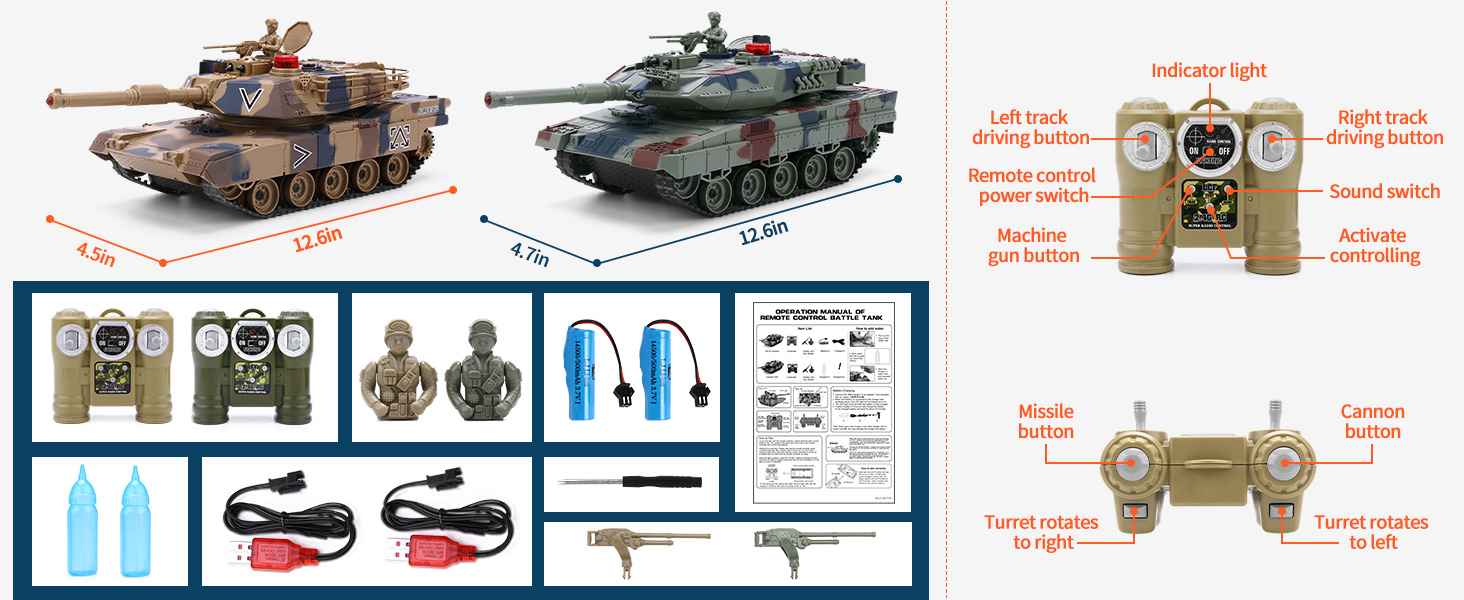
Image: Tank dimensions and remote control button layout for operation.

Image: Demonstrating the tank's 360-degree rotation, 330-degree turret rotation, and 30-degree manual barrel adjustment.
4. Spray Function
- After filling the water tank (see Setup Guide), ensure the spray switch on the tank is in the 'ON' position.
- The tank will emit a simulated exhaust spray, enhancing realism.
5. Sound Effects and LED Lights
- The tanks feature realistic engine sounds, shooting sounds, and machine gun sounds.
- LED lights illuminate during operation and firing.
- A sound switch on the remote control allows you to turn off sound effects if desired.

Image: Tank with active LED lights and sound effects, highlighting the sound control on the remote.
6. Battle System (Life Indicators)
The tanks are equipped with an infrared battle system and life indicators for interactive play:
- Each tank has multiple life indicator lights.
- When a tank is hit by an opponent's infrared signal (from a missile or virtual shell), one life indicator light will turn off.
- Being hit by a machine gun fire 5 times will also result in one life indicator light turning off.
- The battle continues until all life indicators on a tank are extinguished, signifying its defeat.

Image: Children engaging in a tank battle, illustrating the life indicator system and battle rules.
7. Terrain Adaptability
The crawler design allows the tanks to operate on various terrains:
- Indoor: Smooth surfaces like wood floors or tiles.
- Outdoor: Lawns, sand, and can climb slopes up to 45 degrees.

Image: The RC tanks demonstrating their ability to traverse various terrains including sand, lawn, indoor surfaces, and climb inclines.
Maintenance
- Cleaning: Wipe the tanks with a soft, dry cloth after use. Avoid using water or harsh chemicals, especially near electronic components.
- Storage: Store the tanks and remote controls in a cool, dry place away from direct sunlight and extreme temperatures. Remove batteries from both the tanks and remote controls if storing for extended periods to prevent leakage.
- Water Tank: Empty any remaining water from the spray tank before storage to prevent mold or residue buildup.
- Tracks: Periodically check the tracks for any debris (e.g., carpet fibers, hair) that may hinder movement. Clean as necessary.
Troubleshooting
| Problem | Possible Cause | Solution |
|---|---|---|
| Tank does not respond to remote. | Tank or remote power off; low batteries; not paired. | Ensure both tank and remote are powered on. Check and replace/recharge batteries. Turn both off and on again to re-pair. |
| Tank moves slowly or inconsistently. | Low tank battery; debris in tracks. | Recharge tank battery. Inspect and clean tracks. |
| Spray function not working. | No water in tank; spray switch off. | Fill water tank. Ensure spray switch is in the 'ON' position. |
| Battle system not registering hits. | Infrared sensors obstructed; too far apart. | Ensure clear line of sight between tanks. Reduce distance between tanks. |
| Sound effects are off. | Sound switch on remote is off. | Toggle the sound switch on the remote control to 'ON'. |
Specifications
- Model Number: 788-3
- Scale: 1/24
- Product Dimensions: 4.5 x 4.9 x 12.2 inches (per tank)
- Item Weight: 3.89 pounds (total for set)
- Battery (Tank): 3.7V 500mAh Lithium Polymer (included)
- Battery (Remote): 2x AA batteries (not included)
- Playtime: Approximately 35 minutes per charge
- Charging Time: 60-90 minutes
- Recommended Age: 36 months - 12 years
- Turret Rotation: 350 degrees
- Cannon Barrel Adjustment: 30 degrees (manual)
- Climbing Angle: Up to 45 degrees
Safety Information
- This product is not suitable for children under 36 months due to small parts.
- Adult supervision is recommended during operation.
- Do not operate near water or in wet conditions to prevent electrical damage.
- Do not aim the tank's cannon or machine gun at people or animals.
- Use only the specified batteries and charging cables.
- Do not attempt to modify or disassemble the product.
- Dispose of batteries responsibly according to local regulations.
Warranty and Support
ROGALALY products are manufactured with quality and care. For any questions, concerns, or technical support regarding your RC Tank Set, please contact the seller or refer to your purchase platform for customer service options. Please retain your proof of purchase for warranty claims.