
Godox TR-S2 Wireless Remote Shutter User Manual
Model: TR-TX/TR-RX
1. Product Overview
The Godox TR-S2 Wireless Remote Shutter is a versatile intervalometer and shutter release system designed for Sony cameras. It consists of a transmitter (TR-TX) and a receiver (TR-RX) that communicate wirelessly via 2.4GHz technology, offering a reliable remote control distance of up to 100 meters. This system provides precise control over your camera's shutter, enabling various shooting modes including single shot, continuous shooting, BULB mode, and advanced timer functions for time-lapse photography.
Its compact and lightweight design makes it highly portable, fitting easily into a jacket pocket. The TR-S2 helps minimize camera shake, ensuring sharper images, especially in low light or during long exposures. It is powered by readily available AA batteries, offering extended standby times for both the transmitter and receiver.

Figure 1.1: Godox TR-S2 Wireless Remote Shutter components, including the TR-TX transmitter, TR-RX receiver, and the S2 shutter cable.
2. Setup Guide
2.1 Battery Installation
Both the TR-TX transmitter and TR-RX receiver are powered by two AA 1.5V batteries each. Ensure correct polarity when inserting the batteries.
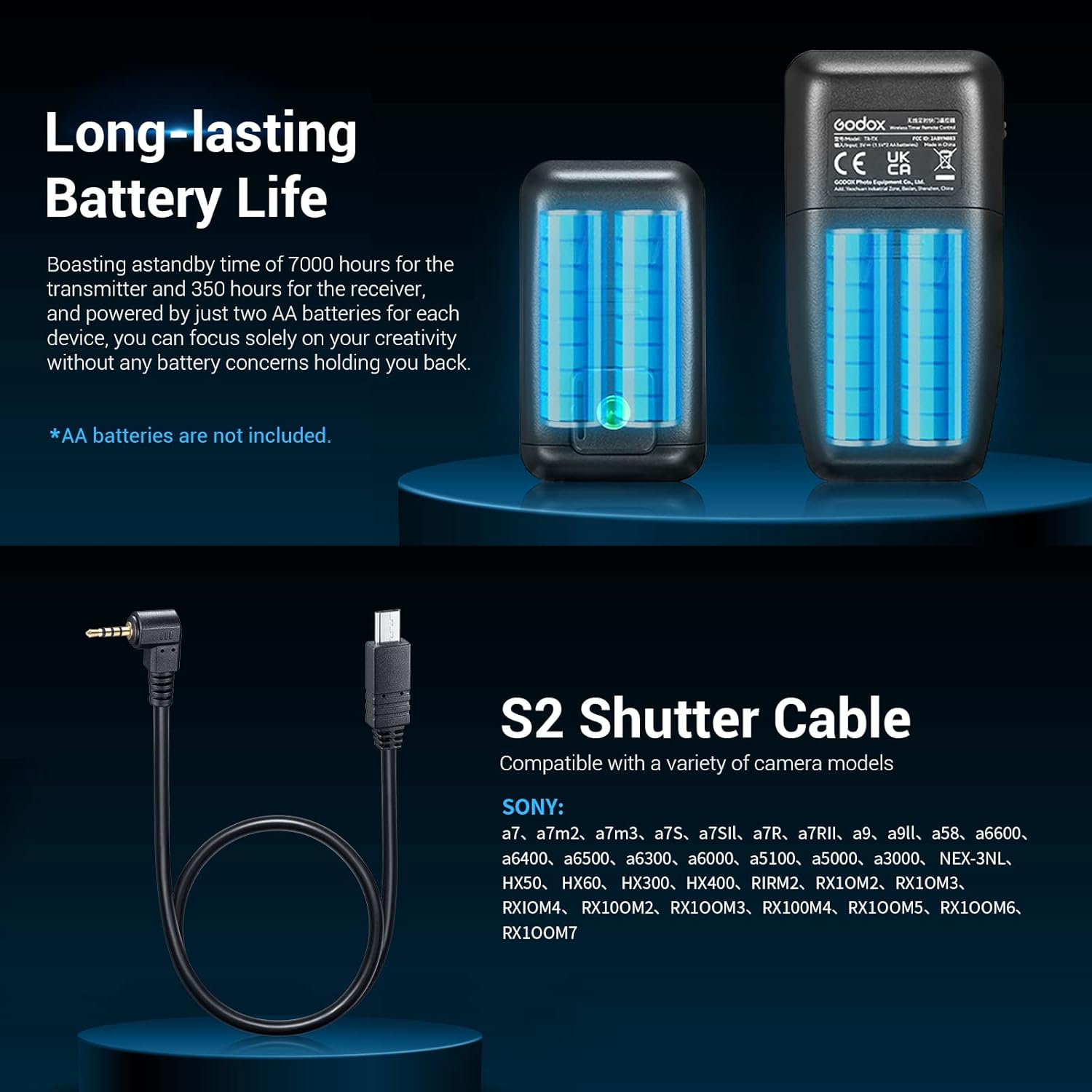
Figure 2.1: Battery compartments of the TR-TX and TR-RX units, illustrating the insertion of AA batteries.
2.2 Connecting the Receiver to the Camera
- Mount the TR-RX receiver onto the hot shoe of your camera.
- Connect the receiver to the camera's remote port using the provided S2 shutter release cable.
- Long-press the "Power Switch/+" button on the receiver to turn it on.
- To set the channel, long-press and hold the "Channel Setting/-" button, then use the "+" or "-" keys to switch channels.
2.3 Turning on the Transmitter
- Long-press the "Power Switch" button on the TR-TX transmitter to turn it on.
- Short-press the "Channel" button on the transmitter to switch its channel to match the receiver's channel.
Once both units are powered on and set to the same channel, they are ready for operation.
3. Operating Instructions
The Godox TR-S2 offers various shooting modes and functions. Ensure your camera is set to the appropriate shooting mode (e.g., Single Shooting, Continuous Shooting, BULB) as required by the remote's function.
3.1 Single Shooting
- Set your camera to Single Shooting mode.
- Half-press the "Shutter Release" button on the TR-TX transmitter to focus the camera.
- Fully press the "Shutter Release" button to take a single picture.
3.2 Continuous Shooting
- Set your camera to Continuous Shooting mode.
- Half-press the "Shutter Release" button on the TR-TX transmitter to focus.
- Press and hold the "Shutter Release" button fully; the camera will shoot continuously until the button is released.
3.3 BULB Mode Shooting
- Set your camera to BULB mode.
- Half-press the "Shutter Release" button on the TR-TX transmitter to focus.
- Long-press the "Shutter Release" button to begin the exposure. The timer on the transmitter will count up.
- Press the button again to stop the exposure.

Figure 3.1: Examples of creative time-lapse photography possible with the TR-S2's programmable functions.
3.4 Delay Shooting & Interval Timer Shooting
The TR-TX transmitter allows for programming complex shooting schedules using its various timer interfaces:
- DELAY: Adjust the waiting time before shooting begins. Press the "SET" button on the DELAY interface to adjust the time, then press "Start/Stop" to begin the countdown.
- LONG: Set the exposure duration for long exposures. Switch to the LONG interface by pressing Left/Right keys, then press "SET" to set the duration. Match the transmitter to the camera for shutter speeds over 1 second, or to 00:00:00 for speeds under 1 second.
- INTVL1: Set the interval time between each shot. Switch to the INTVL1 interface and set the interval time.
- INTVL1 N: Set the number of shots for the INTVL1 schedule. Switch to the INTVL1 N interface and set the number of shots.
- INTVL2: Set the interval time between each INTVL1 schedule. Switch to the INTVL2 interface and set the interval time.
- INTVL2 N: Set the repeat times of the INTVL1 schedule. Switch to the INTVL2 N interface and set the repeat times.

Figure 3.2: Overview of the 6 timer shooting settings available on the TR-TX transmitter.
3.5 Other Functions
- Cancel Time-lapse: Press "Start/Stop" again during time-lapse shooting to cancel the current plan.
- Beep Sound: Short press the "Alert/Lock" button to turn the beep sound on or off.
- Lock/Unlock Parameters: Long press the "Alert/Lock" button to lock or unlock parameters, preventing accidental changes.
- Wired Control: The TR-TX transmitter can be connected directly to the camera with a shutter cable to achieve wired control, useful when wireless is not desired or batteries are low.

Figure 3.3: The TR-TX transmitter can be used for wired control by connecting it directly to the camera.

Figure 3.4: The TR-S2 helps stabilize images and preserve details by reducing camera shake.
3.6 Official Product Video Guide
For a comprehensive visual guide on setting up and operating your Godox TR-S2, please watch the official product video below. This video covers battery installation, camera connection, channel setting, and various shooting modes in detail.
Video 3.1: Godox TR Series Wireless Timer Remote Control Shutter Remote - A detailed demonstration of the product's features and usage.
4. Maintenance
- Keep the device dry. Do not handle with wet hands or immerse in water.
- Use only soft, dry cloths to clean the device. Avoid harsh chemicals or abrasive materials.
- Store the device in a cool, dry place away from direct sunlight and extreme temperatures.
- Remove batteries if the device will not be used for an extended period to prevent leakage.
5. Troubleshooting
| Problem | Possible Cause | Solution |
|---|---|---|
| Device does not power on. | Low or dead batteries; incorrect battery installation. | Replace batteries with fresh AA batteries; ensure correct polarity. |
| Shutter does not fire. | Incorrect channel setting; receiver not properly connected to camera; camera not in remote mode. | Ensure transmitter and receiver are on the same channel; check cable connection; set camera to remote control mode. |
| Limited wireless range or interference. | Environmental interference; obstacles between units. | Change channels to avoid interference; ensure clear line of sight between transmitter and receiver. |
6. Specifications
- Brand: GODOX
- Model Number: TR-TX/TR-RX
- Connectivity Technology: 2.4G Wireless
- Compatible Devices: Sony Camera (a7, a7m2, a7m3, a7S, a7SII, a7R, a7RII, a9, a9II, a58, a6600, a6400, a6500, a6300, a6000, a5100, a5000, a3000, NEX-3NL, HX50, HX60, HX300, HX400, R1RM2, RX10M2, RX10M3, RX10M4, RX100M2, RX100M3, RX100M4, RX100M5, RX100M6, RX100M7)
- Max Number of Supported Devices: 1
- Batteries: 2 AA batteries required (for each unit, sold separately)
- Item Weight: 8.1 ounces (approx. 230 grams for the set)
- Package Dimensions: 5.5 x 4.9 x 1.9 inches
- Special Feature: Ergonomic
- Country of Origin: China
- Date First Available: May 19, 2023
7. Warranty and Support
For detailed warranty information and customer support, please refer to the official Godox website or contact your local distributor. An official user manual in PDF format is also available for download: