Introduction
This manual provides detailed instructions for the operation and maintenance of your Bluetooth 5.3 True Wireless Earbuds M41. Please read this manual thoroughly before using the product to ensure proper function and longevity.
The M41 earbuds feature Bluetooth 5.3 connectivity, environmental noise canceling with 4 built-in microphones, and an IPX7 waterproof rating, making them suitable for various activities.
Package Contents
- Bluetooth 5.3 True Wireless Earbuds (Left and Right)
- Charging Case
- USB Charging Cable
- User Manual
- Multiple Sizes of Eartips (S, M, L)
Product Overview

Figure 1: The M41 True Wireless Earbuds with their charging case. The case features a digital display indicating battery levels for both the case and individual earbuds.

Figure 2: A close-up view of the M41 earbuds and charging case, highlighting the metallic accents and LED indicators.
The M41 earbuds are designed for comfort and secure fit, featuring an in-ear form factor. The charging case provides extended battery life and includes a digital display for battery status.
Setup
1. Initial Charging
Before first use, fully charge the earbuds and the charging case. Connect the provided USB cable to the charging port on the case and a compatible USB power source.

Figure 3: The M41 charging case can also function as a portable power bank to charge mobile phones, as shown with a phone connected via USB cable.
The digital display on the charging case will show the charging progress. Ensure both earbuds are placed correctly in the charging slots within the case.
2. Pairing with a Device
- Ensure the earbuds are fully charged and placed inside the charging case.
- Open the charging case lid. The earbuds will automatically enter pairing mode, indicated by flashing LED lights on the earbuds.
- On your device (smartphone, tablet, computer), go to the Bluetooth settings.
- Search for available Bluetooth devices and select "M41" from the list.
- Once connected, the LED lights on the earbuds will stop flashing, and your device will confirm the connection.
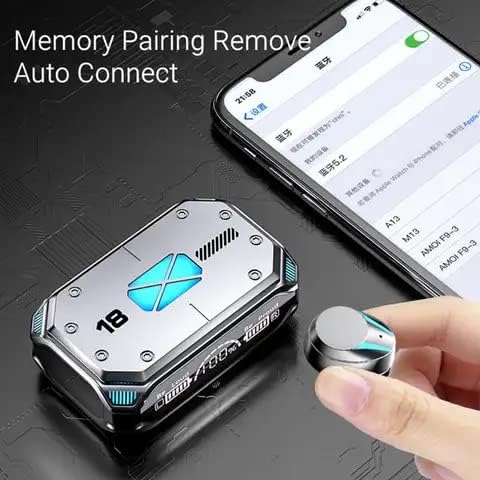
Figure 4: The M41 earbuds feature memory pairing and auto-connect functionality, simplifying the connection process with previously paired devices.
The earbuds support automatic reconnection to the last paired device once removed from the charging case.
Operating Instructions
Touch Controls
The M41 earbuds feature touch-sensitive controls for various functions:
| Action | Function |
|---|---|
| Single Tap (Left/Right Earbud) | Play/Pause music, Answer/End call |
| Double Tap (Left Earbud) | Previous Track |
| Double Tap (Right Earbud) | Next Track |
| Triple Tap (Left/Right Earbud) | Activate Voice Assistant |
| Long Press (2 seconds) | Reject Call |
| Long Press (3 seconds) | Power On/Off |
Environmental Noise Canceling (ENC)
The M41 earbuds are equipped with 4 built-in microphones for Environmental Noise Canceling, which helps reduce ambient noise during calls for clearer communication.
Gaming Experience

Figure 5: The M41 earbuds utilize an upgraded BT 5.2 chip for lower latency, enhancing the gaming experience by synchronizing audio with visuals.
The advanced Bluetooth 5.3 chip provides low latency audio transmission, which is beneficial for gaming, ensuring sound effects and dialogue are synchronized with on-screen actions.
Maintenance
- Cleaning: Regularly clean the earbuds and charging case with a soft, dry cloth. Do not use abrasive cleaners or solvents.
- Eartips: Remove and clean the eartips periodically to prevent wax buildup, which can affect sound quality.
- Storage: When not in use, store the earbuds in their charging case to protect them and keep them charged.
- Water Resistance: The earbuds are IPX7 waterproof, meaning they can withstand immersion in water up to 1 meter for 30 minutes. However, the charging case is not waterproof. Avoid exposing the charging case to liquids.
- Temperature: Avoid exposing the product to extreme temperatures (hot or cold) as this can damage the battery and internal components.
Troubleshooting
| Problem | Possible Solution |
|---|---|
| Earbuds not pairing | Ensure earbuds are charged. Turn off and on Bluetooth on your device. Forget "M41" from your device's Bluetooth list and re-pair. |
| Only one earbud working | Place both earbuds back into the charging case, close the lid, wait a few seconds, then open the lid and try again. Ensure both earbuds are charged. |
| Low volume or poor sound quality | Adjust volume on your device. Clean eartips and earbud mesh. Try different sized eartips for a better seal. |
| Earbuds not charging | Ensure charging cable is securely connected. Check if the charging case has power. Clean charging contacts on earbuds and case. |
| Connection drops frequently | Move closer to your device. Avoid obstacles between earbuds and device. Reduce interference from other wireless devices. |
Specifications
- Model: M41
- Bluetooth Version: 5.3
- Ear Placement: In Ear
- Noise Control: Environmental Noise Canceling (ENC) with 4 Built-in Mics
- Battery Life (Earbuds): Up to 6-8 hours (approximate, varies with volume and usage)
- Total Playtime with Charging Case: Up to 180 hours (approximate)
- Charging Case Battery: High capacity, can charge mobile phones
- Waterproof Rating: IPX7 (Earbuds only)
- Color: Black
- Audio Driver: 8mm Moving Coil Unit with 8mm Biological Diaphragm

Figure 6: The M41 earbuds feature an 8mm moving coil unit and an 8mm biological diaphragm for high-precision audio decoding, aiming for an immersive listening experience with undistorted details.
Warranty and Support
For warranty information and customer support, please refer to the contact details provided with your purchase or visit the manufacturer's website. Keep your proof of purchase for warranty claims.
For further assistance, please contact customer support at support@example.com or call 1-800-123-4567.


