
1. Important Safety Information and Precautions
Please read all instructions carefully before attempting installation. Incorrect installation can cause damage to your device or the replacement part.
- Fragile Components: All components are fragile. Handle with extreme care to avoid damage.
- Pre-Installation Testing: It is crucial to test the received item before full installation. Do not remove any protective films or tags during testing.
- Correct Model Identification: Ensure you have correctly identified your phone model (Infinix Hot 30i X669) before purchase and installation. Using the wrong model may damage your phone.
- Professional Installation Recommended: Installation instructions are not included. If you lack experience in phone repair, seek professional assistance to avoid damage.
- Additional Tools: Customers may need to purchase additional tools beyond the essential device opening tools provided.
2. Package Contents
Verify that all items are present and undamaged upon receipt.
- 1x Jaytong LCD Replacement Screen for Infinix Hot 30i X669
- Essential Device Opening Tools (may vary)

Image 1: Jaytong LCD Replacement Screen for Infinix Hot 30i X669, showing the display assembly and a set of basic repair tools.
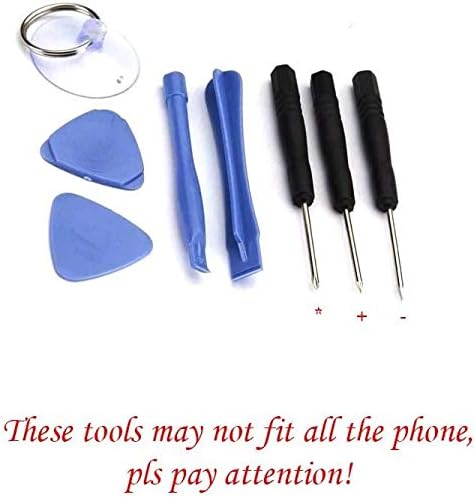
Image 2: A close-up view of the essential device opening tools, including screwdrivers, prying tools, and a suction cup. Note that these tools may not be suitable for all phone models.
3. Pre-Installation Testing Procedure
Before proceeding with full installation, perform the following test steps to ensure the new screen is functional:
- Clean Connections: Carefully clean the flex cable of the new screen and the corresponding slot on your phone's motherboard.
- Connect Screen: Connect the new screen's flex cable securely to the motherboard. Do not force the connection.
- Battery Check: Ensure your phone's battery is fully charged. Also, confirm that your phone's motherboard is not damaged.
- Power On & Test: Power on your phone. Test the display for clarity, color accuracy, and touch functionality across the entire screen. Check for any dead pixels or unresponsive areas.
- Do Not Install Damaged Screens: If any issues are observed during testing, do not proceed with installation. Contact customer support immediately. Screens that have been installed or attempted to be installed cannot be returned.
4. Installation Guidelines (General)
This section provides general guidelines. Specific steps for disassembling and reassembling your phone model are not included and should be sourced from reliable repair guides or professional services.
- Power Off: Always power off your device completely before starting any repair.
- Disconnect Battery: Disconnect the battery to prevent short circuits during the repair process.
- Static Precautions: Use anti-static precautions (e.g., anti-static wrist strap) to protect sensitive electronic components.
- Organize Screws: Keep track of all screws and components, noting their original positions.
- Gentle Handling: Handle all flex cables and connectors gently.
- Do Not Force: Never force any components into place. If something doesn't fit, re-evaluate your steps.
5. Troubleshooting Common Issues
If you encounter problems after installation or during testing, consider the following:
- Display Not Working / Touch Unresponsive:
- Ensure all flex cables are securely and correctly connected to the motherboard.
- Check for any visible damage to the flex cables or connectors.
- Verify that the phone's motherboard is not damaged.
- Re-perform the pre-installation testing steps carefully.
- Screen Flickering / Abnormal Display:
- Check for loose connections.
- Ensure no debris is present in the connectors.
- Physical Damage During Installation: If the screen was damaged during installation attempts, it cannot be returned. Exercise extreme caution.
For persistent issues, please contact customer support for assistance.
6. Specifications
| Feature | Detail |
|---|---|
| Product Type | LCD Display Touch Screen Assembly |
| Compatibility | Infinix Hot 30i X669 |
| Color | Black |
| Product Dimensions | 7.87 x 4.33 x 1.57 inches |
| Item Weight | 3.52 ounces |
| Manufacturer | Generic |
| ASIN | B0C5LX8199 |
| Note on Model Number | While some product data may list "Galaxy F52 5G SM-E5260", this product is specifically designed for the Infinix Hot 30i X669. Please ensure compatibility with your device. |
7. Warranty and Support
Each screen is tested before shipping to ensure 100% functionality. Due to the nature of replacement parts and the complexity of installation, specific warranty details may vary.
- Return Policy: Returns are generally accepted within 30 days of purchase, provided the item is in its original, untested condition with all protective films and tags intact. Screens with attempted installation or physical damage are not eligible for return.
- Customer Support: If you have any questions, concerns, or encounter issues with the product, please feel free to contact us. We are committed to assisting you.