
Introduction
The HOMEPILOT Sun Sensor 0.75m is designed to enhance the functionality of your RolloTron belt winders and timers by enabling automatic control of roller shutters based on ambient light conditions. This sensor detects sunlight intensity, allowing your roller shutters to adjust automatically, providing optimal light and thermal protection for your home.
This manual provides essential information for the proper installation, operation, and maintenance of your sun sensor.
Setup and Installation
Follow these steps to correctly install your HOMEPILOT Sun Sensor:
- Prepare the Roller Shutter: Ensure the roller shutter is in a position that allows access to the window pane where the sensor will be attached.
- Attach the Sun Sensor: Fix the sun sensor to the window pane using the integrated suction cup. Position the sensor where it can accurately detect direct sunlight. Ensure the window surface is clean and smooth for secure attachment.
- Connect to RolloTron Device: Plug the 0.75m cable of the sun sensor into the designated port on your compatible RolloTron belt winder or timer. Refer to your RolloTron device's manual for the exact port location.
- Power On and Configure: Ensure your RolloTron device is powered on. Configure the sun sensor settings within your RolloTron device according to its specific instructions to activate brightness-dependent control.

Installation diagram for the HOMEPILOT Sun Sensor, illustrating the connection to a RolloTron device.

The HOMEPILOT Sun Sensor installed on a window, connected to a RolloTron belt winder.

Detail of the sun sensor cable connection to the RolloTron device.

The sun sensor connected to a wall-mounted RolloTron timer.
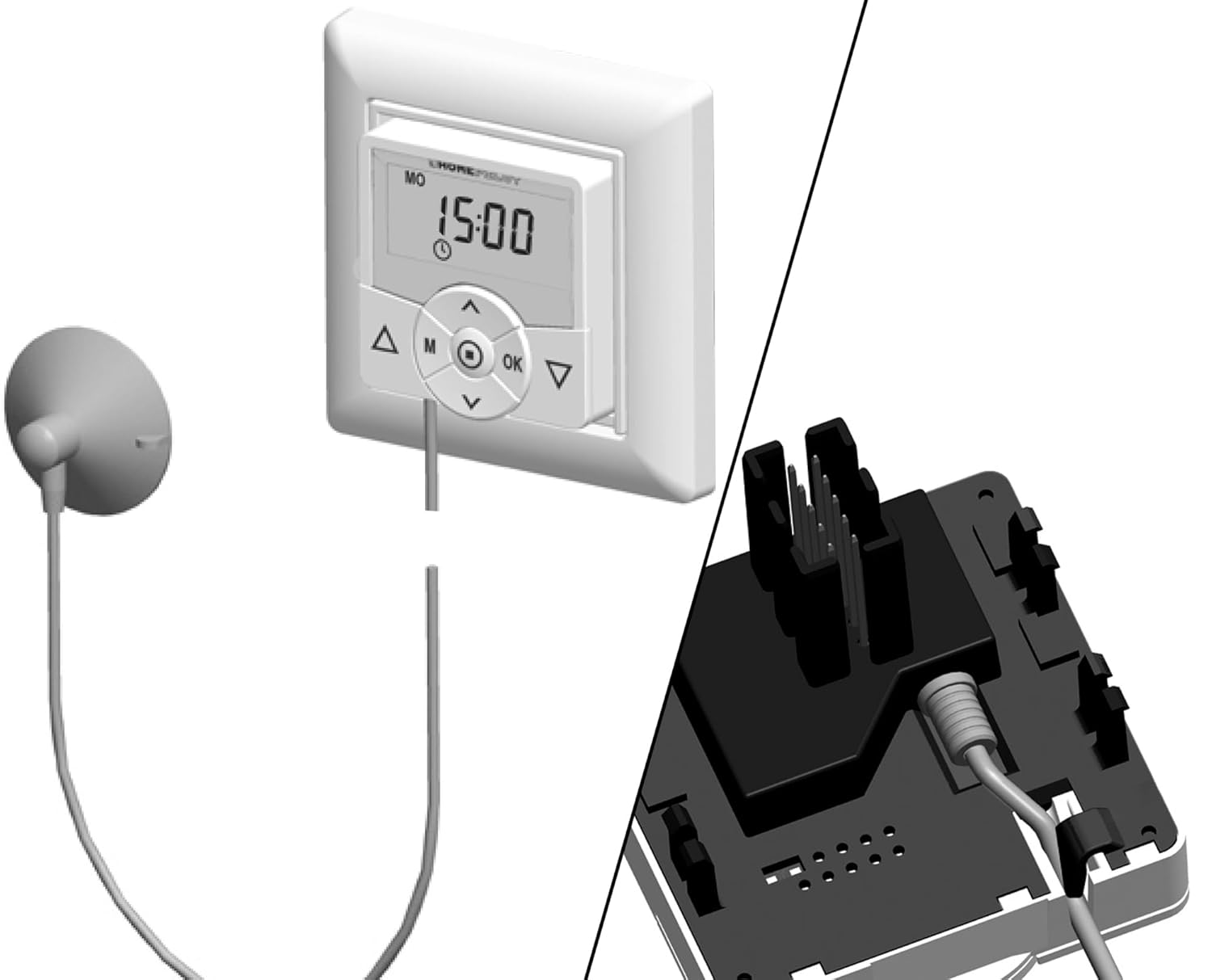
The sun sensor connected to an alternative wall-mounted timer.
Operating Instructions
Once installed and configured with a compatible RolloTron belt winder or timer, the HOMEPILOT Sun Sensor operates automatically:
- Brightness-Dependent Control: The sensor continuously monitors the sunlight intensity. When intense sunlight is detected, the connected roller shutter will automatically lower to a pre-set position (typically the sensor's height) to provide shade and thermal protection.
- Dusk/Night Operation: Conversely, when light levels decrease (e.g., at dusk), the sensor signals the RolloTron device to automatically raise the roller shutter, allowing natural light into the room.
- Integration: The sensor works in conjunction with the settings on your RolloTron device. Ensure your RolloTron is programmed to respond to the sun sensor's input for automatic operation.
Maintenance
To ensure optimal performance and longevity of your HOMEPILOT Sun Sensor, consider the following maintenance tips:
- Cleaning: Regularly clean the sensor's surface and the suction cup with a soft, damp cloth. Dust or dirt on the sensor can impair its ability to accurately detect light.
- Cable Inspection: Periodically check the sensor cable for any signs of wear, damage, or kinks. A damaged cable can affect the sensor's functionality.
- Suction Cup Adhesion: If the suction cup loses its grip, clean both the suction cup and the window surface thoroughly. A small amount of moisture on the suction cup can help improve adhesion.
Troubleshooting
If your HOMEPILOT Sun Sensor is not functioning as expected, consider the following:
- Roller Shutters Not Reacting:
- Check Sensor Placement: Ensure the sensor is positioned correctly on the window pane and is not obstructed by curtains, blinds, or dirt.
- Verify Cable Connection: Confirm that the sensor cable is securely plugged into the RolloTron belt winder or timer.
- Power Supply: Ensure the RolloTron device is receiving power.
- RolloTron Configuration: Consult the instruction manual for your specific RolloTron model to ensure the sun sensor function is activated and correctly configured (e.g., sensitivity settings, automatic mode).
- Sensor Not Sticking:
- Clean the suction cup and the window surface thoroughly. Ensure both are free of dust, grease, or moisture (other than a slight dampness on the suction cup for better seal).
- Apply firm pressure when attaching the suction cup to the window.
- Inconsistent Operation: Environmental factors such as heavy clouds or reflections can sometimes affect sensor readings. Ensure the sensor is not exposed to artificial light sources that might interfere with its natural light detection.
Specifications
| Feature | Detail |
|---|---|
| Model Number | 10991001 |
| Dimensions (L x W x H) | 4 x 4 x 2 cm |
| Weight | 14 grams |
| Cable Length | 0.75 meters |
| Material | Aluminium (internal components/casing) |
| Mounting Type | Suction cup support |
| Measurement Accuracy | ±7.5% |
| Upper Rated Temperature | 70 Degrees Celsius |
| Compatibility | RolloTron belt winders and timers |
| Specific Uses | Roller shutter control, brightness control |
Warranty Information
The HOMEPILOT Sun Sensor 0.75m comes with a 2-year warranty. Please retain your proof of purchase for any warranty claims. The warranty covers manufacturing defects under normal use conditions. It does not cover damage resulting from improper installation, misuse, accidents, or unauthorized modifications.
Customer Support
For further assistance, technical support, or inquiries regarding your HOMEPILOT Sun Sensor, please contact HOMEPILOT customer service. When contacting support, please have your product model number (10991001) and purchase details ready.
You can find contact information on the official HOMEPILOT website or through your retailer.


