
1. Introduction
Thank you for choosing the MYW-Tech 4ft Car DC Adapter. This manual provides important information for the proper installation, operation, and maintenance of your new power supply. Please read these instructions carefully before use to ensure optimal performance and safety.
2. Product Overview
The MYW-Tech Car DC Adapter is a high-quality power supply designed to provide reliable power to your compatible dashcam. It features a 4-foot cable for flexible placement and an LED indicator to confirm power status.
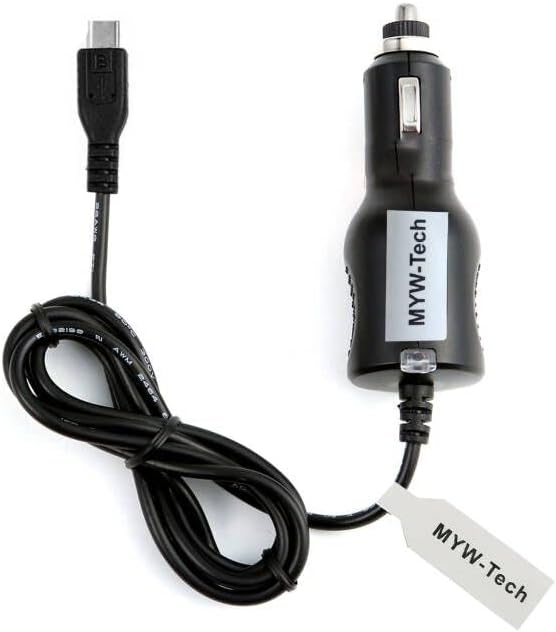
Figure 1: MYW-Tech 4ft Car DC Adapter. This image shows the black car charger with a barrel connector on one end and a standard car cigarette lighter plug on the other. The cable is coiled neatly.

Figure 2: Key features of the adapter. This image highlights two main features: a '4 FEET' cable length and an 'LED indicator' for power status.
3. Compatibility
This adapter is specifically designed for the Type S BT530024-1 4K UHD Dashcam ONLY. It is NOT compatible with other models or brands. Please verify your dashcam model before use.
If your dashcam model is not listed as Type S BT530024-1, please contact MYW-Tech customer support to confirm compatibility.
4. Setup Instructions
- Identify the Power Port: Locate the DC power input port on your Type S BT530024-1 dashcam.
- Connect to Dashcam: Insert the barrel connector end of the MYW-Tech Car DC Adapter firmly into the dashcam's power input port.
- Connect to Vehicle: Insert the car cigarette lighter plug end of the adapter into your vehicle's 12V-24V DC power outlet (cigarette lighter socket).
- Verify Power: Once connected, the LED indicator on the car plug will illuminate, confirming that power is being supplied to the dashcam. Your dashcam should power on or begin charging.
5. Operating Instructions
The MYW-Tech Car DC Adapter operates automatically once connected. It provides continuous power to your dashcam when the vehicle's power outlet is active. No additional user interaction is required for its basic function.
6. Maintenance
- Keep the adapter and its connectors clean and free from dust and debris.
- Avoid exposing the adapter to extreme temperatures, direct sunlight, or moisture.
- Do not bend or crimp the cable excessively, as this can damage internal wiring.
- Store the adapter in a cool, dry place when not in use.
7. Troubleshooting
- Dashcam not powering on:
- Ensure the adapter is fully inserted into both the dashcam and the vehicle's power outlet.
- Check if the vehicle's power outlet is active (some vehicles require the ignition to be on).
- Verify that the LED indicator on the car plug is illuminated. If not, try a different power outlet in your vehicle.
- Confirm your dashcam is indeed the Type S BT530024-1 model.
- Intermittent power:
- Ensure all connections are secure and not loose.
- Check for any visible damage to the cable or connectors.
If problems persist, please contact MYW-Tech customer support.
8. Specifications
| Input Voltage: | 12V - 24V DC (worldwide compatible) |
| Output Voltage: | 12 Volts |
| Output Current: | 1 Amps |
| Cable Length: | 4 feet (approx. 1.2 meters) |
| Connector Type: | Barrel Connector |
| Special Features: | LED Indicator, Over Voltage Output Protection, Over Current Output Protection, Short Circuit Output Protection |
| Product Dimensions: | 4 x 2 x 2 inches |
| Item Weight: | 5 ounces |
| Certification: | CE |
9. Warranty and Support
MYW-Tech is committed to providing high-quality products. This adapter is manufactured with robust protection features to ensure safety and reliability. For any questions regarding compatibility, troubleshooting, or product information, please contact MYW-Tech customer support through your purchase platform.