1. Introduction
Thank you for purchasing the Supersonic IQ Sound IQ-1944BT Portable Bluetooth Speaker. This manual provides essential information for the safe and efficient operation of your device. Please read it thoroughly before use and retain it for future reference.
2. Safety Information
- Do not expose the speaker to water, moisture, or extreme temperatures.
- Avoid dropping or subjecting the speaker to strong impacts.
- Do not attempt to disassemble or modify the speaker. This will void the warranty.
- Keep the speaker away from heat sources and direct sunlight.
- Use only the specified charging cable and power adapter.
- Prolonged listening at high volume levels may cause hearing damage.
3. Package Contents
Please check the package for the following items:
- IQ Sound IQ-1944BT Portable Bluetooth Speaker
- USB Charging Cable
- User Manual
4. Product Overview
The IQ Sound IQ-1944BT is a portable Bluetooth speaker featuring dual 3-inch high-efficiency speakers, colorful LED lights, True Wireless Stereo (TWS) functionality, FM radio, and multi-connectivity options including USB, TF card, and AUX input. It is designed for versatile use in various settings.

Figure 4.1: Front view of the IQ Sound IQ-1944BT speaker, showcasing the two 3-inch speaker cones with vibrant, multi-colored LED light rings. The speaker has a black, rectangular design with a perforated metal grille.

Figure 4.2: Angled view of the speaker, highlighting the top-mounted control panel with various buttons and a sturdy carrying handle. The side of the speaker features a textured, ribbed design.
Control Panel Functions
The control panel is located on the top of the speaker. Refer to Figure 4.2 for button placement.
- Power Button: Press and hold to turn the speaker ON/OFF.
- Mode Button (M): Press to switch between Bluetooth, FM Radio, USB, TF Card, and AUX modes.
- Previous Track / Volume Down (-): Press to go to the previous track. Press and hold to decrease volume.
- Play/Pause Button (►/∎): Press to play or pause audio. In FM mode, press to auto-scan and save stations.
- Next Track / Volume Up (+): Press to go to the next track. Press and hold to increase volume.
- LED Light Button (LIGHT): Press to cycle through different LED light modes or turn them off.
- BASS Button: Press to activate or deactivate bass boost.
5. Setup
5.1 Charging the Speaker
- Connect the small end of the USB charging cable to the charging port on the speaker.
- Connect the large end of the USB charging cable to a USB power adapter (not included) or a computer's USB port.
- The charging indicator light will illuminate during charging and turn off when fully charged.
- A full charge typically takes approximately 3-4 hours.
5.2 Power On/Off
- To turn ON: Press and hold the Power button until the LED lights illuminate and you hear a power-on prompt.
- To turn OFF: Press and hold the Power button until the LED lights turn off and you hear a power-off prompt.
6. Operating Instructions
6.1 Bluetooth Pairing
- Turn on the speaker. It will automatically enter Bluetooth pairing mode, indicated by a flashing LED light and an audible prompt.
- Enable Bluetooth on your mobile device (smartphone, tablet, laptop).
- Search for available Bluetooth devices and select "IQ-1944BT" from the list.
- Once paired, the speaker will emit an audible confirmation, and the LED light will stop flashing.
- You can now play audio from your device through the speaker.

Figure 6.1: The IQ Sound IQ-1944BT speaker with a smartphone securely positioned in the integrated holder on top, illustrating a common use case for Bluetooth audio playback.
6.2 True Wireless Stereo (TWS) Function
TWS allows you to connect two IQ-1944BT speakers wirelessly for a stereo sound experience.
- Ensure both IQ-1944BT speakers are turned ON and are not connected to any Bluetooth device.
- On one of the speakers (this will be the primary speaker), press and hold the Mode button (M) for a few seconds until you hear a TWS pairing prompt.
- The two speakers will automatically connect to each other. Once connected, you will hear a confirmation tone.
- Now, enable Bluetooth on your mobile device and connect to the primary speaker ("IQ-1944BT").
- Audio will now play in stereo through both speakers.
6.3 FM Radio Operation
- Turn on the speaker and press the Mode button (M) repeatedly until you enter FM Radio mode.
- Press the Play/Pause button (►/∎) once to initiate an automatic scan for FM stations. The speaker will scan and save available stations.
- Use the Previous Track (-) and Next Track (+) buttons to navigate between saved FM stations.
6.4 USB / TF Card Playback
- Insert a USB flash drive or a TF (Micro SD) card into the corresponding port on the speaker.
- The speaker will automatically switch to USB or TF card mode and begin playing audio files. If not, press the Mode button (M) to select the correct mode.
- Use the Play/Pause, Previous Track, and Next Track buttons to control playback.
6.5 AUX Input
- Connect one end of a 3.5mm audio cable (not included) to the AUX input port on the speaker.
- Connect the other end of the 3.5mm audio cable to the audio output jack of your external device (e.g., MP3 player, computer).
- Press the Mode button (M) to switch to AUX mode.
- Control audio playback from your external device.
6.6 Microphone / Karaoke Function
- Connect a wired microphone (not included) to the MIC input port on the speaker.
- Adjust the microphone volume using the dedicated knob (if available) or through your connected audio source.
- You can sing along to music playing via Bluetooth, USB, TF card, or AUX input.
6.7 LED Lights Control
- Press the LIGHT button on the control panel to cycle through various LED light modes.
- Continue pressing the button to select your desired light effect or to turn the lights off.
7. Maintenance
- Clean the speaker with a soft, dry cloth. Do not use abrasive cleaners or solvents.
- Store the speaker in a cool, dry place when not in use.
- Charge the battery regularly, even if the speaker is not used for extended periods, to maintain battery health.
8. Troubleshooting
| Problem | Possible Cause | Solution |
|---|---|---|
| Speaker does not turn on | Low battery; Power button not pressed correctly | Charge the speaker fully; Press and hold the Power button for 3-5 seconds |
| No sound | Volume too low; Incorrect mode; Device not paired | Increase volume on speaker and device; Press Mode button to select correct input; Re-pair Bluetooth device |
| Bluetooth connection unstable | Device too far; Obstructions; Interference | Move device closer to speaker (within 10 meters); Remove obstructions; Avoid other wireless devices |
| TWS pairing fails | Speakers already paired to a device; Incorrect pairing procedure | Ensure both speakers are disconnected from other devices; Follow TWS pairing instructions carefully |
| FM radio reception poor | Weak signal; Location interference | Relocate the speaker; Perform auto-scan again |
9. Specifications
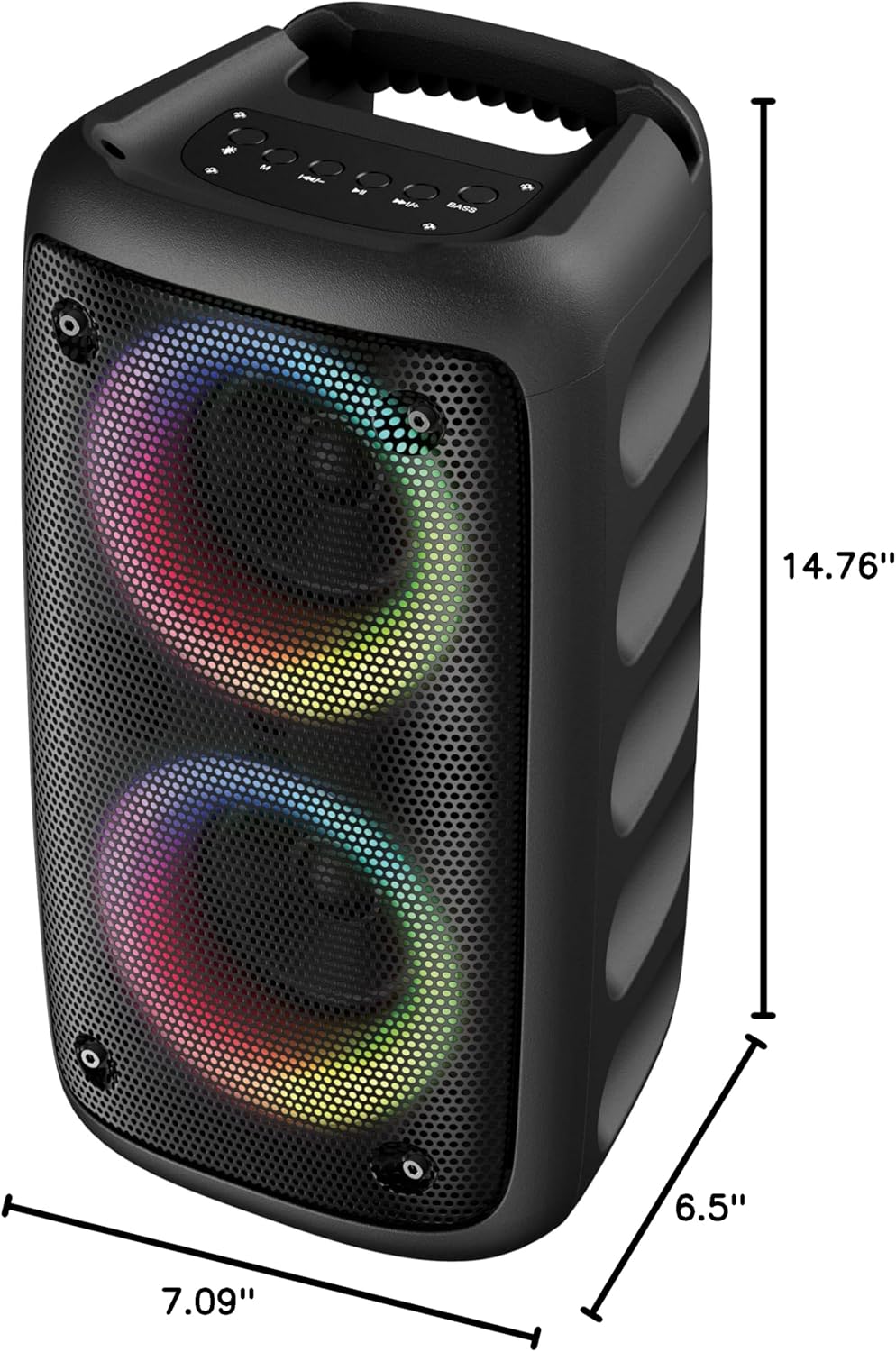
Figure 9.1: Dimensions of the IQ Sound IQ-1944BT speaker.
| Feature | Detail |
|---|---|
| Model Name | IQ-1944BT |
| Speaker Type | Portable |
| Speaker Size | 2 x 3-inch High Efficiency Speakers |
| Output Power | 10 Watts |
| Connectivity Technology | Bluetooth 5.0, USB, TF Card, AUX |
| Wireless Communication | Bluetooth |
| Bluetooth Range | Up to 10 meters (33 feet) |
| Special Features | Colorful LED Lights Show, FM Radio, True Wireless Stereo (TWS), Karaoke Function |
| Power Source | Battery Powered (Rechargeable) |
| Battery Capacity | 2400 mAh |
| Control Method | Touch Buttons |
| Product Dimensions (D x W x H) | 7.09" x 6.5" x 14.76" (18cm x 16.5cm x 37.5cm) |
| Item Weight | 2.95 pounds (1.34 kg) |
| Color | Black |
| UPC | 639131219335 |
10. Warranty and Support
This product comes with a limited warranty. For specific warranty terms and conditions, please refer to the documentation included with your purchase or contact Supersonic customer support.
For technical assistance or customer service inquiries, please visit the official Supersonic website or contact their support channels.


