
1. Important Safety Information
Please read and understand all safety instructions before installing or operating the Power Queen 2000W Pure Sine Wave Inverter. Failure to follow these instructions may result in electric shock, fire, serious injury, or death.
- Electrical Shock Hazard: Always ensure the inverter is disconnected from the battery before performing any maintenance or troubleshooting.
- Polarity: Avoid direct contact between the terminals of the positive and negative wires connected to the battery. Do not reverse the positive and negative connections, as this will cause damage to the inverter and may pose a safety risk.
- Ventilation: Ensure adequate ventilation around the inverter to prevent overheating. The integrated cooling fan requires clear airflow.
- Environment: Do not expose the inverter to rain, moisture, or extreme temperatures. Operate in a dry, well-ventilated area.
- Grounding: Properly ground the inverter according to local electrical codes.
2. Package Contents
The Power Queen 2000W Pure Sine Wave Inverter package includes the following items:
- 1x Power Queen 2000W Pure Sine Wave Inverter
- 2x (2.8AWG) 1.8FT Battery to Inverter Cables (1 red, 1 black)
- 4x Mounting Screws
- 4x Plastic Anchors

Image: Detailed view of the Power Queen 2000W Inverter and its included accessories, such as battery cables, mounting screws, and plastic anchors.
3. Product Overview
The Power Queen 2000W Pure Sine Wave Inverter converts 12V DC battery power to 110V-120V AC household power, providing 2000W continuous output and a 4000W peak surge. Its pure sine wave output protects sensitive electronics and ensures compatibility with all types of loads. The inverter features an intelligent 5-tier protection system and an efficient cooling design for reliable performance.
3.1 Front and Rear Panels
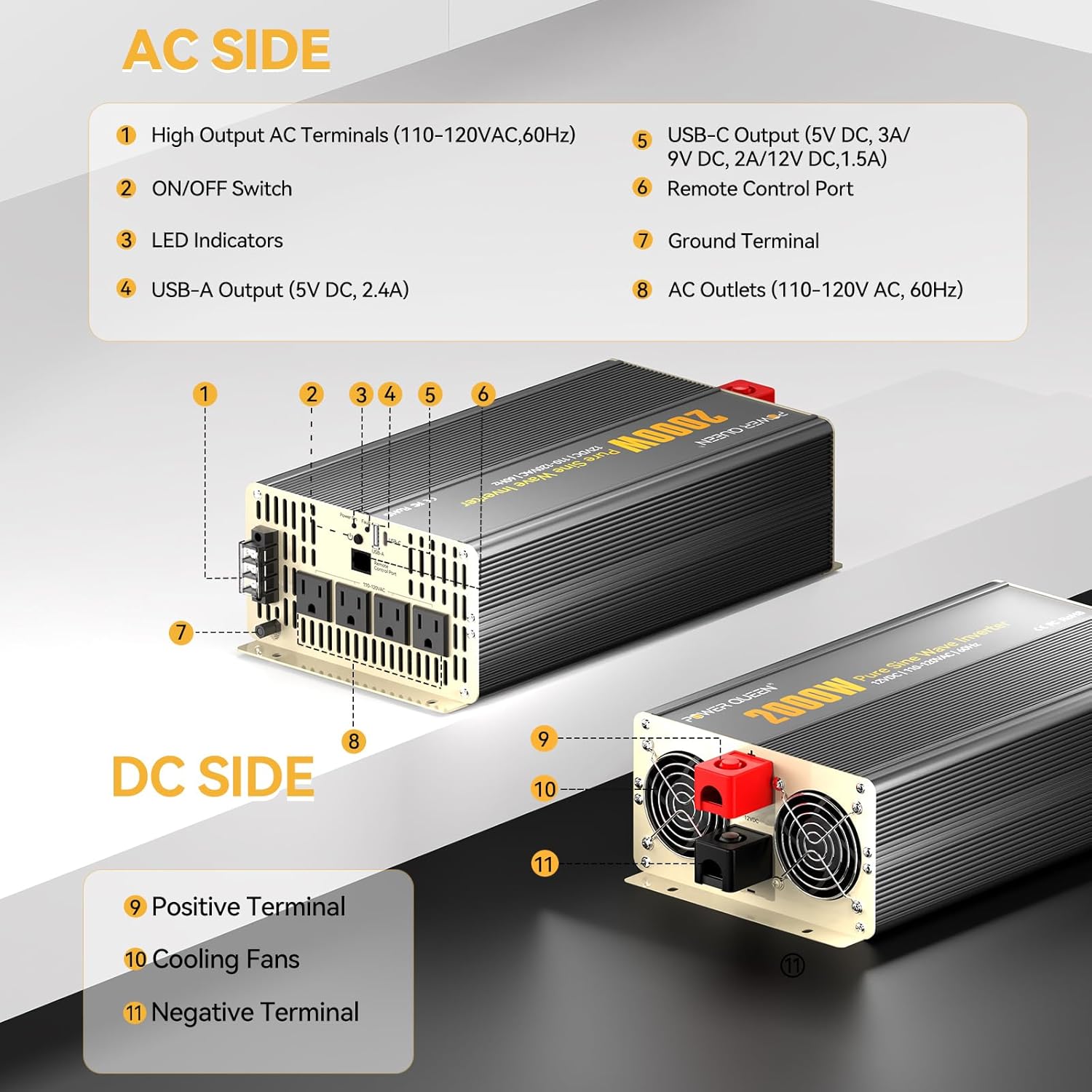
Image: Diagram illustrating the AC side (High Output AC Terminals, ON/OFF Switch, LED Indicators, USB-A Output, USB-C Output, Remote Control Port, Ground Terminal, AC Outlets) and DC side (Positive Terminal, Cooling Fans, Negative Terminal) of the Power Queen 2000W Inverter.
3.2 LCD Display
The inverter features an intuitive LCD screen that provides real-time monitoring of key metrics, including input voltage, output voltage, and load power, for instant performance insight.

Image: Close-up view of the inverter's LCD display, detailing various parameters such as DC Input Voltage, Temperature, Frequency, AC Output Voltage, Battery Remaining Capacity, Error Code, Output Waveform, and Output Power.
3.3 Cooling System
Equipped with dual cooling fans, the inverter efficiently dissipates operational heat, ensuring unwavering stability and reliability while maintaining low noise output. The smart fan only spins when needed, saving power.

Image: An internal view of the Power Queen 2000W Inverter highlighting its dual cooling fans, designed for powerful and low-noise operation.
3.4 Product Videos
Video: An overview of the Power Queen 2000W Power Inverter, showcasing its features and design.
Video: A promotional video highlighting the versatility and benefits of Power Queen products, including the inverter, for various applications.
4. Setup Instructions
Follow these steps to properly set up your Power Queen 2000W Pure Sine Wave Inverter:
- Mounting: Choose a dry, well-ventilated location for mounting the inverter. Use the provided mounting screws and plastic anchors to secure the inverter firmly.
- Battery Connection: Ensure the inverter's ON/OFF switch is in the "OFF" position. Connect the red positive (+) battery cable to the positive (+) terminal on the inverter and the positive (+) terminal on your 12V battery. Connect the black negative (-) battery cable to the negative (-) terminal on the inverter and the negative (-) terminal on your 12V battery. Ensure all connections are tight and secure.
- Grounding: Connect a ground wire (not included) from the inverter's ground terminal to a proper earth ground.
- Remote Control (Optional): If using the remote control, connect its cable to the designated remote control port on the inverter.

Image: The Power Queen 2000W Inverter shown with various 12V battery types (LFP, AGM, GEL, SLA, FLD), illustrating its wide compatibility.
5. Operating Instructions
Once the inverter is properly installed and connected, follow these steps for operation:
- Power On: Flip the ON/OFF switch on the inverter to the "ON" position. The LCD display will illuminate, showing input voltage, output voltage, and other operational data.
- Connect Devices: Plug your 110V-120V AC appliances into the AC outlets on the inverter. For USB charging, use the USB-A or USB-C ports.
- Monitor Performance: Regularly check the LCD display for input voltage, output voltage, and load power to ensure optimal performance and prevent overloading.
- Power Off: When finished, disconnect all appliances and then flip the ON/OFF switch on the inverter to the "OFF" position.

Image: The Power Queen 2000W Inverter connected to a 12.8V 200Ah battery, simultaneously powering a laptop, smartphone, and a hairdryer, demonstrating its capability to connect multiple devices.
6. Maintenance
To ensure the longevity and optimal performance of your Power Queen 2000W Pure Sine Wave Inverter, perform the following maintenance tasks:
- Regular Cleaning: Keep the inverter's exterior clean and free from dust and debris. Ensure the cooling fan vents are unobstructed.
- Connection Check: Periodically inspect all electrical connections (battery cables, ground wire, AC outlets) for tightness and corrosion. Tighten any loose connections.
- Storage: If storing the inverter for an extended period, ensure it is disconnected from the battery and stored in a cool, dry place.
7. Troubleshooting
If you encounter issues with your Power Queen 2000W Pure Sine Wave Inverter, refer to the following common troubleshooting tips:
| Problem | Possible Cause | Solution |
|---|---|---|
| No Power Output | Inverter OFF, loose battery connections, low battery voltage, blown fuse. | Turn ON inverter, check/tighten connections, charge battery, check/replace fuse. |
| Overload Alarm | Connected appliance exceeds inverter's rated power. | Reduce load by disconnecting some appliances. |
| High Temperature Alarm | Inverter overheating due to poor ventilation or excessive load. | Ensure clear airflow around vents, reduce load, allow to cool. |
| Low Voltage Alarm | Battery voltage is too low. | Charge the battery. |
| Short Circuit Protection | Short circuit in the output. | Disconnect all loads, check wiring for shorts, restart inverter. |
The intelligent 5-tier protection system (over-voltage, low-voltage, high temperature, overload, and short circuit protections) is designed to safeguard your devices and the inverter itself.
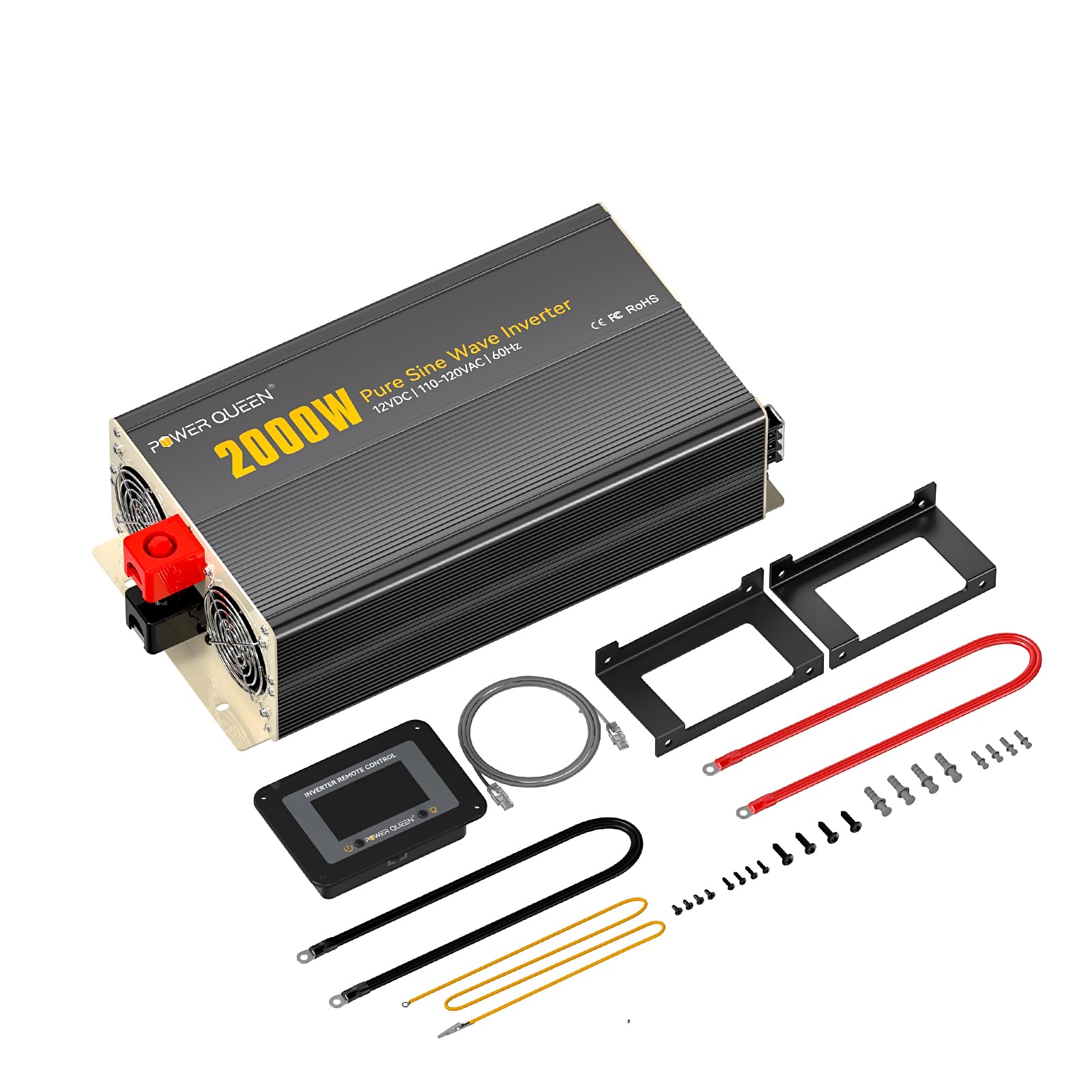
Image: The Power Queen 2000W Inverter with an overlay illustrating its five protection features: Load Short Circuit Protection, Undervoltage Protection, Overload Protection, Overheat Protection, and Overvoltage Protection.
8. Specifications
Key technical specifications for the Power Queen 2000W Pure Sine Wave Inverter:
- Continuous Power: 2000W
- Peak Surge Power: 4000W
- Input Voltage: 12V DC
- Output Voltage: 110V-120V AC
- Output Waveform: Pure Sine Wave
- Conversion Efficiency: >90%
- Product Dimensions: 14.17 x 6.81 x 2.99 inches
- Item Weight: 4.4 pounds
- Model Number: P12V2KW-Y
9. Warranty and Support
For warranty information and technical support, please refer to the official Power Queen website or contact their customer service directly. Keep your purchase receipt as proof of purchase for any warranty claims.