
MATTEL HPC07
Hot Wheels Neon Speeders Speed Circuit Playset Instruction Manual
Model: HPC07 | Brand: MATTEL
1. Product Overview
The Hot Wheels Neon Speeders Speed Circuit Playset is designed for thrilling racing action. It features a motorized booster to propel cars at high speeds and a unique crash zone where vehicles can navigate without colliding, challenging players to see how many cars can complete the circuit. This playset encourages dynamic play and includes one Hot Wheels mini car to start the fun.

Image: The complete Hot Wheels Neon Speeders Speed Circuit Playset, showcasing its track layout, booster, and crash zone.
2. Safety Information
This product is intended for children aged 5 years and older. Adult supervision is recommended during assembly and play. Please ensure all parts are securely connected before use. Keep small parts away from younger children to prevent choking hazards. Do not modify the playset or its components.
As per the product description, there are no specific safety warnings beyond general toy safety guidelines.
3. Package Contents
Before assembly, please verify that all the following components are present in your package:
- Track pieces (various shapes and lengths)
- Booster unit
- Support structures and connectors
- One (1) Hot Wheels mini car
- Instruction manual
4. Setup Instructions
Follow these steps to assemble your Hot Wheels Neon Speeders Speed Circuit Playset:
- Unpack Components: Carefully remove all track pieces, the booster, and support structures from the packaging.
- Connect Base Sections: Begin by connecting the main track sections as shown in the diagram. Ensure all connections click securely into place.
- Assemble Support Towers: Attach the green support towers to the designated points on the track. These provide stability for elevated sections.
- Install Booster Unit: Place the booster unit into its designated slot on the track. Ensure it is firmly seated.
- Attach Elevated Loops/Turns: Connect the blue elevated track sections, including the loop and turns, to the support towers.
- Insert Batteries: The booster requires batteries (not included). Locate the battery compartment on the booster unit, insert the required batteries (refer to the booster unit for battery type and orientation), and close the compartment securely.
- Final Track Connections: Complete the circuit by connecting any remaining track pieces. Double-check all connections for stability.

Image: A partially assembled Hot Wheels track, showing the main circuit and elevated sections.

Image: A close-up view of the booster mechanism, which propels the cars forward.
5. Operating Instructions
Once the playset is fully assembled and batteries are installed in the booster, you are ready to play:
- Power On: Turn on the booster unit using the power switch (if applicable). You should hear the motor running.
- Place Car: Place the included Hot Wheels mini car at the starting gate, just before the booster.
- Launch Car: Release the car onto the track. The booster will automatically propel the car forward at high speed.
- Observe Action: Watch as the car navigates the track, including the crash zone. The design allows cars to pass through without direct collisions, creating dynamic near-misses.
- Multiple Cars: For enhanced play, you can introduce additional Hot Wheels mini cars (sold separately) to see how many can run simultaneously without crashing.

Image: Two Hot Wheels cars speeding through a track intersection, demonstrating the playset's action.

Image: Multiple Hot Wheels cars on the track, showcasing the playset's ability to handle several vehicles at once.
6. Maintenance and Care
To ensure the longevity and optimal performance of your playset, follow these maintenance guidelines:
- Cleaning: Wipe down track pieces and the booster unit with a soft, dry cloth. Avoid using harsh chemicals or abrasive cleaners.
- Battery Care: Remove batteries from the booster unit if the playset will not be used for an extended period to prevent leakage.
- Storage: The playset is designed for easy storage. Disassemble the track into larger sections or fold it as indicated in the diagrams for compact storage.

Image: The Hot Wheels playset folded into a compact form for convenient storage.
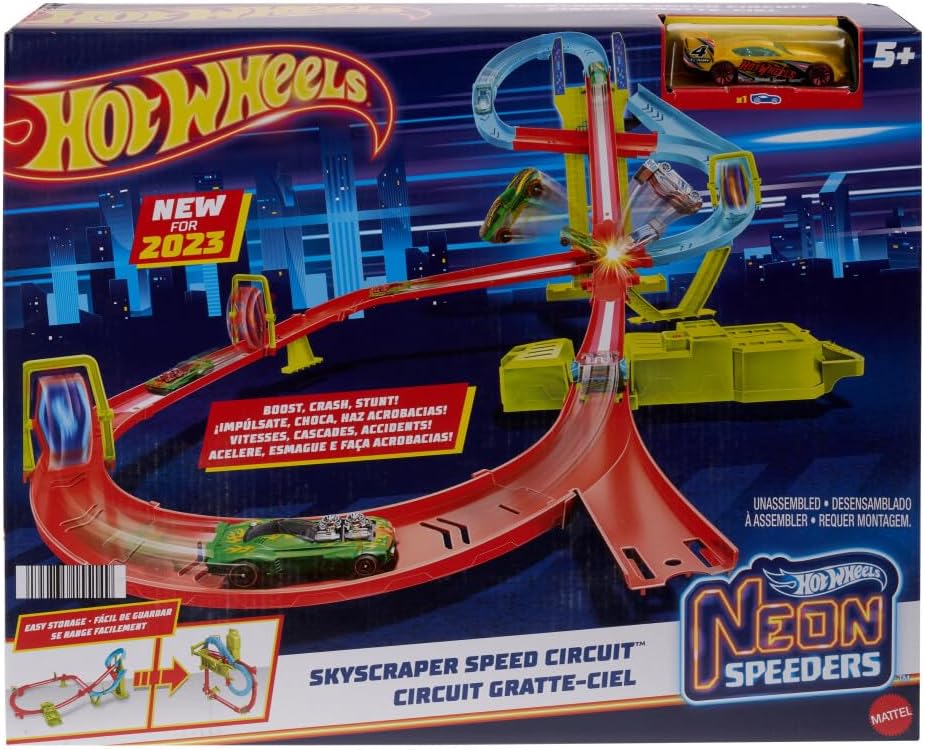
Image: A person carrying the folded Hot Wheels playset by its integrated handle, demonstrating its portability.
7. Troubleshooting
If you encounter any issues with your Hot Wheels Neon Speeders Speed Circuit Playset, refer to the following common problems and solutions:
| Problem | Possible Cause | Solution |
|---|---|---|
| Car not moving or moving slowly. | Booster batteries are low or incorrectly installed. | Replace batteries with fresh ones, ensuring correct polarity. |
| Car derails frequently. | Track pieces are not securely connected or misaligned. | Check all track connections to ensure they are firmly snapped together and properly aligned. |
| Booster not operating. | Power switch is off or batteries are completely drained. | Ensure the power switch is in the 'ON' position. Replace batteries. |
| Cars are crashing in the crash zone. | Too many cars introduced at once or non-compatible cars used. | Reduce the number of cars on the track. Ensure only standard Hot Wheels mini cars are used. |
8. Specifications
| Feature | Detail |
|---|---|
| Model Number | HPC07 |
| Number of Items | 2 (Playset + 1 Mini Car) |
| Battery Use | Yes |
| Batteries Included | No |
| Main Material | Plastic |
| Target Gender | Male |
| Manufacturer Recommended Age | 5 years and up |
| Release Date | 2023/7/29 |
| Product Dimensions | 68.6 x 45.7 x 96.5 cm; 1.3 kg |
| ASIN | B0C5BBZHD8 |
9. Warranty and Support
For inquiries regarding product quality defects or malfunctions, please contact Mattel customer service directly. Please have your product model number (HPC07) and purchase information ready when contacting support.
Mattel Customer Service:
- Phone: 03-5207-3620
- Operating Hours: Monday - Friday (excluding holidays), 10:00 - 16:00 JST
Please note that warranty terms may vary based on region and retailer. Retain your proof of purchase for any warranty claims.