
Introduction
The Nord Stage 4 is a powerful 88-key fully-weighted keyboard designed for professional musicians. It features an innovative panel design with dedicated LED faders for each Layer, enhancing control and flexibility during sound creation and live performances. The instrument includes a new Preset Library with a wide array of ready-to-use Piano, Synth, and Organ sounds, facilitating quick patch creation. The Layer Scene function allows for seamless switching between two distinct sound setups with a single button press.
This product bundle includes the Nord Stage 4 88-Key Fully-Weighted Keyboard, a GFW-KEY-5100XRED Deluxe Two Tier X Frame Stable Keyboard Stand (Bright Red Finish), a Knox Gear Furniture Style Flip-Top Piano Bench (Black), a Knox Gear 88-Key Keyboard Stretchy Spandex Dust Cover (Black), and a MIDI Cable (6-Feet).

Image: Complete Nord Stage 4 88-Key Keyboard bundle, including the keyboard, stand, bench, MIDI cables, and dust cover.
Setup Guide
Unpacking and Initial Setup
Carefully unpack all components from the packaging. Ensure all items listed in the bundle are present. Place the keyboard stand on a flat, stable surface.

Image: The GFW-KEY-5100XRED Deluxe Two Tier X Frame Stable Keyboard Stand in bright red finish. This stand features rubberized gripping feet and a secure quick height adjustment system.
The keyboard stand features rubberized gripping feet to prevent shifting and sliding during use. Utilize the quick-pull height adjustment system to set the stand to your desired height for comfortable playing, whether sitting or standing. The mechanism locks securely into place. If using a second keyboard, the two-tier design provides an additional stable space with a Gator teeth-locking mechanism.
Place the Nord Stage 4 keyboard securely on the stand. Connect the power cable to the keyboard and a suitable power outlet. Connect the included MIDI cable to the MIDI IN/OUT ports on the keyboard and your desired MIDI device or computer interface.

Image: A 6-foot MIDI cable, essential for connecting the keyboard to other MIDI-compatible devices.
Assemble the Knox Gear Furniture Style Flip-Top Piano Bench as per its instructions and position it comfortably in front of the keyboard.

Image: The Knox Gear Furniture Style Flip-Top Piano Bench in black, providing comfortable seating for playing.
Utilize the cable management clips on the stand to keep your setup tidy and prevent accidental disconnections.
Operating Instructions
Keyboard Overview
The Nord Stage 4 features a redesigned panel for intuitive control. Dedicated LED faders provide visual feedback for each layer, simplifying sound creation and live performance adjustments. The new Preset Library offers a vast collection of pre-configured Piano, Synth, and Organ sounds for immediate use.

Image: Front view of the Nord Stage 4 88-Key Fully-Weighted Keyboard, showcasing its control panel and 88 keys.
The Layer Scene feature allows for quick transitions between two different sound configurations, enhancing performance versatility.

Image: Close-up view of the Layer Effects section on the Nord Stage 4, showing various controls and LED indicators.
Piano Section
The Piano section includes an enhanced collection of Grand, Upright, and Electric Pianos from the exclusive Nord Piano Library. New features such as Dynamic Compression and Unison provide greater expressive control and sonic richness.
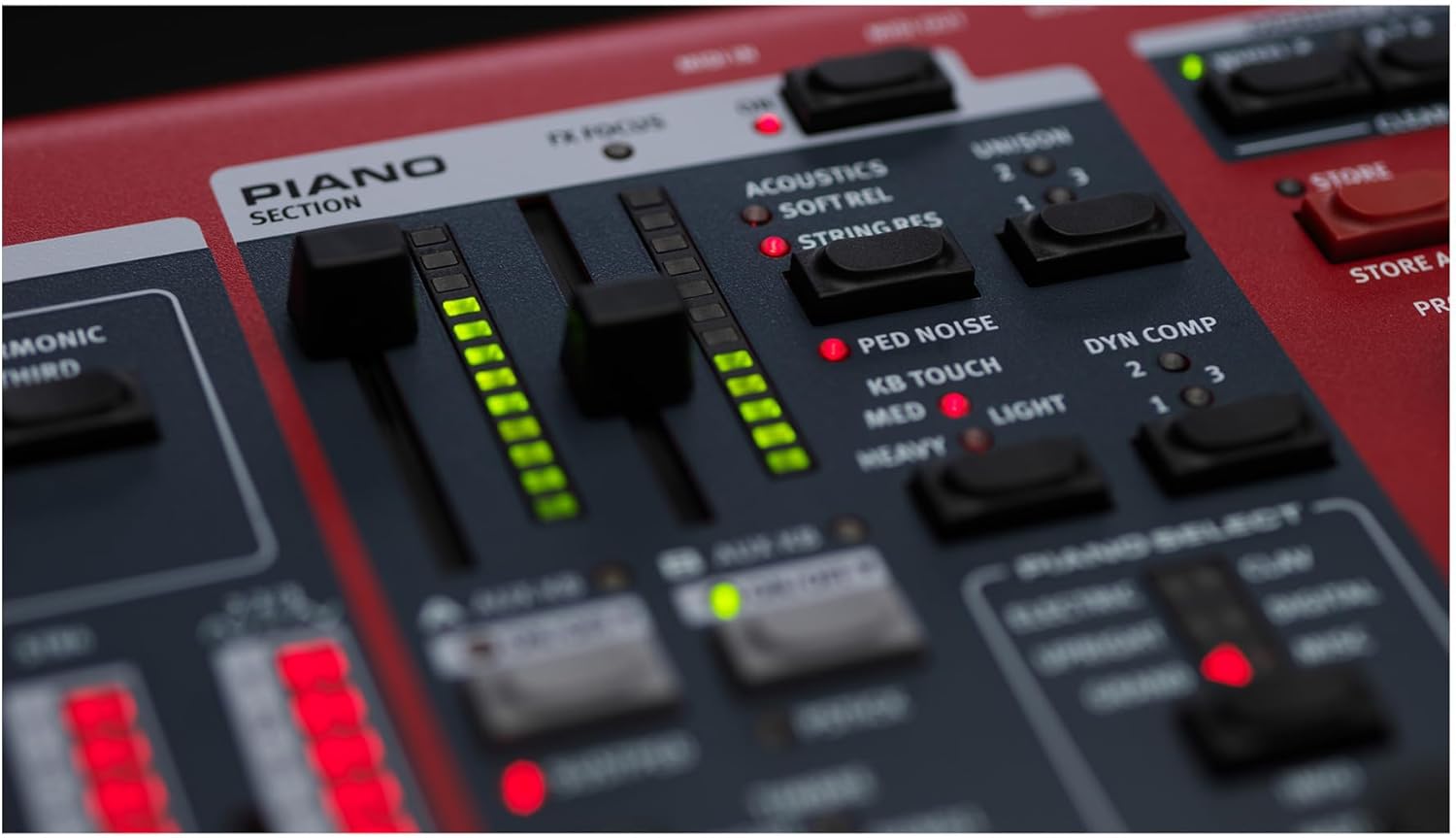
Image: Close-up view of the Piano Section on the Nord Stage 4, highlighting the faders and controls for sound adjustments.
Synth Section
The Synth section comprises three independent Layers, powered by the Nord Wave 2 Synth Engine. This engine supports Virtual Analog synthesis, Samples, FM synthesis, and Digital Waves. An extensive collection of samples from the Nord Sample Library provides a broad sonic palette, including Strings, Bass, Choirs, and Guitars.
The advanced Arpeggiator offers new Polyphonic, Gate, and Pattern modes, enabling a wide variety of rhythmic applications with customizable patterns.
Rear Panel Connections
The rear panel of the Nord Stage 4 provides various input and output connections for integration with other audio equipment and computers.

Image: Rear view of the Nord Stage 4 keyboard, showing power input, audio outputs, MIDI ports, and other connectivity options.
Maintenance and Care
Cleaning
To clean the Nord Stage 4 keyboard and its accessories, use a soft, dry, lint-free cloth. For stubborn dirt, a slightly damp cloth with mild soap can be used, but ensure no liquid enters the instrument. Avoid abrasive cleaners or solvents, as these can damage the finish.
Regularly wipe down the keys and control surfaces to prevent dust and grime buildup. The included Knox Gear 88-Key Keyboard Stretchy Spandex Dust Cover should be used when the keyboard is not in use to protect it from dust and spills.

Image: The Knox Gear 88-Key Keyboard Stretchy Spandex Dust Cover in black, designed to protect the keyboard from dust.
Storage
Store the keyboard in a cool, dry environment, away from direct sunlight, extreme temperatures, and high humidity. When transporting the keyboard, use a suitable case to protect it from physical damage.
Troubleshooting
Common Issues and Solutions
If the keyboard does not power on, ensure the power cable is securely connected to both the keyboard and a working power outlet. Check if the power switch is in the 'On' position.
If there is no sound, verify that the volume is turned up, headphones are properly connected (if used), and audio cables are correctly connected to an amplifier or sound system. Check the instrument's internal settings to ensure the correct sound program or patch is selected.
For any issues related to MIDI connectivity, ensure MIDI cables are connected to the correct IN/OUT ports on both the keyboard and the external device. Verify MIDI settings within the keyboard's menu and the connected software/hardware.
If keys are not responding, check for any debris or foreign objects lodged between the keys. If the issue persists, contact customer support.
Specifications
| Feature | Detail |
|---|---|
| Brand | Nord |
| Model Name | Stage 4 |
| Number of Keys | 88 |
| Key Type | Fully-Weighted Triple Sensor Keybed (A-C) with Aftertouch |
| Instrument Type | Synthesizer & Workstation Keyboard |
| Connectivity Technology | Auxiliary, MIDI |
| Power Source | Corded Electric |
| Headphones Jack | Yes |
| Color | Red |
| Item Weight (Keyboard) | Approximately 1 pound (Note: This weight is for the main keyboard unit, not the entire bundle.) |
| UPC | 196271470113 |
Warranty Information
Nord products are manufactured to high standards and come with a limited warranty. For specific details regarding the warranty period and coverage for your Nord Stage 4 keyboard, please refer to the warranty card included with your product or visit the official Nord website. Keep your proof of purchase for warranty claims.
Support
For technical assistance, product inquiries, or service requests, please visit the official Nord support website or contact their customer service department. Online resources, including FAQs and software updates, may also be available.


