
1. Introduction
This user manual provides comprehensive instructions for the installation, operation, and maintenance of your BXLIYER SXAUTO Android 12 Car Stereo system. Please read this manual thoroughly before installation and use to ensure proper functionality and to prevent damage. Keep this manual for future reference.
2. Safety Information
- Professional Installation Recommended: Due to the complexity of car electrical systems, professional installation is highly recommended.
- Power Supply: Ensure the unit is connected to a 12V DC power supply with negative grounding.
- Wiring: Do not modify or cut the wiring harness. Incorrect wiring can cause damage to the unit or vehicle.
- Driving Safety: Do not operate the unit in a way that distracts you from driving. Always prioritize road safety.
- Temperature: Avoid exposing the unit to extreme temperatures or direct sunlight for prolonged periods.
3. Package Contents
Please verify that all items listed below are included in your package:
- Car Stereo Unit
- Accessories (various cables and connectors)
- User Manual
- Frame Kit
- Power Cable
- GPS Antenna
- USB Cables
- Install Brackets
- Rear Camera (LED)
- External Microphone
4. Setup and Installation
4.1. Wiring Diagram
Refer to the following diagram for correct wiring connections. Ensure all cables are securely connected to their respective ports.

This diagram illustrates the connections for the power socket, RCA outputs, GPS antenna, USB cables, and other accessories. Ensure all connections are secure and correctly matched to your vehicle's wiring.
4.2. Frame Kit Installation
Use the provided frame kit to integrate the car stereo seamlessly into your vehicle's dashboard. Follow the specific instructions for your Benz Smart fortwo 451 model.
4.3. Camera and Microphone Connection
Connect the included LED rear camera to the designated input for reverse viewing. The external microphone should be positioned for optimal voice pickup.
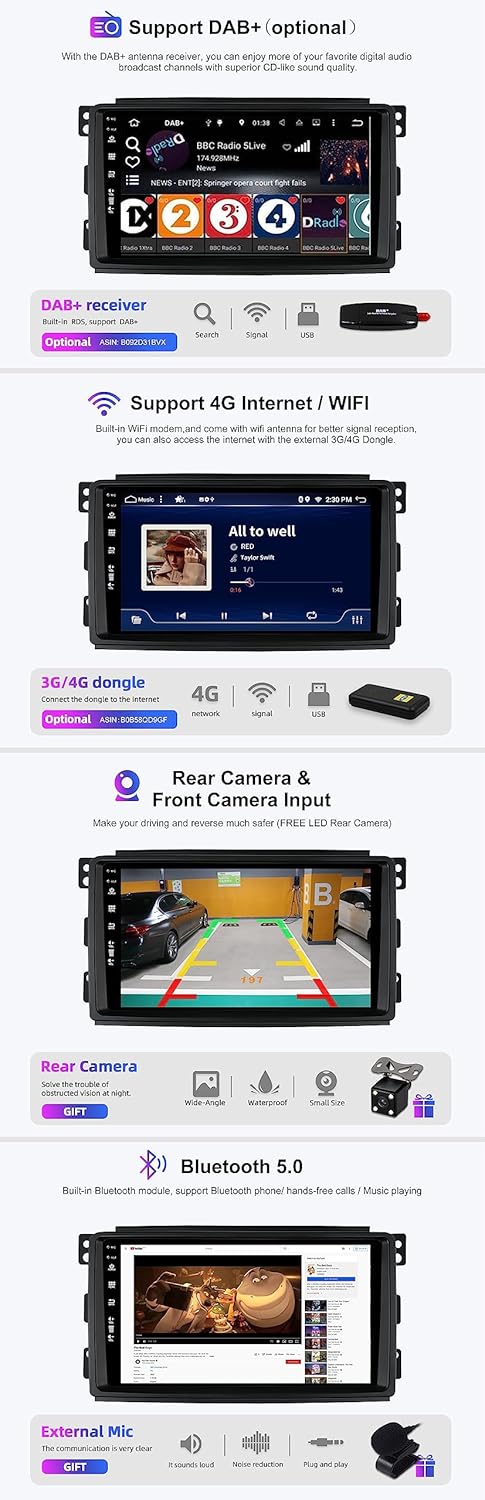
An external microphone is included to improve call quality and voice command accuracy. The system supports rear and front camera inputs for enhanced safety.
For 360-degree panoramic parking function, optional AHD cameras are required and must be purchased separately. This feature provides a comprehensive view around your vehicle.

The system supports a 360-degree panoramic parking function, which requires optional AHD cameras (not included). This provides a clear, all-around view of your vehicle's surroundings.
5. Operating Instructions
5.1. System Overview
The car stereo runs on Android 12, powered by an Octa-Core Rockchip AC8257 A53 processor (2.0 GHz). It features 8GB RAM and 256GB ROM for smooth performance and ample storage.

The system runs on Android 12 with an Octa-Core Rockchip AC8257 A53 processor, 8GB RAM, and 256GB ROM, providing a powerful and responsive user experience. It also supports 4G/WiFi, Bluetooth 5.0, IPS display, Fast-boot, DSP, and AHD/360 cameras.
5.2. Wireless Carplay & Android Auto
The unit features built-in wireless Carplay and Android Auto. Connect your smartphone wirelessly to access navigation, make calls, send messages, and play music directly from your phone's interface on the car stereo screen.

Integrated wireless Carplay and Android Auto allow seamless smartphone integration for navigation, calls, messages, and music playback.
5.3. Digital Sound Processor (DSP)
The built-in DSP features a 64-bit double precision mode, offering advanced audio customization. Adjust the 64-band equalization, surround sound settings, bass boost, and subwoofer levels to achieve your preferred audio profile.
5.4. Fast Boot
The Fast Boot feature allows the system to start up in less than 2 seconds, providing quick access to all functions after turning on your vehicle.

The Fast Boot feature enables the system to start up in less than 2 seconds, providing quick access to functions.
5.5. MirrorLink
MirrorLink supports mirroring content from both Android and iPhone devices. This allows you to display music, video, and applications from your smartphone directly onto the car stereo screen.
5.6. Split Screen Mode
Utilize the split screen mode to run two applications simultaneously on the display. For example, you can view navigation on one side and control music on the other.
5.7. Radio (AM/FM, RDS, DAB+)
The unit includes an integrated AM/FM tuner with RDS (Radio Data System) for displaying station information. DAB+ digital radio is supported with an optional DAB+ adapter (ASIN: B092D31BVX) for superior digital audio quality.
5.8. Navigation (GPS)
The system supports both online and offline GPS navigation. Connect the provided GPS antenna for accurate positioning and reliable route guidance.
5.9. Bluetooth 5.0
Integrated Bluetooth 5.0 enables hands-free calling, wireless music streaming, and phonebook synchronization with your compatible devices.
5.10. 4G/WiFi Connectivity
The unit features built-in WiFi for internet access. For 4G connectivity, an optional 4G dongle (ASIN: B092D31BVX) is required.
5.11. Steering Wheel Control
Connect the unit to your vehicle's steering wheel controls for convenient operation of audio functions (volume, track change) and other features, enhancing driving safety.
5.12. OBD2 Support
OBD2 functionality is supported. With an optional Bluetooth OBD2 module and a compatible application (e.g., Torque, available in the Play Store), you can retrieve vehicle error codes and display real-time diagnostic information on the screen.
6. Maintenance
- Cleaning: Use a soft, dry cloth to clean the screen and unit. Avoid abrasive cleaners or solvents.
- Software Updates: Periodically check the manufacturer's official website for available software updates to ensure optimal performance and access to new features.
- Environmental Conditions: Protect the unit from excessive moisture, dust, and extreme temperatures.
7. Troubleshooting
| Problem | Possible Cause | Solution |
|---|---|---|
| No Power | Incorrect wiring; Blown fuse; Vehicle battery issue. | Check power cable connections; Inspect vehicle fuses; Verify vehicle battery charge. |
| No Sound | Volume too low; Mute activated; Speaker wiring issue. | Increase volume; Check mute settings; Verify speaker connections. |
| GPS Signal Loss | GPS antenna not connected or obstructed. | Ensure GPS antenna is securely connected and has a clear view of the sky. |
| Bluetooth Connection Issues | Device not in pairing mode; Interference. | Ensure Bluetooth is enabled on both devices and in pairing mode; Try re-pairing. |
| Touchscreen Unresponsive | System freeze; Software glitch. | Perform a soft reset (refer to specific device instructions if available); Contact support if persistent. |
8. Specifications
- Operating System: Android 12
- CPU: Rockchip AC8257 A53 Octa-Core, 2.0 GHz
- RAM: 8GB LPDDR4
- ROM: 256GB SSD
- Screen: IPS, 1280 x 600 HD
- Power Output: 4 x 50W Max
- Radio Tuner: AM/FM (Worldwide), RDS
- Bluetooth: Version 5.0
- Connectivity: 4G (optional dongle), WiFi
- USB/MicroSD Support: Up to 500GB
- Weight: 2.3 Kilograms
9. Warranty Information
This product comes with a 2-Year Warranty from the date of purchase. Please retain your proof of purchase for warranty claims. The warranty covers manufacturing defects but does not cover damage caused by improper installation, misuse, accidents, or unauthorized modifications.
10. Support
For technical assistance, troubleshooting, or any inquiries regarding your BXLIYER SXAUTO car stereo, please contact our technical support team:
- Email: SXAUTO_TECHSUPPORT@163.com
When contacting support, please provide your product model number and a detailed description of the issue.


