
1. Introduction
Thank you for choosing the SPKPAL S135 Computer Soundbar. This manual provides essential information for setting up, operating, and maintaining your new soundbar. The S135 is designed to enhance your audio experience with rich stereo sound, dynamic RGB lighting, and versatile connectivity options for your desktop computer, PC, laptop, or monitor.
2. Package Contents
- SPKPAL S135 Computer Soundbar
- User Manual
3. Product Overview
The SPKPAL S135 features dual full-range speaker units for clear stereo sound, dynamic RGB lighting, and convenient controls. It offers both wired and wireless connection methods.

Image: The SPKPAL S135 soundbar with an exploded view showing its internal speaker components, emphasizing its 360-degree rich clear stereo sound and dual full-range speaker units.

Image: The SPKPAL S135 soundbar positioned on a desk, demonstrating its compact size suitable for desktop setups, alongside a keyboard and mouse.
4. Setup
4.1 Power Connection
- Connect the USB-A cable from the soundbar to a USB port on your computer or a 5V/2A USB power adapter (not included).
- Ensure the power source provides sufficient power (DC 5V=2A Max) for optimal performance.
4.2 Audio Connection
The SPKPAL S135 offers two connection methods:
- Wired Connection (3.5mm AUX): Plug the 3.5mm audio cable into the AUX port on the soundbar and the audio output jack on your device (e.g., computer, laptop).
- Bluetooth Connection (Bluetooth 5.0):
- Ensure the soundbar is powered on.
- On the right side of the soundbar, gently swipe two fingers over the Bluetooth logo from front to back to switch to Bluetooth mode. The indicator light will flash, indicating pairing mode.
- On your device (e.g., smartphone, laptop), enable Bluetooth and search for "SPKPAL S135".
- Select "SPKPAL S135" to pair. Once connected, the indicator light will become solid.

Image: An illustration detailing the USB power connection and the two audio connection methods: a wired 3.5mm Aux cable and wireless Bluetooth 5.0 pairing, compatible with various devices like phones, tablets, and computers.
5. Operating Instructions
5.1 Power On/Off and Volume Control
The large rotary knob on the front of the soundbar controls both power and volume.
- Power On/Off: Rotate the knob clockwise until you hear a click to turn on the soundbar. Rotate counter-clockwise until you hear a click to turn it off.
- Volume Adjustment: Rotate the knob clockwise to increase volume and counter-clockwise to decrease volume.

Image: A detailed view of the soundbar's central rotary knob, illustrating its use for convenient power control and volume adjustment.
5.2 RGB Lighting Control
The dynamic RGB lighting can be controlled via a touch-sensitive area on the left side of the soundbar.
- Turn On/Off: Gently swipe two fingers over the touch-sensitive area on the left side of the soundbar from front to back to toggle the RGB lighting on or off.

Image: A close-up of the soundbar highlighting the touch-sensitive area on its left side, used for turning the cool dynamic RGB lighting on or off.
6. Maintenance
To ensure the longevity and optimal performance of your SPKPAL S135 soundbar, follow these maintenance guidelines:
- Cleaning: Use a soft, dry cloth to clean the surface of the soundbar. Do not use liquid cleaners or abrasive materials.
- Storage: Store the soundbar in a cool, dry place away from direct sunlight and extreme temperatures.
- Avoid Liquids: Keep the soundbar away from water and other liquids to prevent damage to internal components.
- Handle with Care: Avoid dropping or subjecting the soundbar to strong impacts.
7. Troubleshooting
If you encounter any issues with your SPKPAL S135 soundbar, please refer to the following troubleshooting steps:
| Problem | Possible Cause | Solution |
|---|---|---|
| No sound |
|
|
| Bluetooth not pairing |
|
|
| RGB lighting not working |
|
|
8. Specifications
| Feature | Specification |
|---|---|
| Model Number | S135 |
| Dimensions (L x W x H) | 33.7 x 8.7 x 8.7 cm (approx. 13 x 3.4 x 3.4 inches) |
| Weight | 570 grams (approx. 1.26 lbs) |
| Max Speaker Output Power | 3 Watts |
| Connectivity Technology | USB (power), 3.5mm Aux, Bluetooth 5.0 |
| Audio Output Mode | Surround (2.0 Channel) |
| Material | Plastic |
| Special Feature | LED Light (RGB) |
| Compatible Devices | Laptop, Personal Computer |
| Control Type | Touchpad (RGB/Bluetooth mode), Rotary Knob (Volume/Power) |
| Speaker Size | 13.1 Centimeters |
| Power Source | Electric Cable (USB) |
| Input | DC 5V=2A Max |
| Frequency Response | 300Hz ~ 20KHz |
| Signal-to-Noise Ratio | ≥ 45dB |
| Cable Length | 1.2 meters |
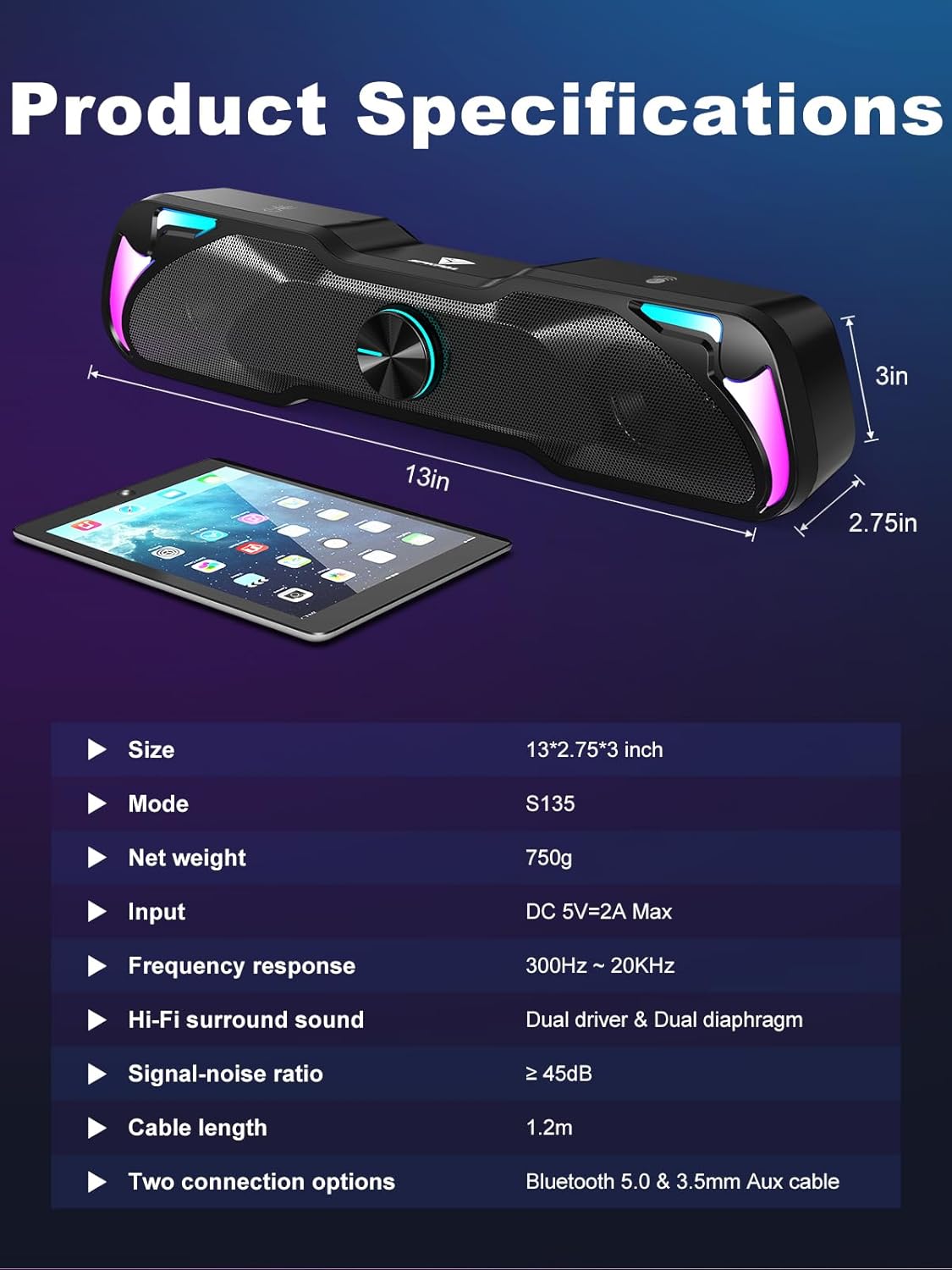
Image: A visual representation of the SPKPAL S135 soundbar's product specifications, including its dimensions, weight, power input, frequency response, and connectivity details.
9. Warranty and Support
SPKPAL products are designed for reliability and performance. For warranty information, technical support, or customer service inquiries, please refer to the contact information provided with your purchase or visit the official SPKPAL website. Please retain your proof of purchase for warranty claims.