
M10 TWS - 02
Generic M10 TWS Bluetooth V5.1 Wireless Earbuds User Manual
Model: M10 TWS - 02
1. Introduction
Thank you for choosing the Generic M10 TWS Bluetooth V5.1 Wireless Earbuds. This manual provides essential information for the proper setup, operation, and maintenance of your new earbuds. Please read this manual thoroughly before use to ensure optimal performance and longevity of the product.
These in-ear wireless earbuds feature Bluetooth 5.1 connectivity, noise-cancellation, and a built-in power bank within the charging case. They are designed for stereo audio playback and are suitable for sports activities due to their waterproof design.
2. Product Overview
2.1 Components
- M10 TWS Wireless Earbuds (Left and Right)
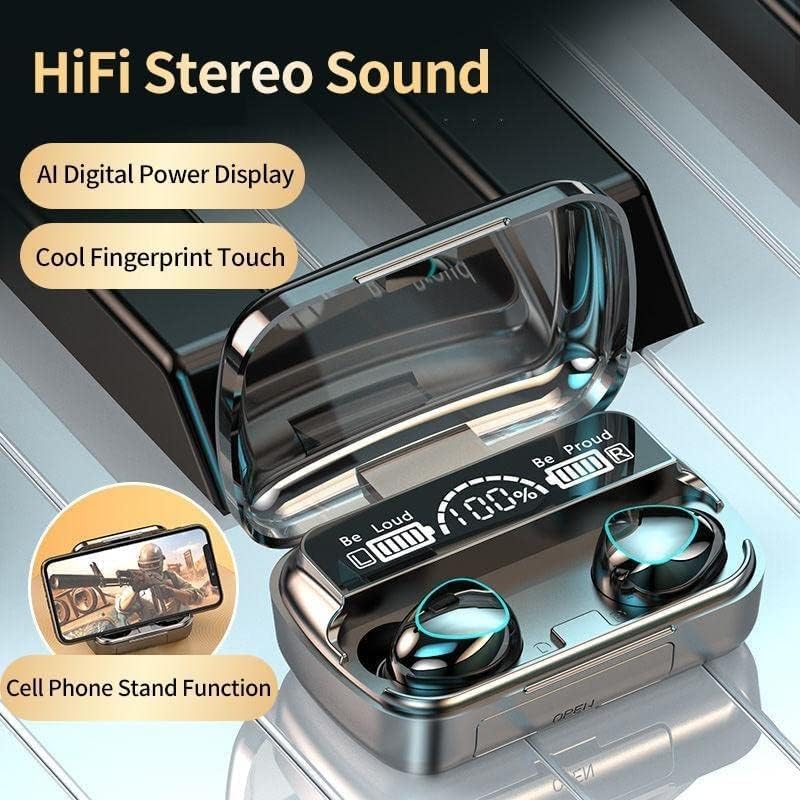
- Charging Case with LED Display and Inbuilt Power Bank
- Charging Cable
- User Manual
2.2 Key Features
- Bluetooth V5.1 for stable and efficient wireless connection.
- In-ear design for comfortable fit.
- Noise-cancellation for immersive audio experience.
- Waterproof design, suitable for sports.
- Charging case with LED digital power display.
- Integrated power bank function in the charging case.
- Touch control for various functions.
- Voice control capability.
2.3 Product Visuals



3. Setup
3.1 Initial Charging
Before first use, fully charge the earbuds and the charging case. Place the earbuds into the charging case and connect the charging case to a power source using the provided USB cable. The LED display on the case will indicate the charging status.
3.2 Pairing with a Device
- Earbud Inter-Pairing: Before connecting to your phone, allow up to 2 minutes for the earbuds to pair with each other. This step is crucial for both earbuds to function simultaneously.
- Device Connection: Once the earbuds are paired together, open the Bluetooth settings on your mobile device.
- Search for "M10" or a similar device name in the list of available Bluetooth devices.
- Select "M10" to connect. A voice prompt will confirm successful pairing.
NOTE: Skipping the earbud inter-pairing step may result in only one earbud connecting to your phone.
4. Operating Instructions
4.1 Power On/Off
- Power On: The earbuds will automatically power on when removed from the charging case. Alternatively, press and hold the touch area on both earbuds for a few seconds.
- Power Off: Place the earbuds back into the charging case. They will automatically power off and begin charging. Alternatively, press and hold the touch area on both earbuds for a few seconds until you hear a power-off prompt.
4.2 Music Playback
- Play/Pause: Tap the touch area on either earbud once.
- Next Track: Double-tap the touch area on the right earbud.
- Previous Track: Double-tap the touch area on the left earbud.
4.3 Call Management
- Answer/End Call: Tap the touch area on either earbud once.
- Reject Call: Press and hold the touch area on either earbud for 2 seconds.
4.4 Voice Assistant
- Activate Voice Assistant: Triple-tap the touch area on either earbud. (Supports Siri, Google Assistant, etc.)
5. Maintenance
- Cleaning: Use a soft, dry, lint-free cloth to clean the earbuds and charging case. Do not use harsh chemicals or abrasive materials.
- Storage: When not in use, store the earbuds in their charging case to protect them and keep them charged.
- Water Exposure: While waterproof, avoid prolonged submersion in water. Dry thoroughly if exposed to moisture.
- Temperature: Avoid exposing the device to extreme temperatures (hot or cold) as this can affect battery life and performance.
6. Troubleshooting
- Issue: Only one earbud connects or plays audio.
- Solution: Ensure both earbuds have successfully inter-paired before connecting to your device. Place both earbuds back into the charging case, then remove them simultaneously. Wait for up to 2 minutes for them to pair with each other, then attempt to connect to your device again. If the issue persists, try resetting the earbuds (refer to manufacturer's specific reset instructions if available, otherwise try forgetting the device on your phone and re-pairing from scratch).
- Issue: Earbuds are not charging.
- Solution:
- Ensure the charging cable is securely connected to both the case and the power source.
- Check if the charging case itself has power (indicated by the LED display).
- Verify that the charging contacts on the earbuds and inside the case are clean and free of debris.
- Issue: Poor sound quality or connection drops.
- Solution:
- Ensure the earbuds are within the effective range of your Bluetooth device (typically 10 meters/33 feet).
- Minimize obstacles between the earbuds and your device.
- Try disconnecting and reconnecting the earbuds to your device.
- Check for interference from other wireless devices.
7. Specifications
| Feature | Detail |
|---|---|
| Model Number | M10 TWS - 02 |
| Connectivity Technology | Wireless (Bluetooth V5.1) |
| Headphones Form Factor | In Ear |
| Noise Control | Active Noise Cancellation (ANC) |
| Earbud Battery Capacity | 50mAh (per earbud) |
| Charging Case Battery Capacity | 2000mAh |
| Call Time | 4-5 hours |
| Charging Time | Approximately 1 hour |
| Impedance | 1 Ohm |
| Sensitivity | 96 dB |
| Product Dimensions | 15 x 14 x 4 cm |
| Product Weight | 180 g |
| Material | Plastic |
| Special Feature | Inbuilt Power Bank |
| Control Type | Voice Control, Touch Control |
8. Warranty and Support
For warranty information and customer support, please refer to the documentation provided at the time of purchase or contact the seller directly. Keep your proof of purchase for any warranty claims.
Ask a question about this manual
Ask about setup, troubleshooting, compatibility, parts, safety, or missing instructions. Manuals+ will review the question and use this page’s manual context to help answer it.