
1. Product Overview
The Fesley FED1200W Electric Drum Set is a full-size electronic drum kit designed to provide a realistic drumming experience with advanced features for practice and performance. It includes independent hi-hat and snare drums, mesh dual-zone drum pads, and a powerful sound module with Bluetooth MIDI functionality.
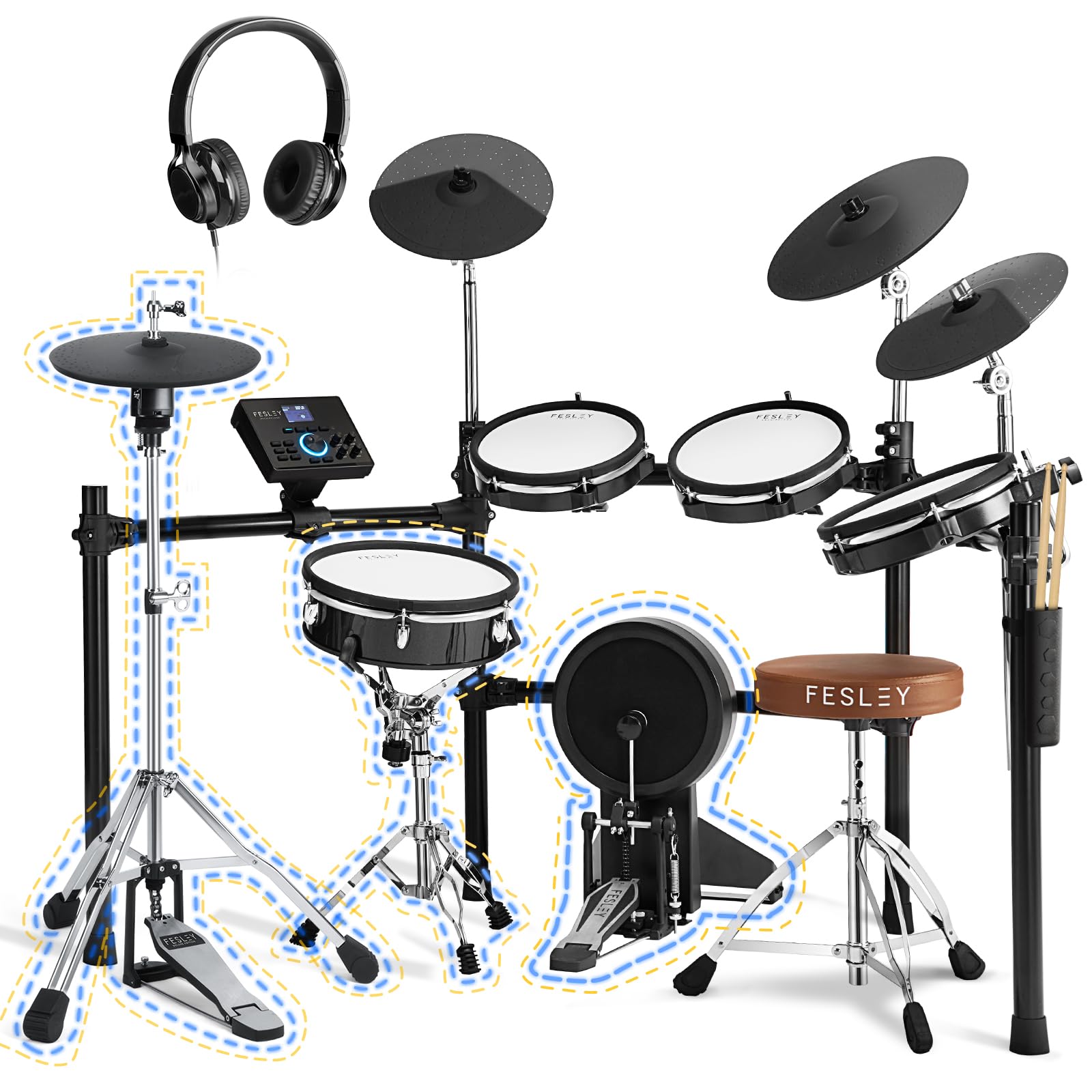
Figure 1: Fesley FED1200W Electric Drum Set assembled.
Key Features:
- Superior Sound Engine: Delivers a realistic drumming experience with advanced sound modeling, wide dynamic range, and tonal changes based on strike force.
- 12-Inch Independent Digital Snare: Features a three-layer mesh head for natural rebound and feel. A multi-element sensor system tracks playing across the pad, detecting head, rimshots, and cross-stick techniques in real-time.
- Superior Cymbal Performance: Includes dual-zone 13'' ride cymbal, dual-zone 12'' crash cymbal, and 12'' movable hi-hat. These cymbals are covered with thick rubber for feel, control, bounce, and reduced volume.
- Extensive Drum Sounds: The updated module features 25 preset kits developed with professional drummers and allows for 1 user-defined drum kit, offering a wide range of sounds for various musical genres.
- Wireless Audio Streaming: Stream songs and backing tracks wirelessly from your smartphone via Bluetooth audio to the electric drum module.
- Rehearse and Record: Offers multiple connectivity options including outputs and headphone monitoring for live performance and studio recording. Built-in USB audio/MIDI interface facilitates multi-track performance capture.
- Acoustic Drumming Techniques: Four-post metal rack system, curved for enhanced reach and closer drum placement, provides a rounded visual appearance and feel comparable to an acoustic drum set. Pad positions and angles are fully adjustable.
2. Package Contents
The Fesley FED1200W Electric Drum Set comes with all necessary components to begin playing immediately. Please verify all items are present upon unboxing.

Figure 2: All components included in the Fesley FED1200W Electric Drum Set package.
- 10"x3.2" Bass Kick Drum
- 12" Hi-Hat Cymbal
- Hi-Hat Pedal
- 12"x4.2" Dual Zone Snare Drum with Stand
- 13" Ride Cymbal with Choke
- Three 10"x2.8" Dual Zone Toms
- Drum Throne
- Drum Sticks (2 pairs)
- Sound Module
- Two 12" Crash Cymbals with Choke
- Metal Drum Stand (Rack System)
- Cables and Power Adapter
- Headphones
- Drumstick Holder
3. Assembly Instructions
Assembling your Fesley FED1200W Electric Drum Set requires careful attention to detail. Follow these steps for a smooth setup. It is recommended to lay out all parts according to the instruction manual's diagrams before beginning assembly.
Important Note:
Do NOT remove the plastic wrapping from the rack components until instructed. Each plastic bag is labeled with a letter (A, B, C, etc.) that corresponds to the assembly diagram in the manual. Removing them prematurely can complicate identification.
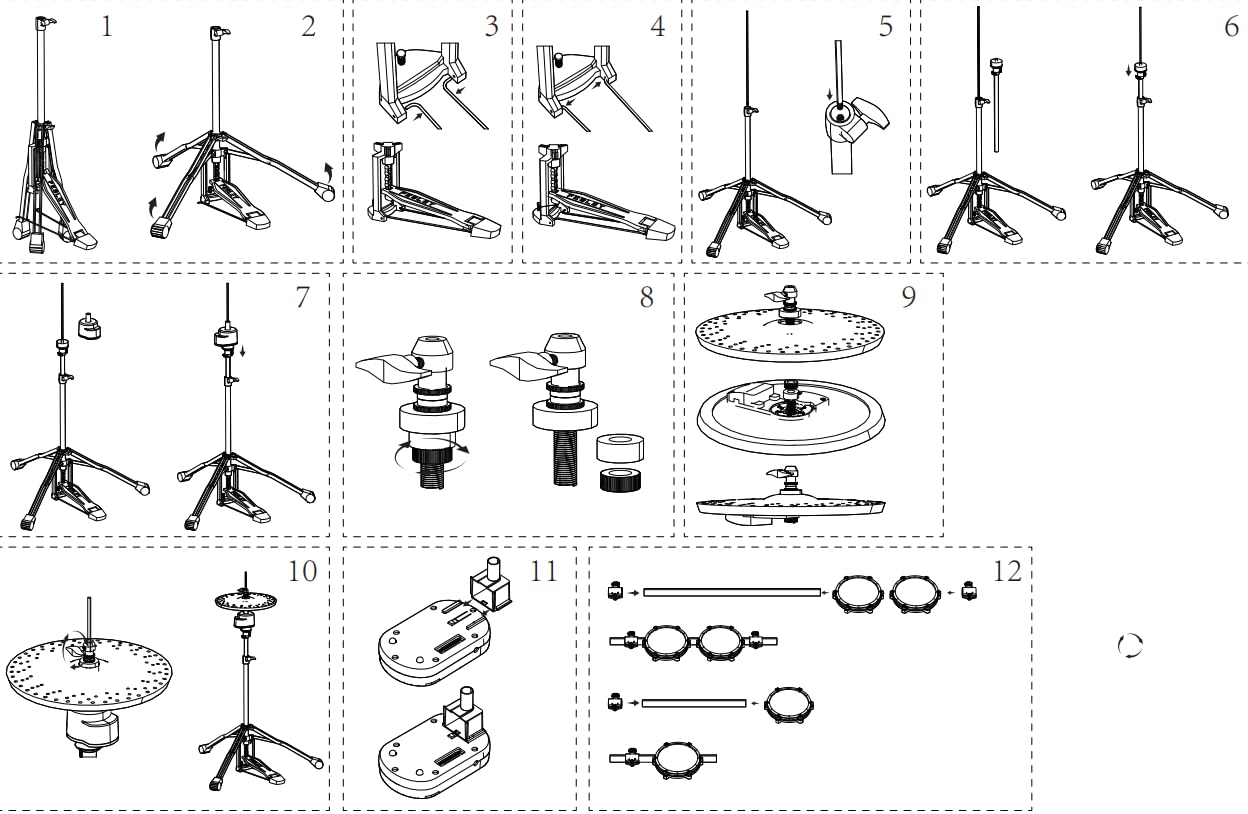
Figure 3: Rack components laid out for assembly, with labels visible through plastic.
General Assembly Steps:
- Unpack and Organize: Carefully unpack all components. Lay out the rack pieces on a flat surface, keeping them in their labeled plastic bags. Refer to the assembly diagram in your printed manual.
- Assemble the Rack System: Begin by connecting the central cross beams, then attach the vertical support legs. Ensure all connections are secure but do not overtighten until the entire frame is assembled.
- Attach Drum Pads: Mount the snare drum, tom pads, and kick drum pad to their designated positions on the rack. Adjust their height and angle for comfortable playing.
- Install Cymbals: Secure the hi-hat, crash cymbals, and ride cymbal to the rack. Ensure they are positioned for easy access and proper playability.
- Connect Pedals: Place the hi-hat pedal and kick drum pedal in their respective positions. Connect them to the sound module.
- Mount Sound Module: Secure the sound module to the rack in an easily accessible location.
- Cable Management: Connect all drum pads and cymbals to the sound module using the provided cables. Route cables neatly to prevent tangling and ensure they do not interfere with playing.
- Final Adjustments: Once all components are in place, tighten all screws and clamps. Adjust the height, angle, and position of each pad and cymbal to suit your ergonomic preferences.
Video 1: A detailed look at the assembly process for the Fesley FED1200W Electric Drum Set.
4. Component Details
4.1. Snare Drum
The 12-inch independent digital snare drum features a three-layer mesh head for a natural rebound and feel. Its multi-element sensor system accurately tracks playing across the pad, detecting head, rimshots, and cross-stick techniques in real-time.

Figure 4: Close-up of the 12-inch independent digital snare drum.
4.2. Hi-Hat Cymbal
The 12-inch movable hi-hat cymbal provides a realistic feel and response. It is designed for quiet practice sessions while maintaining authentic hi-hat transitions.

Figure 5: Detailed view of the independent hi-hat design.
4.3. Bass Kick Drum
The 10-inch bass kick drum offers a thick, textured surface for an authentic feel without excessive noise. It is compatible with double pedals and supports conversion to dual-pedal use.

Figure 6: Features of the newly upgraded bass kick drum.
4.4. Tom Pads
The set includes three 10-inch dual-zone tom pads with high-elastic nylon mesh heads and advanced 6-layer force sensing. These pads support dual-triggering with rim and surface hit functions, offering a wider range of tones and expressiveness.

Figure 7: Authentic dual-zone mesh heads on the tom pads.
4.5. Crash and Ride Cymbals
The dual-zone 13'' ride cymbal and two dual-zone 12'' crash cymbals are covered with thick, comfortable rubber for a blend of feel, control, bounce, and volume. They offer precise recognition and sound production from both the bow and edge, and feature a choke function for dynamic control.

Figure 8: Dual-zone crash and ride cymbals with choke function.
4.6. Sound Module
The updated sound module is the central control unit for the drum set. It features 25 preset kits, 1 user-defined drum kit, 475 drum sounds, 50 demo songs, a metronome, and recording functions. It also provides various connectivity options.

Figure 9: The upgraded sound module with various controls and display.
5. Operating the Sound Module
The sound module provides extensive control over your drumming experience. Familiarize yourself with its functions to customize your sound and practice effectively.
5.1. Kit Selection and Customization
- Preset Kits: The module comes with 25 pre-programmed drum kits, each offering a unique sound profile. Use the navigation buttons or dial to browse and select different kits.
- User-Defined Kit: Create and save your own custom drum kit by assigning different sounds to individual pads and cymbals.
- Sound Library: Access 475 individual drum sounds to tailor your kits.
5.2. Practice and Performance Features
- Demo Songs: Practice along with 50 built-in demo songs.
- Metronome: Utilize the integrated metronome for timing practice. Adjust tempo and beat settings.
- Recording System: Record your performances directly on the module to review and improve your playing.
Video 2: An overview of the Fesley FED1200W Electric Drum Set module features and sounds.
Video 3: A detailed demonstration of the Fesley FED1200W module's interface and customization options.
6. Connectivity
The Fesley FED1200W offers a variety of connectivity options for diverse applications, from silent practice to live performance and recording.

Figure 10: Overview of the sound module's connectivity ports.
- Headphone Output: Connect headphones for silent practice sessions.
- Auxiliary Input (AUX IN): Connect external audio devices (e.g., smartphone, MP3 player) to play along with your favorite music.
- Stereo Sound Output (L/MONO R OUTPUT): Connect to an amplifier, PA system, or audio interface for live performance or studio monitoring.
- USB MIDI: Connect to a computer for MIDI recording, triggering software instruments, or using the drum set as a MIDI controller.
- Bluetooth MIDI Function: Wirelessly stream songs and backing tracks from your smartphone or other Bluetooth-enabled devices.
- DC 9V Power Input: Connect the provided power adapter to power the module.
7. Care and Maintenance
Proper care and maintenance will extend the lifespan of your Fesley FED1200W Electric Drum Set.
- Cleaning: Use a soft, dry cloth to wipe down the drum pads, cymbals, module, and rack. Avoid abrasive cleaners or solvents that could damage surfaces.
- Pad Care: While mesh heads are durable, avoid excessive force that could damage the sensors. Rotate pads periodically if wear is uneven.
- Cable Management: Keep cables organized and untangled to prevent damage. Avoid sharp bends or pinching.
- Storage: When not in use, store the drum set in a cool, dry place away from direct sunlight and extreme temperatures. If disassembling for storage, ensure all components are packed securely.
- Environmental Conditions: Protect the drum set from moisture, dust, and excessive vibrations.
8. Troubleshooting
If you encounter any issues with your Fesley FED1200W Electric Drum Set, refer to the following common troubleshooting tips:
- No Sound:
- Check power connection and ensure the module is turned on.
- Verify headphone or output cables are securely connected.
- Adjust the master volume on the module and any connected amplifier/headphones.
- Ensure individual pad/cymbal volumes are not set to zero within the module settings.
- Inconsistent Triggering/Sensitivity:
- Check cable connections for the affected pad/cymbal.
- Adjust the sensitivity settings for individual pads/cymbals in the module's menu.
- Ensure pads are not overtightened, which can affect responsiveness.
- Bluetooth Connection Issues:
- Ensure Bluetooth is enabled on both the module and your external device.
- Check that the module is not already connected to another device.
- Move your device closer to the module to ensure a strong signal.
- Module Display Not Working:
- Verify power supply is correctly connected and functioning.
- If the issue persists after checking power, contact customer support.
9. Specifications
| Feature | Detail |
|---|---|
| Model Name | FED1200W Electric Drum Set |
| Item Weight | 88.8 pounds (40.37 Kilograms) |
| Product Dimensions | 14 x 27 x 32 inches |
| Body Material | Electric Drum Set |
| Finish Type | Electronic Drum Set |
| Set Name | Full Size Electronic Drum Set |
| Snare Drum | 12"x4.2" Dual Zone Snare Drum w/ Stand |
| Hi-Hat | 12" Hi-Hat Cymbal, Hi-Hat Pedal |
| Toms | Three 10"x2.8" Dual Zone Toms |
| Cymbals | 13" Ride with Choke, Two 12" Crash with Choke |
| Bass Kick Drum | 10"x3.2" Bass Kick Drum |
| Sound Module | Included, with 475 sounds, 25 preset kits, 1 user-defined kit, 50 demo songs |
| Connectivity | Auxiliary, Bluetooth, Headphone, Stereo Sound Output, USB MIDI |
| Included Accessories | Drum Throne, Drum Sticks |
10. Warranty and Support
Fesley is committed to customer satisfaction and product quality.
- 30-Day Returns: Enjoy hassle-free returns and exchanges within 30 days of purchase.
- 1-Year Quality Warranty: The Fesley FED1200W Electric Drum Set is covered by a 1-year warranty against manufacturing defects.
- Lifetime Support: Fesley provides lifetime support and solutions for any aftermarket and music theory questions.


Figure 11: Fesley's commitment to customer support and warranty.
For any inquiries or support, please contact Fesley customer service through the vendor's official channels.