
Introduction
This manual provides detailed instructions for the setup, operation, and maintenance of your Zetta Z16 Digital Camcorder. Please read this manual thoroughly before using the device to ensure proper functionality and to maximize its performance.
Product Overview
The Zetta Z16 is a compact digital camcorder designed for security and surveillance. It features a 160-degree rotatable lens and multiple recording modes.

Figure 1: Zetta Z16 Digital Camcorder. A front view of the compact Zetta Z16 device.
Components and Controls

Figure 2: Zetta Z16 at a Glance. This diagram illustrates the key components and controls of the Zetta Z16 Digital Camcorder, including the LED indicator, card slot, mode switches, power button, camera lens, microphone, and USB port.
- LED Indicator: Provides status information.
- Card Slot: For inserting a FAT32 formatted SD card.
- Surveillance Mode Switch: Activates surveillance recording.
- On-the-GO Mode Switch: Activates motion detection recording.
- Custom Mode Switch: For advanced configurations via "Zetta Widget" software.
- On/Off Button: Powers the device on or off.
- Camera Lens: 160-degree rotatable lens for video capture.
- Microphone: For audio recording.
- USB Port: For charging and connecting to a computer.

Figure 3: Top View of Zetta Z16 Controls. This image shows the top panel of the camcorder, highlighting the SD card slot, the status LED, and the mode selection buttons.

Figure 4: Bottom View of Zetta Z16. The bottom of the device displays the Zetta branding, input voltage information (5V), and a warning regarding cover removal.
Setup
- Charge the Device: Before first use, fully charge the Zetta Z16 using the provided USB cable and a 5V power adapter. The LED indicator will show charging status.
- Insert SD Card: Ensure the device is off. Insert a FAT32 formatted SD card into the card slot. A minimum of 8GB and maximum of 128GB is recommended for optimal performance.
- Initial Power On: Press and hold the On/Off button for 2 seconds. The green light will flash, indicating the camera is operational.
Operating Modes
The Zetta Z16 offers several operating modes to suit different surveillance needs.
1. Custom Mode (Advanced Configuration)
This mode allows for detailed customization of recording settings using the "Zetta Widget" software on a computer. Connect the camcorder to your computer via USB to access these settings.

Figure 5: Zetta Widget Software Interface. This image displays the software used for advanced configuration, allowing users to adjust video quality, resolution, frame rate, and other recording parameters.
- Download "Zetta Widget": Obtain the software from the official Zetta website.
- Connect to PC: Use a USB cable to connect the Z16 to your computer.
- Configure Settings:
- Loop Recording: Enable/disable continuous recording that overwrites older files.
- Timestamp: Add date and time stamps to recordings.
- Scheduled Recording: Set specific times for the camera to record.
- Motion Detection Recording: Activate recording only when motion is detected.
- Auto Power On/Off: Schedule power cycles.
- Voice-Activated Recording: Initiate recording based on sound detection.

Figure 6: Scheduled Recording Configuration. The Zetta Widget allows users to set up recording schedules and define triggers such as voice, vibration, or motion detection.
2. On-the-GO Mode (Motion Detection)
In this mode, the camera records only when motion is detected within a range of 3-5 meters. Recording stops when the memory card is full. Video resolution is 1280 x 720 pixels.
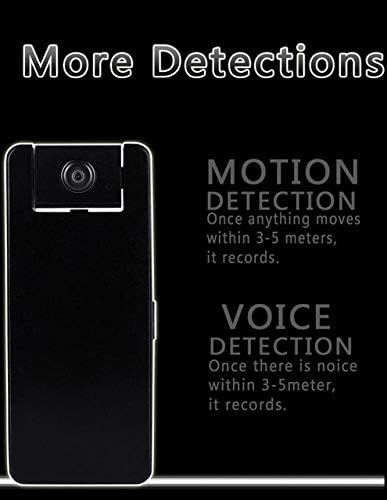
Figure 7: Motion and Voice Detection. This graphic explains how motion detection triggers recording when movement occurs within 3-5 meters, and voice detection triggers recording when noise is detected within the same range.
3. Continuous Mode
The Z16 features a built-in 1200 mAh rechargeable battery, allowing for up to 10 hours of continuous video recording. The video resolution in this mode is 640 x 360 pixels.
Maintenance
- Cleaning: Use a soft, dry cloth to clean the camera lens and exterior. Avoid abrasive cleaners or solvents.
- Storage: Store the device in a cool, dry place away from direct sunlight and extreme temperatures.
- Battery Care: To prolong battery life, avoid fully discharging the battery frequently. Charge the device regularly, even if not in use.
- Firmware Updates: Check the Zetta website periodically for firmware updates to ensure optimal performance and access to new features. The "UPGRADE" label on the bottom of the device indicates this capability.
- SD Card Management: Regularly back up important recordings and format the SD card to maintain performance and prevent data corruption.
Troubleshooting
| Problem | Possible Cause | Solution |
|---|---|---|
| Device does not power on. | Low battery; device not charged. | Charge the device fully. Ensure the power button is held for 2 seconds. |
| Recording not starting. | SD card not inserted or not formatted correctly (FAT32); incorrect mode selected. | Insert a FAT32 formatted SD card. Check mode selection. Use Zetta Widget for advanced settings. |
| Poor video quality. | Lens is dirty; low light conditions; incorrect resolution setting. | Clean the lens. Ensure adequate lighting. Adjust video resolution in Custom Mode via Zetta Widget. Note that Continuous Mode records at 640x360. |
| Motion detection not working. | On-the-GO mode not activated; sensitivity settings too low. | Ensure On-the-GO mode is selected. Adjust motion detection sensitivity using Zetta Widget. |
| Device unresponsive. | Software glitch. | Locate the reset pinhole (often near the SD card slot or on the bottom) and gently press with a thin object (e.g., paperclip) to reset the device. Refer to Figure 4 for the "RESET" label on the bottom. |
Specifications
- Model: Z16
- Video Resolution: 720p (1280x720 in On-the-GO mode), 640x360 (in Continuous mode)
- Lens: 160-degree rotatable
- Battery: 1200 mAh rechargeable
- Continuous Recording Time: Up to 10 hours
- Connectivity: Wired (USB)
- Storage: MicroSD card (FAT32 format required)
- Power Input: 5V, 10W
- Recommended Use: Indoor Security
- Special Features: Motion Detection, Voice Activation, Scheduled Recording, Loop Recording, Timestamp, Portable
- IP Rating: IP54
Warranty and Support
For warranty information and technical support, please refer to the official Zetta website or contact your retailer. Keep your purchase receipt for warranty claims.
Website: www.zetta.com.hk
Warning: Removal of the device cover will void any and all warranties. (As indicated on the product's bottom label).


