
Introduction
This manual provides detailed instructions for the ModishOmbre UNMO18 Multifunction Car Charger FM Transmitter. Please read this manual carefully before use to ensure proper operation and to maximize the product's lifespan. Keep this manual for future reference.

Image: ModishOmbre UNMO18 Car Charger FM Transmitter, showing its compact design and LED display.
Product Features
- Supports all types of vehicles (12-24V).
- PD3.0 fast charge output and USB Type-C protocol.
- Supports Quick Charge 3.0/2.0, Huawei FCP/SCP, Samsung AFC, and Apple 2.4A charging specifications.
- Stereo FM transmission technology for audio output.
- U disk and TF card music playback (supports WMA, MP3, WAV, FLAC formats up to 32GB).
- Automatic power-off memory function for frequency and track.
- Bluetooth V5.0 for wireless connectivity and high-quality music playback.
- Hands-free calling with built-in microphone and DSP technology for clear communication.
- Supports one-button subwoofer output.
- Battery voltage detection for vehicle battery status.
- CVC (Clear Voice Capture) noise suppression technology for calls.
- Supports Siri / Google Assistant activation.
- Radiant design with 7 colorful LED lights and fluid rainbow light effects.

Image: The UNMO18 device highlighting its radiant design with 7 colorful LED lights, fluid rainbow lights, and power on/off button functionality.
Package Contents
- 1x ModishOmbre UNMO18 Bluetooth Car Charger Adapter with Multifunction Wireless FM Transmitter
Setup Instructions
- Power On: Insert the UNMO18 device firmly into your car's cigarette lighter outlet. Start the car to power on the device. The LED display will illuminate.
- FM Frequency Pairing: Tune your car radio to an unused, blank FM channel (one with no strong radio station signals). Then, adjust the UNMO18 device to the same blank FM frequency. Press the [CH] button on the device to enter frequency adjustment mode, then use the rotary knob or navigation buttons to match the frequency. For example, if your car radio is set to 87.5MHz, set the device to 87.5MHz.
- Bluetooth Connection: Turn on Bluetooth on your mobile phone. Search for "BT-Car" in the list of available Bluetooth devices and select it to pair. Once successfully paired, the device will confirm the connection, and you can play music from your phone, with audio transmitting through your car speakers.
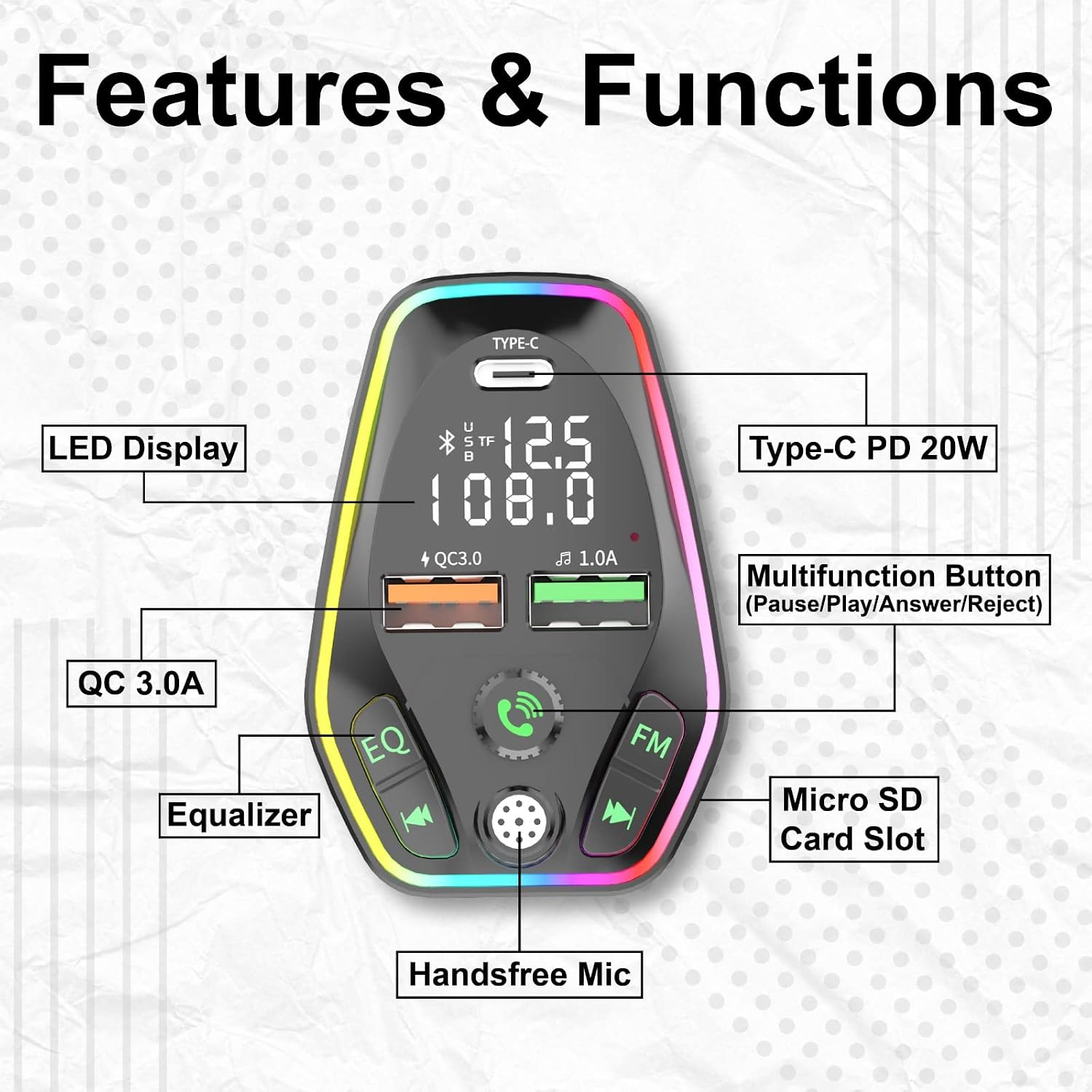
Image: Diagram illustrating the various features and functions of the UNMO18 device, including LED display, Type-C PD 20W port, QC 3.0A port, Equalizer, Micro SD Card Slot, Handsfree Mic, and Multifunction Button.
Operating Instructions
Music Playback Modes
The UNMO18 supports three music playback modes: Bluetooth, USB drive, and TF card.
- TF/USB Flash Music Playing: If a TF card or USB flash drive (up to 32GB) containing supported music files (WMA, MP3, WAV, FLAC) is inserted, the device will automatically detect and begin playing music from it.
- Switching Music Mode: To switch between USB, TF card, and Bluetooth music modes, long press the [Answer] button (often the central rotary knob button).

Image: The UNMO18 device illustrating its three music playing modes: Bluetooth 5.0, USB Drive (up to 32GB), and MicroSD Card (up to 32GB), along with supported music formats.
Bluetooth Mode (Hands-Free Calling)
Once your phone is paired via Bluetooth, you can manage calls directly through the UNMO18 device.
- Answer/Hang up Call: Short press the [Answer] button.
- Reject Call: Long press the [Answer] button.
- Redial Last Number: Double press the [Answer] button.
- Voice Assistant: Long press the Call button (often the same as the Answer button) to activate your phone's voice assistant (Siri or Google Assistant).
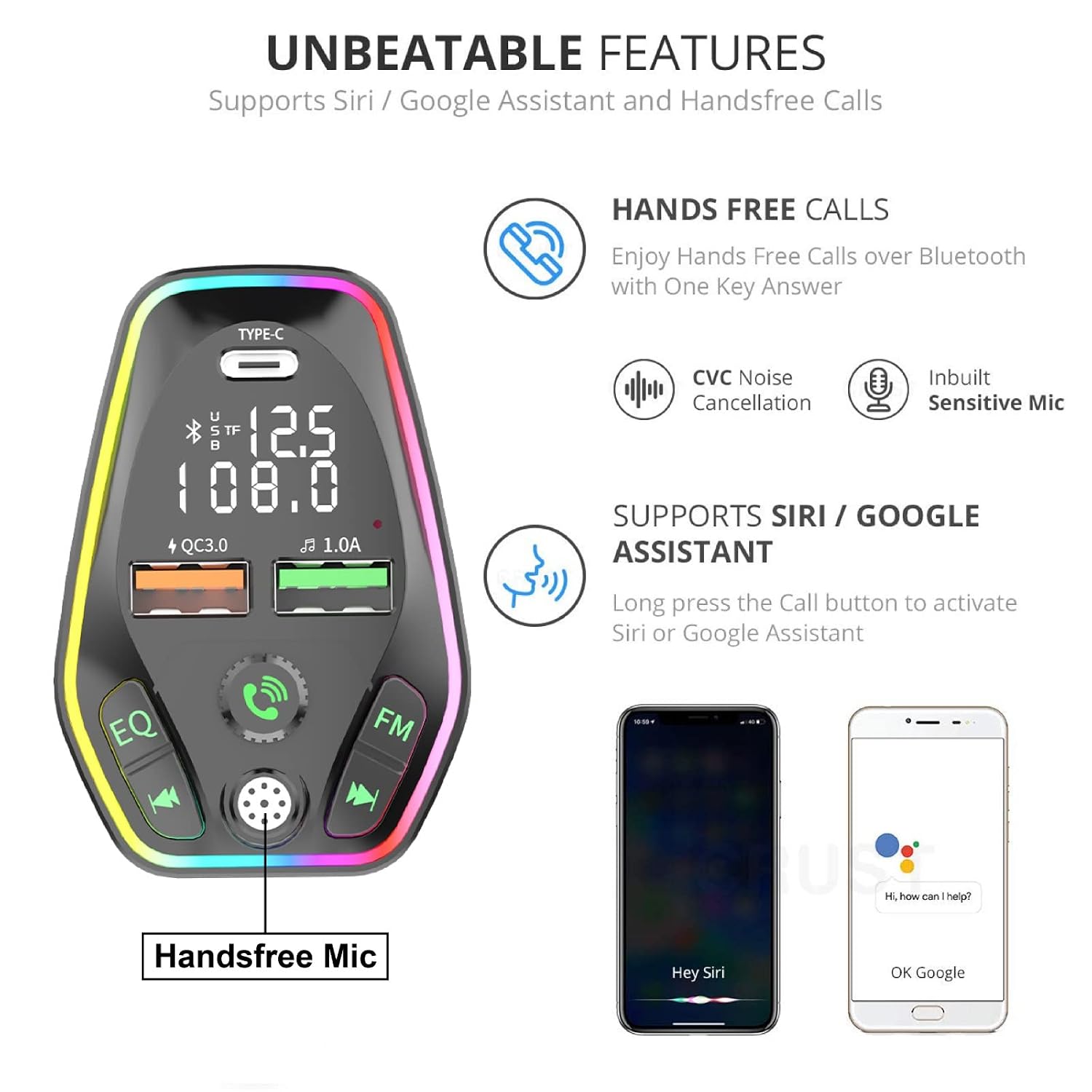
Image: The UNMO18 device demonstrating hands-free operation, including hands-free calls, inbuilt sensitive mic, CVC noise cancellation, and voice assistant support.
Specifications
| Feature | Detail |
|---|---|
| Model | UNMO18 |
| Bluetooth Version | V5.0 |
| Input Voltage | 12-24V (Compatible with all car sockets) |
| Charging Ports | 1x USB Type-C (PD3.0 Fast Charge), 1x USB-A (QC3.0), 1x USB-A (1.0A) |
| Supported Charging Protocols | PD3.0, QC3.0/2.0, Huawei FCP/SCP, Samsung AFC, Apple 2.4A |
| Music Formats | WMA, MP3, WAV, FLAC |
| Storage Support | U disk (up to 32GB), TF card (up to 32GB) |
| Microphone | Built-in, with CVC Noise Suppression |
| Dimensions | 5 x 4 x 1.5 cm |
| Weight | 50 g |
| Material | Plastic |
Troubleshooting
- No Power: Ensure the device is fully inserted into the car's cigarette lighter socket and the car engine is running. Check your car's fuse for the cigarette lighter if the issue persists.
- Poor FM Sound Quality/Static: Verify that the FM frequency on both the device and your car radio are identical and set to a blank channel with no strong radio signals. Try different blank frequencies. Adjust the volume on both the device and your car radio.
- Bluetooth Connection Issues: Make sure Bluetooth is enabled on your phone and the device is in pairing mode. Forget "BT-Car" from your phone's Bluetooth settings and attempt pairing again. Ensure no other devices are actively connected to the UNMO18.
- Music Not Playing from USB/TF Card: Confirm that the USB drive or TF card is formatted correctly (FAT32 is generally recommended) and contains supported music formats (WMA, MP3, WAV, FLAC). Ensure the storage device capacity does not exceed 32GB. Long press the [Answer] button to cycle through music input modes (USB/TF/Bluetooth).
- Charging Not Working: Check that the charging cable is securely connected to both the device and your phone. Ensure your phone supports the fast-charging protocols (PD3.0, QC3.0) for optimal charging speed.
Maintenance
- Keep the device dry and away from moisture to prevent damage.
- Avoid exposing the device to extreme temperatures (hot or cold).
- Clean the device with a soft, dry cloth. Do not use harsh chemicals, solvents, or abrasive cleaners.
- Store the device in a cool, dry place when not in use for extended periods.
Warranty and Support
This ModishOmbre product comes with a 6-month warranty from the date of purchase. For warranty claims, technical assistance, or customer support, please contact Modish Tradex Pvt Ltd.
Manufacturer/Importer: Modish Tradex Pvt Ltd
Address: D 11 / 153 Sector 8 Rohini, Near 389 Metro Pilar
Customer Care No.: 8287912907
Please retain your purchase receipt or proof of purchase for all warranty-related inquiries.