
1. Important Safety Instructions
WARNING: This device operates with high voltage. Improper installation or use can result in electric shock, fire, or serious injury. Always consult a qualified electrician for installation if you are unsure.
- Do not use this power supply with devices operating in BUCK-BOOST mode (e.g., batteries, chargers, dimmers, regulators, PWM modules).
- Ensure the input voltage switch (115V/230V) is set correctly for your region before connecting to power. Incorrect setting can damage the unit.
- Always disconnect power before making any connections or adjustments.
- This unit is designed for indoor use in a dry environment. Avoid exposure to moisture or extreme temperatures.
- Ensure adequate ventilation around the power supply to prevent overheating. Do not block cooling vents.
- The maximum peak current of the connected device must be below the power supply's overload protection point.
- The terminal block contains live parts. Exercise caution and ensure all connections are secure and insulated.

Image: MEISHILE 24V 50A 1200W Switching Power Supply highlighting protection features such as overload, overvoltage, interruption, short circuit, high-precision components, and overheating protection.
2. Product Overview
The MEISHILE 24V 50A 1200W Switching Power Supply (Model: 24V-1200W) is a robust AC-to-DC converter designed for various applications requiring a stable 24V DC output. It features a double-panel PCB for fast conduction response and high efficiency. The unit is housed in a thickened 2.0mm aluminum casing for durability and heat dissipation, incorporating a temperature-controlled cooling fan.
Key Features:
- Input Voltage: AC 85-145V / 185-265V (selectable via side switch).
- Output Voltage: DC 24V (adjustable 22-25V).
- Rated Power: 1200W.
- Rated Current: 50A (Max. load 80%).
- Overload Protection: 150%-200% of rated current (75A-100A), with power failure recovery.
- Cooling System: Temperature-controlled fan (activates at 45℃).
- Construction: 2.0mm thickened aluminum casing, double-panel PCB, high-precision components.
- Certifications: CE, FCC, RoHS compliant.
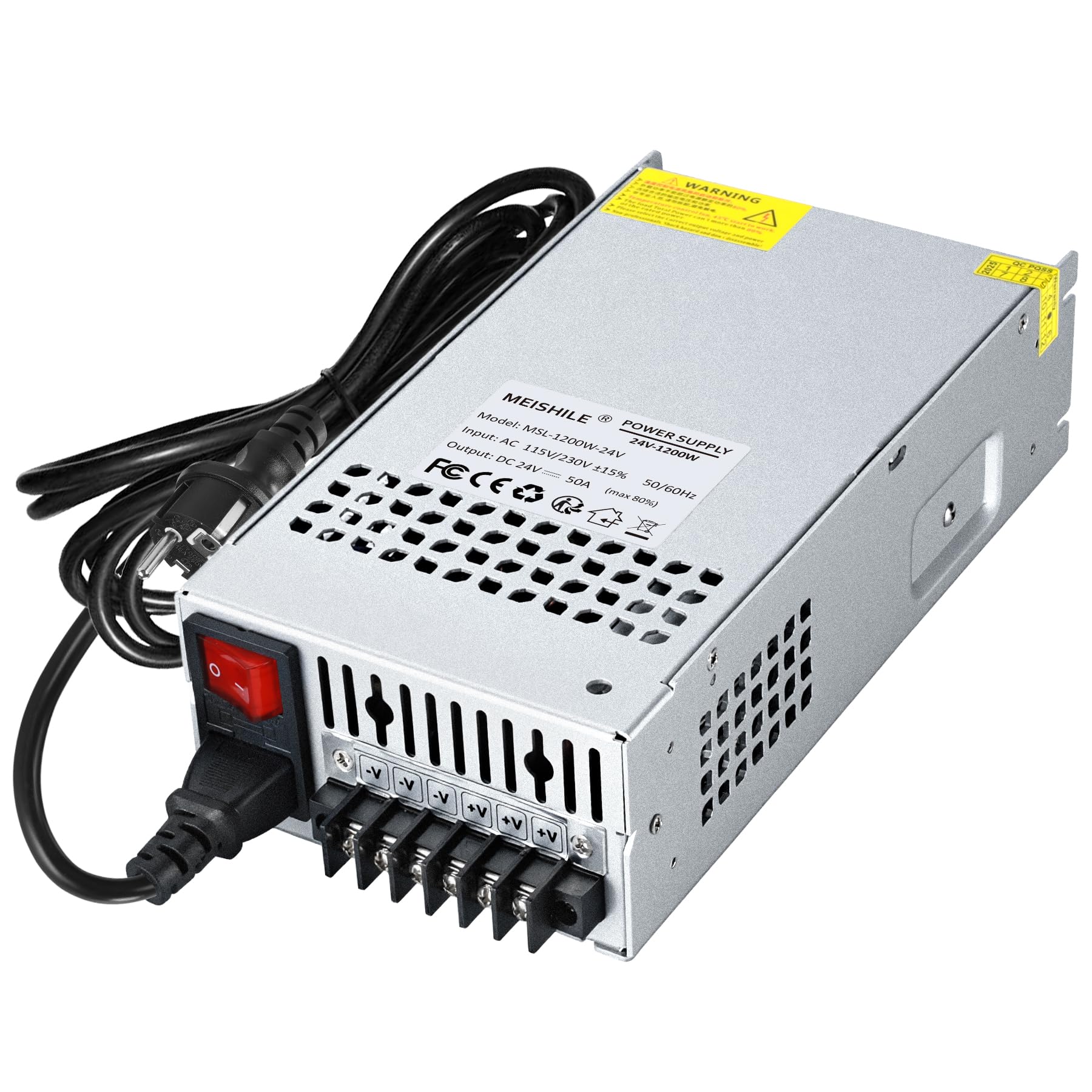
Image: MEISHILE 24V 50A 1200W Switching Power Supply. Dimensions are approximately 24.5 x 12.5 x 6.48 cm.
3. Specifications
| Feature | Detail |
|---|---|
| Model Number | 24V-1200W (PSSE-1200-24) |
| Input Voltage | AC 85-145V / 185-265V (Switchable) |
| Output Voltage | DC 24V (Adjustable 22-25V) |
| Rated Current | 50 A |
| Rated Power | 1200 W |
| Output Voltage Difference | ±1% |
| Overload Protection Point | 150%-200% of rated current (75A-100A) |
| Cooling Fan Activation | 45°C |
| Product Dimensions (L x W x H) | 24.5 x 12.5 x 6.48 cm |
| Item Weight | 1.23 Kilograms |
| Mounting Type | Wall Mount |
| Certifications | CE, FCC, RoHS |
| Country of Origin | China |
4. Setup Instructions
4.1 Unpacking and Inspection
Carefully remove the power supply from its packaging. Inspect the unit for any signs of physical damage. Ensure all components listed in the packaging are present, including the power supply and the multilingual user manual. The packaging uses pearl cotton for protection during transport.
4.2 Input Voltage Selection
Before connecting the power supply to an AC source, verify the input voltage switch setting. This switch is located on the side of the unit.
- Set the switch to 115V for regions with 100-120V AC power (e.g., USA, Canada).
- Set the switch to 230V for regions with 200-240V AC power (e.g., Europe).
CAUTION: Setting the switch incorrectly can cause severe damage to the power supply and connected devices.

Image: Side view of the power supply indicating the input voltage switch for 115V (USA/CA) and 230V (EU) settings.
4.3 Electrical Connections
Ensure the power supply is disconnected from the AC source before making any connections. The unit features a terminal block for both AC input and DC output.
- AC Input: Connect your AC power cord to the designated AC input terminals. The terminal block uses cross-head screws for secure wiring.
- DC Output: Connect your 24V DC load to the V+ (positive) and V- (negative) terminals. The power supply provides multiple V+ and V- terminals for convenience.
- Grounding: Ensure the power supply is properly grounded according to local electrical codes.

Image: Detailed view of the connection instruction, showing AC input and DC power output terminals (V+ and V-).
4.4 Output Voltage Adjustment
The DC output voltage can be manually adjusted within a range of 22V to 25V. Use a small screwdriver to carefully turn the adjustment potentiometer located near the output terminals. Monitor the output voltage with a multimeter during adjustment to ensure it meets your requirements.
5. Operating Instructions
5.1 Powering On
After all connections are secure and the input voltage switch is correctly set, connect the power supply to the AC mains. The power indicator light should illuminate.
5.2 Load Calculation and Selection
To ensure optimal performance and prevent overload, it is crucial to select a power supply with sufficient capacity for your application.
- For devices with a soft start (e.g., most LED lights), the power supply capacity should be at least 125% of the device's maximum peak power (e.g., for a 150W light, select a power supply of 187.5W or more).
- For devices with a hard start or high inrush current (e.g., heaters, motors), the power supply capacity should be at least 200% of the device's maximum peak power (e.g., for a 150W heater, select a power supply of 300W or more).
The power supply's rated power (1200W) refers to its normal operating capacity under load, not its no-load power. The maximum load should not exceed 80% of the rated current (50A), which is 40A, to ensure longevity and stability.
5.3 Applications
This power supply is suitable for a wide range of 24V DC applications, including:
- LED strip lights and other LED lighting fixtures (COB, metal bulbs).
- Audio equipment and amplifiers.
- Industrial machinery and equipment.
- 3D printers.
- Motor drives and servos.
- Security camera systems.

Image: Internal view of the power supply, showing aluminum housing, capacitors, filters, high-density copper coils, copper transformers, and cooling fans, indicating high-quality board construction.
6. Maintenance
6.1 Cooling System
The power supply features a temperature-controlled cooling fan that activates when the internal temperature reaches 45°C. Ensure that the ventilation openings are clear of obstructions to allow for proper airflow. Regularly check for dust accumulation on the fan and vents, and clean as necessary using compressed air.

Image: Front view of the power supply, showing the fan grill for the quiet and efficient cooling system, designed for extended lifespan and safety.
6.2 General Care
- Keep the unit clean and free from dust and debris.
- Avoid placing the power supply in direct sunlight or near heat sources.
- Do not open the casing unless you are a qualified technician, as it contains high voltage components.
- Periodically check all wiring connections to ensure they remain tight and secure.
7. Troubleshooting
| Problem | Possible Cause | Solution |
|---|---|---|
| No power output / Indicator light off |
|
|
| Output voltage unstable or incorrect |
|
|
| Cooling fan constantly running or excessively noisy |
|
|
| Unit shuts down unexpectedly |
|
|
8. Warranty and Support
MEISHILE is committed to providing quality products and long-term support.
- For any questions or issues, please contact MEISHILE customer service immediately. Our support team has years of experience in power supply technology and is available to assist with pre-sale and after-sale inquiries.
- Refer to the product listing or contact MEISHILE directly for specific warranty terms and conditions.
The multilingual user manual is also available for download from the product page under "Product Guide and Documentation."
