
1. Introduction
Thank you for choosing the Kapbom KA-8779 6W Bluetooth Speaker. This portable speaker is designed to deliver high-quality audio with powerful bass, making it suitable for both indoor and outdoor use. It features Bluetooth 5.0 connectivity, IPX6 water and dust resistance, and a long-lasting rechargeable battery. Please read this manual carefully to ensure proper use and maintenance of your device.
Key Features:
- Bluetooth 5.0 Connectivity: For stable and efficient wireless audio streaming.
- 6W Audio Output: Delivers clear sound with strong bass.
- IPX6 Water and Dust Resistance: Protects against powerful water jets and dust ingress, suitable for outdoor environments.
- Hands-Free Calling: Built-in microphone for convenient call management.
- Multiple Playback Options: Supports USB, Micro SD card, and AUX input.
- FM Radio: Integrated radio tuner for listening to your favorite stations.
- TWS Technology: Allows pairing with another KA-8779 speaker for true wireless stereo sound.
- RGB LED Lights: Dynamic lighting that changes with the music beat.
- Long Battery Life: Up to 6 hours of playback on a single charge (at medium volume).
2. Package Contents
Please check the box for the following items:
- 1 x Kapbom KA-8779 Bluetooth Speaker
- 1 x USB Charging Cable
- 1 x User Manual (This document serves as the English version)
3. Product Overview
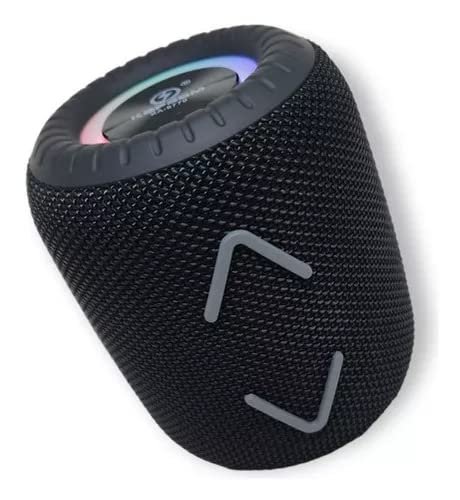
Image 3.1: Front view of the Kapbom KA-8779 Bluetooth Speaker. The speaker features a black mesh grille, a top panel with RGB LED lighting, and two grey chevron-shaped design elements on the front.
The Kapbom KA-8779 speaker is designed for portability and durability. It features a compact cylindrical shape with a robust mesh fabric exterior. The top panel houses the main controls and an RGB LED light ring. A sturdy strap is integrated for easy carrying.

Image 3.2: Back view of the Kapbom KA-8779 Bluetooth Speaker. This view shows the control panel with buttons for power, mode, volume/track control, and a microphone icon. A braided carrying strap is attached to the top.
Controls and Ports (Refer to Image 3.2):
- Power Button: Press and hold to turn on/off.
- Mode Button (M): Short press to switch between Bluetooth, FM Radio, AUX, and Micro SD modes.
- Volume Down / Previous Track (-): Short press for previous track, long press to decrease volume.
- Volume Up / Next Track (+): Short press for next track, long press to increase volume.
- Play/Pause / Call Button: Short press to play/pause music or answer/end calls. Long press to reject calls.
- Microphone: For hands-free calling.
- Charging Port: Standard USB charging port (under a protective flap, not visible in image).
- AUX Input: 3.5mm audio jack for wired connection (under a protective flap, not visible in image).
- Micro SD Card Slot: For playing music directly from a Micro SD card (under a protective flap, not visible in image).
- USB Port: For playing music directly from a USB drive (under a protective flap, not visible in image).
4. Setup
4.1 Charging the Speaker
- Connect the provided USB charging cable to the speaker's charging port.
- Connect the other end of the USB cable to a 5V 500mA USB power adapter (not included) or a computer's USB port.
- The LED indicator will illuminate during charging and turn off once fully charged.
- A full charge typically takes approximately 2-3 hours.
Note: For optimal battery life, fully charge the speaker before first use.
4.2 Powering On/Off
- To Power On: Press and hold the Power button for approximately 3 seconds until you hear an audible prompt and the LED lights illuminate.
- To Power Off: Press and hold the Power button for approximately 3 seconds until you hear an audible prompt and the LED lights turn off.
4.3 Bluetooth Pairing
- Ensure the speaker is powered on and in Bluetooth mode. If not, short press the Mode (M) button to switch to Bluetooth mode. The LED indicator will flash, indicating it's ready for pairing.
- Enable Bluetooth on your smartphone, tablet, or computer.
- Search for available Bluetooth devices. You should see "KA-8779" in the list.
- Select "KA-8779" to connect. Once connected, you will hear a confirmation sound, and the LED indicator will stop flashing and remain solid.
- The speaker will automatically reconnect to the last paired device when powered on, if the device is within range and Bluetooth is enabled.
5. Operating Instructions
5.1 Music Playback
- Play/Pause: Short press the Play/Pause button.
- Next Track: Short press the "+" button.
- Previous Track: Short press the "-" button.
- Volume Up: Long press the "+" button.
- Volume Down: Long press the "-" button.
5.2 Hands-Free Calling
- Answer Call: Short press the Play/Pause button when an incoming call rings.
- End Call: Short press the Play/Pause button during a call.
- Reject Call: Long press the Play/Pause button when an incoming call rings.
5.3 Mode Switching
Short press the Mode (M) button to cycle through available modes:
- Bluetooth Mode: For wireless audio streaming.
- FM Radio Mode:
- In FM mode, short press the Play/Pause button to automatically scan and save available radio stations.
- Use the "+" and "-" buttons to navigate between saved stations.
- AUX Mode: Connect an external audio device using a 3.5mm audio cable (not included). The speaker will automatically switch to AUX mode.
- Micro SD Card Mode: Insert a Micro SD card with MP3 audio files. The speaker will automatically switch to Micro SD mode and begin playback.
- USB Drive Mode: Insert a USB drive with MP3 audio files. The speaker will automatically switch to USB drive mode and begin playback.
5.4 True Wireless Stereo (TWS) Pairing
TWS technology allows you to pair two Kapbom KA-8779 speakers together for a stereo sound experience.
- Ensure both KA-8779 speakers are powered on and in Bluetooth mode, but not connected to any device.
- On one of the speakers (this will be the primary speaker), long press the Play/Pause button until you hear a pairing tone. The speakers will attempt to connect to each other.
- Once successfully paired, you will hear a confirmation sound. The LED indicator on the primary speaker will flash, and the secondary speaker's LED will remain solid.
- Now, connect your device to the primary speaker via Bluetooth as described in section 4.3. Audio will play in stereo through both speakers.
- To disconnect TWS, long press the Play/Pause button on either speaker.
5.5 RGB LED Lights
The speaker features dynamic RGB LED lights that synchronize with the music. There is no explicit control mentioned for these lights, implying they are always active when the speaker is on.
6. Maintenance
6.1 Water and Dust Resistance (IPX6)

Image 6.1: The Kapbom KA-8779 speaker shown on a wet surface, illustrating its IPX6 water resistance. This rating means it can withstand powerful water jets, but it is not designed for submersion.
The KA-8779 speaker has an IPX6 rating, meaning it is protected against powerful water jets from any direction and is dust-tight. This makes it suitable for use in rainy conditions or near water bodies. However, it is not designed to be submerged in water. Ensure all port covers are securely closed before exposing the speaker to water or dust.
6.2 Cleaning and Storage
- Clean the speaker with a soft, damp cloth. Do not use abrasive cleaners or solvents.
- Store the speaker in a cool, dry place away from direct sunlight and extreme temperatures.
- If not used for an extended period, charge the battery at least once every three months to maintain battery health.
7. Troubleshooting
| Problem | Possible Cause | Solution |
|---|---|---|
| Speaker does not turn on. | Low battery. | Charge the speaker fully. |
| Cannot pair via Bluetooth. | Speaker not in pairing mode; Bluetooth disabled on device; device too far. | Ensure speaker is in Bluetooth pairing mode (flashing LED). Enable Bluetooth on your device. Move device closer to speaker (within 10 meters). Forget "KA-8779" on your device and try pairing again. |
| No sound. | Volume too low; incorrect mode selected; audio source issue. | Increase speaker and device volume. Ensure correct mode (Bluetooth, AUX, SD, USB) is selected. Check audio source playback. |
| Poor FM radio reception. | Weak signal. | Move the speaker to an open area. The charging cable can sometimes act as an antenna; try connecting it. |
| TWS pairing fails. | Speakers already connected to a device; too far apart. | Ensure both speakers are disconnected from any Bluetooth device. Place speakers close to each other. Try resetting both speakers by powering them off and on. |
8. Specifications
| Feature | Detail |
|---|---|
| Model Name | KA-8779 |
| Speaker Type | Woofer |
| Connectivity Technology | Bluetooth 5.0 |
| Output Power | 6W |
| Frequency Response | 120Hz - 18KHz |
| Signal-to-Noise Ratio | ≥ 95 dB |
| Battery Capacity | 1200mAh |
| Battery Voltage | 3.7V |
| Playback Time | 4-6 hours (at medium volume) |
| Charging Input | 5V 500mA |
| Wireless Transmission Distance | Up to 10 meters (33 feet) |
| Dimensions (H x W x D) | 11.5 x 8.6 x 8.6 cm (4.5 x 3.4 x 3.4 inches) |
| Product Weight | 415g (0.91 lbs) |
| Waterproof Rating | IPX6 |
| Compatible Devices | Smartphones, Tablets, Notebooks |
| Included Components | USB Charging Cable |
9. Warranty and Support
The Kapbom KA-8779 speaker comes with a manufacturer's warranty of 1 month from the date of purchase. This warranty covers manufacturing defects. Please retain your proof of purchase for warranty claims.
The product is certified by Anatel: 20249-22-13887.
For technical support or warranty inquiries, please contact your retailer or the Kapbom customer service channel where you purchased the product.
Important: This warranty does not cover damage caused by misuse, accidents, unauthorized modifications, or normal wear and tear.