
VBChome 130
VBChome Desk 130x50 cm Black Matt Instruction Manual
Model: 130 | Brand: VBChome
1. Product Overview
The VBChome Modern Desk is designed for functionality and practicality, ideal for home offices, study rooms, or professional environments. Its compact design makes it suitable for spaces where a dedicated office room is not feasible, while still offering ample storage with its six integrated drawers.
This desk provides a comfortable and efficient workspace, ensuring that you can spend your time productively. Its robust construction and thoughtful design make it a key element for any workspace.
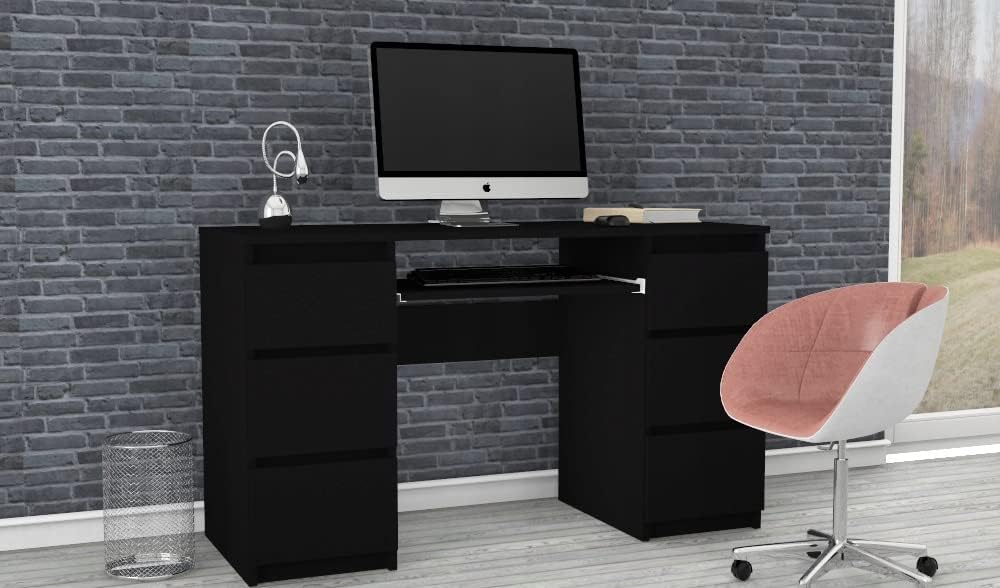
Image: The VBChome black matt desk integrated into a modern home office setup.
2. Setup and Assembly
Assembly of your VBChome desk is designed to be straightforward. Please ensure all components are present before beginning. A Phillips head screwdriver and a hammer are typically required for assembly.
2.1. Package Contents
Verify that all parts listed in the included assembly instructions are present. The package typically includes:
- Desk panels (top, side, back)
- Drawer components (fronts, sides, backs, bottoms)
- Drawer slides and hardware
- Keyboard tray and slides
- Assembly hardware (screws, dowels, cam locks)
2.2. Assembly Steps
Prepare the Workspace: Clear a spacious, clean area for assembly. Lay down a blanket or cardboard to protect the desk components and your floor.
Assemble Drawer Units: Begin by assembling the two side drawer units. Attach the drawer slides to the side panels as per the instructions. Construct each drawer by attaching the sides, back, and bottom to the drawer front. Install the drawer slides onto the assembled drawers.


Images: Example of a drawer component and a drawer slide for assembly.
Connect the Main Desk Frame: Attach the desk's top panel and the central support panel to the assembled drawer units using the provided hardware. Ensure all connections are secure and aligned.
Install Keyboard Tray: Mount the keyboard tray slides to the designated area under the desk top. Then, attach the keyboard tray to these slides.
Insert Drawers: Carefully slide the assembled drawers into their respective slots in the drawer units. Ensure they glide smoothly.

Image: Illustrates the process of inserting a drawer into its compartment.
Final Checks: Once assembled, gently move the desk to its desired location. Check all screws and fasteners to ensure they are tight. The desk should be stable and level.
3. Operating and Usage
The VBChome desk is designed for daily use in various settings. Its features are optimized for convenience and organization.
3.1. Drawers
The desk features six spacious drawers, three on each side, providing ample storage for documents, office supplies, and personal items. To open, gently pull the drawer handle. To close, push the drawer firmly until it is fully seated.
- Avoid overloading drawers to ensure smooth operation and prevent damage to the slides.
- Distribute weight evenly within drawers to maintain balance.
3.2. Keyboard Tray
A pull-out keyboard tray is integrated into the central section of the desk, offering a convenient space for your keyboard and mouse. Pull the tray out when in use and push it back in to save space when not needed.
- Do not place heavy objects on the keyboard tray.
- Ensure the tray is fully extended or retracted to prevent accidental damage.
4. Maintenance and Care
Proper care will extend the life and maintain the appearance of your VBChome desk.
- Cleaning: Wipe surfaces with a soft, damp cloth. For stubborn marks, use a mild, non-abrasive cleaner specifically designed for furniture. Dry immediately with a clean cloth.
- Avoid Harsh Chemicals: Do not use abrasive cleaners, solvents, or polishes containing silicone, as these can damage the finish.
- Protect from Moisture: Wipe up spills immediately. Avoid placing hot or wet items directly on the surface without protective coasters.
- Sunlight Exposure: Prolonged exposure to direct sunlight can cause fading or discoloration. Position the desk away from direct sunlight or use blinds/curtains.
- Regular Checks: Periodically check all screws and fasteners and tighten them if necessary to ensure the desk remains stable.
5. Troubleshooting
Here are solutions to common issues you might encounter:
5.1. Desk is Wobbly
- Check Fasteners: Ensure all assembly screws and cam locks are fully tightened.
- Level Surface: Make sure the desk is on a flat, level surface. If your floor is uneven, use furniture pads or shims under the desk feet to stabilize it.
5.2. Drawers Stick or Don't Close Smoothly
- Check Alignment: Verify that the drawer slides are correctly aligned and installed on both the drawer and the desk unit.
- Obstructions: Ensure there are no objects inside the drawer or along the slides preventing smooth movement.
- Lubrication: Apply a small amount of silicone spray or paraffin wax to the drawer slides to improve gliding.
- Overloading: Reduce the weight in the drawer if it is overloaded.
6. Specifications
| Feature | Detail |
|---|---|
| Brand | VBChome |
| Model Number | 130 |
| Color | Black Matt |
| Product Dimensions (L x W x H) | 130 x 50 x 76.5 cm |
| Item Weight | 30 Kilograms |
| Base Material | Wood |
| Surface Type | Glazed or lacquered with matte lacquer |
| Room Type | Office |
| Recommended Uses | Studying, Working, Home Office |
| Mounting Type | Freestanding |
| Furniture Leg Material | Wood |

Image: Detailed dimensions of the VBChome desk.
7. Warranty and Support
Your VBChome desk is manufactured to high-quality standards. For any questions, concerns, or support needs, please contact the seller directly.
- Return Policy: This product is eligible for a 30-day return policy. Please refer to your purchase platform for specific return instructions and conditions.
- Manufacturer Support: For assistance with assembly, missing parts, or product defects, please reach out to VBChome customer service via the contact information provided with your purchase or through the seller's page on the platform where you purchased the item.
Seller: VBChome