Introduction
The Philips OneBlade Face Hybrid Trimmer & Shaver is a versatile grooming tool designed for shaving, trimming, and edging any length of facial hair. Its unique technology is engineered to cut hair, not skin, providing a comfortable experience. This manual provides essential information on how to set up, operate, and maintain your OneBlade device for optimal performance and longevity.
Important Safety Information
Please read all safety instructions before using the appliance. Failure to follow these instructions may result in electric shock, fire, or serious injury.
- Always keep the blade away from your eyes.
- Avoid using the device near water sources when charging.
- Charge the device on a dry surface.
- Unplug the device after it is fully charged to prevent overcharging.
- Replace the blade when the replacement indicator (eject icon) appears to maintain optimal performance and hygiene.
- This appliance is not intended for use by persons (including children) with reduced physical, sensory or mental capabilities, or lack of experience and knowledge, unless they have been given supervision or instruction concerning use of the appliance by a person responsible for their safety.
Package Contents
Verify that all items are present in your package:
- 1 Philips OneBlade Handle
- 1 Original OneBlade Blade
- 3 Stubble Combs (1mm, 3mm, 5mm)
- 1 USB-A Charging Cord (power adapter not included)
- 1 Protective Cap

Image: The Philips OneBlade device, along with its original blade, three stubble combs (1mm, 3mm, 5mm), a USB-A charging cable, and a protective cap, are shown. The product packaging is also visible, highlighting the "Original blade" and "Designed to cut hair not skin" features.
Setup
Charging the Device
- Connect the USB-A charging cord to the charging port on the bottom of the OneBlade handle.
- Plug the USB-A end of the cord into a compatible USB power adapter (not included) or a USB port on a computer.
- Allow the device to charge for approximately 8 hours for a full charge. A full charge provides up to 30 minutes of constant shaving power.
- Ensure the device is completely dry before charging.
Attaching and Detaching the Blade and Combs
- Attaching the Blade: Align the blade with the handle and push it until it clicks into place.
- Detaching the Blade: Press the eject button on the back of the blade and slide it off the handle.
- Attaching Stubble Combs: Select the desired stubble comb (1mm, 3mm, or 5mm). Snap the comb onto the blade until it securely locks.
- Detaching Stubble Combs: Gently pull the comb away from the blade.
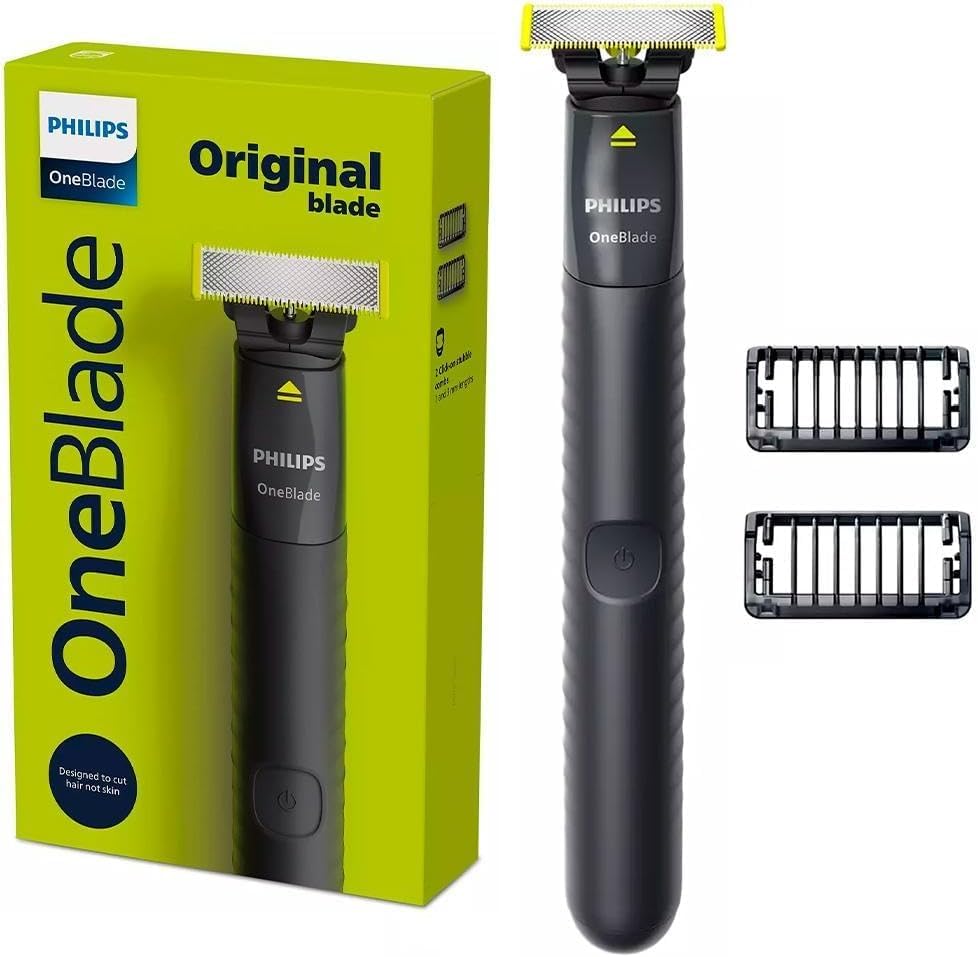
Image: The Philips OneBlade device is shown alongside its three detachable stubble combs (1mm, 3mm, 5mm). The combs are designed to snap onto the blade for precise trimming lengths.
Operating Instructions
The Philips OneBlade can be used for shaving, trimming, and edging. It is 100% waterproof, allowing for wet or dry use, even in the shower, without the need for shaving cream.
Shaving
- Ensure the blade is clean and properly attached.
- Press the power button to turn on the device.
- Move the OneBlade against the grain of your hair. The blade follows the contours of your face for a comfortable shave.
- Note that the OneBlade does not shave as close as a traditional blade, which helps prevent skin irritation.
Trimming
- Attach one of the three stubble combs (1mm, 3mm, or 5mm) to achieve your desired beard length.
- 1mm comb: For a 5 o'clock shadow look.
- 3mm comb: For a tight, short trim.
- 5mm comb: For a longer stubble.
- Turn on the device and move it against the direction of hair growth to trim evenly.
Edging
- Remove any attached stubble comb.
- Use the dual-sided blade to create precise edges and clean lines.
- Move the blade in any direction to shape your beard or create sharp lines.
Maintenance
Cleaning
- After each use, turn off the device.
- Rinse the blade and the device under running tap water. The OneBlade is 100% waterproof.
- Shake off excess water and allow the device to air dry completely before storing or recharging.
Blade Replacement
- The durable stainless steel blade is designed to last up to 4 months with typical use (based on 2 full shaves per week).
- When the replacement indicator (eject icon) appears on the blade, it signifies that the blade's performance may no longer be optimal.
- To replace the blade, press the eject button and slide off the old blade. Snap a new Philips OneBlade replacement blade into place.
Troubleshooting
If you encounter any issues with your Philips OneBlade, please refer to the following common solutions:
- Device not turning on: Ensure the device is fully charged. If the battery is depleted, charge it for 8 hours.
- Poor shaving performance: The blade may need replacement. Check for the eject icon indicator. Ensure the blade is clean and free of hair debris.
- Irritation: Ensure you are using the device correctly, moving it against the grain. If irritation persists, ensure the blade is not dull and consider replacing it.
- For further assistance, please contact Philips customer support.
Specifications
| Model Name | Original Face |
| Item Model Number | QP1424/10 |
| Brand | PHILIPS |
| Power Source | Battery Powered |
| Battery Type | 1 12V battery required (rechargeable) |
| Special Features | Cordless, Portable, Rechargeable, 100% Waterproof |
| Recommended Uses | Face, Body |
| Product Dimensions | 4.33 x 4.33 x 7.09 inches; 5.64 ounces |
Warranty and Support
For warranty information and customer support, please refer to the documentation included with your purchase or visit the official Philips website. Keep your proof of purchase for any warranty claims.


