
1. Introduction
Thank you for choosing the GRAND PRO GP-AC90D Air Cooler. This manual provides essential information for the safe and efficient operation, maintenance, and troubleshooting of your new appliance. Please read it thoroughly before use and retain it for future reference.
2. Safety Instructions
- Always ensure the power supply matches the voltage specified on the rating label.
- Do not immerse the appliance, cord, or plug in water or other liquids.
- Unplug the air cooler from the power outlet before cleaning, filling, or performing any maintenance.
- Keep the appliance out of reach of children and pets.
- Place the air cooler on a stable, level surface to prevent tipping and water spillage.
- Do not block the air inlet or outlet grilles.
- Avoid using the appliance near flammable materials or in excessively humid environments.
- If the power cord is damaged, it must be replaced by the manufacturer, its service agent, or similarly qualified persons to avoid a hazard.
3. Package Contents
Please check the package contents upon unpacking:
- GRAND PRO GP-AC90D Air Cooler Unit
- Remote Control
- User Manual (this document)
4. Product Overview
Familiarize yourself with the components of your air cooler.

Figure 4.1: The complete GRAND PRO GP-AC90D Air Cooler unit. It features a grey and black design, with a large front grille for air intake/output, a top-mounted control panel, and four wheels for mobility. The water level indicator is visible at the bottom.
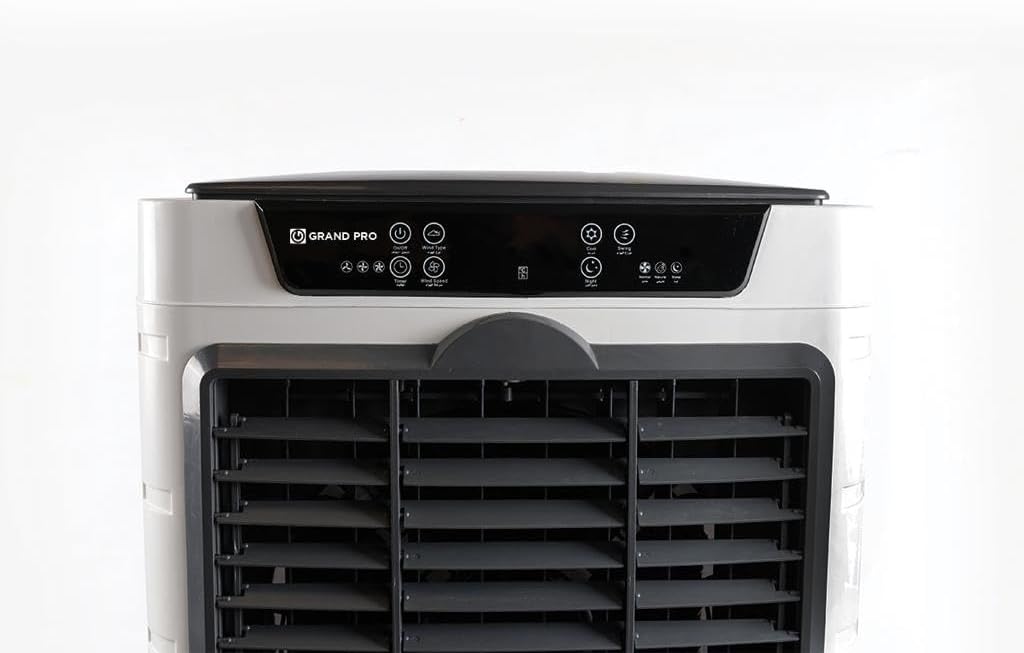
Figure 4.2: A detailed view of the digital control panel located on the top of the GRAND PRO GP-AC90D Air Cooler. It shows various touch-sensitive buttons and indicators for power, speed, mode, timer, and oscillation functions, along with the 'GRAND PRO' logo.
5. Setup
- Unpacking: Carefully remove the air cooler from its packaging. Retain packaging materials for future storage or transport.
- Placement: Position the air cooler on a firm, level surface. Ensure there is adequate space around the unit for proper airflow (at least 20 cm from walls or furniture). The wheels allow for easy movement.
- Filling the Water Tank: The unit has two water tanks (upper and lower) with a water level sensor. Open the water inlet cover (usually on top or side). Fill the tank with clean, cool water. Do not exceed the 'MAX' water level indicator. For enhanced cooling, you may add ice packs or ice cubes to the upper tank.
- Power Connection: Plug the power cord into a grounded electrical outlet.
6. Operating Instructions
Your GP-AC90D Air Cooler can be operated using the digital control panel on the unit or the included remote control.
6.1. Control Panel and Remote Control Functions
The buttons on the control panel and remote control typically include:
- Power (⏻): Turns the unit ON or OFF.
- Speed (⚡): Adjusts fan speed (Low, Medium, High). Press repeatedly to cycle through speeds.
- Mode (☀): Selects operating mode (e.g., Normal, Natural, Sleep).
- Cool/Humidify (💧): Activates or deactivates the water pump for evaporative cooling.
- Swing/Oscillation (↻): Activates or deactivates the automatic horizontal oscillation of the louvers for wider air distribution.
- Timer (⏱): Sets the operating time (e.g., 1-12 hours) after which the unit will automatically turn off.
- Carbon Filter: The unit is equipped with a carbon filter for improved air quality.
6.2. Initial Operation
- Press the Power button to turn on the air cooler.
- Press the Speed button to select your desired fan speed (Low, Medium, or High).
- To activate the cooling function, press the Cool/Humidify button. Ensure the water tank is filled.
- Press the Swing button for automatic louver oscillation.
- Use the Timer button to set an automatic shut-off time if desired.
7. Maintenance
Regular maintenance ensures optimal performance and longevity of your air cooler.
7.1. Cleaning the Exterior
- Always unplug the unit before cleaning.
- Wipe the exterior surfaces with a soft, damp cloth. Do not use abrasive cleaners or solvents.
7.2. Cleaning Air Filters
- The GP-AC90D is equipped with two air filters, including a carbon filter.
- Regularly check and clean the air filters (typically located at the back or sides).
- Remove the filters and rinse them under running water. Allow them to dry completely before reinserting.
- The carbon filter may require replacement periodically depending on usage and air quality. Refer to the manufacturer's recommendations for replacement intervals.
7.3. Cleaning the Water Tank
- Drain any remaining water from the tank, especially if the unit will not be used for an extended period.
- Clean the water tanks (upper and lower) with a mild detergent and water. Rinse thoroughly to remove any residue.
- Ensure all parts are dry before reassembling.
7.4. Storage
- Before storing, ensure the unit is clean and completely dry.
- Store the air cooler in a cool, dry place, preferably in its original packaging.
8. Troubleshooting
If you encounter issues with your air cooler, refer to the following common problems and solutions:
| Problem | Possible Cause | Solution |
|---|---|---|
| Unit does not turn on | No power supply; Power cord not plugged in; Power button not pressed. | Check power outlet; Ensure power cord is securely plugged in; Press the Power button. |
| Weak airflow | Air filters are dirty; Air inlet/outlet blocked. | Clean or replace air filters; Ensure no obstructions around the unit. |
| No cooling effect | Water tank is empty; Cool/Humidify function not activated. | Fill the water tank; Press the Cool/Humidify button. |
| Unusual noise | Unit not on a level surface; Foreign object in fan. | Place unit on a stable, level surface; Unplug and check for obstructions (if safe to do so). |
| Water leakage | Water tank overfilled; Unit tilted. | Do not exceed MAX water level; Ensure unit is on a level surface. |
9. Specifications
| Feature | Specification |
|---|---|
| Brand | GRAND PRO |
| Model | GP-AC90D |
| Tank Capacity | 90 Liters |
| Number of Speeds | 3 |
| Coverage Area | 100 m² |
| Filters | 2 Air Filters (including Carbon Filter) |
| Control Type | Digital, Remote Control |
| Wattage | 175 watts |
| Product Dimensions (L x W x H) | 63.5 x 42 x 107 cm |
| Item Weight | 17 Kilograms |
| Special Features | Adjustable Speed, Water Level Sensor, Wheels for Easy Movement |
10. Warranty and Support
Your GRAND PRO GP-AC90D Air Cooler comes with a manufacturer's warranty. Please refer to the warranty card included with your purchase for specific terms and conditions. For technical support, service, or spare parts, please contact your local GRAND PRO authorized service center or retailer. Do not attempt to repair the unit yourself, as this may void the warranty and pose a safety risk.