
Xiaomi Xiaomi Robot Vacuum X10
Xiaomi Robot Vacuum X10 User Manual
Model: Xiaomi Robot Vacuum X10 | Brand: Xiaomi
Introduction
This user manual provides essential information for the safe and efficient operation, maintenance, and troubleshooting of your Xiaomi Robot Vacuum X10. Please read this manual thoroughly before using the product and retain it for future reference.
The Xiaomi Robot Vacuum X10 is a versatile 2-in-1 robotic vacuum cleaner and mop, designed to provide powerful suction and efficient cleaning for various floor surfaces. It features a strong 4000Pa suction power, a 5200mAh battery capacity, and can be controlled remotely via the Xiaomi Home app.
Safety Information
Always adhere to the following safety precautions to prevent injury or damage to the device:
- Do not allow children to operate the robot vacuum.
- Ensure the power adapter is compatible with your local voltage.
- Keep hair, loose clothing, fingers, and all parts of the body away from openings and moving parts.
- Do not use the robot vacuum to pick up large objects, sharp objects, or liquids.
- Avoid exposing the device to water or moisture.
- Turn off the device and unplug it before cleaning or performing maintenance.
Package Contents
Verify that all items are present in the package:
- Xiaomi Robot Vacuum X10 Unit
- Auto-Emptying Dock Station
- Power Cable
- Side Brush
- Mop Pad (pre-installed or separate)
- Dust Bag (pre-installed or separate)
- Cleaning Tool
- User Manual (this document)
Product Overview

Figure 1: Xiaomi Robot Vacuum X10 with its auto-emptying dock station. The robot vacuum is white and circular, positioned in front of a tall, white rectangular dock.

Figure 2: The Xiaomi Robot Vacuum X10 (left) and its auto-emptying dock station (right) shown separately. This illustrates the compact design of both components.

Figure 3: Top-down view of the Xiaomi Robot Vacuum X10, highlighting its clean white surface and the central LiDAR sensor dome. Two control buttons are visible near the front.

Figure 4: The Xiaomi Robot Vacuum X10 shown alongside a smartphone displaying the Xiaomi Home app interface with a floor map, and a white mop pad, illustrating its smart features and mopping capability.
Setup
1. Unpacking and Placement
- Remove all packaging materials from the robot vacuum and the auto-emptying dock.
- Place the auto-emptying dock against a wall in an open area, ensuring there are no obstacles within 0.5 meters to either side and 1.5 meters in front.
- Connect the power cable to the dock and plug it into a power outlet.
2. Initial Charging
Place the robot vacuum onto the charging contacts of the auto-emptying dock. Ensure the robot is properly aligned. The indicator light on the robot will illuminate, indicating it is charging. Fully charge the robot before first use (approximately 6 hours).
3. App Connection
- Download the Xiaomi Home app from your device's app store.
- Open the app and create an account or log in.
- Tap the "+" icon to add a new device and select "Xiaomi Robot Vacuum X10".
- Follow the on-screen instructions to connect the robot vacuum to your Wi-Fi network.
Operating Instructions
1. Starting a Cleaning Cycle
- Via Robot: Press the power button on the robot once to start a cleaning cycle.
- Via App: Open the Xiaomi Home app, select your robot vacuum, and tap "Clean" to start.

Figure 5: The Xiaomi Robot Vacuum X10 actively cleaning a hard floor, illustrating its powerful suction picking up dust and debris. The robot is shown moving away from its dock.
2. Mopping Function
- Fill the water tank with clean water.
- Attach the mop pad to the mop module and slide it into the robot.
- Start a cleaning cycle. The robot will automatically switch to mopping mode.
3. Auto-Emptying
The auto-emptying dock will automatically empty the robot's dustbin after each cleaning cycle. Ensure the dust bag in the dock is properly installed.
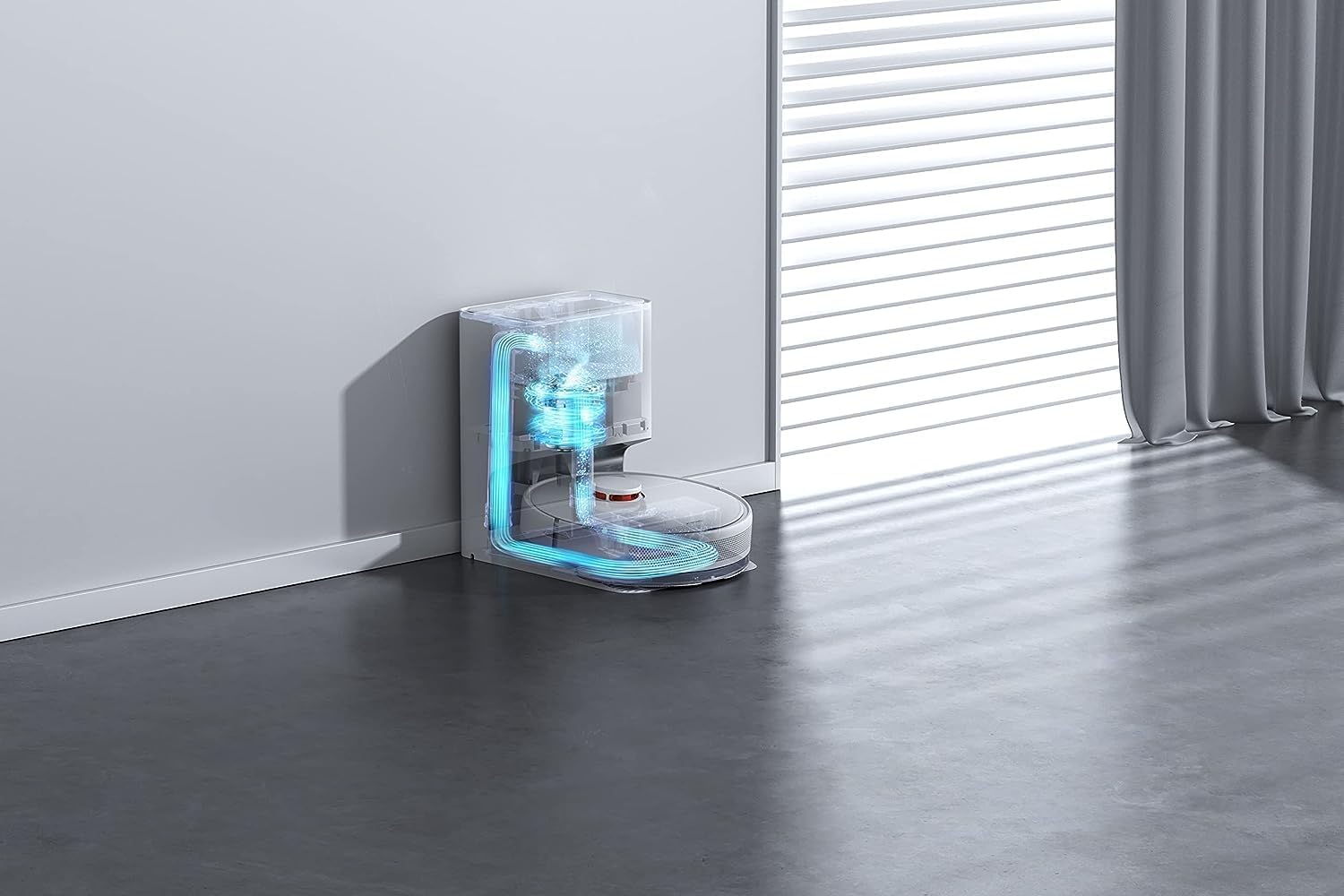
Figure 6: An internal diagram illustrating the dust collection process within the auto-emptying dock. Arrows indicate airflow and debris transfer from the robot into the dock's dust bag.
4. Advanced Features (via App)
- Map Management: View and edit cleaning maps, set virtual walls, and no-go zones.
- Scheduled Cleaning: Set specific times for the robot to clean automatically.
- Spot Cleaning: Direct the robot to clean a specific area.
- Suction Power Adjustment: Adjust the suction level for different cleaning needs.

Figure 7: The underside of the Xiaomi Robot Vacuum X10, showing the main roller brush, side brush, and the attached mop pad, indicating its dual cleaning capabilities.
Maintenance
Regular maintenance ensures optimal performance and extends the lifespan of your robot vacuum.
1. Dustbin and Filter
- Empty the robot's internal dustbin after each use, even with auto-emptying, to check for blockages.
- Clean the filter weekly using the cleaning tool or by tapping it gently to remove dust. Replace the filter every 3-6 months.
2. Main Brush and Side Brush
- Remove the main brush cover and clean the main brush weekly, removing any tangled hair or debris.
- Clean the side brush monthly. If damaged, replace it.
3. Mop Pad and Water Tank
- Wash the mop pad after each use. Allow it to air dry completely before reattaching.
- Empty and rinse the water tank after each mopping session to prevent mold or odor.
4. Sensors and Charging Contacts
- Wipe the cliff sensors, wall sensors, and charging contacts on both the robot and the dock with a clean, dry cloth monthly.

Figure 8: The Xiaomi Robot Vacuum X10 demonstrating its navigation capabilities, approaching a raised surface or step, indicating its ability to detect and avoid obstacles or drop-offs.
Troubleshooting
| Problem | Possible Cause | Solution |
|---|---|---|
| Robot does not turn on. | Low battery; Power button not pressed long enough. | Charge the robot; Press and hold the power button for 3 seconds. |
| Robot cannot charge. | Charging contacts are dirty; Dock not powered. | Clean charging contacts; Ensure dock is plugged in and powered. |
| Suction power is weak. | Dustbin full; Filter clogged; Main brush tangled. | Empty dustbin; Clean/replace filter; Clean main brush. |
| Robot gets stuck frequently. | Obstacles in path; Sensors dirty. | Clear obstacles; Clean sensors. |
| Mopping function not working. | Water tank empty; Mop pad not attached correctly. | Fill water tank; Reattach mop pad. |

Figure 9: The Xiaomi Robot Vacuum X10 utilizing its laser navigation system to map a room, depicted by blue laser lines extending from the robot, ensuring efficient and systematic cleaning.
Specifications
| Feature | Specification |
|---|---|
| Model Name | Xiaomi Robot Vacuum X10 |
| Brand | Xiaomi |
| Color | White |
| Suction Power | 4000Pa |
| Battery Capacity | 5200mAh |
| Operating Time | Up to 180 minutes |
| Dustbin Capacity | 2.5 Liters (dock) |
| Voltage | 20 Volts |
| Dimensions (Robot) | 35.3 x 35.3 x 9.9 cm (L x W x H) |
| Weight (Item) | 7.4 Kilograms |
| Compatible Devices | Smartphones (Xiaomi Home App) |
| Special Feature | Portable, Auto-Emptying Dock |
| Filter Type | Cartridge |
Warranty and Support
For warranty information and technical support, please refer to the official Xiaomi website or contact their customer service. Keep your purchase receipt as proof of purchase.
You can visit the official Xiaomi store for more information: Xiaomi Official Store
Related Documents - Xiaomi Robot Vacuum X10
 |
Xiaomi Robot Vacuum X10+ Main Brush Replacement Guide Concise instructions for replacing the main brush on the Xiaomi Robot Vacuum X10+, including product details, manufacturer information, and warranty terms. |
 |
Xiaomi Smart Doorbell 3 Quick Guide - Features and Specifications Comprehensive quick guide for the Xiaomi Smart Doorbell 3, detailing its 2K camera, AI person detection, 5200mAh battery, 72-hour free cloud storage, and smart intercom features for enhanced home security. |
 |
Xiaomi Robot Vacuum X10+ Brush Replacement Guide A concise guide on how to replace the brush for the Xiaomi Robot Vacuum X10+. Includes step-by-step instructions and important notes for optimal cleaning. |
 |
Xiaomi Robot Vacuum X10+ Brush Cover Replacement Guide | Official Instructions Detailed instructions for replacing the brush cover on your Xiaomi Robot Vacuum X10+. Includes warranty information, manufacturer details, and recycling guidance. |
 |
Xiaomi Robot Vacuum X10+ Mop Pad Replacement Instructions Learn how to replace the mop pads on your Xiaomi Robot Vacuum X10+ for optimal cleaning performance. Includes warranty and manufacturer information. |
 |
Xiaomi Robot Vacuum X10+ User Manual Comprehensive user manual for the Xiaomi Robot Vacuum X10+. Includes setup, safety information, maintenance, and troubleshooting instructions for your robot vacuum and omni station. |
Ask a question about this manual
Ask about setup, troubleshooting, compatibility, parts, safety, or missing instructions. Manuals+ will review the question and use this page’s manual context to help answer it.