
MILOUZ IDW19
MILOUZ IDW19 Smart Watch User Manual
Model: IDW19
1. Introduction
Welcome to the user manual for your MILOUZ IDW19 Smart Watch. This device is designed to be a comprehensive fitness and communication companion, offering advanced features such as Bluetooth calling, Alexa voice assistance, extensive health monitoring, and a wide array of sports modes. Please read this manual thoroughly to ensure proper use and optimal performance of your smartwatch.

Image: The MILOUZ IDW19 Smart Watch, showcasing its main display with health metrics and time.
2. Safety Information
- Water Resistance: The watch is IP68 waterproof, suitable for swimming and handwashing. Do not wear it in hot showers, saunas, or environments with hot water or steam, as this can damage the device.
- Charging: Use only the provided charging cable. Ensure the charging contacts are dry and clean before charging to prevent corrosion or short circuits.
- Medical Disclaimer: This device is not a medical device. Health monitoring data (heart rate, sleep, etc.) is for reference only and should not be used for medical diagnosis or treatment. Consult a healthcare professional for any health concerns.
- Battery: Do not attempt to replace the battery yourself. Improper battery replacement can lead to explosion or injury. Dispose of batteries according to local regulations.
- Operating Temperature: Avoid exposing the watch to extreme temperatures (very hot or very cold) as this can affect battery life and performance.
3. Setup Guide
3.1 Charging the Smart Watch
Before first use, fully charge your MILOUZ IDW19 Smart Watch. The watch comes with a 300mAh battery and takes approximately 2 hours to fully charge.
- Connect the magnetic charging cable to the charging contacts on the back of the watch.
- Connect the USB end of the cable to a standard USB power adapter (5V/1A recommended) or a computer USB port.
- The watch display will show the charging progress.

Image: The MILOUZ IDW19 Smart Watch being charged via its magnetic charging cable.
3.2 App Installation and Pairing
The MILOUZ IDW19 Smart Watch requires the "Veryfit" app for full functionality. It is compatible with Android 6.0 or above and iOS 9.0 or above.
- Download the Veryfit App: Search for "Veryfit" in your smartphone's app store (Google Play Store for Android or Apple App Store for iOS) and download it.
- Enable Bluetooth: Ensure Bluetooth is enabled on your smartphone.
- Pairing for Data Sync:
- Open the Veryfit app and follow the on-screen instructions to create an account or log in.
- Navigate to the "Device" section within the app and select "Add Device" or "Bind Device".
- The app will search for available devices. Select "IDW19" from the list to connect.
- Confirm the pairing request on both your phone and the watch if prompted.
- Pairing for Bluetooth Calls: After the initial connection for data, you need to establish a second Bluetooth connection for call functionality.
- Go to your smartphone's Bluetooth settings.
- Look for "IDW19 BT" (or similar, e.g., "IDW19-BT") in the list of available devices.
- Tap on "IDW19 BT" to connect. Once connected, your watch will be able to make and receive calls.

Image: Step-by-step guide for connecting the MILOUZ IDW19 Smart Watch to your smartphone via the Veryfit app and for Bluetooth calls.
4. Operating Instructions
4.1 Basic Navigation
- Touchscreen: Swipe left/right, up/down to navigate through menus and features. Tap to select.
- Side Button: Short press to return to the previous screen or wake the display. Long press for specific functions (e.g., accessing Alexa).
- Wake Screen: The screen can be woken by raising your wrist or pressing the side button.
4.2 Communication Features
Your MILOUZ IDW19 Smart Watch allows for convenient communication directly from your wrist.
- Bluetooth Calls: With the "IDW19 BT" connected, you can answer incoming calls, make calls from your contact list, or dial numbers directly using the watch's built-in microphone and speaker.
- Message Notifications: Receive notifications from various apps (Facebook, Calendar, Messenger, Instagram, Gmail, WhatsApp, Twitter, Snapchat, etc.) directly on your watch. You can read messages but cannot reply from the watch.

Image: The MILOUZ IDW19 Smart Watch demonstrating its Bluetooth call features, including call history and dial pad.

Image: Overview of Bluetooth call, message reminder, and Alexa Assistant features on the MILOUZ IDW19 Smart Watch.
4.3 Alexa Voice Assistant
Your smartwatch features built-in Alexa functionality, allowing you to use voice commands for various tasks.
- Activating Alexa: Long press the side button or navigate to the Alexa icon in the app menu.
- Commands: You can ask Alexa to play music, read news, check the weather, set alarms, or control compatible smart home devices.
4.4 Health Monitoring
The MILOUZ IDW19 Smart Watch provides comprehensive health tracking features.
- Heart Rate Monitor: Continuously monitors your heart rate throughout the day. View real-time data on the watch or detailed trends in the Veryfit app.
- Sleep Monitor: Tracks your sleep patterns and provides analysis of sleep quality.
- Blood Oxygen (SpO2) Monitor: Measures your blood oxygen saturation levels.
- Stress Monitor: Provides insights into your stress levels.
- Female Menstrual Cycle Reminder: Helps track and predict menstrual cycles.
- Breathing Training: Guided breathing exercises to help you relax.
- Reminders: Includes sedentary reminders, handwashing reminders, and water drinking reminders to promote healthy habits.

Image: Detailed view of the MILOUZ IDW19 Smart Watch's health monitoring capabilities, including sleep, heart rate, blood oxygen, and female menstruation tracking.
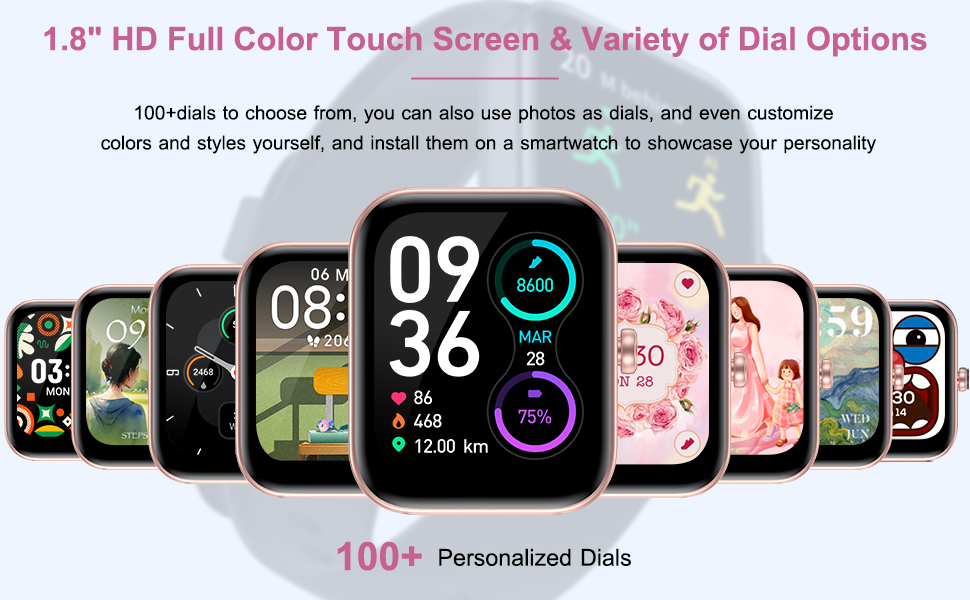
Image: The MILOUZ Smart Watch as "Your Health Keeper", illustrating its various health monitoring functions.
4.5 Sports Modes and Activity Tracking
The watch supports over 100 sports modes to track your workouts effectively.
- Tracking Metrics: Records steps, distance, calories burned, activity time, and heart rate during exercise.
- Available Modes: Includes walking, running, cycling, elliptical, yoga, pilates, swimming, dancing, rowing machine, and many more.
- GPS: Utilizes GPS via your connected smartphone for outdoor activity tracking.

Image: The MILOUZ IDW19 Smart Watch supporting 100 sports modes for activity tracking.
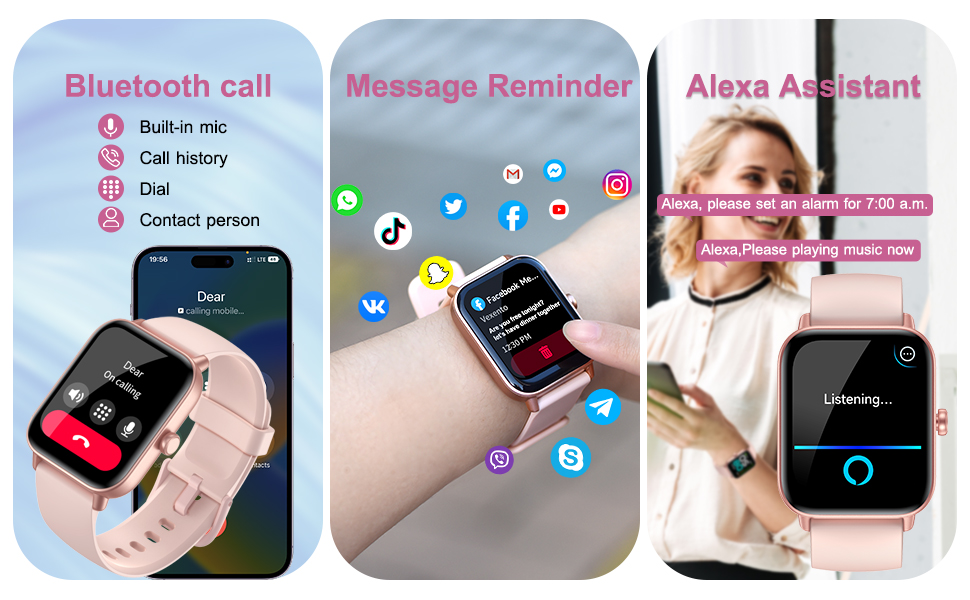
Image: The MILOUZ Smart Watch's 100 Sports Mode Activity Tracking feature, showing data recording and athletic performance analysis.
4.6 Customization and Other Features
- DIY Dial/Watch Faces: Choose from over 100 watch faces or customize your own with photos and preferred colors/styles via the Veryfit app.
- Music Control: Control music playback on your smartphone (play, pause, skip tracks, adjust volume).
- Camera Control: Use your watch as a remote shutter for your smartphone camera.
- Weather: View current weather conditions and forecasts.
- Find Your Phone: Locate your misplaced smartphone by making it ring.
- Alarm Clock & Stopwatch: Set alarms and use the stopwatch function.
- Torch: Utilize the watch screen as a small flashlight.

Image: The MILOUZ IDW19 Smart Watch showcasing its multifunctional capabilities and customizable dial options.

Image: The MILOUZ Smart Watch's 1.8" HD Full Color Touch Screen and Variety of Dial Options, highlighting over 100 personalized dials.
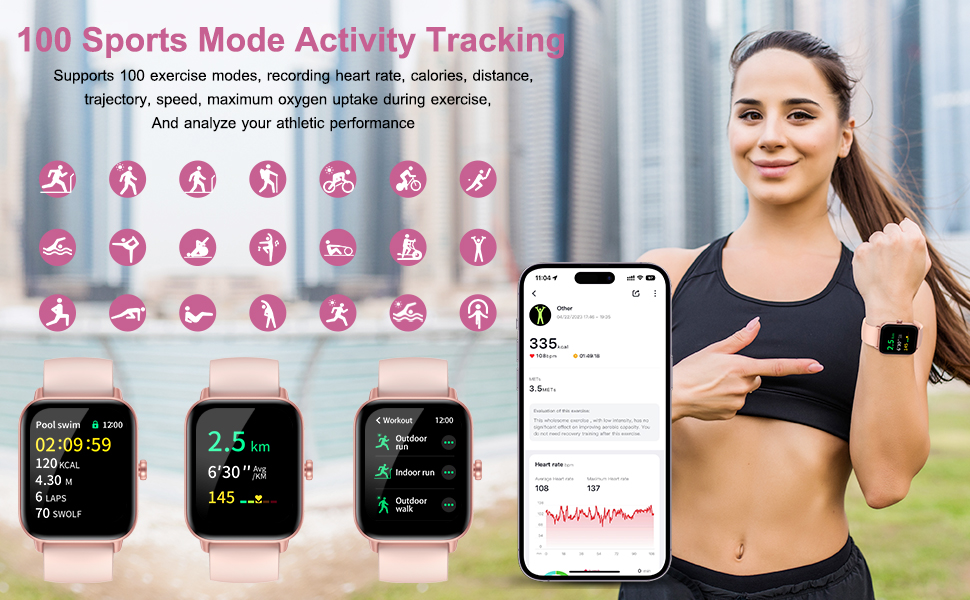
Image: A visual guide to additional features of the MILOUZ Smart Watch, including camera control, weather, and various reminders.
5. Maintenance
- Cleaning: Wipe the watch and strap regularly with a soft, damp cloth. Avoid using harsh chemicals or abrasive materials.
- Water Exposure: While IP68 waterproof, avoid prolonged submersion in water, especially saltwater. Always dry the watch thoroughly after exposure to water. Do not press buttons underwater.
- Charging Contacts: Keep the charging contacts on the back of the watch clean and free of debris to ensure efficient charging.
- Storage: Store the watch in a cool, dry place when not in use. If storing for an extended period, charge the battery to about 50% to preserve its lifespan.
6. Troubleshooting
| Problem | Possible Cause / Solution |
|---|---|
| Watch not turning on or charging. |
|
| Bluetooth disconnection or unable to pair. |
|
| Inaccurate health data (Heart Rate, Sleep, Steps). |
|
| Notifications not appearing. |
|
| Alexa not responding. |
|
7. Specifications
| Feature | Detail |
|---|---|
| Brand | MILOUZ |
| Model | IDW19 |
| Screen Size | 1.8 Inches |
| Display Type | Digital, Full-Color Touch Screen |
| Resolution | 240 x 240 |
| Operating System | Android/iOS Compatible (Android 6.0+, iOS 9.0+) |
| Connectivity | Bluetooth |
| Battery Capacity | 300 mAh (Lithium Polymer) |
| Charging Time | Approx. 2 Hours |
| Working Time | 7-10 Days (typical usage) |
| Standby Time | Up to 30 Days |
| Water Resistance | IP68 |
| Special Features | Bluetooth Call, Alexa Built-in, Heart Rate Monitor, Sleep Monitor, Activity Tracker, 100 Sports Modes, DIY Dial, Message Notifications, SpO2, Stress Monitor, Female Cycle Tracking, Breathing Training, Reminders (Sedentary, Handwash, Drink), Music/Camera Control, Weather, Find Phone, Alarm, Stopwatch, Torch. |
| Dimensions | 25.7 x 3.72 x 1.15 cm |
| Weight | 90 g |
8. Warranty and Support
MILOUZ is committed to providing high-quality products and customer satisfaction. For any questions, concerns, or technical support regarding your MILOUZ IDW19 Smart Watch, please refer to the following:
- Customer Service: Please contact the seller or the MILOUZ customer support channel through the platform where you purchased the product.
- Online Resources: Visit the official MILOUZ brand store on Amazon for additional product information and FAQs: MILOUZ Store.
- Warranty: Specific warranty terms and conditions may vary by region and retailer. Please retain your proof of purchase for warranty claims.
Ask a question about this manual
Ask about setup, troubleshooting, compatibility, parts, safety, or missing instructions. Manuals+ will review the question and use this page’s manual context to help answer it.