
Introduction
Thank you for choosing the KJK LCK226 Trail Camera. This manual provides detailed instructions for setting up, operating, and maintaining your camera to ensure optimal performance. The LCK226 is designed for capturing high-quality images and videos of wildlife, for hunting, home security, or property surveillance. It features 24MP photo resolution, 1080P HD video recording, a rapid 0.2-second trigger speed, and IP66 waterproof rating for reliable outdoor use.
Product Overview
Package Contents
Verify that all items are present in your package:
- KJK LCK226 Trail Camera
- User Manual
- Threaded Tripod Mount
- USB Cable
- Installation Strap
- Screw Accessories (for mounting)
- 8x AA Batteries
- 32GB TF Card (Micro SD Card)

Image: Included components of the KJK LCK226 Trail Camera.
Camera Structure
Familiarize yourself with the camera's external features and ports.

Image: Internal view of the KJK LCK226 Trail Camera showing ports and controls. Ports include Micro SD Card slot (up to 128GB), AV port, USB port, DC 6V 1.5A port, and a 1/4"-20 Tripod Thread.
Setup Guide
1. Battery Installation
- Open the camera housing latches and open the back cover.
- Insert 8x AA alkaline batteries into the battery compartment, ensuring correct polarity (+/-).
- Close the back cover and secure the latches.
2. Micro SD Card Insertion
- With the camera powered off, locate the Micro SD card slot.
- Insert the provided 32GB Micro SD card (or another compatible card up to 128GB, Class 10 or higher) into the slot until it clicks into place.
- To remove, push the card in again until it springs out.
3. Mounting the Camera
The camera can be mounted using the included strap or tripod mount.
- Strap Mounting: Thread the installation strap through the slots on the back of the camera and secure it around a tree or pole.
- Tripod Mounting: Attach the threaded tripod mount to the 1/4"-20 tripod thread at the bottom of the camera. Use the screw accessories to secure the mount to a desired surface.
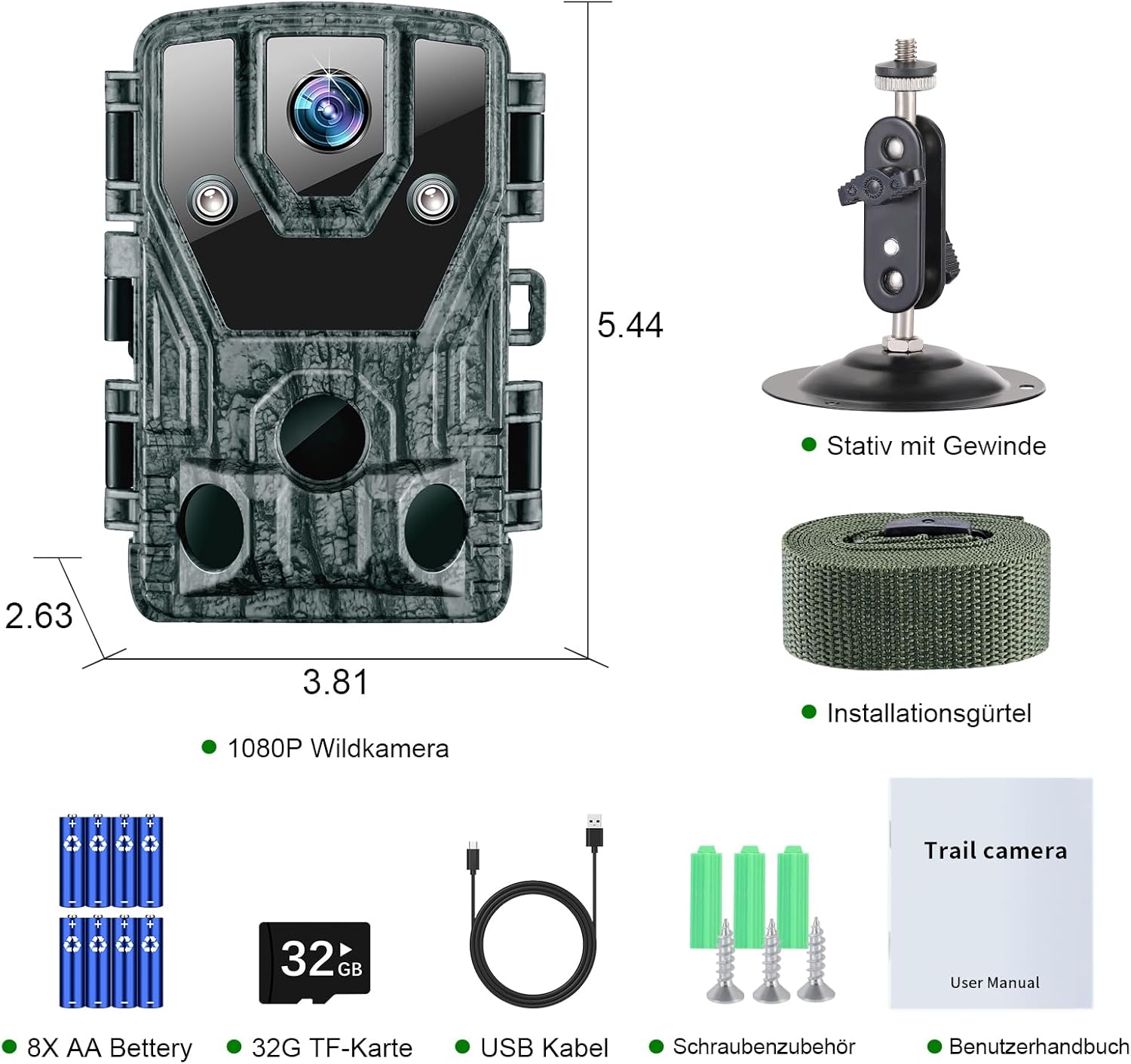
Image: KJK LCK226 Trail Camera showing dimensions and mounting options.
4. Initial Power-On and Basic Settings
- Slide the power switch to the "SETUP" position. The internal screen will turn on.
- Use the navigation buttons (UP, DOWN, LEFT, RIGHT, OK, MENU) to access the settings menu.
- Set the current date and time. This is crucial for accurate timestamps on your recordings.
- Format the Micro SD card: Navigate to the "Format SD Card" option in the menu and confirm. This prepares the card for use and ensures compatibility.
- Adjust other basic settings as desired (e.g., language, photo/video mode).
- Once settings are configured, slide the power switch to the "ON" position to activate the camera for recording. The screen will turn off, and the camera will enter monitoring mode.
Operating Instructions
Operating Modes
The KJK LCK226 Trail Camera has three main operating modes:
- OFF: Camera is powered off.
- SETUP: Allows access to the menu for settings configuration and viewing captured media.
- ON: Camera is active and will record photos or videos based on motion detection and configured settings.
Key Features and Settings
Photo and Video Resolution
The camera supports high-resolution imaging:
- Photo Resolution: Up to 24 Megapixels for clear still images. Options typically include 24MP, 16MP, 8MP.
- Video Resolution: 1080P HD for detailed video recordings.

Image: Visual representation of 24MP photo and 1080P video resolution capabilities.
Trigger Speed
The camera boasts an ultra-fast 0.2-second trigger speed, ensuring that fast-moving subjects are captured effectively.

Image: Illustrates the 0.2-second trigger speed for capturing dynamic events.
Night Vision
Equipped with non-illuminated infrared LEDs, the camera captures clear black-and-white images and videos in low-light conditions without disturbing wildlife.

Image: Demonstrates the camera's advanced night vision capabilities, showing clear black and white images in darkness.
Wide Angle Field of View
The camera features a 120-degree wide-angle lens, allowing for a broader surveillance area.

Image: Depicts the 120-degree wide-angle field of view, capturing a large area.
Menu Navigation
In "SETUP" mode, use the following buttons to navigate the menu:
- MENU: Enters/exits the main menu.
- UP/DOWN: Navigates through menu options.
- LEFT/RIGHT: Changes values for selected options.
- OK: Confirms selection or enters sub-menus.
- SHOT: Manually takes a photo or starts recording a video (depending on current mode).
- REPLAY: Enters playback mode to view captured media.
Viewing Captured Media
To view photos and videos directly on the camera:
- Switch the camera to "SETUP" mode.
- Press the "REPLAY" button.
- Use the UP/DOWN buttons to scroll through files.
- Press "OK" to play a video or view a photo.
- Press "REPLAY" again to exit playback mode.
Alternatively, connect the camera to a computer using the USB cable or insert the Micro SD card into a card reader to view files on a larger screen.
Maintenance
Cleaning
- Gently wipe the camera lens and PIR sensors with a soft, lint-free cloth to remove dust or smudges.
- Clean the camera housing with a damp cloth. Avoid harsh chemicals or abrasive materials.
Battery Management
- Replace all batteries simultaneously with new ones when the low battery indicator appears. Do not mix old and new batteries or different battery types.
- For extended periods of inactivity, remove the batteries to prevent leakage.
- The camera supports external 6V 1.5A power input, and can be used with a compatible solar panel for continuous power.

Image: The camera supports external power, including solar panels.
Micro SD Card Management
- Regularly format the Micro SD card (at least once a month) to maintain optimal performance and prevent data corruption.
- Ensure the card is properly inserted and removed to avoid damage.
Waterproof Rating (IP66)
The camera is rated IP66 waterproof, protecting it from dust and strong jets of water. This makes it suitable for outdoor use in various weather conditions, including rain, snow, and robust environments.

Image: The IP66 waterproof rating ensures durability in various weather conditions.
Troubleshooting
Camera Not Turning On
- Check battery polarity.
- Ensure batteries are fully charged or replace them with new ones.
- Verify the power switch is in "SETUP" or "ON" position.
Camera Not Recording
- Ensure the Micro SD card is inserted correctly and formatted.
- Check if the SD card is full; if so, transfer files and format the card.
- Verify the camera is in "ON" mode.
- Adjust PIR sensitivity settings if motion is not being detected.
- Ensure there are no obstructions in front of the PIR sensors.
Poor Image/Video Quality
- Clean the camera lens.
- Check resolution settings in the menu; ensure they are set to 24MP for photos and 1080P for videos.
- Ensure the camera is mounted securely to prevent shaking.
- For night vision, ensure there are no reflective objects close to the camera that could cause IR glare.
Date/Time Stamp Incorrect
- Enter "SETUP" mode and reset the date and time in the menu.
Specifications
| Feature | Detail |
|---|---|
| Model Name | LCK226 |
| Photo Resolution | Up to 24 Megapixels |
| Video Resolution | 1080P HD |
| Trigger Speed | 0.2 seconds |
| Night Vision | Yes (Non-illuminated IR) |
| Field of View | 120 degrees |
| Waterproof Rating | IP66 |
| Storage | Micro SD Card (up to 128GB, Class 10 recommended) |
| Power Supply | 8x AA Alkaline Batteries (included), External DC 6V 1.5A |
| Material | Acrylonitrile Butadiene Styrene |
| Color | Grey |
| Dimensions (approx.) | 20.7 x 11.9 x 9 cm (Package) |
| Weight (approx.) | 660 grams (Package) |
Warranty and Support
For warranty information or technical support, please refer to the contact details provided with your purchase or visit the official KJK website. Keep your proof of purchase for warranty claims.


