
Product Overview
The PureOptics LED Verve Designer Clamp Light, Model LED2100-CL, is a versatile lighting solution designed for various environments. It features a unique 2-in-1 clamp design allowing attachment to both horizontal and vertical surfaces up to 3 inches thick. This lamp provides adjustable white light, dimming capabilities, and a spectrum of 16 million RGB colors for customizable ambiance. Its durable construction includes anodized aluminum beams and a lamp head with three touch-capacitive buttons for easy control.

Image: The Verve Designer Clamp Light securely attached to a shelf, illustrating its compact design and focused illumination.
Key Features:
- Verve Designer Series: Features tilt-forward lightweight aluminum beams for focused illumination, a swivel base, and an adjustable lamp head with 3-touch capacitive buttons.
- Customizable Ambiance: Offers adjustable white light, single color, and color-changing mood lighting options.
- Adjustable Color Temperature (CCT): Provides three color temperature modes (3000K Warm White, 4000K Natural Daylight, 6000K Cool White) with 10 stepless dimming levels.
- Flicker-Free Illumination: Designed to provide a light zone free of shadows, halos, and glares.
- PureOptics LED Technology: Utilizes energy-efficient LEDs with a lifespan of up to 50,000 hours, consuming 85% less energy than incandescent lamps.
Setup and Installation
The Verve Designer Clamp Light is designed for easy installation on various surfaces. Its 2-in-1 clamp accommodates both horizontal and vertical mounting.

Image: The 2-in-1 clamp design demonstrated, showing the light mounted horizontally on a shelf and vertically on a headboard.
Mounting Instructions:
- Identify Mounting Surface: Choose a stable horizontal or vertical surface (e.g., shelf, desk, headboard, cubicle wall) that is between 0.27 inches and 3 inches thick.
- Attach Clamp: Loosen the clamp screw by turning it counter-clockwise. Position the clamp onto the desired surface.
- Secure Clamp: Tighten the clamp screw by turning it clockwise until the light is firmly secured and does not wobble. Do not overtighten.
- Connect Power: Plug the provided USB cable into the lamp and connect the other end to a compatible USB power adapter (not included) or USB port.
Ensure the lamp is stable before use. The lamp head and arm can be adjusted after mounting to direct light as needed.
Operating Instructions
The Verve Designer Clamp Light features intuitive touch-capacitive controls located on the lamp head.
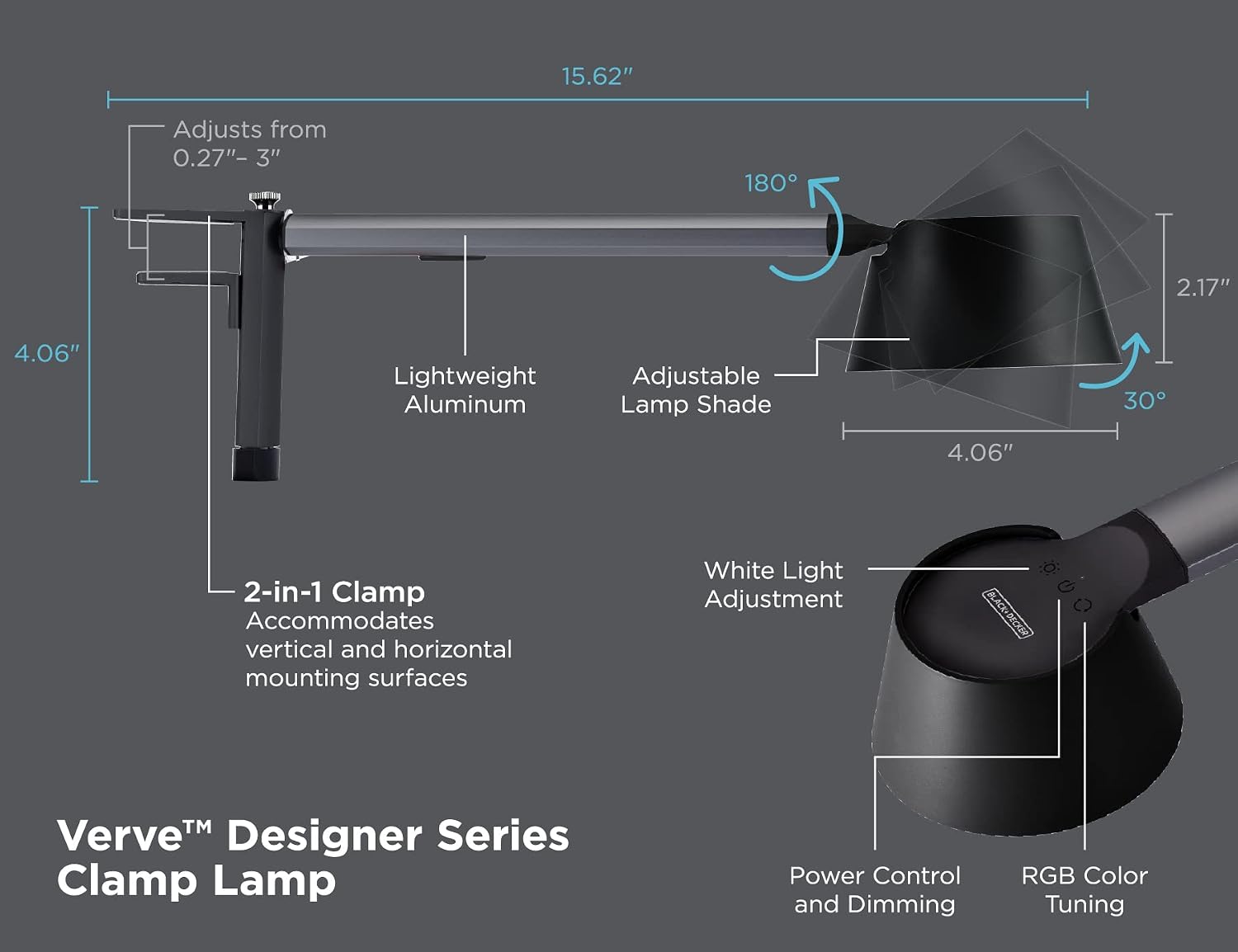
Image: Detailed diagram illustrating the lamp's dimensions and the three touch controls for Power/Dimming, White Light Adjustment, and RGB Color Tuning.
Control Functions:
- Power Control and Dimming:
- Touch once to turn the lamp ON/OFF.
- Press and hold to adjust brightness (stepless dimming from 0% to 100%).
- White Light Adjustment (CCT):
- Touch repeatedly to cycle through three color temperature modes: 3000K (Warm White), 4000K (Natural Daylight), and 6000K (Cool White).
- RGB Color Tuning:
- Touch once to activate RGB color mode.
- Touch repeatedly to cycle through various single colors.
- Press and hold to activate color-changing mode, which smoothly transitions through the 16 million color spectrum.

Image: Visual representation of the lamp's capabilities including 0-100% stepless dimming, adjustable white light (3000K, 4000K, 5000K), and 16 million RGB colors with single and color-changing modes.
The lamp's arm and head can be manually adjusted to achieve the desired lighting angle. The lamp head swivels, and the arm allows for tilt-forward positioning.
Maintenance
Proper care ensures the longevity and optimal performance of your PureOptics LED Verve Designer Clamp Light.
- Cleaning: Disconnect the power before cleaning. Use a soft, dry cloth to wipe the lamp. Do not use abrasive cleaners, solvents, or harsh chemicals, as these can damage the finish or electronic components.
- Storage: If storing the lamp for an extended period, ensure it is clean and dry. Store in a cool, dry place away from direct sunlight.
- LED Lifespan: The integrated LEDs are designed to last up to 50,000 hours and are not user-replaceable.
Troubleshooting
If you encounter issues with your Verve Designer Clamp Light, refer to the following common solutions:
- Light Does Not Turn On:
- Ensure the power cable is securely connected to both the lamp and a working USB power source.
- Verify the power source is active (e.g., wall outlet is functional, USB port is powered).
- Try a different USB power adapter or port.
- Dimming or Color Change Not Responding:
- Ensure your finger is making full contact with the touch-capacitive buttons.
- Clean the touch control area with a dry cloth to remove any dust or residue.
- Disconnect and reconnect the power to reset the lamp.
- Lamp is Unstable After Mounting:
- Re-tighten the clamp screw to ensure it is firmly secured to the surface.
- Verify the mounting surface thickness is within the 0.27" - 3" range.
If the issue persists after attempting these steps, please contact customer support.
Specifications
| Model Number | LED2100-CL |
| Brand | PureOptics LED |
| Light Source Type | LED |
| Wattage | 5.5 watts (Max 12 Watts compatible) |
| Color Temperature | 3000K, 4000K, 6000K (Adjustable) |
| Color Options | True White LED + 16 Million RGB Colors |
| Dimming | 10 Stepless Dimming Levels (0-100%) |
| Material | Aluminum |
| Finish Type | Anodized |
| Mounting Type | Clamp (Horizontal/Vertical, 0.27" - 3" thick surfaces) |
| Product Dimensions | 15.75 x 4.06 x 4.06 inches |
| Item Weight | 1.5 Pounds |
| Switch Style | Touch-Capacitive |
| Included Components | Desk Lamp, USB Cable |
| UPC | 842048035824 |
Warranty and Customer Support
This PureOptics LED Verve Designer Clamp Light (Model LED2100-CL) is covered by a 3-year limited warranty from the date of purchase. This warranty covers defects in materials and workmanship under normal use.
For warranty claims, technical assistance, or any questions regarding your product, please contact PureOptics LED customer support. Please have your model number (LED2100-CL) and proof of purchase available when contacting support.
For further assistance, please visit the manufacturer's official website or refer to your purchase documentation for contact information.