Introduction
Demons of Asteborg is a challenging 2D action-platformer designed for the Nintendo Switch. This game blends action, puzzles, and strategic elements, delivering a classic 16-bit gaming experience. Players embody Gareth, the royal guard of Asteborg, on a quest to thwart Zadimus, the demonic leader, from reclaiming the kingdom. The narrative delves into an ancient war and Gareth's personal journey of discovery.

Figure 1: Demons of Asteborg Nintendo Switch game box art. The cover prominently displays the game title, featuring characters Gareth and Maria, with a demonic skull in the background.
Setup
To begin playing Demons of Asteborg on your Nintendo Switch console, please follow these instructions:
- Insert Game Card: For physical copies, insert the game card into the Nintendo Switch game card slot. Ensure it is fully seated and clicks into place.
- Digital Download: If you purchased the digital version, navigate to the Nintendo eShop. Select "Redeem Code" or access "Redownload Software" from your account menu, then follow the on-screen prompts to download and install the game.
- System Update: Verify that your Nintendo Switch console's system software is current. Access System Settings > System > System Update to check and install any available updates.
- Game Updates: After installation, the game may require additional updates. Connect your Nintendo Switch to the internet and allow any necessary game updates to download and install automatically.
- Launch Game: Select the Demons of Asteborg icon from the HOME Menu to initiate the game.
Operating Instructions
Basic Controls
The game utilizes standard Nintendo Switch controls. Detailed button mappings are typically provided in-game or within the digital manual accessible from the game's main menu.
- Left Stick/D-Pad: Controls Gareth's movement.
- A Button: Initiates a jump.
- B Button: Performs a melee attack with Gareth's weapon.
- Y Button: Activates a special ability or spell.
- X Button: Used for interaction with objects or opening menus.
- L/R Buttons: Cycles through available spells and abilities.
- ZL/ZR Buttons: Executes a guard or dodge maneuver.
- Plus (+) Button: Pauses the game and accesses the main menu.
Gameplay Overview
Demons of Asteborg is a 2D side-scrolling action-platformer. Players will traverse hazardous environments, defeat various monsters, solve environmental puzzles, and engage in challenging boss encounters. Thorough exploration is essential for uncovering secrets and progressing through the storyline.

Figure 2: An in-game screenshot depicting Gareth, the protagonist, battling enemies within a dark cave environment. Health and magic meters are visible at the top of the screen.
The game features diverse environments, from dark caves to open fields and dense forests, each presenting unique challenges and enemies.

Figure 3: Gareth navigating an open field with a windmill in the background, showcasing one of the varied environments players will explore.
Combat and Abilities
Gareth can employ melee weapons, special abilities, and potent spells. As you advance, you will acquire new spells and upgrades to enhance your combat effectiveness and unlock new pathways. Strategic application of these abilities is vital for overcoming formidable bosses and environmental obstacles.

Figure 4: Gareth casting a fire-based spell against a floating enemy in a lush forest setting, illustrating the game's 16-bit art style and magical combat.
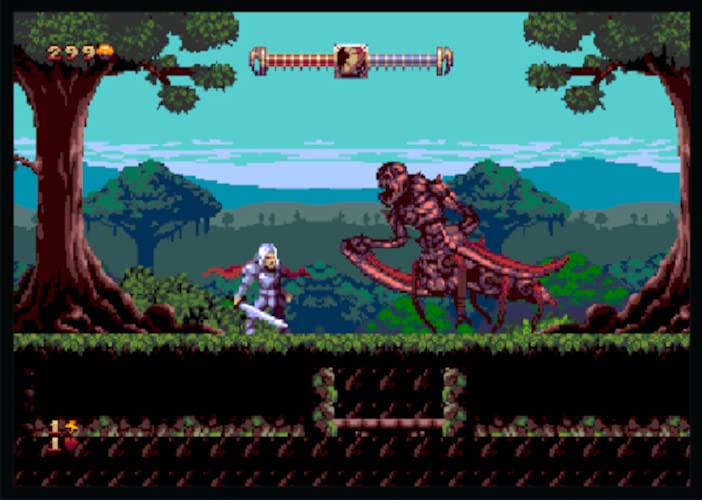
Figure 5: Gareth confronting a large, multi-limbed demon boss in a forest area, representing a typical boss encounter within the game.
Maintenance
To ensure optimal performance and longevity of your game and console, consider the following:
- Keep Software Updated: Regularly check for and install system updates for your Nintendo Switch console and game updates for Demons of Asteborg.
- Game Card Care: If using a physical game card, handle it by the edges. Store it in its original case when not in use to prevent scratches or damage. Keep the contacts clean and free of dust.
- Console Care: Maintain your Nintendo Switch console by keeping it clean and free of dust. Avoid exposing it to extreme temperatures or high humidity.
- Save Data: Ensure you regularly save your game progress. Consider backing up your save data to the cloud if you have an active Nintendo Switch Online subscription.
Troubleshooting
- Game Not Loading:
Ensure the game card is inserted correctly or that the digital download is fully complete. Restart your Nintendo Switch console. Check for any pending system or game updates.
- Controls Unresponsive:
Verify that your Joy-Cons or Pro Controller are properly connected and sufficiently charged. If necessary, recalibrate your controllers via the System Settings menu.
- Performance Issues (Lag/Freezing):
Close any other applications running in the background. Confirm your console has adequate free storage space. Restart both the game and the console. If problems persist, consider reinstalling the game (your save data should typically remain intact).
- Graphical Glitches:
Ensure your console's system software and the game itself are fully updated. Restart the console. If playing in TV mode, inspect your HDMI connection for any issues.
Specifications
| Feature | Detail |
|---|---|
| Product Title | Demons of Asteborg - Nintendo Switch |
| Brand | Limited Run |
| Model Number | NSW-DOA |
| Compatible Consoles | Nintendo Switch, Nintendo Switch - OLED Model, Nintendo Switch 2, Nintendo Switch Lite |
| UPC | 810105672268 |
| Release Date | July 7, 2023 |
| Language | English |
| ESRB Rating | Teen |
| Item Weight | 1.76 ounces |
| Package Dimensions | 6.61 x 4.06 x 0.47 inches |
Support Information
For technical support, game-related inquiries, or further assistance, please refer to the official support channels for Limited Run Games or Nintendo Switch.
- Limited Run Games Support: Visit the official Limited Run Games website for their dedicated support section or contact information.
- Nintendo Support: For console-related issues or general Nintendo Switch inquiries, please visit the official Nintendo Support website.
Note: Warranty information for video games typically covers manufacturing defects of the physical media. Digital purchases do not have physical media warranties. Please consult the retailer's return policy or the publisher's terms of service for specific details regarding your purchase.