
Philips S5887/50
Philips Shaver Series 5000 S5887/50 User Manual
Model: S5887/50
1. Introduction and Overview
Welcome to the user manual for your new Philips Shaver Series 5000 S5887/50. This electric shaver is designed to provide a comfortable and efficient shaving experience, whether wet or dry.

Image 1.1: The Philips Shaver Series 5000 S5887/50, showcasing its ergonomic design and included accessories.
Key Features:
- Wet & Dry Use: Designed for comfortable dry shaves or refreshing wet shaves with gel or foam.
- 60-Minute Cordless Shaving: Enjoy up to 60 minutes of cordless shaving on a single charge.
- Rechargeable Lithium-ion Battery: Provides consistent power and quick charging.
- SkinIQ Technology: Adapts to your beard density for personalized shaving comfort.
- Flexible Rotary Heads: Contour to your face for efficient hair capture.
2. Important Safety Information
Please read this user manual carefully before you use the appliance and save it for future reference.
- Electrical Safety: Always ensure the shaver is switched off and unplugged from the power outlet before cleaning, maintenance, or when not in use. Do not use the appliance if the adapter or the appliance itself is damaged.
- Water Usage: This appliance is 100% waterproof and suitable for use in the shower or with foam/gel. However, always disconnect the shaver from the power supply before using it with water.
- Battery Safety: The appliance contains a rechargeable battery. Do not expose the appliance to excessive heat or direct sunlight. Do not attempt to replace the battery yourself.
- Intended Use: This shaver is designed for shaving facial hair only. Do not use it for any other purpose.
- Children and Persons with Reduced Capabilities: This appliance can be used by children aged 8 years and above and persons with reduced physical, sensory or mental capabilities or lack of experience and knowledge if they have been given supervision or instruction concerning use of the appliance in a safe way and understand the hazards involved. Children shall not play with the appliance. Cleaning and user maintenance shall not be made by children without supervision.
3. What's in the Box
Upon opening the package, ensure all components are present and in good condition.
- Philips Shaver Series 5000 S5887/50
- Power Adapter
- Protective Cap
- Cleaning Brush
- Travel Pouch (as seen in image 3.1)
- User Manual (this document)
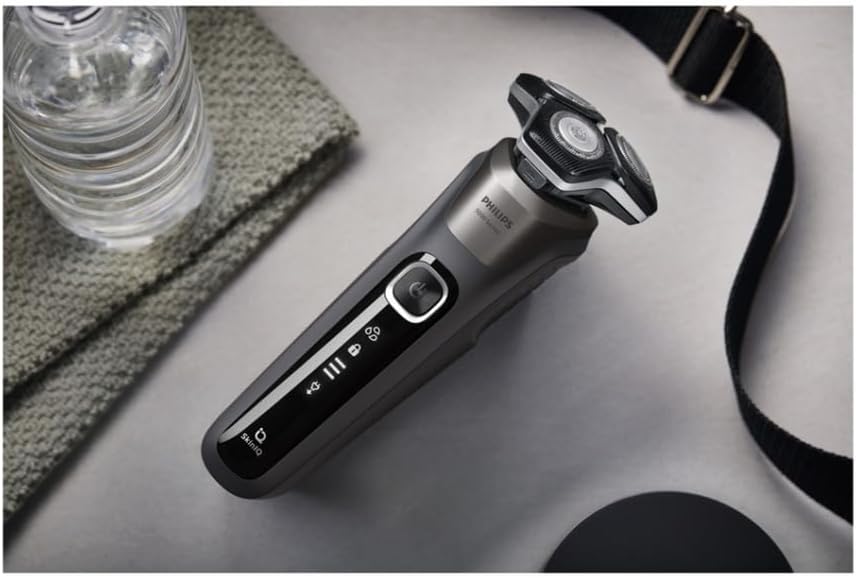
Image 3.1: The Philips Shaver Series 5000 S5887/50 alongside its included travel pouch.
4. Setup and Initial Use
4.1 Charging the Shaver
- Ensure the shaver is dry before charging.
- Insert the small plug of the power adapter into the shaver's charging socket.
- Plug the adapter into a wall outlet. The battery indicator lights on the shaver will illuminate to show charging progress.
- A full charge takes approximately 1 hour and provides up to 60 minutes of shaving time.
- When the battery is fully charged, all battery indicator lights will be steadily lit or turn off, depending on the model.
4.2 First Use
For your first shave, it is recommended to fully charge the shaver. Your skin may need 2-3 weeks to adapt to a new shaving system.
5. Operating Instructions
5.1 Turning On/Off
- To turn on the shaver, press the On/Off button once.
- To turn off the shaver, press the On/Off button again.
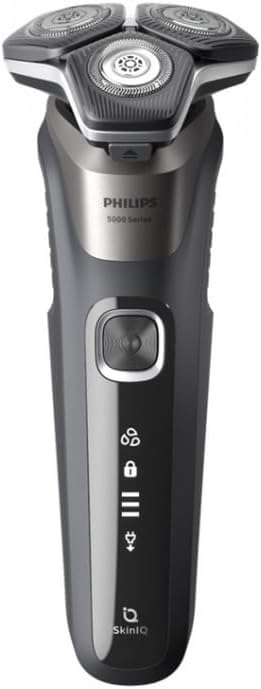
Image 5.1: Detail of the shaver's power button and display indicators.
5.2 Dry Shaving
- Ensure your face is clean and dry.
- Move the shaver in small, circular motions over your skin.
- Stretch your skin with your free hand to make the hairs stand upright.
- Do not press too hard; a light touch is sufficient for an effective shave.
5.3 Wet Shaving (with foam or gel)
- Wet your face with water.
- Apply shaving foam or gel to your skin.
- Move the shaver in small, circular motions over your skin.
- Rinse the shaving heads under running water during shaving to prevent clogging.
- After shaving, rinse your face and the shaver thoroughly.
5.4 Battery Indicators
The shaver features intuitive battery indicators on its handle:
- Three bars: Full battery.
- Two bars: Medium battery.
- One bar: Low battery, recharge soon.
- Flashing low battery indicator: Battery is almost empty, recharge immediately.
- Plug icon: Indicates the shaver is connected to power and charging.
- Lock icon: Indicates travel lock is activated. Press and hold the power button for 3 seconds to activate/deactivate.
6. Maintenance and Cleaning
Regular cleaning ensures optimal performance and extends the lifespan of your shaver.
6.1 Quick Cleaning (After Each Use)
- Turn off the shaver.
- Open the shaving head unit by pressing the release button (if applicable) or gently pulling it open.
- Rinse the shaving heads and the hair chamber thoroughly under warm running water.
- Shake off excess water and leave the shaving head unit open to air dry.
- Close the shaving head unit.
6.2 Deep Cleaning (Weekly)
- Turn off the shaver and disconnect it from power.
- Open the shaving head unit.
- Remove the retaining frame by turning the lock counter-clockwise.
- Remove the shaving heads. Note that the cutters and guards are a matched set; do not mix them.
- Clean the cutters and guards with the supplied cleaning brush or rinse them under warm running water.
- Rinse the hair chamber.
- Allow all parts to air dry completely before reassembling.
- Reassemble the shaving heads, ensuring each cutter is placed back into its original guard.
- Place the retaining frame back and turn the lock clockwise to secure.
6.3 Replacing Shaving Heads
For optimal shaving performance, it is recommended to replace the shaving heads every 12 months. Replacement heads can be purchased from authorized Philips retailers or online. Refer to the packaging of your shaver for the correct replacement head type (e.g., SH50).
7. Troubleshooting
If you encounter issues with your Philips Shaver, refer to the table below for common problems and solutions.
| Problem | Possible Cause | Solution |
|---|---|---|
| Shaver does not turn on. | Battery is empty. Travel lock is activated. | Charge the shaver. Deactivate travel lock by pressing and holding the On/Off button for 3 seconds. |
| Poor shaving performance. | Shaving heads are dirty or worn out. Incorrect shaving technique. | Clean the shaving heads thoroughly. Replace shaving heads if they are older than 12 months. Ensure you are using small, circular motions and not pressing too hard. |
| Shaver does not charge. | Adapter or charging cable is damaged. Power outlet issue. | Check the adapter and cable for damage. Try a different power outlet. Ensure the shaver is dry before charging. |
| Skin irritation after shaving. | Skin not adapted to electric shaving. Shaving heads are worn. | Allow 2-3 weeks for your skin to adapt. Ensure shaving heads are clean and not worn. Consider using a wet shave with foam/gel. |
8. Specifications
| Feature | Detail |
|---|---|
| Model Name | Shaver Series 5000 (S5887/50) |
| Article Model Number | 10719840 |
| Brand | Philips |
| Product Type | Electric Shaver |
| Usage | Wet and Dry |
| Power Source | Battery Powered |
| Battery Type | Lithium-ion |
| Battery Life | Up to 60 minutes |
| Charging Time | Approx. 1 hour (for full charge) |
| Color | Black |
| Blade Material | Carbon Steel |
| Head Type | Rotary, Flexible |
| Special Features | Rechargeable |
9. Warranty and Support
Philips products are designed and manufactured to the highest standards. In the unlikely event that you experience a problem with your shaver, please refer to the troubleshooting section first.
9.1 Warranty Information
Specific warranty terms and conditions may vary by region. Please refer to the warranty card included with your purchase or visit the official Philips website for detailed warranty information applicable to your country. Keep your proof of purchase for warranty claims.
9.2 Customer Support
For further assistance, product registration, or to find replacement parts, please visit the official Philips support website or contact their customer service.
- Philips Official Website: www.philips.com/support
- Online Product Registration: Register your product to receive support and updates.
Related Documents - S5887/50
 |
Philips Shaver Series 5000 S5887/10: Powerful Shave, Gentle on Skin with SkinIQ Technology Discover the Philips Series 5000 wet and dry electric shaver (S5887/10) featuring SkinIQ Technology for a powerful, gentle shave. Includes Steel Precision blades, 360° Flexing heads, 60-minute run time, and USB-A charging. Learn about its specifications and features. |
 |
Philips Shaver Series 5000 S5887/10: Powerful Shaving with SkinIQ Technology Discover the Philips Shaver Series 5000 (S5887/10) for a powerful, skin-gentle shave. Featuring Steel Precision blades, SkinIQ technology, 360-D flexing heads, and 60 minutes of cordless use for a superior grooming experience. |
 |
Philips Shaver Series 5000 S5885/35: Powerful Shaving, Gentle on Skin with SkinIQ Technology Explore the Philips Shaver Series 5000 S5885/35, designed for a powerful yet gentle shave. Featuring SteelPrecision blades, SkinIQ technology, 360-D flexible heads, and up to 60 minutes of cordless use. Learn about its wet & dry functionality, easy cleaning, and 5-year warranty. |
 |
Philips Shaver Series 5000 S5887/10: Powerful, Gentle Shaving with SkinIQ Technology Discover the Philips Shaver Series 5000 (S5887/10) featuring SteelPrecision blades, SkinIQ technology, and 360-D flex heads for a powerful yet gentle wet and dry shave. Learn about its features, specifications, and benefits for a comfortable grooming experience. |
 |
Philips Shaver Series 5000 S5887/10: Powerful Shaving, Gentle on Skin with SkinIQ Technology Discover the Philips Shaver Series 5000 (S5887/10) for a powerful yet gentle shave. Featuring SkinIQ technology, SteelPrecision blades, 360-D flexible heads, and 60 minutes of cordless use. Learn about its features, specifications, and durability. |
 |
Philips Shaver 1000 Series S1134/00: Fast, Thorough, and Easy Shaving Discover the Philips Shaver 1000 Series (S1134/00) for a fast, thorough, and comfortable shave. Features PowerCut blades, 3D Flex heads, 30-minute cordless use, and waterproof design for easy cleaning. |
Ask a question about this manual
Ask about setup, troubleshooting, compatibility, parts, safety, or missing instructions. Manuals+ will review the question and use this page’s manual context to help answer it.