
Weibath W021123-US
Weibath Modern Smart Toilet & Bidet User Manual
Model: W021123-US | Brand: Weibath
1. Introduction
Thank you for choosing the Weibath Modern Smart One-Piece Automatic Toilet & Bidet. This manual provides essential information for the safe and efficient operation, installation, and maintenance of your new smart toilet. Please read this manual thoroughly before installation and use, and retain it for future reference.

Figure 1.1: Weibath Modern Smart One-Piece Automatic Toilet & Bidet.
2. Safety Information
Always adhere to the following safety precautions to prevent injury or damage to the product:
- Ensure the toilet is installed by a qualified professional in accordance with local plumbing and electrical codes.
- Do not expose the electrical components to water or excessive moisture.
- Unplug the unit from the power outlet before performing any maintenance or cleaning.
- Keep children and pets away from the toilet during operation, especially when automatic features are active.
- Do not use abrasive cleaners or harsh chemicals on any part of the toilet, as this may damage surfaces or internal components.
- Avoid placing heavy objects on the toilet lid or seat.
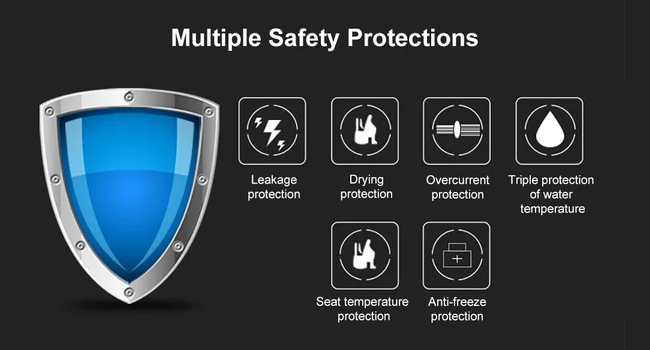
Figure 2.1: Built-in Safety Protections.
3. Product Overview & Components
The Weibath Smart Toilet integrates advanced features for enhanced hygiene and convenience. Key components include:
- One-Piece Ceramic Body
- Heated Elongated Seat
- Integrated Bidet Nozzle (for feminine and hip washing)
- Warm Air Dryer
- Automatic Flush Mechanism
- Foot Sensor for Lid/Seat Opening
- LED Nightlight & UV Disinfection
- Multi-functional Remote Control
- Side Panel Control Buttons

Figure 3.1: Overview of Smart Toilet Functions.
4. Installation
Installation of the Weibath Smart Toilet requires professional plumbing and electrical knowledge. It is highly recommended to consult the detailed Installation Manual (PDF) provided with your product or available for download from the manufacturer's website. Ensure all local building and plumbing codes are strictly followed during installation.
Key installation considerations include:
- Proper water supply connection and pressure.
- Secure floor mounting.
- Dedicated electrical outlet (US Plug) with appropriate grounding.
- Verification of all connections for leaks before first use.

Figure 4.1: Product Dimensions.
5. Operating Instructions
Your Weibath Smart Toilet offers multiple convenient operating modes. Familiarize yourself with the remote control and side panel buttons for optimal use.
Video 5.1: Comprehensive demonstration of the Weibath Smart Toilet's automatic features, bidet functions, flushing options, and remote control usage.
5.1 Automatic Open, Close & Flush
The toilet features intelligent sensors for hands-free operation:
- Automatic Lid Opening: When a person is detected within 120 cm (approximately 47 inches) in front of the toilet, the lid will automatically open.
- Foot Sensor for Seat Opening: Lightly touch the foot sensor located at the base of the toilet to automatically open the seat ring. This is particularly useful for male users.
- Automatic Flush: The toilet will automatically flush after you stand up and leave the seat.
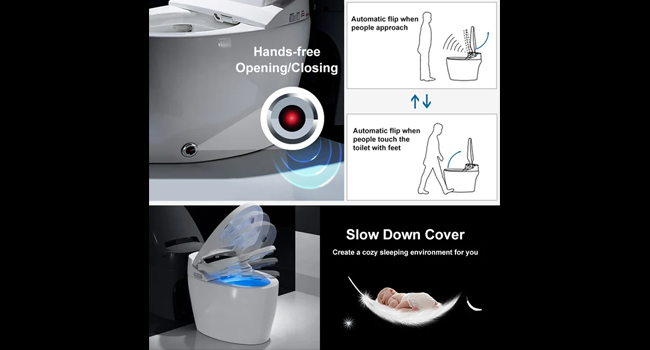
Figure 5.1.1: Automatic Opening and Closing Features.
5.2 Flushing Options
The toilet offers multiple ways to flush:
- Automatic Flush: As described above, the toilet flushes automatically upon departure.
- Remote Control Flush: Press the 'Flush' key on the remote control to initiate a flush.
- Manual Flush (Side Panel): Press the 'Flush' key on the side panel of the toilet. This manual flush option is also available during power outages.
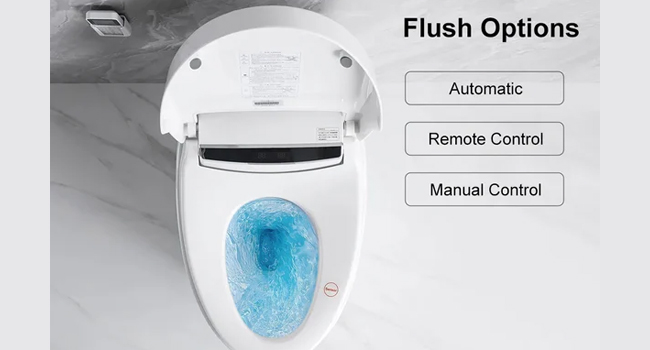
Figure 5.2.1: Various Flushing Options.
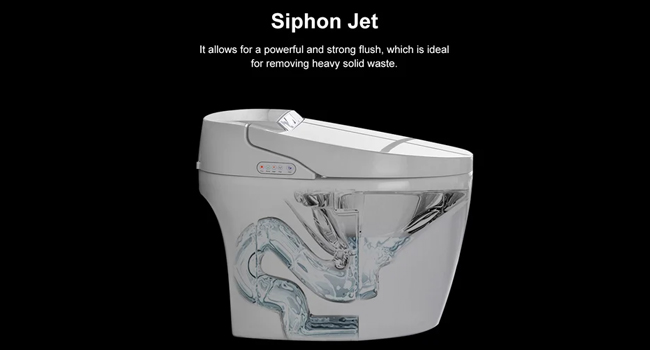
Figure 5.2.2: Siphon Jet Flushing System.
5.3 Bidet Functions
The integrated bidet offers personalized cleaning options:
- Hip Washing: For posterior cleaning.
- Feminine Washing: For gentle anterior cleaning.
- Nozzle Self-cleaning: The nozzle performs an automatic self-cleaning cycle before and after each use.
- Water Temperature Adjustment: Use the remote control to adjust water temperature to your preference (4 adjustable gears).
- Water Pressure Adjustment: Use the remote control to adjust water pressure for optimal cleaning strength.
- Cleaning Position Adjustment: Adjust the nozzle's forward and backward position via the remote control.
- Massage Function: Activate the massage function via the remote control for a pulsating water stream that moves back and forth.

Figure 5.3.1: Bidet Cleaning Modes and Adjustments.
6. Additional Smart Features
6.1 Heated Seat & Warm Air-Drying
Enjoy enhanced comfort with these features:
- Heated Seat: The seat offers 3 adjustable temperature settings (Room Temperature, 36°C, 39°C) that can be controlled via the wireless remote.
- Warm Air-Drying: After washing, a built-in air dryer provides 3 different adjustable temperatures (40°C, 45°C, 50°C) for a comfortable drying experience.
- Auto Deodorization: An automatic deodorization function helps maintain freshness.

Figure 6.1.1: Heated Seat and Warm Air-Drying Features.
6.2 LED Nightlight & UV Disinfection
For convenience and hygiene:
- LED Nightlight: A soft LED light illuminates the bowl, providing visibility during nighttime use without needing to turn on bright bathroom lights.
- UV Disinfection: The toilet features UV disinfection to help maintain a hygienic environment within the bowl.

Figure 6.2.1: LED Nightlight and UV Disinfection.
7. Maintenance
Regular cleaning and maintenance will ensure the longevity and optimal performance of your smart toilet.
- General Cleaning: Use a soft cloth and mild, non-abrasive cleaner to wipe down the exterior surfaces. Avoid harsh chemicals or abrasive pads.
- Nozzle Cleaning: The bidet nozzle has a self-cleaning function. For deeper cleaning, gently wipe the nozzle with a soft cloth and mild soap when it is extended. Ensure the unit is unplugged before manual cleaning of the nozzle.
- Filter Maintenance: Periodically check and clean the water inlet filter to prevent blockages and maintain water flow. Refer to the full installation manual for filter location and cleaning instructions.
- Power Outage: In case of a power outage, the manual flush button on the side panel can still be used.
8. Specifications
| Feature | Specification |
|---|---|
| Brand | Weibath |
| Model Number | W021123-US |
| Color | White |
| Material | Vitreous China (Toilet), Plastic (Seat) |
| Installation Type | Floor Mounted |
| Shape | Elongated (Oblong) |
| Product Dimensions | 26.77 x 16.54 x 20.87 inches |
| Included Components | Remote Control |
| Flush Type | 1.28 GPF (Gallons Per Flush) |
9. Troubleshooting
If you encounter any issues with your Weibath Smart Toilet, please refer to the following general advice. For specific error codes or persistent problems, contact customer support.
- No Power: Ensure the toilet is properly plugged into a working electrical outlet. Check the circuit breaker.
- Automatic Features Not Responding: Ensure the sensors are clean and unobstructed. Verify that the human body induction area on the seat ring is being properly engaged if applicable to the function.
- Bidet Water Issues (No water/Low pressure): Check water supply valve is fully open. Ensure water inlet filter is clean.
- Remote Control Not Working: Check battery levels in the remote control. Ensure there are no obstructions between the remote and the toilet's receiver.
- Unusual Noises: If you hear unusual noises, power off the unit and contact customer support.
10. Warranty & Support
Weibath products are designed for quality and durability. For warranty information, please refer to the documentation included with your purchase or visit the official Weibath website. For any technical support, questions, or concerns, please contact our customer service team.
Email: weibath66@hotmail.com
Service Time: Reply within 24 hours, Monday through Sunday.
When contacting us, please provide your order number or product ASIN (B0C4T5CLGW) for faster service.

Figure 10.1: Customer Support Contact Information.
Related documentsW021123-US

Ask a question about this manual
Ask about setup, troubleshooting, compatibility, parts, safety, or missing instructions. Manuals+ will review the question and use this page’s manual context to help answer it.