
Fruhdi FR-DL-SK-109
Fruhdi 4 Button 5 Pin Prong Hand Control Handset Remote User Manual
Model: FR-DL-SK-109
1. Introduction
Thank you for choosing the Fruhdi 4 Button 5 Pin Prong Hand Control Handset Remote. This remote is designed to provide convenient and reliable control for various lift chairs, electric sofas, and power recliners. Featuring a USB port for charging devices and a backlight for easy visibility in low light, this handset enhances your comfort and functionality. This manual provides essential information for proper setup, operation, and maintenance of your new remote control.
2. Product Overview
The Fruhdi hand control features a durable black housing with four large, easy-to-press buttons and an integrated USB charging port. It is equipped with a 5-pin round male plug for connection to your furniture's motor system.
Key Features:
- 4-Button Control: Dedicated buttons for various reclining and lifting functions.
- 5-Pin Connector: Standard round male plug for broad compatibility.
- USB Charging Port: Conveniently charge your mobile devices directly from the remote.
- Backlight: Illuminated buttons for easy use in dimly lit environments.
- Durable Design: Long black housing built for regular use.
- Wide Compatibility: Works with popular chair motor brands such as Okin, Limoss, Kaidi, Mulin, and FBS.
Product Components:

The Fruhdi 4 Button 5 Pin Hand Control Remote, showing the main remote unit and its 5-pin round male connector.

The remote control with its coiled cable, extending to the 5-pin connector and an additional USB plug for power.

A detailed view of the USB charging port located on the side of the Fruhdi remote control.
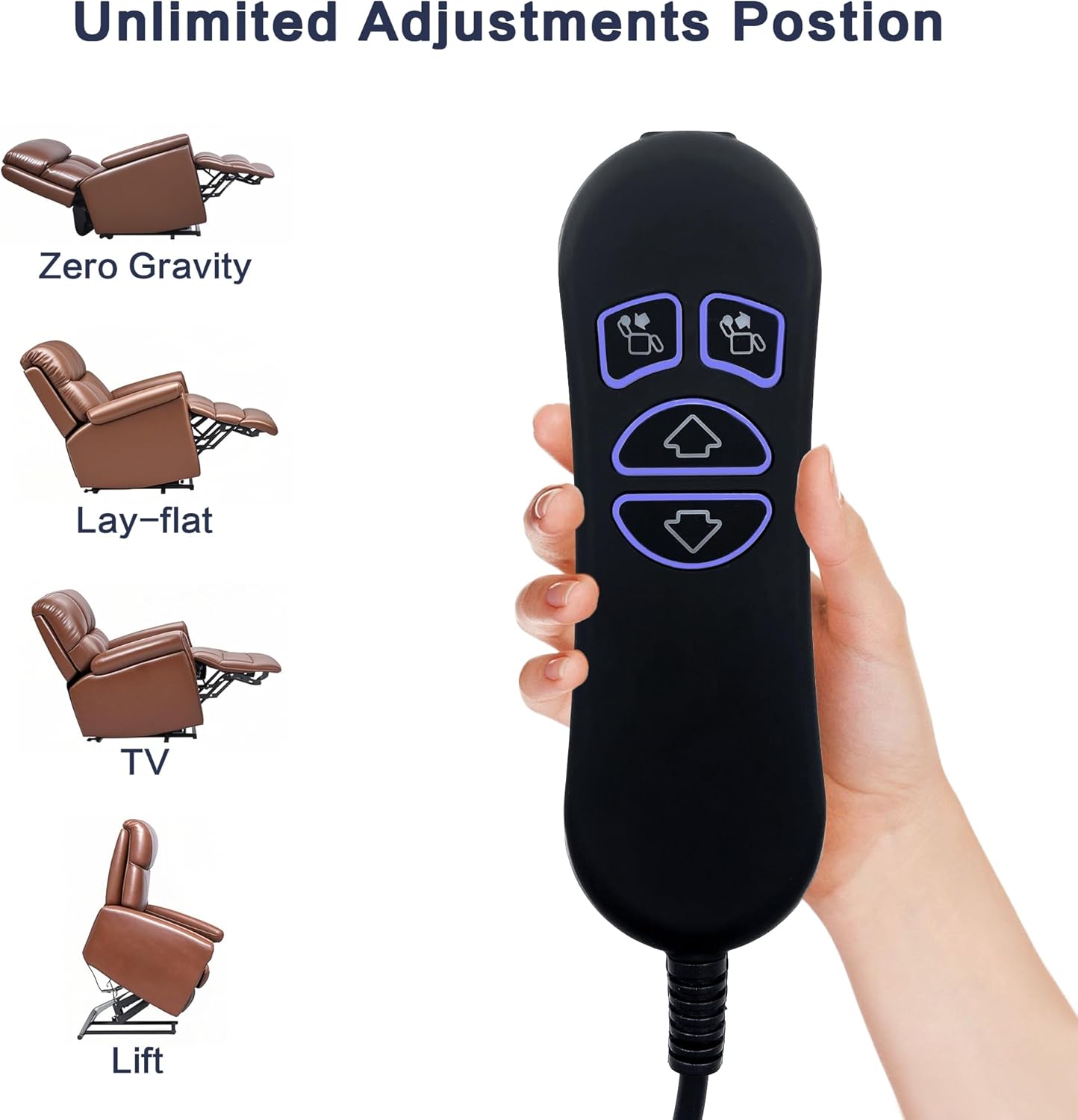
The remote control displaying its buttons alongside illustrations of various recline positions, including Zero Gravity, Lay-flat, TV, and Lift.
3. Setup
Installation of the Fruhdi hand control is straightforward. Please follow these steps carefully to ensure proper connection and functionality.
- Identify the Connector: Locate the existing remote control cable connected to your lift chair or recliner. Ensure it has a 5-pin round female receptacle. The Fruhdi remote features a 5-pin round male plug with a straight connector. If your current connector type is different, this remote may not be compatible.
- Disconnect Old Remote (if applicable): Carefully unplug the old remote control from the chair's motor system.
- Connect New Remote: Align the 5-pin male plug of the Fruhdi remote with the corresponding 5-pin female receptacle on your chair's motor. Gently push the plug in until it is securely seated. Do not force the connection.
- Cable Management: The remote cable is approximately 4.6 feet long. Route the cable safely to prevent tripping hazards or damage.
4. Operating Instructions
The Fruhdi hand control is designed for intuitive operation of your lift chair or power recliner. The buttons are backlit for visibility in various lighting conditions.
Button Functions:
- Upper Buttons (Recline/Lift): These buttons typically control the backrest and footrest movement, allowing you to recline or lift the chair. Press and hold to achieve desired positions, including zero gravity, lay-flat, TV viewing, or full lift.
- Lower Buttons (Up/Down Arrows): These buttons control the overall up and down movement of the chair, particularly for lift chairs. Press the 'Up' arrow to raise the chair to a standing assist position, and the 'Down' arrow to lower it.
The remote supports two motors, allowing for independent or synchronized adjustments depending on your chair's design. Continuous pressing of the buttons will move the chair to its full extent in that direction.
USB Charging:
The integrated USB port allows you to charge compatible electronic devices, such as smartphones or tablets. Simply plug your device's USB charging cable into the port on the side of the remote. Ensure the chair is powered on for the USB port to function.
5. Maintenance
To ensure the longevity and proper functioning of your Fruhdi hand control, follow these simple maintenance guidelines:
- Cleaning: Spot clean the remote control with a soft, dry cloth. For stubborn dirt, lightly dampen the cloth with water. Do not use harsh chemicals or abrasive cleaners.
- Liquid Exposure: Keep the remote control away from water and other liquids to prevent electrical damage.
- Cable Inspection: Periodically inspect the cable for any signs of wear, fraying, or damage. If the cable is damaged, discontinue use and seek a replacement.
- Storage: When not in use, store the remote in a safe place where it will not be stepped on or crushed.
6. Troubleshooting
If you encounter issues with your Fruhdi hand control, please refer to the following common problems and solutions:
| Problem | Possible Cause | Solution |
|---|---|---|
| Remote not responding / Chair not moving | Loose connection, power outage, motor issue. | Ensure the 5-pin connector is fully inserted. Check if the chair is plugged into a working power outlet. Verify power to the outlet. |
| Buttons reversed (e.g., 'Up' moves down) | Compatibility variation with certain chair models (e.g., Ashley Yandel Lift Chair model HSW304C-B-KBA, Motomotion Senior Chair). | This can occur with some specific chair models. While the remote is generally compatible, some manufacturers may wire their motors differently. There is no direct fix for this on the remote itself. |
| USB port not charging | Chair not powered on, faulty USB cable, device issue. | Ensure the chair is plugged in and receiving power. Try a different USB cable or device to rule out external issues. |
| Backlight not working | Internal wiring issue, power supply problem. | Ensure the remote is properly connected and the chair has power. If the issue persists, the backlight may be faulty. |
If the problem persists after attempting these solutions, please contact Fruhdi customer support for further assistance.
7. Specifications
| Brand | Fruhdi |
| Model Name | Recliner Remote |
| Item Model Number | FR-DL-SK-109 |
| ASIN | B0C4T311RZ |
| Color | Black |
| Product Dimensions | 1"D x 1.7"W x 5.9"H |
| Item Weight | 8 ounces |
| Cable Length | Approx. 4.6 ft |
| Connector Type | 5 Pin Round Male Plug |
| Material | Plastic |
| Manufacturer | LYLZ |
8. Safety Information
Caution: This is an electrical device. Always follow proper charging procedures when using the USB charging feature. Keep the remote control away from water and other liquids to prevent electrical shock. Do not use the remote control if the cable is damaged or if you suspect any electrical issues. Always follow the manufacturer's instructions for safe use and storage.
9. Warranty and Support
For any questions, concerns, or technical support regarding your Fruhdi hand control, please contact the manufacturer or seller directly. Refer to your purchase documentation for specific warranty details and contact information. You can also visit the official Fruhdi store on Amazon for more information: Fruhdi Store.
Ask a question about this manual
Ask about setup, troubleshooting, compatibility, parts, safety, or missing instructions. Manuals+ will review the question and use this page’s manual context to help answer it.