
Phoenix Home CD0504
Phoenix Home Power Lift Recliner User Manual
Model: CD0504
Introduction
Thank you for choosing the Phoenix Home Power Lift Recliner. This manual provides essential information for the safe and efficient operation, assembly, and maintenance of your new recliner. Please read all instructions carefully before use and retain this manual for future reference.
Important Safety Information
WARNING: Always read and follow the assembly instructions carefully. If you have any health concerns, consult your doctor before using this product.
- Ensure all components are securely fastened before use.
- Keep children and pets away from the chair's moving parts.
- Do not allow anyone to sit on the footrest when it is extended.
- Avoid placing hands or feet near the mechanism when operating the chair.
- Do not exceed the maximum weight capacity of 300 lbs.
- Unplug the chair from the power outlet before cleaning or maintenance.
Setup and Assembly
The Phoenix Home Power Lift Recliner is designed for easy assembly, typically taking less than 15 minutes. Follow the instructions provided in the packaging for detailed steps. Ensure all parts are present and undamaged before beginning assembly.
General Assembly Steps:
- Unpack all components and lay them out on a clean, soft surface.
- Attach the backrest to the seat body, ensuring it clicks securely into place.
- Connect any necessary wiring as indicated in the specific assembly guide.
- Attach the armrests if they are separate components.
- Place the chair in its desired location, ensuring adequate space for reclining and lifting functions.
- Plug the power cord into a suitable electrical outlet.


Operating Instructions
Your Phoenix Home Power Lift Recliner features easy-to-use controls for reclining, lifting, massage, and heating functions.
Power Lift and Reclining Functions
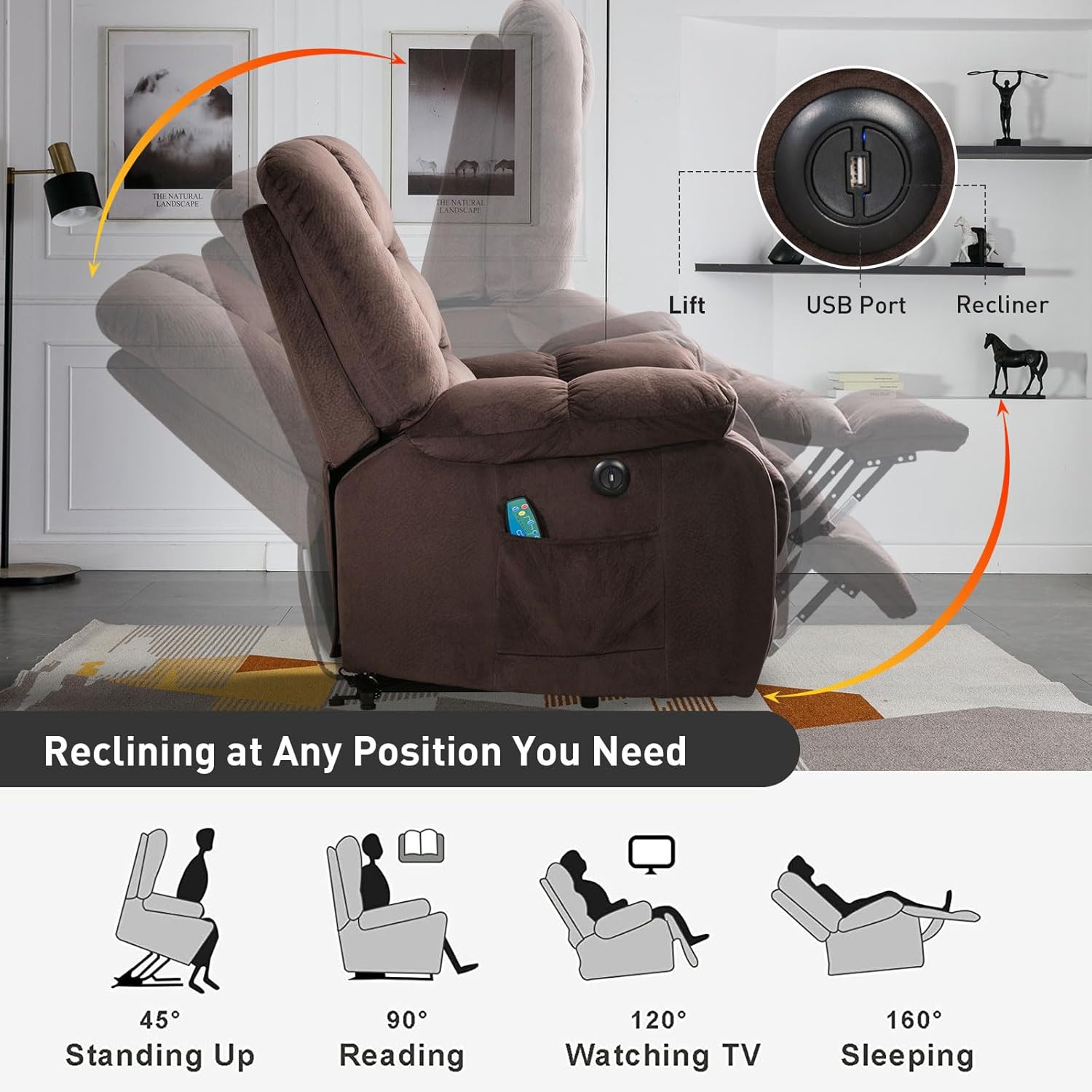
The chair is equipped with two buttons, typically located on the side of the chair, to control the lift and recline mechanisms. Press and hold the appropriate button to smoothly adjust the chair to your desired position.
- Recline: Press the recline button to gradually lower the backrest and raise the footrest. The chair can recline up to 150 degrees.
- Lift: Press the lift button to gently raise the chair, assisting you in standing up from a seated position.
Massage and Heating Functions
The recliner includes an 8-point massage system with 5 modes and a lumbar heating function, controlled by a wired remote.
- Massage Zones: The 8 massage points target the back, lumbar, thighs, and legs.
- Massage Modes: Select from 5 different massage modes (e.g., Pulse, Press, Wave, Auto, Normal) to customize your experience.
- Lumbar Heating: Activate the heating function for soothing warmth in the lumbar area.
- Intensity and Timer: Adjust massage intensity and set a timer for your massage session using the remote control.

USB Charging Port
A convenient USB charging port is integrated into the chair, allowing you to charge your devices while relaxing.

Official Product Video
Maintenance
Proper care will extend the life of your recliner.
- Cleaning: For upholstery care, dry clean only. Do not use liquid cleaners or abrasive materials.
- Mechanism: Periodically check all bolts and screws to ensure they are tight. Do not lubricate the mechanism unless specifically instructed by the manufacturer.
- Electrical Components: Inspect the power cord and remote control for any damage. If damage is found, discontinue use and contact customer support.
Troubleshooting
If you encounter issues with your recliner, refer to the following common solutions:
- Chair Not Responding: Ensure the power cord is securely plugged into both the chair and the wall outlet. Check if the wall outlet is functional by plugging in another device.
- Massage/Heat Not Working: Verify the remote control is properly connected. Check if the power indicator on the remote is lit.
- Unusual Noises: Inspect the chair's mechanism for any obstructions. Ensure all assembly bolts are tightened.
If the problem persists, please contact Phoenix Home customer support.
Specifications
| Feature | Detail |
|---|---|
| Model Number | CD0504 |
| Overall Dimensions (W x D x H) | 35.8" x 39.7" x 42.9" |
| Reclining Angle | 45° - 150° |
| Weight Capacity | 300 lbs |
| Material | High-density foam sponge, high-quality velvet fabric (suede upholstery) |
| Color | Brown |
| Massage Points | 8 points (back, lumbar, thighs, legs) |
| Massage Modes | 5 |
| Heating Function | Lumbar heating |
| Special Features | Arm Rest, Ergonomic, Foot Rest, Reclining, Side Pocket, USB Charge Port |
| Assembly Time | Approximately 15 minutes |
Warranty and Support
Phoenix Home offers one-year support and 24-hour after-sales service for this product. For any inquiries, technical assistance, or warranty claims, please refer to the contact information provided with your purchase or visit the official Phoenix Home website.
Ask a question about this manual
Ask about setup, troubleshooting, compatibility, parts, safety, or missing instructions. Manuals+ will review the question and use this page’s manual context to help answer it.