
HEI LIANG HL-1
HEI LIANG Fingerprint Smart Door Knob User Manual
Model: HL-1
Product Overview
The HEI LIANG Smart Door Knob offers advanced security and convenience with its 3-in-1 access methods: fingerprint recognition, app control via WiFi/Bluetooth, and a traditional mechanical key. Constructed from durable stainless steel and aluminum alloy, it provides robust protection against tampering. This smart handle is designed for easy installation on standard doors and features automatic locking, real-time access logs, and low battery warnings.

Image: The HEI LIANG Smart Door Knob, showcasing its sleek black design, integrated fingerprint sensor, and accompanying mechanical keys. An illustration of the mobile app interface is also visible, highlighting its smart control capabilities.
What's in the Box
Upon opening the product packaging, verify that all components are present and in good condition. The package typically includes the following items:
- Smart Lock x 1 (consisting of inner and outer knob assemblies)
- Screws x 6
- Latch x 1
- Strike Plate x 1
- Installation Guide x 1
- Keys x 2
Video: This video demonstrates the unboxing process of the HEI LIANG Smart Door Knob, showing each component as it is removed from the packaging. It visually confirms the contents listed above, including the smart lock unit, installation hardware, and keys.

Image: A top-down view of all components included with the HEI LIANG Smart Door Knob, neatly arranged on a surface. This includes the two knob pieces, the latch, strike plate, screws, and the installation guide, providing a clear visual inventory.
Installation
The HEI LIANG Smart Door Knob is designed for straightforward DIY installation, replacing existing door handles without the need for complex wiring. It is compatible with US standard doors ranging from 1.18" to 2.17" (30mm-55mm) in thickness. Ensure your door's bore hole and backset dimensions match the requirements before proceeding.
- Prepare the Door: Remove your existing door knob. Verify the door's thickness and the backset (distance from the door edge to the center of the bore hole) are within the specified range (2-3/8" or 2-3/4").
- Install the Latch: Insert the latch into the door edge, ensuring the "UP" arrow on the latch mechanism points upwards. Secure it with screws.
- Install the Exterior Knob: Insert the exterior knob assembly through the bore hole, aligning its spindle with the latch mechanism.
- Install the Interior Knob: Connect the interior knob assembly to the exterior knob, ensuring all wires are properly routed and not pinched. Secure the assembly with the provided screws.
- Install the Strike Plate: Attach the strike plate to the door frame, aligning it with the latch bolt.
- Test Operation: After installation, test the mechanical operation of the knob and latch to ensure smooth movement.
Refer to the detailed installation guide included in the package for step-by-step instructions and diagrams. Following the "UP" sign during installation is crucial for correct orientation.
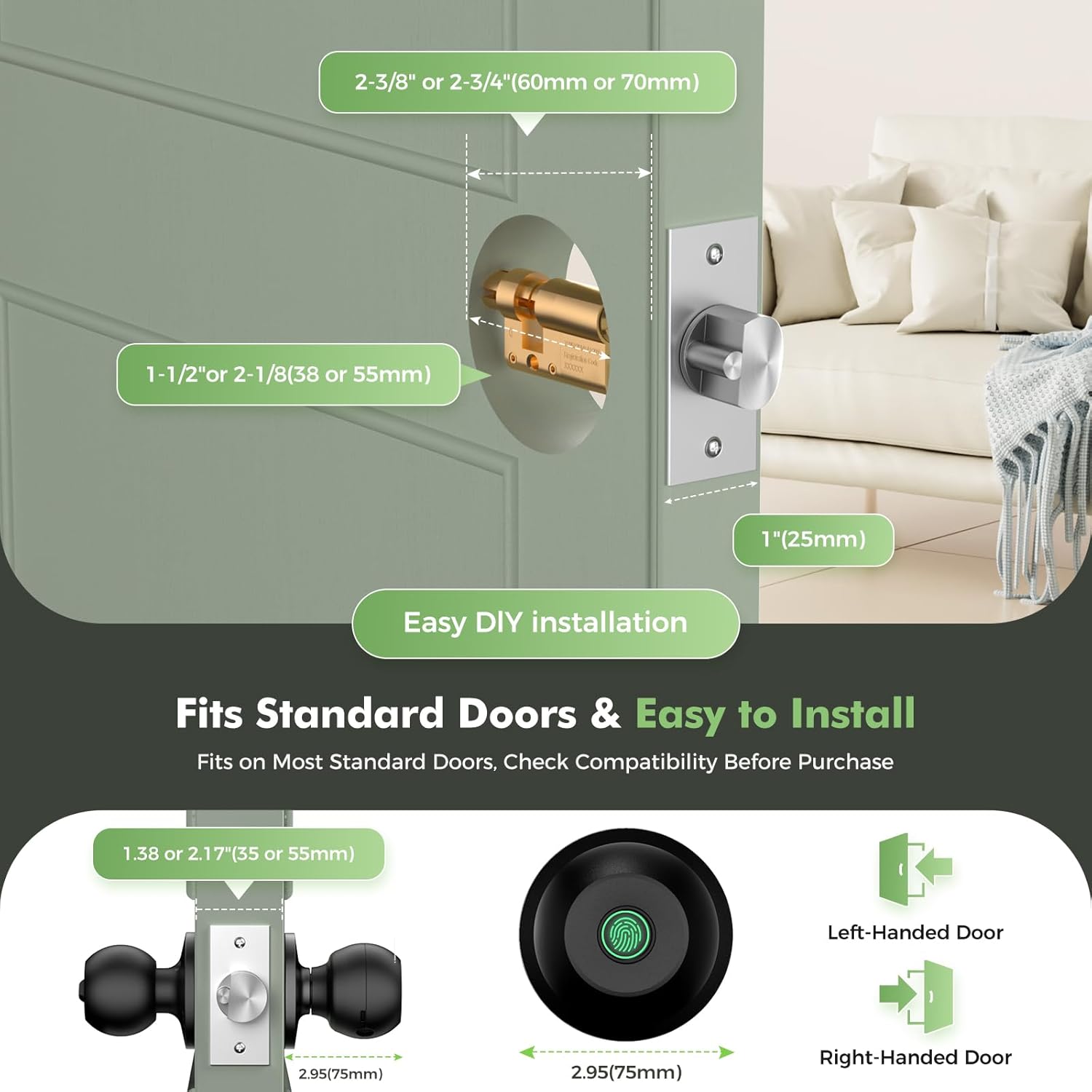
Image: A visual guide illustrating the critical door dimensions (thickness, backset, and bore hole diameter) required for proper installation of the smart door knob. It also shows the orientation for left-handed and right-handed doors.
Setup and Configuration
The HEI LIANG Smart Door Knob offers versatile setup options, primarily through its companion mobile application. This allows for easy management of users, access methods, and security settings.
App Control Setup
- Download the App: Search for the "KHOR LOCK" or compatible smart home app (e.g., Tuya Smart) on your smartphone's app store (iOS or Android).
- Create an Account: Register for a new account or log in if you already have one.
- Add Device: Follow the in-app instructions to add your smart door knob. This typically involves enabling Bluetooth on your phone and bringing it close to the lock.
- Connect to Wi-Fi (Optional): For remote access and advanced features, you may need to purchase a compatible Wi-Fi gateway and connect it through the app. This enables features like remote access logs and temporary access codes.
Fingerprint Management
The lock can store up to 20 unique fingerprints. Fingerprint enrollment and management are performed through the mobile app:
- Open the app and navigate to the "Member Management" or "Fingerprint Management" section.
- Select "Add Fingerprint" and follow the on-screen prompts to register new fingerprints. You will typically be asked to place your finger on the sensor multiple times from different angles.
- You can also delete existing fingerprints or view unlock records through the app.

Image: A close-up of a smartphone displaying the smart lock application interface, highlighting options for member management, smart scenes, and settings. This visual emphasizes the ease of app-based control.
Operating the Lock
The HEI LIANG Smart Door Knob offers multiple convenient ways to access your space.
Fingerprint Unlock
Place a registered finger on the biometric sensor located on the exterior knob. The lock will recognize your fingerprint within 0.5 seconds and unlock. A successful unlock is typically confirmed by a visual indicator (LED) and/or an audible cue.

Image: A detailed graphic illustrating the fingerprint sensor on the smart door knob, emphasizing its quick 0.3-second unlock time and the larger 160x160 DPI sensor for higher identification efficiency compared to older models.
App Unlock
Open the companion app on your smartphone. Ensure Bluetooth is enabled and you are within range of the lock. Tap the unlock icon within the app to remotely unlock the door. If a Wi-Fi gateway is connected, you can unlock the door from anywhere with an internet connection.
Mechanical Key Unlock
In case of battery depletion or other issues, a hidden mechanical keyhole is provided. Insert one of the two included keys into the keyhole and turn to unlock the door manually.

Image: A visual representation of the three primary methods for unlocking the HEI LIANG Smart Door Knob: via the mobile app, using a registered fingerprint on the sensor, and with a traditional mechanical key.
Auto-Lock Feature
The lock features an automatic locking mechanism that engages within 5 seconds of being unlocked. This feature can be customized via the app to set a preferred auto-lock delay time (e.g., 3-1800 seconds) for added convenience and security.
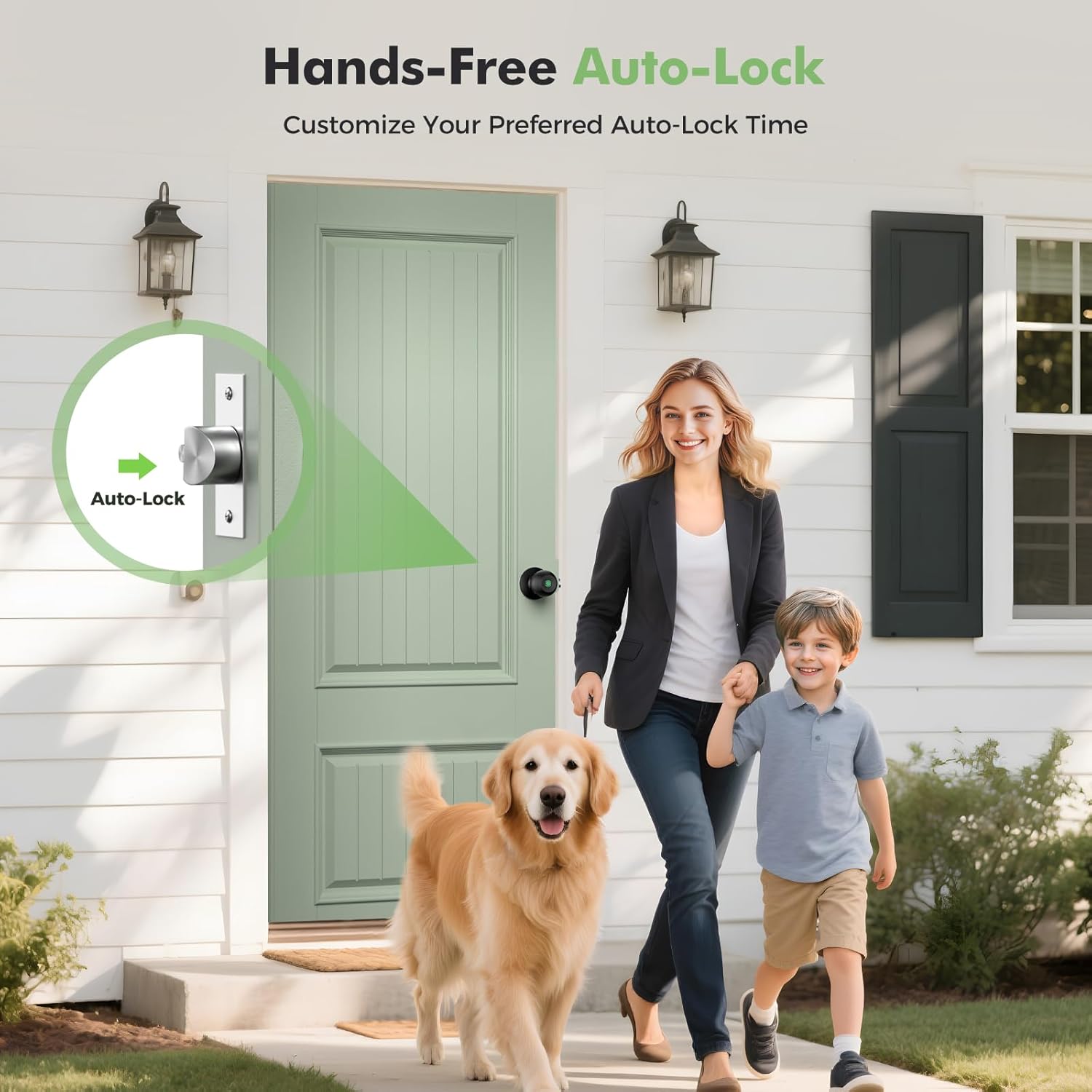
Image: An illustration demonstrating the auto-lock feature of the smart door knob, showing the internal mechanism engaging to secure the door automatically after a set period.
Remote One-Time Passcodes (with Gateway)
If connected to a Wi-Fi gateway, you can remotely generate and share temporary access codes for guests, delivery personnel, or service providers. These codes can be set to expire automatically after a specified duration (e.g., 12 hours, 3 days, 1 week).
Channel Mode
The channel mode allows the lock to remain unlocked for extended periods, facilitating frequent access during events or when continuous entry is desired. This mode can be activated and deactivated via the app.
Silent Mode
Activate silent mode through the app to disable audible cues during unlocking and locking, providing discreet access without disturbing others, particularly useful for bedrooms or quiet environments.
Maintenance
Battery Management
The fingerprint door lock has a built-in 400mAh rechargeable battery. It takes approximately 3 to 4 hours to fully charge using a USBA-TypeC cable (not included). The lock features a visual battery display within the app and provides an automatic low battery warning when capacity drops to 15%.
- Charging: Connect a USB-A to USB-C cable to the charging port on the lock (usually located on the interior knob) and to a power source.
- Low Battery Alert: When the battery is low, the lock will emit an audible warning and/or a visual indicator. Charge the battery promptly to avoid being locked out.
- Battery Life: Battery life varies depending on usage frequency. Regular charging is recommended.
Cleaning and Care
To maintain the appearance and functionality of your smart door knob:
- Wipe the surface with a soft, damp cloth. Avoid abrasive cleaners or solvents that could damage the finish.
- Keep the fingerprint sensor clean and dry for optimal performance.
Troubleshooting
If you encounter issues with your HEI LIANG Smart Door Knob, refer to the following common troubleshooting steps:
- Fingerprint Not Recognized:
- Ensure your finger is clean and dry.
- Try placing your finger on the sensor from different angles.
- Re-register your fingerprint in the app if the issue persists.
- App Connection Issues:
- Ensure Bluetooth is enabled on your phone and you are within range of the lock.
- Restart the app and/or your phone.
- Check if the lock's battery is sufficiently charged.
- If using a Wi-Fi gateway, ensure it is properly connected to your home network and the lock.
- Lock Not Responding:
- Check the battery level and recharge if necessary.
- Use the mechanical key to unlock the door.
- If the lock is completely unresponsive, contact customer support.
- Auto-Lock Not Functioning:
- Verify the auto-lock settings in the app.
- Ensure the door closes properly and the latch engages fully.
For more detailed troubleshooting or issues not covered here, please consult the full installation guide or contact HEI LIANG customer support.
Specifications
| Feature | Detail |
|---|---|
| Brand | HEI LIANG |
| Model Name | HL Knob Lock 1 |
| Item Model Number | HL-1 |
| Lock Type | Biometric |
| Access Methods | Fingerprint, App (Bluetooth/Wi-Fi with gateway), Mechanical Key |
| Fingerprint Capacity | Up to 20 fingerprints |
| Material | Stainless Steel, Aluminum Alloy |
| Color | Black |
| Dimensions (L x W x H) | 9.29 x 2.99 x 2.99 inches |
| Item Weight | 1.49 pounds |
| Door Thickness Compatibility | 1.18" - 2.17" (30mm - 55mm) |
| Power Source | Built-in 400mAh rechargeable battery (Lithium Ion) |
| Charging Time | 3-4 hours for full charge |
| Low Battery Warning | Activates at 15% capacity |
| Recommended Uses | Bedroom doors, cloakroom doors, apartments, offices, hotels |
| UPC | 758984224249 |
Warranty and Support
HEI LIANG offers support and warranty options for your smart door knob.
Protection Plans
Extended protection plans are available for purchase to provide additional coverage beyond the standard warranty. These plans typically cover:
- 3-Year Protection Plan
- 4-Year Protection Plan
- Complete Protect (monthly subscription covering multiple eligible purchases)
For details on coverage and terms, please refer to the specific protection plan documentation or contact the provider.
User Guide and Documentation
A comprehensive Instructions for Use (IFU) document in PDF format is available for download. This guide provides detailed information on installation, operation, and troubleshooting.
Download User Guide: Instructions for Use (PDF)
Customer Support
For any questions, technical assistance, or warranty claims, please contact HEI LIANG customer support. Contact information can typically be found in the included documentation or on the official HEI LIANG brand store page.
Visit HEI LIANG Store: HEI LIANG Official Store
Related documentsHL-1


Ask a question about this manual
Ask about setup, troubleshooting, compatibility, parts, safety, or missing instructions. Manuals+ will review the question and use this page’s manual context to help answer it.