Introduction
The Kendox RowShaper is a versatile home fitness device designed for comprehensive cardio and strength training. It combines effective endurance training with full-body muscle engagement, making it an ideal solution for achieving your fitness goals.
Key features include:
- Innovative hydraulic technology that engages over 80% of your body's muscles.
- A specially developed mono-paddle for correct and fluid exercise execution.
- 12 intensity levels and 3 inclination angles, offering up to 36 different training intensities.
- An integrated LCD display training computer to track your strokes, time, and calorie consumption.
- Ergonomically designed, ball-bearing roller seat and non-slip pedals for comfort and safety.
- Robust steel construction with an aluminum slide rail, supporting up to 120 kg.
- Foldable design for easy storage after use.

Figure 1: The Kendox RowShaper Rowing Machine.
What's in the Box
Upon unboxing your Kendox RowShaper, please ensure all components are present:
- Front Main Part
- Rear Main Part
- Rear Stand Foot
- Two Hand Grips
- Training Computer (LCD Display)
- Four Foam End Caps
- Assembly Screws and Nuts
- Open-end Wrench
- Allen Key
- User Manual
- Training Plan

Figure 2: All components included in the Kendox RowShaper package.
Setup
Before beginning your workout, it is important to properly assemble the Kendox RowShaper. Refer to the included user manual for detailed step-by-step instructions and diagrams. A general overview of the assembly process is provided below:
- Connect Main Parts: Connect the front and rear main parts using the provided Allen screws and hex nuts.
- Attach Rear Stand: Fold out the rear part of the main body to 90 degrees and secure it. Then, insert the rear stand foot into the main part and fix it with the quick-release screw.
- Install Foam End Caps: Slide the four foam end caps onto the extension bars and secure the extension to the main body using the Allen screw and hex nut. Fix it in position with the quick-release screw.
- Attach Hand Grips and Computer: Slide both hand grips into place and attach the training computer to its designated slot.
For a visual guide on assembly and initial setup, please watch the official user video:
Video 1: Kendox RowShaper User Application Video. This video demonstrates the assembly process and initial usage steps.
Operating Instructions
Before You Start
It is important to stretch your body thoroughly before beginning any training session to prevent injuries. Ensure your feet are securely fastened in the pedals with the straps tightened.

Figure 3: Proper body positioning and foot placement on the RowShaper.
Adjusting Resistance and Incline
The Kendox RowShaper offers adjustable resistance and incline settings to customize your workout intensity:
- Hydraulic Cylinder Resistance: Adjust the resistance by turning the adjustment knob on the hydraulic cylinder. There are 12 distinct resistance levels. We recommend starting at the lowest level and gradually increasing as your fitness improves.
- Incline Adjustment: Loosen the pull pin on the rear foot and pull it out. Adjust the rear foot to your desired height. Higher settings increase the intensity of leg training. Once adjusted, re-insert and secure the pull pin.
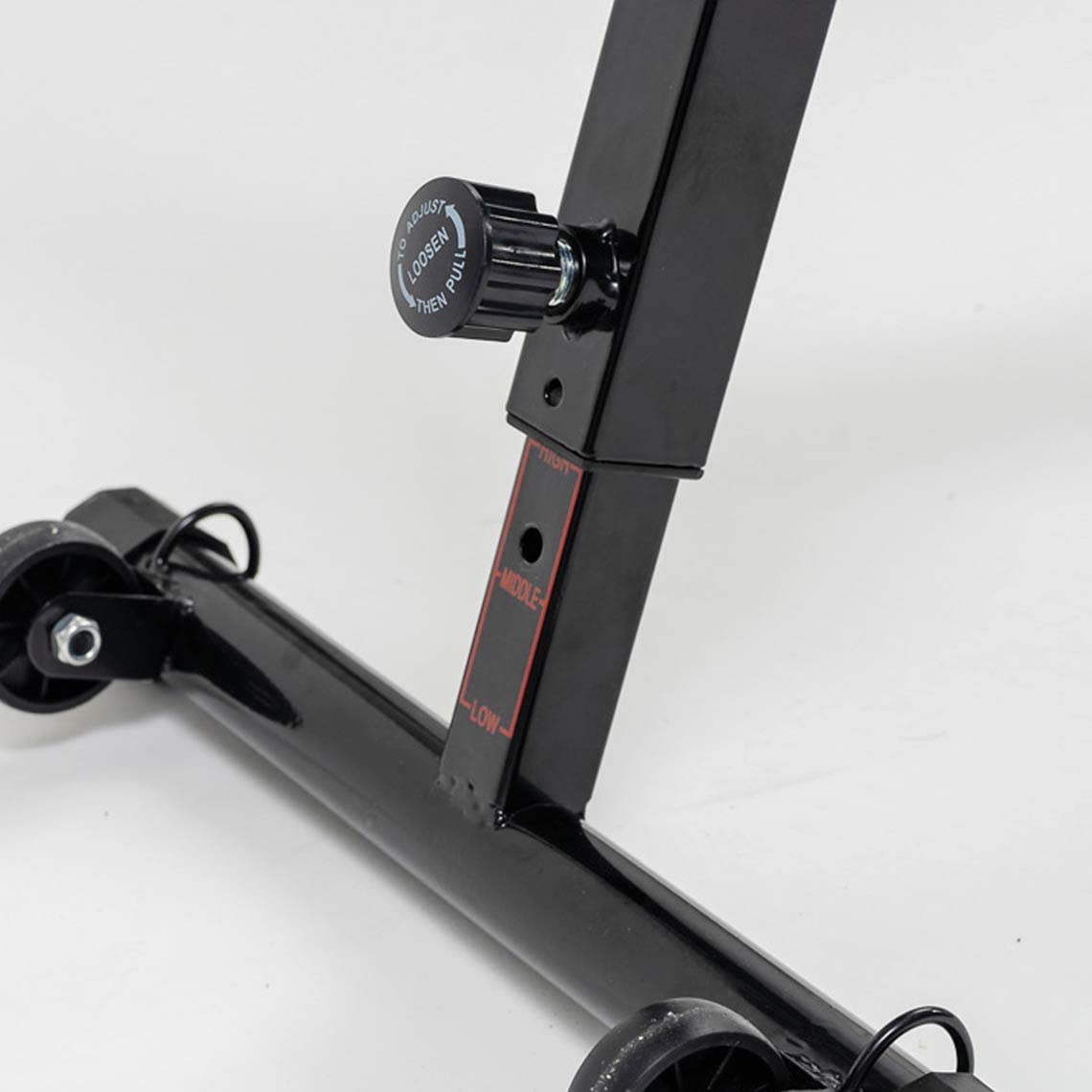
Figure 4: The resistance adjustment knob on the hydraulic cylinder.
Training Computer Functions (LCD Display)
The integrated LCD display provides real-time feedback on your workout:
- Battery Installation: Insert 1 AAA battery into the compartment on the back of the computer, observing polarity.
- Automatic On/Off: The computer automatically turns on when you start rowing and switches off after 4 minutes of inactivity. If the display remains black despite movement, replace the battery.
- SCAN: This function automatically cycles through all display metrics every 4 seconds.
- TIME: Shows the total duration of your current workout.
- COUNT: Displays the number of repetitions during your training.
- RPM (Revolutions Per Minute): Indicates the number of repetitions you perform per minute.
- CAL (Calories): Estimates the kilocalories burned during your session.
- MODE Button: Press to switch between different functions. Press and hold for 4 seconds to reset all values to zero.
- RESET Button: Press to reset the currently displayed value to zero.
Securing the Seat (for storage or sit-up exercises)
The seat can be locked in place for storage or to perform sit-up exercises:
- To lock the seat, insert the bolt into the "LOCK" position.
- For rowing, ensure the bolt is in the "UNLOCK" position, allowing the seat to slide freely.
Maintenance
To ensure the longevity and optimal performance of your Kendox RowShaper, regular maintenance is recommended:
- Cleaning: Wipe down the machine with a damp cloth after each use to remove sweat and dust. Avoid abrasive cleaners.
- Lubrication: Periodically check the aluminum slide rail and apply a small amount of silicone-based lubricant if the seat movement feels rough.
- Bolt and Screw Check: Regularly inspect all bolts, nuts, and screws to ensure they are tight. Tighten any loose fasteners to maintain stability and safety.
- Pedal Straps: Check the pedal straps for any signs of wear and tear. Replace them if they become frayed or damaged.
- Storage: When not in use, fold the RowShaper and store it in a dry, cool place away from direct sunlight and extreme temperatures.
Troubleshooting
| Problem | Possible Cause | Solution |
|---|---|---|
| LCD Display not working | Dead battery; Incorrect battery installation. | Replace AAA battery, ensuring correct polarity. |
| Seat movement is not smooth | Dust/debris on the rail; Lack of lubrication; Loose components. | Clean the slide rail; Apply silicone lubricant; Check and tighten all screws. |
| Resistance feels inconsistent or too low | Hydraulic cylinder setting too low; Cylinder overheating during prolonged use. | Increase the resistance level using the adjustment knob; Allow the hydraulic cylinder to cool down if used for extended periods. |
| Unusual noises during operation | Loose bolts or connections; Worn parts. | Inspect and tighten all assembly bolts and nuts; Contact customer support if noises persist after tightening. |
Specifications
- Color: Black
- Size: Standard
- Display Type: LCD
- Frame Material: Alloy Steel
- Main Material: Steel
- Power Source: Battery Powered (1 x AAA battery required, not included)
- Max User Weight: 120 kg
- Product Dimensions (L x W x H): 96 x 24.5 x 26 cm
- Product Weight: 13.5 Kilograms
- Resistance System: Hydraulic Cylinder with 12 levels
- Incline Settings: 3 adjustable angles
Warranty and Support
For warranty information, technical support, or replacement parts, please contact Kendox customer service. Refer to the contact details provided in your product packaging or visit the official Kendox website.
Please retain your proof of purchase for any warranty claims.


