
1. Introduction
This manual provides instructions for the Generic Replacement Remote Control, designed for use with Ailipu SP-2290, SP-2392, SP-2379, and SP-2385 Karaoke Portable Party PA DJ Speaker Systems. This remote control is pre-programmed and requires no additional setup beyond battery installation.
Please read this manual thoroughly before using the remote control to ensure proper operation and to familiarize yourself with its features.
2. Safety Information
- Do not expose the remote control to direct sunlight, heat sources, or extreme temperatures.
- Avoid dropping the remote control or subjecting it to strong impacts.
- Do not attempt to disassemble or modify the remote control. This will void any implied warranty.
- Keep batteries out of reach of children. If swallowed, seek immediate medical attention.
- Dispose of used batteries according to local regulations. Do not dispose of batteries in fire.
3. Package Contents
The package includes:
- 1 x Generic Replacement Remote Control
Note: Batteries and additional instructions are not included in the package.
4. Setup
4.1 Battery Installation
The remote control requires two (2) AAA batteries (not included). Follow these steps to install the batteries:
- Locate the battery compartment cover on the back of the remote control.
- Slide the battery compartment cover downwards or in the direction indicated by an arrow to open it.
- Insert two AAA batteries, ensuring the positive (+) and negative (-) terminals match the markings inside the compartment.
- Slide the battery compartment cover back into place until it clicks securely.

Image: Back of the remote control with the battery compartment visible. This shows the location of the battery cover.
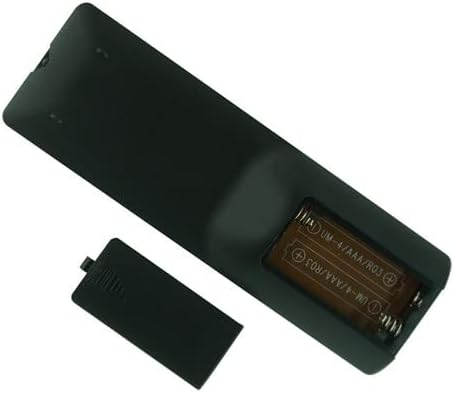
Image: The remote control with its battery compartment open, showing where to insert the two AAA batteries according to polarity markings.
Once batteries are correctly installed, the remote control is ready for use. No programming is required.
5. Operating Instructions
This remote control is designed to function immediately with compatible Ailipu speaker systems (SP-2290, SP-2392, SP-2379, SP-2385) once batteries are installed. Point the remote control directly at the speaker system's infrared (IR) receiver and press the desired function button.
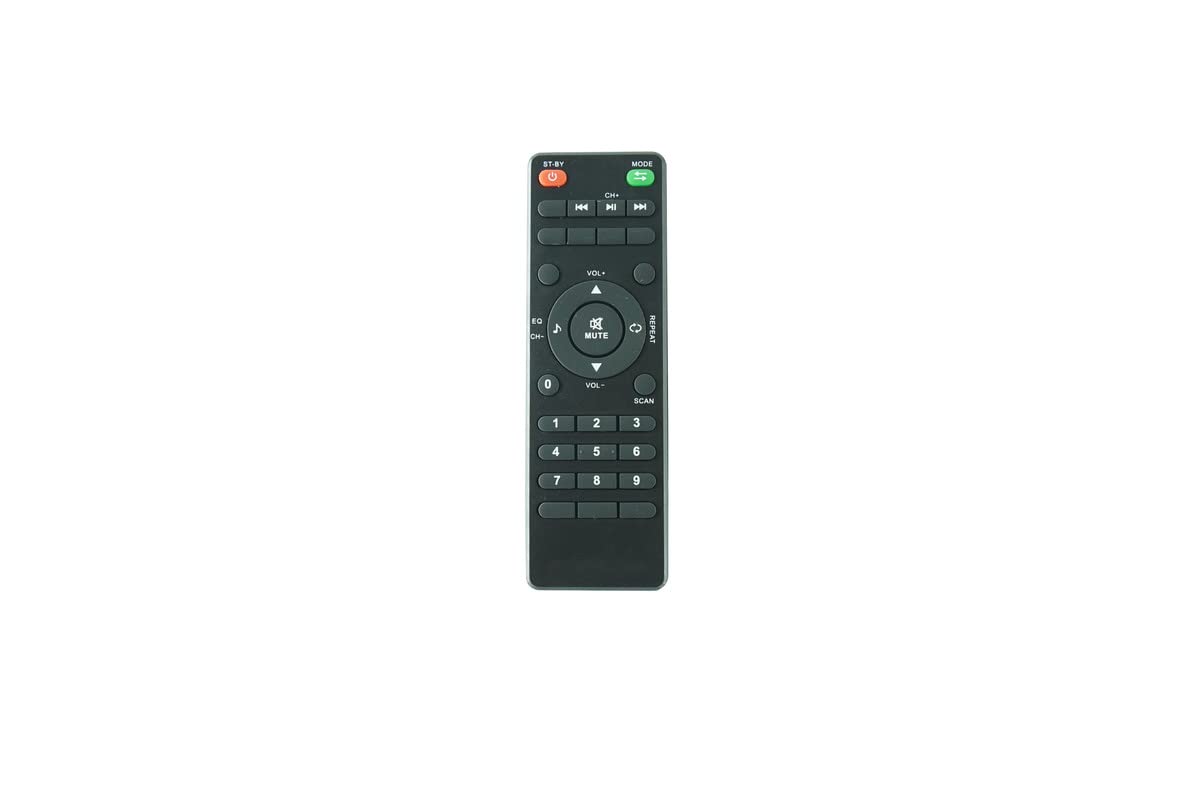
Image: Front view of the remote control, displaying its various buttons for controlling the speaker system.
Common Functions (Button Layout may vary slightly)
- Power: Turns the speaker system on or off.
- Volume Up/Down: Adjusts the speaker's volume level.
- Play/Pause: Controls media playback.
- Next/Previous Track: Skips to the next or previous audio track.
- Mode: Switches between input sources (e.g., Bluetooth, USB, AUX, FM).
- Mute: Silences the speaker output.
- Number Buttons: For direct track selection or FM radio frequency input.
Refer to your Ailipu speaker system's original manual for specific functions and button mappings if needed.
6. Maintenance
6.1 Cleaning
To clean the remote control, gently wipe its surface with a soft, dry cloth. Do not use liquid cleaners, abrasive pads, or chemical solvents, as these may damage the remote's finish or internal components.
6.2 Battery Replacement
Replace the batteries when the remote control's range decreases or it stops responding. Follow the battery installation steps in Section 4.1. Always replace both batteries at the same time with new AAA batteries.
7. Troubleshooting
| Problem | Possible Cause | Solution |
|---|---|---|
| Remote control is not working. |
|
|
| Some buttons are not responding. |
|
|
8. Specifications
- Product Type: Replacement Remote Control
- Compatibility: Ailipu SP-2290, SP-2392, SP-2379, SP-2385 Karaoke Portable Party PA DJ Speaker Systems
- Power Source: 2 x AAA Batteries (not included)
- Connectivity Technology: Infrared (IR)
- Special Feature: No programming required
9. Warranty and Support
As this is a generic replacement product, specific warranty details may vary depending on the retailer or seller. Please refer to your purchase documentation for information regarding warranty coverage and return policies.
For technical support or further assistance, please contact the seller or the manufacturer directly through the platform where the product was purchased.