1. Product Overview
The LUV HUB Spider Moving Head Light RGBW is a versatile LED lighting fixture designed for DJ setups, live concerts, parties, and other events requiring dynamic stage effects. It features multiple LEDs capable of producing a wide range of colors and movement patterns.
Key features include:
- 180 degrees rotatable moving head and 220 degrees illuminating angle, 10 RGBW LEDs create a vivid and brilliant stage effect.
- Various Control Modes: Sound Control, Master-Slave mode and auto running, very sensitive to music rhythm.
- Gorgeous Visual Effect: Offer RGBW color jumping, gradual color change, strobe, smooth 0-100% electronic dimming.
- 8x10W RGBW 4 in 1 Rotatable LED Spider Beam Moving Head Stage Lighting DJ Party Disco.
2. Package Contents
Please check the package carefully to ensure all items are present and in good condition:
- 1 x mini spider light
- 1 x US standard power cable
- 1 x bracket
- 2 x screws
- 1 x English user manual
3. Setup Instructions
Follow these steps to set up your LUV HUB Spider Moving Head Light:
- Unpacking: Carefully remove the light fixture and all accessories from the packaging. Inspect for any signs of damage during transit.
- Mounting:
The light can be placed on a flat surface or mounted using the included bracket. Ensure the mounting surface or truss is stable and can support the weight of the fixture (approximately 3.3 kg).

Figure 3.1: Front view of the LUV HUB Spider Moving Head Light.

Figure 3.2: Dimensions of the LUV HUB Spider Moving Head Light (280mm length, 150mm width, 120mm height).
- Power Connection: Connect the provided power cable to the power input on the rear panel of the light fixture. Plug the other end into a compatible power outlet (AC 100-240V, 50/60Hz).
- DMX Connection (Optional): If using DMX control, connect a DMX cable from your DMX controller to the DMX IN port on the light. For multiple units, daisy-chain them by connecting the DMX OUT of the first unit to the DMX IN of the next.

Figure 3.3: Rear panel (DMX Input, DMX Output, Power Output) and side panel (MIC, LED Indicator, Menu/ESC, Down, Up, Enter buttons) of the light.
4. Operating Instructions
The LUV HUB Spider Moving Head Light offers several control modes:
4.1. Control Panel Navigation
The control panel on the side of the unit allows you to select modes and adjust settings. It typically includes MENU/ESC, UP, DOWN, and ENTER buttons.

Figure 4.1: Close-up of the control panel with Menu, Up, Down, and Enter buttons.
4.2. Operating Modes
- Sound Control Mode: The light reacts to ambient sound or music, changing patterns and colors in sync with the rhythm. This mode is highly sensitive to music.
- Master-Slave Mode: Connect multiple units via DMX cables. Set one unit as the "Master" and others as "Slave" units. The slave units will mimic the master unit's movements and effects, creating a synchronized light show.
- Auto Running Mode: The light cycles through pre-programmed patterns and color changes automatically without external input.
- DMX 512 Control Mode: For professional control, connect the light to a DMX 512 controller. Refer to the DMX channel chart in Section 7 for specific channel functions.
4.3. Visual Effects
The light produces various dynamic visual effects:
- RGBW Color Mixing: Produces a wide spectrum of colors using Red, Green, Blue, and White LEDs.
- Color Jumping: Rapid changes between different colors.
- Gradual Color Change: Smooth transitions between colors.
- Strobe Effect: Adjustable flash rate for dramatic effects.
- Electronic Dimming: Smooth 0-100% dimming capability.
- Moving Head Rotation: The light heads can rotate 180 degrees, creating dynamic beam movements.
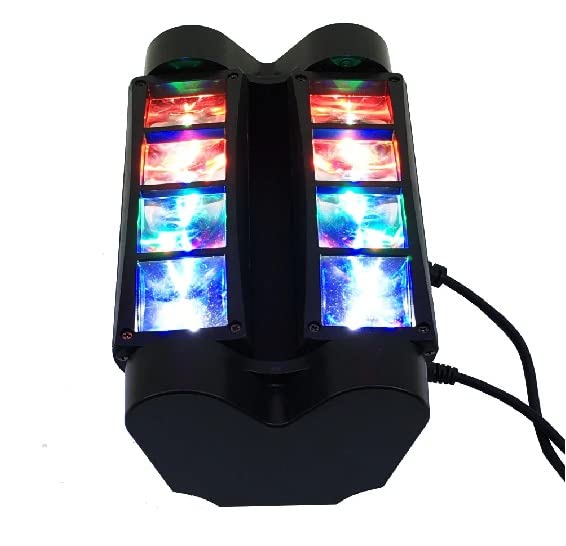
Figure 4.2: Illustration of the 180-degree rotation capability of the light heads.
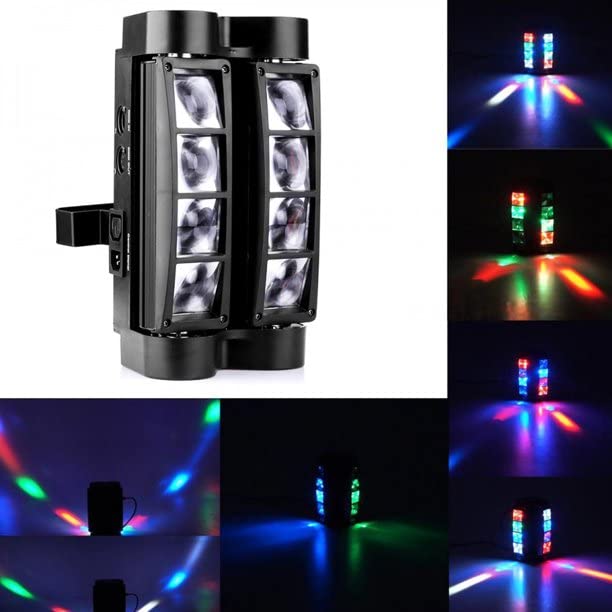
Figure 4.3: The light producing vibrant RGBW colors.
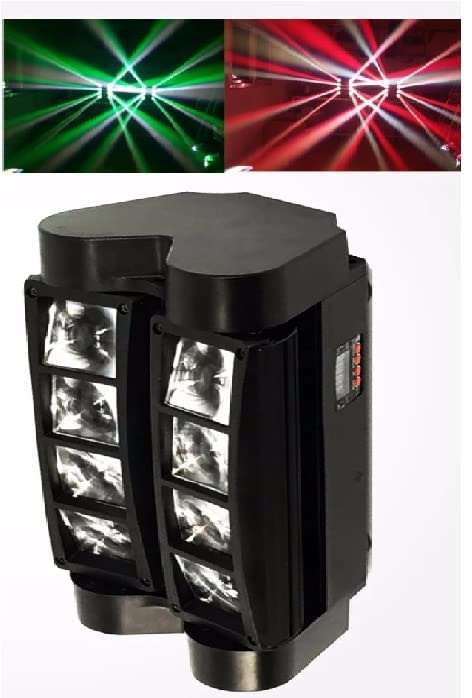
Figure 4.4: Examples of beam patterns and color combinations from the light.
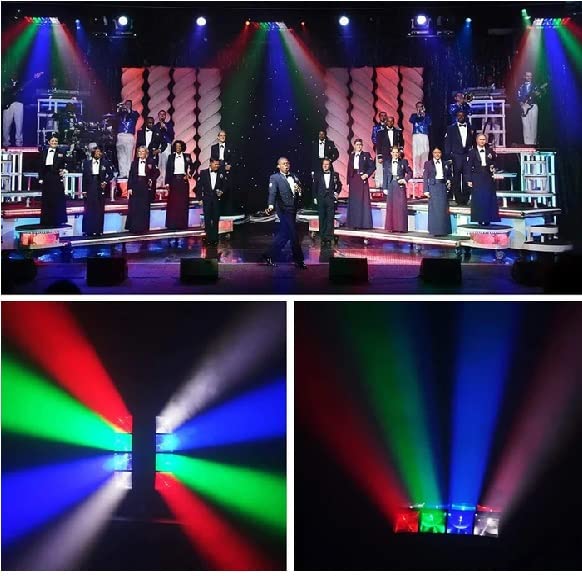
Figure 4.5: Clear beams of red, green, and blue light projected by the fixture.

Figure 4.6: The light in action, illuminating a stage with various colors and patterns.
Figure 4.7: Dynamic green and red light beams from the fixture.
Video 4.1: Demonstration of the LUV HUB Spider Moving Head Light's various color and movement effects in a stage setting.
5. Maintenance
Regular maintenance ensures the longevity and optimal performance of your light fixture:
- Cleaning: Periodically clean the lenses and exterior casing with a soft, lint-free cloth. Do not use abrasive cleaners or solvents.
- Ventilation: Ensure the ventilation openings are clear of dust and debris to prevent overheating.
- Power Disconnection: Always disconnect the power before performing any cleaning or maintenance.
- Storage: When not in use for extended periods, store the light in a dry, dust-free environment.
6. Troubleshooting
| Problem | Possible Cause | Solution |
|---|---|---|
| Light does not power on. | No power supply; faulty cable; internal fuse. | Check power connection; try a different outlet; inspect power cable; consult a qualified technician for fuse replacement. |
| No light output. | Dimmer at 0%; DMX signal issue; LED failure. | Increase dimmer setting; check DMX connections and controller settings; contact support if LEDs are faulty. |
| Light not responding to DMX. | Incorrect DMX address; faulty DMX cable; DMX termination issue. | Verify DMX address matches controller; check DMX cable integrity; ensure proper DMX termination for long chains. |
| Movement is erratic or stuck. | Mechanical obstruction; motor issue; DMX signal interference. | Check for obstructions; reset the unit; verify DMX signal quality. |
| Sound control not working. | Microphone obstructed; low sound input; mode not selected. | Ensure microphone is clear; increase sound volume; confirm Sound Control mode is active. |
7. Technical Specifications
| Specification | Value |
|---|---|
| Brand | LUV HUB |
| Model | Spider Moving Head Light RGBW |
| Light Source Type | LED (8x3W RGBW LEDs) |
| Power Input | AC 100-240V, 50/60Hz |
| Power Consumption | 45W |
| Control Modes | Sound Activated, DMX 512, Master-Slave, Auto Running |
| DMX Channels | 7/13 Channels |
| Rotation Angle | 180 degrees (moving head), 220 degrees (illuminating angle) |
| Material | Plastic |
| Color | BLACK (unit), Multicolor (light output) |
| Item Weight | 3.3 Kilograms |
| Product Dimensions | 30L x 15W x 30H Centimeters |
| Certification | CE |
8. Warranty and Support
For warranty information and technical support, please refer to the contact details provided on the product packaging or the official LUV HUB website. Keep your purchase receipt as proof of purchase.
For further assistance, you may contact the manufacturer:
- Manufacturer: LUV HUB, MUMBAI-400002, MAHARASHTRA.