
VATOS BG1532
VATOS Remote Control Robot User Manual
Model: BG1532 | Brand: VATOS
1. Introduction
Thank you for choosing the VATOS Remote Control Robot, Model BG1532. This intelligent robot toy is designed to provide an engaging and interactive experience with its advanced features, including voice control, gesture sensing, and programmable actions. Please read this manual thoroughly before use to ensure proper operation and to maximize your enjoyment of the product.

Image: The VATOS Remote Control Robot, showcasing its design and the included remote control, with musical notes indicating its entertainment features.
2. Safety Information
- Do not disassemble or modify the robot or its components.
- Keep the robot away from water and high humidity environments.
- Avoid dropping or subjecting the robot to strong impacts.
- Use only the provided USB charging cable for charging.
- Adult supervision is recommended, especially during charging and initial setup.
- Ensure the robot is turned off when not in use to conserve battery life.
3. Package Contents
Please check the package to ensure all items are present:
- 1 x VATOS Remote Control Robot (Model BG1532)
- 1 x 2.4GHz Remote Control
- 1 x USB Charging Cable
- 1 x Screwdriver
- 1 x User Manual (this document)

Image: All components included in the VATOS Remote Control Robot package: the robot, remote control, screwdriver, USB charging cable, and user manual.
4. Product Overview
The VATOS Remote Control Robot features a robust design with interactive elements. Key components include:
- LED Eyes: Bright LED eyes that change expressions during various actions.
- Gesture Sensing Area: Located on the chest, allowing control via hand gestures.
- Foot Rollers: Enable smooth sliding movements.
- Charging Port: Located on the back of the robot for easy charging.
- Power Switch: To turn the robot On/Off.

Image: Detailed view of the robot's dimensions (approximately 15.4 inches tall) and close-ups highlighting the gesture sensing area, foot rollers, and the charging port.
5. Setup
5.1. Battery Installation (Remote Control)
The remote control requires 2 x AAA batteries (not included). Use the provided screwdriver to open the battery compartment on the back of the remote, insert the batteries with correct polarity, and close the compartment securely.
5.2. Charging the Robot
The robot has a built-in rechargeable Lithium-Ion battery. Before first use, fully charge the robot.
- Ensure the robot's power switch is in the OFF position.
- Connect the small end of the USB charging cable to the charging port on the robot's back.
- Connect the larger end of the USB cable to a USB power source (e.g., computer USB port, power bank, or USB wall adapter).
- The charging indicator light on the robot will illuminate during charging and turn off when fully charged.
- A full charge takes approximately 2 hours and provides about 60 minutes of playtime.

Image: The robot being charged via its USB charging cable connected to a wall adapter.
5.3. Power On/Off
Locate the power switch on the robot's back. Slide it to the ON position to power on the robot. Slide it to the OFF position to power off.
6. Operating Instructions
The VATOS robot offers multiple control methods for dynamic play.
6.1. Remote Control Operation
The 2.4GHz remote control provides comprehensive command over the robot's movements and functions. Ensure the robot is powered on and the remote control has fresh batteries.
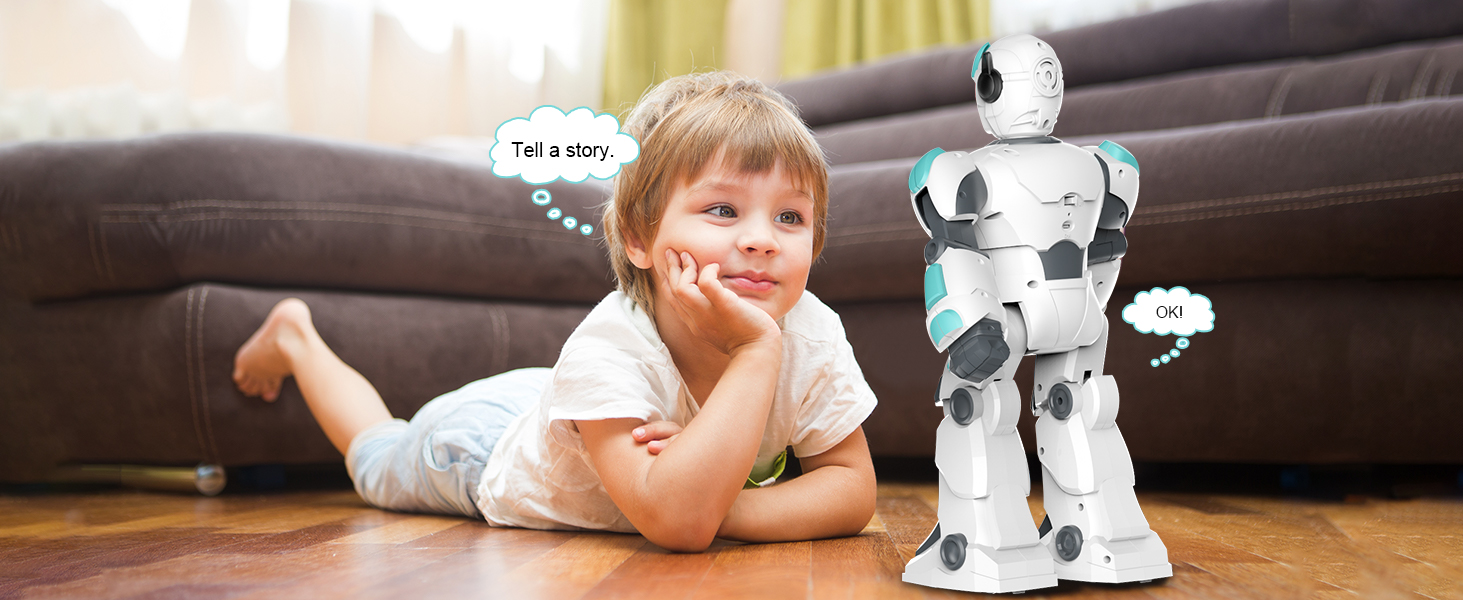
Image: A detailed diagram illustrating the remote control layout with labels for each button's function, including Automatic, Song, Stories, Dance, Joke, Poetry, Programming, various movement controls (slide, walk, turn), Robot Language, Stop, Eye Lamp, and Volume controls.
Refer to the diagram above for specific button functions. Common actions include:
- Movement: Use the directional buttons to make the robot slide forward/backward, turn left/right, walk forward/backward, or fast slide.
- Entertainment: Press buttons for Song, Stories, Dance, Joke, or Poetry to activate pre-programmed performances.
- Volume: Adjust the robot's volume using the Volume+ and Volume- buttons.
- Stop: Press the Stop button to halt any current action.
6.2. Gesture Sensing Control
The robot can respond to simple hand gestures. Ensure your hand is within range of the gesture sensing area on the robot's chest.
- Forward: Wave your hand forward in front of the robot's chest.
- Backward: Wave your hand backward in front of the robot's chest.
- Turn Left: Wave your hand to the left in front of the robot's chest.
- Turn Right: Wave your hand to the right in front of the robot's chest.

Image: Visual guide demonstrating the specific hand gestures required to control the robot's movements: Forward, Backward, Turn Left, and Turn Right.
6.3. Voice Control
The robot features intelligent voice control, allowing it to respond to spoken commands. Speak clearly and directly to the robot.
- The robot can engage in basic dialogue and obey voice commands for various actions.
- Example commands include "Sing a song," "Tell a story," or "Go forward."
- The robot's LED eyes will often change to indicate it is listening or responding.

Image: The VATOS robot positioned between two children, illustrating its intelligent voice interaction capabilities.
Video: Demonstration of the robot's voice control and dialogue features, showcasing its ability to understand and respond to spoken commands.
6.4. Programming Mode
The robot can be programmed to perform a sequence of up to 30 commands. This feature encourages creativity and logical thinking.
- Press the Programming button on the remote control.
- Input your desired sequence of actions using the remote control buttons (e.g., walk forward, turn left, sing a song).
- Press the Programming button again to save the sequence.
- Press the Play button (often integrated with Programming button or a separate play icon) to execute the programmed actions.
7. Maintenance
- Cleaning: Wipe the robot with a soft, dry cloth. Do not use harsh chemicals or abrasive cleaners.
- Storage: Store the robot in a cool, dry place away from direct sunlight when not in use. Ensure it is powered off.
- Battery Care: If storing for an extended period, charge the robot's battery every 3 months to maintain its health. Remove batteries from the remote control if not used for a long time.
8. Troubleshooting
| Problem | Possible Cause | Solution |
|---|---|---|
| Robot does not turn on. | Battery is low or dead; Power switch is off. | Charge the robot fully. Ensure the power switch is in the ON position. |
| Remote control not working. | Remote control batteries are dead or incorrectly installed. | Replace remote control batteries, ensuring correct polarity. |
| Robot not responding to commands. | Robot and remote are not paired; Interference; Out of range. | Ensure robot and remote are close to each other. Turn both off and on again to re-establish connection. Avoid strong electromagnetic interference. |
| Voice control not working. | Background noise; Unclear pronunciation; Incorrect command. | Speak clearly and loudly in a quiet environment. Refer to the manual for correct voice commands. |
| Gesture sensing not working. | Hand too far or too close; Incorrect gesture. | Ensure hand is within 5-10 cm of the sensing area and gestures are precise as shown in the manual. |
9. Specifications
- Model Number: BG1532
- Product Dimensions: 16.7 x 11.6 x 5.1 inches (approximately 15.4 inches tall)
- Item Weight: 2.64 pounds
- Control Frequency: 2.4GHz
- Robot Battery: 1 x Lithium Ion battery (included)
- Remote Control Battery: 2 x AAA batteries (not included)
- Charging Time: Approximately 2 hours
- Play Time: Approximately 60 minutes
- Manufacturer Recommended Age: 3 years and up
- Material: High-quality ABS plastic and metal materials
10. Warranty and Support
VATOS products are manufactured with high-quality materials and undergo strict quality control. If you encounter any issues or have questions regarding your VATOS Remote Control Robot, please contact our customer support team. We are committed to providing excellent service and ensuring your satisfaction.
For support, please visit the official VATOS store on Amazon or contact the seller directly through your purchase platform.
Related Documents - BG1532
 |
Vatos Laser Tag Gun BB8933F Instruction Manual Comprehensive instruction manual for the Vatos Laser Tag Gun BB8933F, covering setup, operation, safety, and maintenance. Learn how to play and care for your laser tag set. |
 |
VATOS YD-218 3.5CH Remote Control Helicopter Instruction Manual Comprehensive instruction manual for the VATOS YD-218 3.5CH remote control helicopter, covering parts identification, battery installation and charging, operating instructions, and safety precautions. Suitable for ages 14 and up. |
 |
Vatos Rechargeable Infrared Laser Tag Gun - Instruction Manual Official instruction manual for the Vatos Rechargeable Infrared Laser Tag Gun set (Model NO.BB8933F). Learn how to set up, operate, and maintain your laser tag game for exciting battles. |
 |
Vatos Urban Kitchen & Bar Drinks Menu Explore the extensive drinks menu from Vatos Urban Kitchen & Bar, featuring a wide selection of beers, cocktails, wines, tequilas, mezcals, whiskies, bourbons, cognacs, rums, and other spirits. |
 |
VEVOR BG1532/BG1536 Kids Robot Toys - Technical Support, E-Warranty & FCC Compliance Official technical support, e-warranty information, FCC compliance details, and correct disposal instructions for VEVOR BG1532 and BG1536 Kids Robot Toys. |
Ask a question about this manual
Ask about setup, troubleshooting, compatibility, parts, safety, or missing instructions. Manuals+ will review the question and use this page’s manual context to help answer it.