
Introduction
Thank you for choosing the SKMEI Digital Sports Watch Model 1828. This watch is designed for durability and functionality, featuring multiple time zones, a stopwatch, countdown timer, alarm, and LED backlight. This manual provides instructions for proper setup, operation, and maintenance to ensure optimal performance and longevity of your watch.
Watch Overview
The SKMEI 1828 features a robust design with clearly labeled buttons for easy navigation through its various functions.
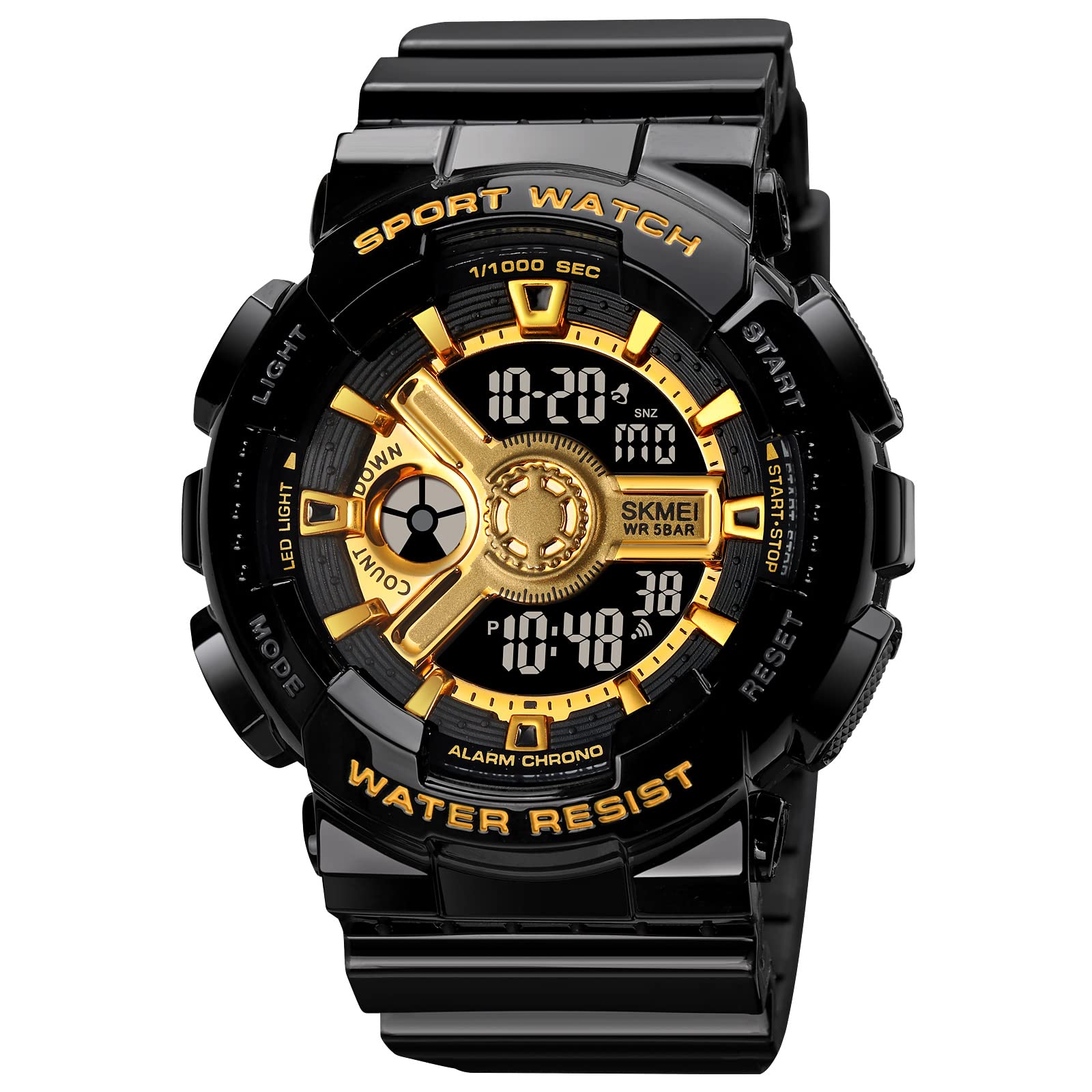
Image: Front view of the SKMEI 1828 watch highlighting key features and button labels (MODE, LIGHT, START, RESET).
Button Functions:
- MODE: Cycles through different modes (Time, Stopwatch, Alarm, Countdown, Dual Time).
- LIGHT: Activates the LED backlight.
- START: Used to start/stop functions in Stopwatch and Countdown modes, and to adjust settings.
- RESET: Used to reset functions in Stopwatch and Countdown modes, and to select settings.
Setup Instructions
1. Setting Time and Date:
- In Time Mode, press the MODE button repeatedly until the seconds begin to flash. This indicates you are in setting mode.
- Press the RESET button to cycle through the settings: seconds, hour, minute, year, month, day.
- Use the START button to adjust the flashing value.
- Once all settings are correct, press the MODE button to exit setting mode.
2. Setting the Alarm:
- From Time Mode, press the MODE button until 'AL' appears, indicating Alarm Mode.
- Press the RESET button to select the hour or minute to set.
- Use the START button to adjust the flashing value.
- Press the MODE button to confirm and exit.
- To activate/deactivate the alarm, press START while in Alarm Mode. An alarm icon will appear/disappear.
3. 12/24 Hour Format:
In Time Mode, press the START button to toggle between 12-hour and 24-hour display formats.
Operating Instructions
The watch offers several operational modes for various activities.

Image: Close-up view of the SKMEI 1828 watch face, showing digital display and analog-style elements.
1. Stopwatch Function:
- Press the MODE button until 'ST' appears, indicating Stopwatch Mode.
- Press START to begin timing.
- Press START again to pause timing.
- Press RESET to clear the stopwatch to zero.
2. Countdown Timer:
- Press the MODE button until 'TR' appears, indicating Timer Mode.
- To set the timer, press and hold RESET until the digits flash.
- Use START to adjust the time and RESET to move between hours and minutes.
- Press MODE to exit setting.
- Press START to begin the countdown. Press START again to pause.
- Press RESET to reset the timer to its set value.
3. Dual Time Mode:
- Press the MODE button until 'DT' appears, indicating Dual Time Mode.
- Press and hold RESET until the hour digits flash.
- Use START to adjust the hour and RESET to move to minutes.
- Press MODE to confirm and exit setting.
4. LED Backlight:
Press the LIGHT button at any time to illuminate the display for a few seconds, improving visibility in low-light conditions.
Maintenance
Water Resistance:
This watch is rated 50M water resistant, suitable for swimming, handwashing, and light rain. It is not suitable for diving, snorkeling, or hot water activities (e.g., hot showers, saunas) as steam can penetrate the seals. Do not press any buttons while the watch is submerged in water.

Image: Back view of the SKMEI 1828 watch, showing the stainless steel case back with water resistance markings.
Cleaning:
Wipe the watch regularly with a soft, dry cloth. For stubborn dirt, use a slightly damp cloth with mild soap, then wipe dry immediately. Avoid harsh chemicals or abrasive materials.
Battery Replacement:
When the display dims or functions become erratic, the battery may need replacement. It is recommended to have the battery replaced by a qualified watch technician to ensure proper sealing and maintain water resistance.
Troubleshooting
- Display is blank or dim: The battery may be low or depleted. Replace the battery.
- Time is incorrect: Re-set the time and date according to the 'Setting Time and Date' instructions.
- Buttons are unresponsive: Ensure the watch is not wet. If the issue persists, a battery replacement or professional inspection may be required.
- Alarm does not sound: Check if the alarm function is activated (alarm icon visible on display).
Specifications
Detailed specifications for the SKMEI Digital Sports Watch Model 1828.

Image: Diagram illustrating the dimensions of the SKMEI 1828 watch, including case height, width, strap width, and case thickness.
| Feature | Detail |
|---|---|
| Model Number | 1828 |
| Product Dimensions | 27.5 x 5.1 x 1.9 cm |
| Item Weight | 57 g |
| Display Type | Digital |
| Movement Type | Quartz |
| Water Resistance Depth | 50 Metres |
| Band Material Type | Polyurethane (PU) |
| Case Material | ABS, PU |
| Crystal Material | Resin |
| Case Diameter | 5.1 Centimetres |
| Band Width | 2.2 Centimetres |
| Case Thickness | 1.9 Centimetres |
| Band Length | 275 Millimetres |
| Special Features | 2 Time, Alarm, Chronograph, Date-Week, Countdown |
Warranty and Support
Warranty Information:
Enjoy peace of mind with a 9-month Manufacturer Warranty from the date of purchase. This warranty covers manufacturing defects under normal use.
Customer Support:
For any service-related inquiries or feedback, please contact the Skmei India Helpline:
- Helpline Number: 1800-889-6251
- Operating Hours: Monday to Saturday, 9:00 AM to 6:00 PM
Importer/Packer: SKMEI