
Introduction
The OPEN EAR Bone X1 Bone Conduction Headphones are designed for individuals who wish to enjoy audio while remaining aware of their surroundings. Utilizing bone conduction technology, sound is transmitted directly to the inner ear through the bones of the cheek, bypassing the eardrum. This design allows for an open-ear listening experience, making them suitable for sports, outdoor activities, or any situation where situational awareness is crucial.
What's Included
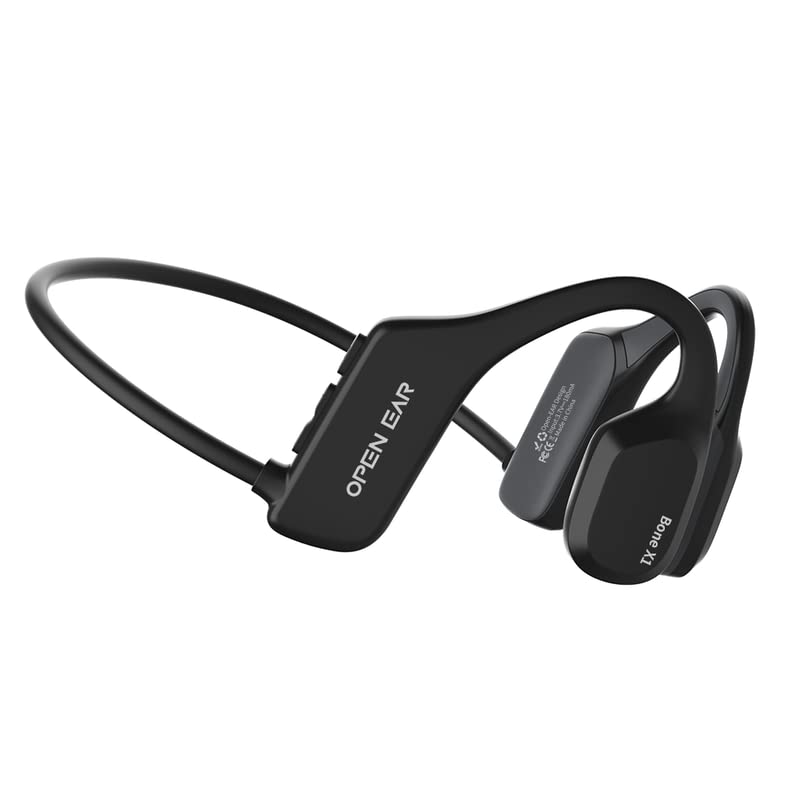
The package contains the following items:
- OPEN EAR Bone X1 Bone Conduction Headphones
- Magnetic Charging Cable
- Two Earplugs
Image: Contents of the OPEN EAR Bone X1 package, including the headphones, charging cable, and earplugs.
Product Overview
The Bone X1 headphones feature a lightweight and flexible design for comfortable wear. The bone conduction transducers rest on your cheekbones, delivering sound without covering your ears.

Image: A close-up view illustrating the flexible titanium headband of the Bone X1 headphones, designed for a secure and comfortable fit during various activities.
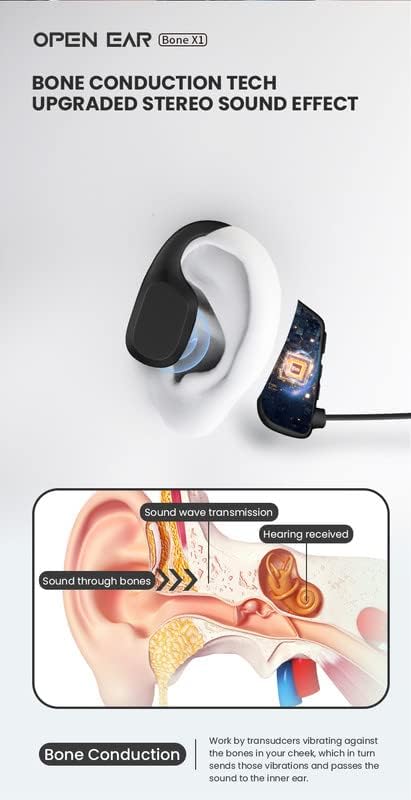
Image: An anatomical diagram demonstrating how bone conduction technology works, showing sound waves transmitted through the bones to the inner ear.
Setup
1. Charging the Headphones
Before first use, fully charge your Bone X1 headphones. A full charge takes approximately 2 hours.
- Connect the magnetic charging cable to the charging port on the headphones.
- Plug the USB end of the cable into a standard USB power adapter (not included) or a computer's USB port.
- The LED indicator on the headphones will show the charging status (e.g., red for charging, blue for fully charged).

Image: The Bone X1 headphones next to a smartphone, illustrating the device's battery life and connectivity.
2. Bluetooth Pairing
Pair your Bone X1 headphones with your Bluetooth-enabled device (smartphone, tablet, PC) to begin listening.
- Ensure the headphones are powered off.
- Press and hold the Power/Multi-function button until the LED indicator flashes red and blue alternately, indicating pairing mode.
- On your device, go to Bluetooth settings and enable Bluetooth.
- Select "Bone X1" from the list of available devices.
- Once connected, the LED indicator will flash blue slowly, and you will hear a confirmation tone.
The headphones support Bluetooth 5.3 for a stable connection up to 10 meters.
Operating Instructions
Power On/Off
- Power On: Press and hold the Power/Multi-function button for 3 seconds.
- Power Off: Press and hold the Power/Multi-function button for 5 seconds.
Music Playback
- Play/Pause: Press the Multi-function button once.
- Next Track: Double-press the Multi-function button.
- Previous Track: Triple-press the Multi-function button.
- Volume Up: Press the Volume + button.
- Volume Down: Press the Volume - button.
Call Management
- Answer/End Call: Press the Multi-function button once.
- Reject Call: Press and hold the Multi-function button for 2 seconds.
Wearing the Headphones
Place the headphones with the transducers resting on your cheekbones, just in front of your ears. The headband should rest comfortably around the back of your head. Adjust for a secure and comfortable fit.

Image: A person wearing the Bone X1 headphones during outdoor activity, highlighting the open-ear design that allows for environmental awareness.
Maintenance
- Cleaning: Wipe the headphones with a soft, damp cloth. Do not use harsh chemicals or abrasive cleaners.
- Water Resistance: The headphones are IPX5 rated, meaning they are resistant to sweat and splashes. They are not designed for submersion in water. Ensure the charging port is dry before charging.
- Storage: Store the headphones in a cool, dry place away from direct sunlight and extreme temperatures.

Image: The Bone X1 headphones shown with water splashes, demonstrating their IPX5 water resistance for use during exercise or light rain.
Troubleshooting
| Problem | Solution |
|---|---|
| Headphones do not power on. | Ensure the headphones are fully charged. Connect to the magnetic charging cable and allow 2 hours for a full charge. |
| Cannot pair with device. |
|
| No sound or low volume. |
|
| Sound quality is poor. |
|
Specifications
| Model Name | Bone X1 |
| Model Number | OPENEARBONEX1 |
| Brand | OPEN EAR |
| Connectivity Technology | Bluetooth 5.3 |
| Wireless Range | Up to 10 meters (33 feet) |
| Water Resistance Rating | IPX5 (Sweat and splash resistant) |
| Battery Life (Music Playback) | Approximately 7 hours |
| Standby Time | Approximately 300 hours |
| Charging Time | Approximately 2 hours |
| Weight | 28 grams |
| Frequency Range | 20 Hz - 20,000 Hz |
| Internal Material | Titanium |
| Compatible Devices | Android and iOS smartphones, tablets, PCs, laptops |

Image: A table summarizing the key technical specifications and parameters of the Bone X1 headphones.
Warranty Information
The OPEN EAR Bone X1 headphones come with a 3-month manufacturer's warranty from the date of purchase. This warranty covers defects in materials and workmanship under normal use. It does not cover damage caused by misuse, accidents, unauthorized modifications, or normal wear and tear.
Please retain your proof of purchase for warranty claims.
Support
For further assistance, technical support, or warranty inquiries, please contact your retailer or visit the official OPEN EAR website. Specific contact details may vary by region.


